๐ธ Capture the Past, Share the Future!
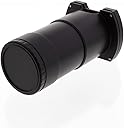
The Digital 35mm Slide Copier Duplicator is a versatile tool designed for photographers looking to convert their 35mm slides into digital formats effortlessly. Compatible with a range of digital cameras featuring a 52mm filter thread, it offers a rotatable mount for easy slide positioning and impressive magnification options, making it perfect for both casual and professional use.
| ASIN | B014V5EMW6 |
| Best Sellers Rank | #290 in Lens Extension Tubes |
| Brand | Albinar |
| Camera Lens | 52 millimetres |
| Camera Lens Description | 52 millimetres |
| Compatible Camera Mount | Canon EF, Nikon F, Sony E, Pentax K, others with 52mm filter thread |
| Compatible Mountings | Canon EF, Nikon F, Sony E, Pentax K, others with 52mm filter thread |
| Customer Reviews | 3.6 out of 5 stars 44 Reviews |
| Focal Length Description | 35 mm |
| Focus Type | Auto/Manual |
| Image stabilization | Digital |
| Item Weight | 6.4 Ounces |
| Lens | Macro |
| Lens Design | Prime |
| Lens Type | Macro |
| Manufacturer | Albinar |
| Manufacturer Part Number | LFD025DUPL |
| Maximum Focal Length | 35 Millimeters |
| Minimum Focal Length | 35 Millimeters |
| Model Number | 4332042627 |
| Photo Filter Size | 52 Millimeters |
| UPC | 847295005514 |
| Zoom Ratio | 1:2.5 |
G**H
Highly recommended.
Inexpensive but works very well. I am using it with a Sony A6300 mirrorless camera with an adapter to fit the Sony. Highly recommended.
W**C
Just Enough To Slide By
Purchased the Albinar Digital 35mm Slide Copier Duplicator for Canon, Nikon, Pentax, Sony Cameras with 52mm Lens Filter Thread and spent the afternoon working with it. Here are my results: The equipment used was a Canon 80D with the EFS 18-55mm lens set at 55mm. A Kiwifotos 58mm-52mm Step-down Adapter Ring for Lenses was needed to mount the duplicator to the lens. This set-up on its own did not produce sharp, in focus images. A Ultimax Studio Series MC Digital Closeup +1 filter was needed to produce an adequately sharp image. For lighting, the instructions state point the camera at a suitable source of light such as the sky, light box etc. I wanted a set-up I could standardize to get reliable results, so I pulled out my old workhorse, a Sunpak 622 super flash unit. Initially I pointed the flash at the unit and ended up with, as other reviewer's have noted, a distinct pattern from the diffusion screen (Photo A). Thinking perhaps adding further diffusion to would help, I put a piece of lens tissue in front of the unit which only added further texture. Perhaps it could be called a "happy mistake" for creating an effect for future images. (Photo B). The final set up (Photo C), has the flash pointed at a 45ยฐ angle along side the camera at foam core. Exposure was ISO 100, 125th at ฦ22. I bracketed the exposure by changing the power of the flash - from 1/128, 1/64, 1/32 and 1/16 power (Photos D, E, F & G). Using this set-up doesnโt quite fill the viewfinder with the slide image, Iโm guesstimating it's about 80%. The images I'm showing here have only been cropped with no further corrections made. I selected this image to check both highlight and shadow detail as well as an area with texture provided by the hat. The final image shown was done using Merge to HDR Pro in Photoshop with editing in Camera Raw and final adjustments and presentation done with Photoshop. So, bottom line- four stars for this product. It basically does what it says it will and will meet my needs for being able to quickly scan a 35mm transparency for use on the web, dropping in the background of other images or creating montages. Would I use it for making a fine art print from a transparency? No, for that I will still have a professional color lab do the scan. No matter what I did, I was unable to post the photos in proper order.
L**E
Deeply Flawed
Doesn't cover the entire 35mm frame, significantly crops. The lens in the duplicator is poor and detrimental to image quality. Way overpriced
J**T
Works well!
I didn't indicate any of the standard features since this is just an open tube. It does seem to work well with my Sony A7 III however.
R**S
Might work... with the right lens... not sure what that is though
Just got a TON of slides from my father in law starting in 1968 Vietnam. Wanted to digitize them and tried to use this with my Sony A7iii. Wanted to fill the frame to minimize any cropping and maximize quality. I tried several lenses and couldn't find one that worked well with it that didn't need me to really crop in. Granted none were macro, but it didn't specify that one was necessary. I went a different route and am getting the results I wanted.
J**E
Works well but WAAAAY overpriced
I was sent a batch of slides from the 1970s that I wanted to digitize. In the past, I used my 100 mm Canon f2.8 lens and an LED lightbox with the camera mounted on a tripod and a time delay that produced pretty reasonable photos (see images). For comparison, I used my iPhone XR which has no macro capability. This Albinar has the advantage of being attached to the lens (with an adaptor) that eliminates shake, a big advantage. The sharpness was not bad (see photos, the Albinar has a black border. One problem is that it doesn't get the full frame with my setup. It might be better to use a zoom that will sacrifice sharpness but at least your will more likely match the frame size. My main issue, however, is the cheap build quality- the item is made of flimsy plastic with not very good threads, not the item that I want to screw into my expensive glass. At $15, acceptable, at $70, forget about it!
T**L
Very cool. Easy to use
Very cool. Easy to use. Just note that the lens has to have a rather short minimum focal distance to be able to be used with this. Lots and lots of light helps, too, if you want to keep the ISO low.
H**N
autofocus is irritating and additional lenses are needed.
The lens that the copier says should be used does not work. I used an even broader zoom lens, that still didn't focus until I used a closeup lens (Ultimax 58 mm Studio series MC Digital Closeup +1) between the camera lens and the duplicator. Even then, I could only capture about 80% of the slide image. When I used autofocus, each time I copied a slide, the autofocus would operate and tilt the slide. I don't know if the camera was trying to focus on an out-of-focus part of the slide, or if the problem was that the film is not flat. I finally gave up and autofocused on a typical slide, then shifted to manual mode. To make sure that the slides remained focused (putting them in and taking them out of the copier may shift the focus), I stuck tiny levels on the camera and the end of the copier so if i changed the focus by accident, I could just move the lens back so the bubbles were level. Use a whiteboard with the sun shining on it, and tape a string to the back to keep it from being blown off by any breeze. The copies are sharp. RAW images are best, since the JPEG images that my Canon 30D saves at the same time seem to be slightly too blue.
Trustpilot
3 weeks ago
1 month ago