Buy anything from 5,000+ international stores. One checkout price. No surprise fees. Join 2M+ shoppers on Desertcart.
Desertcart purchases this item on your behalf and handles shipping, customs, and support to USA.
🚀 Elevate your home network to pro-level speed and security
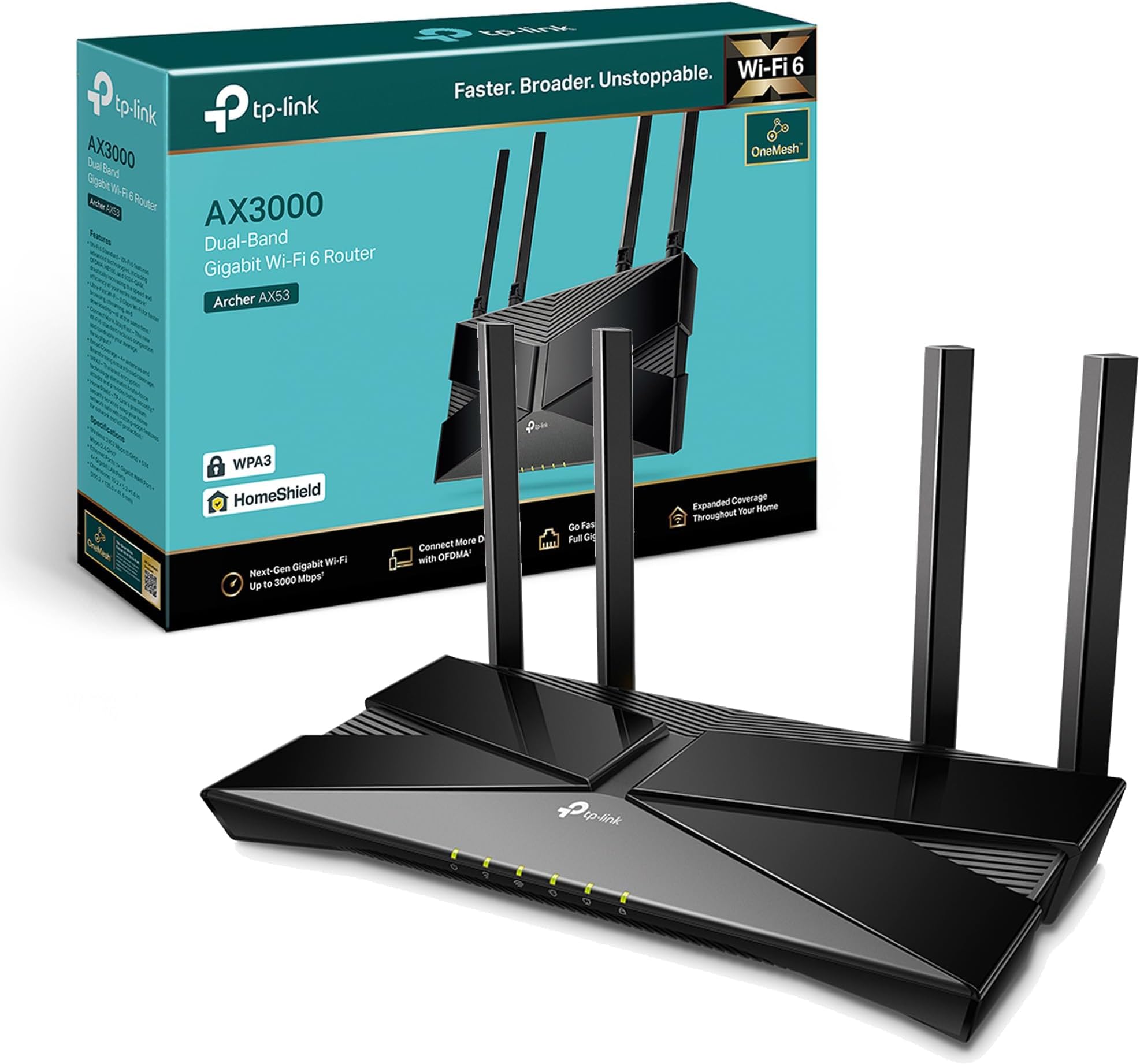
The TP-Link Archer AX53 is a WiFi 6 dual-band router delivering up to 3000 Mbps combined speed, optimized for gaming and 4K streaming. Featuring OFDMA for multi-device efficiency, EasyMesh compatibility for scalable coverage, WPA3 security, and VPN server support, it’s designed for seamless, secure connectivity in modern smart homes. Alexa integration and full gigabit ports make setup and control effortless.


| ASIN | B09TPKT929 |
| Antenna Location | Gaming, Home |
| Antenna Type | Fixed |
| Best Sellers Rank | 1,194 in Computers & Accessories ( See Top 100 in Computers & Accessories ) 7 in Routers |
| Box Contents | Archer AX53 |
| Brand | TP-Link |
| Brand Name | TP-Link |
| Colour | Midnight Black |
| Compatible Devices | Laptop, Personal Computer, Smart Television, Tablet |
| Compatible devices | Laptop, Personal Computer, Smart Television, Tablet |
| Connectivity Protocol | Wi-Fi |
| Connectivity Technology | Wi-Fi |
| Control Method | Voice |
| Controller Type | Amazon alexa |
| Country of Origin | China |
| Coverage | whole-home coverage |
| Customer Reviews | 4.3 out of 5 stars 3,616 Reviews |
| Data Transfer Rate | 3000 Megabits Per Second |
| Frequency | 5 GHz |
| Frequency Band Class | Dual-Band |
| Frequency band class | Dual-Band |
| Global Trade Identification Number | 04897098682630 |
| Has Internet Connectivity | Yes |
| Has Security Updates | Yes |
| Is Modem Compatible | No |
| Item Dimensions L x W x H | 26L x 13.5W x 4.2H centimetres |
| Item Weight | 0.81 Kilograms |
| LAN Port Bandwidth | 3000 Mbps |
| Manufacturer | TP-Link |
| Manufacturer Part Number | Archer AX53 |
| Maximum Upstream Data Transfer Rate | 3000 Megabits Per Second |
| Model Name | Archer AX53 |
| Model Number | Archer AX53 |
| Model name | Archer AX53 |
| Number of Antennas | 4 |
| Number of Ports | 6 |
| Operating System | Windows |
| Other Special Features of the Product | Beamforming,Alexa Compatible,Access Point Mode,External Antanna |
| Router Firewall Security Level | Advanced |
| Router Network Type | wireless |
| Security Protocol | WPA3, WPA2-PSK |
| Smart Home Compatibility | Smart Home Compatible |
| Special feature | Beamforming , Alexa Compatible, Access Point Mode, External Antanna |
| Unit Count | 1.0 count |
| Wi-Fi Generation | Wi-Fi 6 |
| Wireless Compability | 802.11ax |
| Wireless communication standard | 802.11ax |
R**N
Great product
Great product, easy to setup, massive boost in range over my standard providers supplied router, loads of additional features and a bargain on sale. Signal never drops out and a big improvement in reliability. After a quick Google search and YouTube video I had it setup in about 10 mins.
R**4
Fast, Reliable Wi-Fi with Great Coverage
The TP-Link Archer AX53 has been fantastic for our home network. Setting it up was quick and easy, and the AX3000 speed really makes a difference — streaming 4K videos and gaming online is smooth with no noticeable lag. The dual-band feature helps keep devices stable even when multiple people are connected at once. Coverage is excellent; I get strong Wi-Fi signals in every corner of my house. The interface is user-friendly, and firmware updates are simple. Overall, a reliable router that delivers fast, consistent performance at a reasonable price. UPDATE ITS STILL GREAT
M**C
Solid router but firmware update doesnt work via app
I'm on virgin media, they gave me the hub 3 which is absolutely terrible. The wifi kept disconnecting. I complained and they sent me another hub 3 which was just as bad - the wifi kept dropping and I'd have to turn my wifi on and off and put up with stuttering MS teams calls. I suspected it was the wifi signal so I bought this. Setup was reasonably straight forward although the app is kinda basic. You have to put the virgin media hub into modem mode and then connect it to this router and then restart the virgin media hub otherwise it wont work - theres a youtube video on it basically if you search virgin media modem mode - its not the top one but theres one with a guy explaining you need to reset the modem in the correct order. I followed the app and after a little fiddling it worked and the connection has been solid non-stop. No more signal drops, no more MS teams issues. The ONLY criticism is the app on my phone doesnt seem to update the firmware even though it says it does. You begin an update, it completes and then it says the firmware is still outdated and hasn't been applied. It doesnt really make sense.
H**L
Nice and reliable
Really nice and smooth work flow.
S**.
So far so good
Got this for pcvr and it works like a dream. Very easy to setup and manage and the speed is fast
P**R
Versatile and easy to use - with free companion mobile app
Positives: * It works as advertised * Its UI is clear, super responsive, easy to use and informative. * Packed with a host of features Negatives: * None so far I replaced my internet provider's own-brand router (Virgin Media Hub 3.0) with this. I put the Hub 3.0 into 'modem mode' and connected this via ethernet cable and got it sorted pretty quick with the setup feature of the router. This product boasts a lot of additional features and they're all very easy to setup and work as advertised. For example, it can easily setup 3 separate WIFI networks for you, your main network, a guest network, and a IoT network (for your smart home devices) to keep everything separate and stop any compromised guest/smart devices from allowing anyone access to your main devices. There is also the 'tether' app you can download or free and link to the router to manage it from the mobile app. If you create an EasyMesh network (using other TP-Link wifi extenders that support EasyMesh) it can also manage the extender devices! Its got a lot of easy to use extra features such as per-device speed limits, setting priority devices, access point mode, as well as all the usual router config stuff.
T**E
Problems, Problems , Was I just unlucky???
I have had a number of tp-link routers over the years and have nothing but praise for the brand. This model has given me nothing but days of grief. I have tried twice. 1st Router stubbornly refused to link to my Givenergy dongle and had to be returned as it is a necessity for managing my solar system. The WiFi was absolutely great for both speed and distance cf BT Smart Hub 2. 2nd attempt after discovering a work around. Ignore the app and set up offline, especially disabling the 5Ghz WiFi and as before changing SSID and password to match old router. Plugged everything in and all went brilliantly except the router would not install the update it kept pestering me to download. The app suggested I might want to change device names and did this for the dongle. The router then dumped me off the network. Several hours of deep joy talking to Givenergy produced no joy really. Left router connected over night and I woke in the morning with a fully working system, dongle and all. My happiness quickly dissipated when I realised that the dongle was dropping out after around 20min and staying offline for 1 or two hours before coming back online for another 20 mins or so etc etc Whilst trawling around on the net looking looking for ideas I got the impression that downloads of pages were sometimes feeling quite slow. Whilst looking in wifi connection settings there was 'note' saying I would be connected when connection speed improved. This triggered a series of speed checks over several hours which showed that the dongle disconnected when connection speed dropped. My 500Mbs nominal line speed (normally 521Mbs), usually gives a stable WiFi speed of of just over 300Mbs with my old router. At the same area of the house with this second router it showed a high of 350 and a low typically very unstable between 0.9 and 8.5. Totally unacceptable... Back to Amazon for refund. And before any snide comments: I have tried restarting the router, factory reset and reconfiguring. Also restarting my Givenergy app, clearing it's cache and uninstalling and reinstalling the app and 1hr + on the phone following guidance given by a Givenergy installation specialist. I am not having a 3rd attempt as I would lose the wiil to live.
E**H
So sleek my wife doesn't mind it on display!
Couldn't be happier with this device! As an IT Manager I was really pleased with the functionality of the advanced features as well as the optional extras. For non-IT users please understand that the optional extras are not required! It's a gorgeous unit, a mix of gloss and matt black, 4 aerieals that aren't oversized to look like they do more than they're actually doing. The power is a standard plug, no power brick inbetween the unit and the plug socket. The dept of the router means it fits on a nice slim table leaving room for other bits - picture to follow and will edit this bit out once uploaded. Setup is easy and very well guided, without intimidation, although it will try to get you to start a trial for optional extras you don't need, but they are good. I would recommend setting up the mobile app and adding the device so you can manage, if needed, without a computer. I would say it's almost on par with the Netgear Nighthawk app. Wifi range, strength and device distribution is incredible, down to being WIFI6, and I can't wait to renew my EoP devices to get the best out of the Ethernet ports.
R**T
compatibility issues if ordering in the USA
product was as described, but the adapter that came with it was wrong. the power supply plug does not match the adapter at all, so i could not plug it into any of my sockets because it literally would not plug into the adapter either. i wish i took pictures because it's hilarious in hindsight i cannot comment on the quality, speed, functionality, performance, or value for money at all, because i literally could not test it. i didn't have any power sources to spare that would have fit either
R**A
Works Perfectly
⭐️⭐️⭐️⭐️⭐️ 5 Stars Really impressed.....Setup was quick, and it immediately fixed the weak WiFi spots in my home. The connection is steady, the speed feels a lot faster, and everything just works smoothly now. For the price, it’s a solid upgrade. Definitely worth it.
M**I
pretty good device
Router works perfectly, solved all the problems of deadzone, etc in my house. More than 2x faster if you have wifi 6 compatible devices, went from 180mbps max on my phone to 500+mbps. Pretty good upgrade for $70 if you are still using wifi5 routers and you have wifi 6 devices.
F**S
Excellent. Solved All My Game Streaming Issues
I bought this on a whim and it worked out tremendously well. I always had issues streaming games from the PC and PS5 to the Steam Deck OLED with my old Linksys WiFi 5 router. The stream would always slow down and start losing packets. This router completely eliminated these problems and now I can stream at 100mbps+ without any problems. Highly recommend it if you have a similar setup as mine. The range is also better than my old router. I have a 2BHK, and I would always only get either 0 to 1 bar of WiFi signal in my bedroom. With the TPLINK, I get around 2 and the internet is always stable. The app is nice, but I just use the web admin panel. The internet speed across all devices is fantastic and smooth. I have had no isses with this router for the few days I have owned it.
M**L
Comes with a British plug!!!
It's a good router. If you're buying internationally note that it has a UK power plug.
Trustpilot
1 month ago
2 weeks ago