⚡ Work smarter, print faster, and never miss a beat with VersaLink B400!
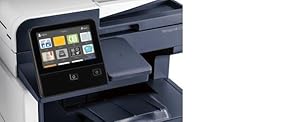
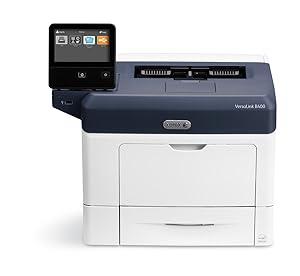
The Xerox VersaLink B400/DN is a high-speed black and white laser printer delivering up to 47 pages per minute with sharp 1200 dpi resolution. Designed for busy professionals, it features a large 550-sheet tray plus a 150-sheet multipurpose tray, automatic duplex printing, and versatile connectivity options including USB, Ethernet, Wi-Fi, and NFC. Its customizable 5-inch color touchscreen offers intuitive control, while robust build quality and a one-year warranty ensure reliable, hassle-free performance in any office environment.


| ASIN | B01N4F39CB |
| Additional Printer functions | Print Only |
| Best Sellers Rank | #231,628 in Office Products ( See Top 100 in Office Products ) #344 in Laser Computer Printers |
| Compatible Devices | Laptops, PC, Smartphones |
| Control Method | App |
| Controller Type | Android, Vera, iOS |
| Customer Reviews | 3.9 3.9 out of 5 stars (82) |
| Date First Available | December 17, 2016 |
| Dual-sided printing | Yes |
| Duplex | Automatic |
| Global Trade Identification Number | 00095205842678 |
| Hardware Interface | USB |
| Included Components | VersaLink B400 Printer, Standard Capacity Toner Cartridge (5900 capacity), software and documentation CD, installation guide, quick use guide, power cord |
| Ink Color | Black |
| Is Discontinued By Manufacturer | No |
| Item Weight | 30 pounds |
| Item model number | B400DN |
| Manufacturer | Xerox |
| Max Copy Speed (Black & White) | 47 ppm |
| Max Input Sheet Capacity | 550 |
| Max copy resolution black-white | 1200 x 1200 dpi |
| Maximum Black and White Print Resolution | 1200 dpi |
| Maximum Color Print Resolution | 1200 x 1200 dpi |
| Maximum Media Size | 8.5 x 14 inch |
| Maximum copies per run | 15000 |
| Memory Storage Capacity | 2048 MB |
| Model Series | VersaLink |
| Number of Trays | 2 |
| Print media | Paper (plain) |
| Printer Ink Type | toner |
| Processor Count | 2 |
| Product Dimensions | 16.8"D x 18.1"W x 13.3"H |
| Scanner Type | Sheetfed |
| Sheet Size | 8.5 inch x 14 |
| Specific Uses For Product | house, office, school |
| Total Ethernet Ports | 1 |
| Total USB Ports | 1 |
| UPC | 095205842678 |
| Warranty Type | One-year warranty |
| Wattage | 565 watts |
J**N
A Great Printer
I have printed 3,473 pages through an ethernet connection in the last 10 work days and have not had a single issue with it. No jams, lost jobs, errors, nothing. The print speed is very fast: a page every 1-1.5 seconds. The quality is much better than the Lexmark printer it is replacing. I am not worried about the wifi or other nonsense. The price is very affordable and you can see why when you open and close various parts of the printer. Everything seems to be made of a thin plastic. That's why this printer is $250 vs the equivalent competitor printer being $700+. The only thing im not a fan of is the touch screen. It is not bad, but its one more thing that might break in the future. The paper tray loads and opperates proplery with a full reem of paper. I cannot say the same for other printers used here. We also use carbonless paper (white/yellow) . Other printers seem to have a problem pulling only one paper at a time, but this printer has not had that issue. Another thing is that the printer accepts and uses aftermarket tonner that can be purchased at a much better price point without any issues. Although i have not been using this printer long i have printed a good amout through it. I would recommend this to anybody. At the current price i am very happy with it. The only think that aggrivates me with this printer is that when i open the paper tray to make sure there is a white page first, i have to press ok on the screen before it will print.
S**S
Amazing quality and speed!
Xerox cares about their products - you can easily tell that by the huge box and load of styrofoam that protect the printer. And they make quality, straight-forward products too. I’m a fan. Pros: This VersaLink B400/DN has amazing print quality for black text on white paper. It’s clear, crisp, and well-defined. When compared to other printers I’ve used, this one absolutely takes the cake for best quality output. And ink and toner have somehow lasted a very long time despite many pages printed. The printing speed is also pretty incredible, with a page coming out just about every second! There’s no lag between pages or jobs - this printer just goes, goes, goes. Setup was simple and easy, and I was able to connect my computer within minutes. My partner prints pages upon pages upon pages for their job and we’ve yet to see any errors or jams. What’s more is each job takes a fraction of the time it used to and uses less power as well. I personally think the adjustable touchscreen is pretty nifty and looks great. Cons: There’s not much I can say bad about this printer. I love it! But if I’m trying to be nitpicky, it’s not an especially beautiful machine. It’s incredibly practical and definitely looks *ok*, but for this price point, I’d love to see something a bit more attractive.
G**N
Workhorse/wont print wireless
When this thing works it's great. It's fast and crisp for simple and even some high-volume black-and-white printing. It won't work wireless out of the box you have to purchase a separate $50 Wifi attachment. Also, once you get the Wifi device to work you can install the printer wirelessly, but after that good luck getting it to print wireless. I have not yet achieved that in two years of ownership thus I am tethered to a cable for printing. Lastly, in January 2021, I paid $436.52, not sure why it's nearly doubled since then.
P**E
BEFORE YOU BUY! NEEDS SEPARATE WIFI ADAPTER!
When trying to set up WIFI, it told me I needed to install a separate adapter that attaches in the back. It's $49 and I just had to order it. My complaint is that they didn't make it clear that this was needed when I purchased the printer. It's just an extra step and a waste of time (the kids are using it for school stuff). Now I need to wait another 5 days to get this random adapter part since, for some reason, they couldn't just put that IN the actual printer to begin with like every other printer I've had since they started doing WIFI for printers. I would have purchased the adapter at the time of the order if I would have known but why this is not already preinstalled I have no idea. Pretty ridiculous. Who WOULDN'T want WIFI for their printer?? Once I got the part, it worked perfectly. Very nice machine. Easy interface.
S**N
Build Quality Seems Cheap
Bought this to replace an old Brother printer for a colleague. Set-up was easy and straightforward. Our network found and installed the printer easily enough. My complaint is with the build quality. A lot of plastic encases the guts of the printer. Opening the lid to get to the toner cartridge left me handling it with kid gloves. It felt extremely flimsy and brittle . . . I was afraid I would break something. We'll see how it holds up, but it seems to be made with very lightweight plastic that may not wear well.
J**M
Heavy Duty Office Printer
Where all this printer is proving to be a significant addition to the office set up. Well set up was a little difficult, the instructions provided are not adequate at all and require some research on the Internet. Once everything was set up and everything connected to the network, it was off to the races. This printer has gone through hundreds of sheets of paper printing top-quality documents. All the prints so far have been significant quality and with agile speed. The touchscreen is a very easy To use interface. We have not tested out the Amazon replenishment feature yet, we are looking forward to using it to minimize downtime and having to wait to buy new ink for this printer. Looking forward to seeing this printer and use for years to come.
A**R
No wifi connectivity
It says is wifi but is not you must buy a wifi kit that cost 60 dollars most printers come with wifi built-in not this one
P**T
Churns out pages quickly
This Xerox VersaLink printer is great for printing large amounts of black and white copy. It runs quickly, quietly and with apt precision. Give your office or home office this quality printer. I also has touch screen and great tech support.
J**.
I've used and had to move around my fair share of laser printers over the years both at home (I had previously been a laser only diehard, but these days my opinion is starting to change) and I have to say I was a little bit shocked at just how light this printer is for one in a class meant for business use. I've had older cheap basic laser printers meant for home use that have weighed more. Here at home, I keep my printers hidden away in the basement so on one hand I was thankful that I didn't feel like I was going to throw my back out getting this down the stairs but on the other hand I can definitely feel like this printer lacks the distinct "tank like" feeling of some other similar models I've handled. Honestly, the printer being light is good but I also like feeling like I'm investing in something that can take abuse and I'm not sure I get that feeling here. There is definitely more "flex" in all of the plastic components I noticed during the unpacking stage than I would have strictly liked to see. One of the first things you notice when you start using the B400 is the user interface which is the form of an adjustable full colour touch LCD screen which is a pretty fair size. The UI itself looks pretty good, has a modern design and overall I found it easy and intuitive to move around and get things configured without having to continually look things up in the user manual. While I like the overall design and image quality offered by the screen, I found it somewhat annoying to use for any length of time because it can sometimes react to my inputs rather slowly. So the UI of the printer definitely gets some marks for style and ease of use, it isn't quite my favourite printer interface I've come across. The overall design of the rest of the printer is pretty standard fare, getting into the parts of the innards needed for maintenance including any jams, which I have not experienced yet in my not so extensive use, is straight forward. I can appreciate this because one of my previous printers I swear I almost snapped in two trying to puzzle the thing open, so this isn't always a given. I wouldn't say it's the most beautiful machine on the market, but it's far from an eye sore. Connectivity is fine for my purposes as I always connect printers via Ethernet, and in this case this printer supports a full gigabit ethernet connection. You can also use a direct USB connection, though I don't see this being utilized very much these days. Wifi connectivity is notably absent from this model (but can be added with an optional add-on), keep this in mind if a wired connection is impossible for you. Printing via Google Cloud Print and via Android work as expected. This printer is extremely fast, as a matter of fact it's the fastest printer I've ever had in the house. The time it takes to get the first page printed is pretty par for the course compared to what I'm used to but it fires out consecutive pages at a ridiculous rate after that point. I can't say a single negative thing about this printers performance. This particular printer creates prints, even on cheap paper, that are some of the best quality prints I've seen out of a mono laser printer. Even images, which are notoriously bad on even colour lasers let alone mono ones are pretty darn good. Usually I expect to see horrible amounts of dithering and especially noticeable banding on anything more complex than simple vector graphics but even when you feed it a colour image (for example, printing out a full web page) it does a very respectable job of printing out a greyscale representation of it that doesn't look awful. I have to say I'm pretty impressed.
R**X
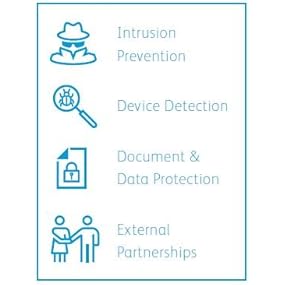
The Xerox B400/DN is perfect option for home business and office printing. Its speed, reliability and scalability make it the perfect choice when secure multi-user high speed and volume printing is required. This is a startup kit, meaning the printer only comes with a power cable and one standard capacity cartridge (5900 capacity). No Ethernet or USB cables are included in the box.. Although it can be setup to be used wirelessly over Wi-Fi, a separate Wi-Fi kit is required to use this feature. The difficulty level of setting up this printer is medium. The 5” touch screen is used to access an intelligently designed and customizable menu system. It is also possible to add Xerox APPS to the printer. There are a lot of security options which are especially good for multi-user use, like USB card key requirements, making it a good choice for sensitive document printing and scanning. The printer's performance is excellent. It’s super fast, pumping out pages at faster than 2 seconds per print on average. It can do single-sided and double-sided printing. The claim of 47 pages per minute is true. I have had zero issues, no jams or errors. Printing PDF documents from a memory stick is easy, fast and worked perfectly. It produces ultra sharp prints that come out on the top of the printer for easy recovery. It can hold an entire package of paper, but also has the option to expand the paper reserves by adding additional paper trays. It comes with a standard capacity toner cartridge (5900 capacity) and can also use the Xerox ultra high capacity cartridge (24600 capacity). This printer has the capability to automatically order new cartridges using amazon dash when needed saving valuable time. The Xerox B400/DN is an excellent choice for secure high speed multi user home and office printing. If you want to save time by not having to order replacement cartridges, replace toner cartridges and feed paper trays often, and require the best reliability and high volume printing performance, this is the perfect printer for you.
O**E
While being a fast printer that produces quality black and white reproduction there are some items that need mentioning. Overall this is a quality printer. It's solid (read heavy) and the curved edges/corner design is pleasing. The two tone color makes it more appealing in my opinion. The layout is very much like other printers aimed at use in office with the prints being ejected at the top instead of someplace at the bottom. ► The front mounted fold down manual feed tray is held securely when placed in the upright position. ► Depending on the height at which it sits on a table top or rack/shelf, the display can be rotated to make it easy to view and use. ► There is a USB port located just underneath the display, this can be used to print form thumb drives, unfortunately it only sees PDF files,no image files such as JPG, PNG, or GIF. ► The USB port does work with NTFS partitioned drives. Set Up: ► Initial up was easy and the manual walks you through the process, no geeking required. ► Setting up parameters manually using the display is painful, the menu placement of certain items isn't logical or at least follow any current standards that every other printer I've used in the last two years does. Xerox has decided to go back about a decade in it's approach to manual set up convention. ► While there is an optional wireless module available I actually prefer to have printers connected with network cables, it reduces the large amount of bandwidth already being used on our routers plus it's far more secure. ► The Xerox phone app is mediocre but there are other app options available that still allow you to print direct from a phone if it's on the same internal network (phone uses the same router) that the printer is connected to. ► While it came with a disk which contains the drivers I went to the Xerox site and downloaded the latest version instead. ► I found it far easier to set up the various options via web browser rather than the display. The layout of options on the display is not intuitive and some things just aren't located under a directory where I would expect them to be. To use the browser you need to determine what the printers IP is and then simply point the browser to this IP. ► There is the option to install new apps but there are limited options and I can't find anything that I would need to install. Operation: The sleep function and other items can be customized, as above this is easier to do via web browser. The bottom paper tray holds a large number of sheet but will not take a whole ream at once. The Not So Good: ♦♦♦ There is one very annoying item, EVERY -- SINGLE -- TIME the printer is powered up, whether by the power switch or when it wakes from power saving mode, it prints out a "Startup Page". I can't find anything in the set up to stop this from happening. It wastes paper and I've never seen this on any other make of printer. I cant for the life of me think of why Xerox would do such a stupid thing. ♦♦♦ While it shows the option to perform firmware updates on the display, this feature doesn't work. Every time I try to use it I get an error, could not connect. I know it's not a network error since it is connected and operates (prints) via Ethernet connection. ♦♦♦ While I've gone through every setting I can find, both on the display and via web browser, it simply does not hold the change to make 8 1/2 x 11 the standard paper used in the tray. It always reverts back to A4! I would need to go through everything I print from to make the change to A4 so that this would stop waiting for me to confirm that I want to continue printing to the paper in the tray. I prefer to have printers sit on standard 19 inch racks for easy access and that way I can stack them on individual shelves without taking up large areas of desk space. This printer sits nicely on a 19 inch media rack the display, while making the printer wider than 19 inch's, sits to the front of the rack upright. In The End: While it's very fast and provides quality prints there are a number of issues that need to be addressed to make it truly easy to use and also eliminate that annoying habit of printing a start up page every time it wakes up! It's because of the negative items I mentioned above that I'm taking two stars.
A**K
Before I tell you how great this printer is I want to make sure I hammer a point home - THERE IS NO WIFI ON THIS PRINTER (unless you want to spend another $85+ on some WIFI module). I kind of think this is ridiculous but I can see why Xerox did it this way - This is an office printer so in order to reduce waste (and redundancy) they made it a separate module. That being said the module should not cost more than $20-30 not the cost of an entire all-in-one unit. If the printer was not exceptional I would have deducted more than 1 star for the wifi, but the printer itself is so good that I would feel like I am doing it an injustice by rating it less than 4 stars. With that out of the way, the printer is beautiful - both aesthetically and functionality wise. Printer spits out paper at a phenomenal rate, good quality prints, and software is decent. The setup was fairly easy and painless - actually had an easier time setting this up than some consumer all-in-one units I have had in the past. I set the printer up from the unit itself (network portion) by hooking it up to my home router and following the on-screen prompts for network setup. I then downloaded the software from the Xerox website (it comes with the drivers included on a CD - but who uses CD drives anymore?). My suggestion to Xerox is to put a QR code in the manual for users to scan and sends them to the download page for the device - OR - include a small cheap usb stick with the installation software and drivers preloaded. Only hitch during setup was discovery - setup could not find my network-attached printer so I had to manually add it by IP address - easy enough for me as an IT professional but may be difficult for some end users. Printer display is really cool - its colour, touch screen, and very crisp. I love the level of functionality I get directly from the unit - I can and did literally update the device firmware from the device display itself! Gone are the days of having to load the firmware onto a usb stick to push to the device - you can do it directly now as long as it is connected to the internet. There is a whole app gallery that can be browsed directly from the printer - allows you to add functionality such as DocuSign, etc. Really cool stuff. Printer has 2 GB of RAM, I remember when a desktop had less than that. Cartridges are rated to last very long - thousands of pages. I obviously could not test that but I did print a number of pages with the included (pre-installed) cartridge without signs of wearing out. Overall I am very impressed with the printer (albeit the WIFI issue - cmon how can you make a printer without it?!) Other than that 8/10, excellent home office printer as long as you don't mind connecting directly to ethernet!
A**R
bad, one work two weeks
Trustpilot
2 months ago
2 weeks ago