Buy anything from 5,000+ international stores. One checkout price. No surprise fees. Join 2M+ shoppers on Desertcart.
Desertcart purchases this item on your behalf and handles shipping, customs, and support to USA.
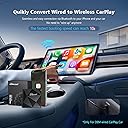
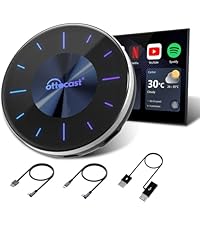
๐ Cut the cords, not the vibe โ wireless CarPlay, redefined.
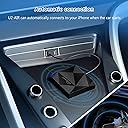
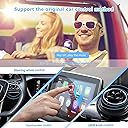
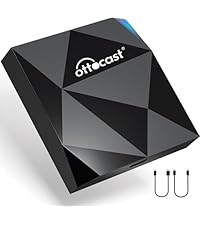
The OTTOCAST U2-AIR is a compact wireless CarPlay adapter that converts wired CarPlay systems in 2016-2022 vehicles into seamless wireless connections. Featuring a rapid 7-second startup, built-in 5GHz WiFi for quick phone detection, and dual USB cables for versatile compatibility, it supports voice and touchscreen controls with virtually no audio delay. Designed for easy plug-and-play installation, it enhances driving convenience with automatic connection and day/night modes, backed by a one-year warranty and professional technical support.


| ASIN | B09Q65SX47 |
| Additional Features | Built-In Microphone, Fast Charging |
| Audio Output Mode | Not Mono |
| Audio Output Type | Bluetooth |
| Best Sellers Rank | #47 in Car Audio & Video Input Adapters |
| Bluetooth support? | Yes |
| Brand | OTTOCAST |
| Built-In Media | WIFI MODULE |
| Color | Black |
| Compatibility Options | iPhone, Cars with wired CarPlay (model years 2016-2022) and iOS 10 or later |
| Compatible Devices | Cars with wired CarPlay (model years 2016-2022) and iOS 10 or later |
| Compatible with Vehicle Type | Car |
| Connectivity Technology | USB, Wi-Fi |
| Connector Type Used on Cable | USB Type A, C |
| Control Method | Voice |
| Controller Type | Voice Control |
| Customer Reviews | 3.9 out of 5 stars 2,919 Reviews |
| Data Link Protocol | USB |
| Hardware Interface | USB |
| Human Interface Input | Touchscreen |
| Installation Type | wireless |
| Item Dimensions L x W x H | 2.2"L x 0.6"W x 2.2"H |
| Item Weight | 0.13 Kilograms |
| Lithium-Battery Energy Content | 5 Watt Hours |
| Manufacturer | OTTOCAST |
| Model Name | U2-AIR |
| Number of Channels | 1 |
| Power Source | Corded Electric |
| Product Dimensions | 2.2"L x 0.6"W x 2.2"H |
| Special Feature | Built-In Microphone, Fast Charging |
| Supported Application | CarPlay |
| Supported Media Type | wifi |
| UPC | 742484740125 |
| Unit Count | 1.0 Count |
| Warranty Description | 1 |
| Wireless Compability | 5 GHz Radio Frequency |
M**N
Quick, Easy, and Works for a Great Price with Iphone
Using with an iPhone in a 2020 Lexus Rx350. It was very quick and easy to set up and has worked flawlessly the four times since that I have started my car. My husband said the call quality isnโt quite as good as wired, but we need to test more as it could have been the vents blowing harder. Regardless, I am very happy with this purchase and like the CarPlay version better with this device than when I plug in- easier interface/more options. I canโt get messages up on wired.
M**L
Great Product + Excellent Tech Support
I bought the OttoCast U2-Air for my 2023 Hyundai Ioniq 5 which has wired Apple CarPlay. After using CarPlay I thought it would be much more useful if I didn't have to plug in my iPhone 13 everytime I got into the car. I had heard about wireless adaptors for CarPlay and thought that the U2-Air would be perfect for me - and the price was very attractive. I received it in just 2 days through Amazon and it worked almost perfectly. It was very easy to set up and I liked that it automatically connected to my iPhone every time I got into the car. However, on a long trip where I was using the Hyundai navigation system to find EV charging stations along my route I discovered a flaw: the steering wheel button that enables voice commands no longer worked for the car's built-in navigation system - instead, when pushing the button, it brought up Siri on my iPhone. The owner's manual for the Hyundai said that a "short press" would initiate the car voice command system and a "long press" would initiate Siri, but it didn't work that way when using the U2-Air. I contacted Ottocast tech support by email and they responded in less than 24 hours with the suggestion to upgrade the U2-Air firmware with very clear and specific instructions on how to do so. With their help (thanks Julie!) I was able to upgrade the firmware which fixed the problem. I'm really quite impressed with the product itself as well as the integrity of the tech support organization. I highly recommend this product to anyone who has a car with wired Apple CarPlay and would like to convert it to wireless Apple CarPlay.
C**2
NOT 5th Gen RAM 1500 friendly.
This is actually the 2nd one of these I have ordered and tried. I have a 2019 RAM 1500 5th Gen Bighorn. These trucks have 2 USB A and 2 USB C plugs, but there has to be a fuse adjusted in the fuse box under that dash, that requires the dash piece to be removed, under the steering column... or, the USB ports stay powered in the RAM, connected to the device and your phone will not switch to your homes WiFi unless you manually disconnect the Carplay device. After I sent the first one back, I found a forum post about moving that fuse, so the power shut off after 1 hour. So, when you get home, the truck has to be off and left alone for 1 hour before it'll disconnect and hop onto your home WiFi. Is it a small inconvenience, yes. Would it be more convenient to just get in the truck and have Carplay without messing with cables, YES. So I ordered this one to try again. I want you to keep in mind, I have had this for 3 weeks now, but the truck I use it in, is not driven much. I have a company vehicle, so my RAM, only gets driven on weekends and maybe a couple trips to the store during the week. With that said, it's now dead. There haven't been any iPhone updates or updates to RAM Uconnect. I got in yesterday and got the screen I added a photo for. I restarted my phone, had to hunt for the Bluetooth connection and then it's WiFi connection and manually force a connection. Tech support is simply logging into the device via it's IP address and checking for updates and it was up to date once I got it forced into connecting. Today, same thing, this same screen. If you force it to connect, it will work fine. If you don't, it won't connect on it's own. I tried different cables and tried all 4 USB plugs to make sure it wasn't an equipment issue on my end, it isn't. I think we would all like wireless Carplay and Android Auto. But I don't think the technology is there yet. Plugging in, just takes a couple seconds. A cord might not be convenient, but it's reliable and only costs $10 to replace if it goes bad later. I'm returning this one and calling the wireless Carplay idea, done and over until I buy a different truck or the devices get reliable.
R**T
Works in my 2023 Hyundai Palisade but disconnects frequently, annoying to reconnect.
9/23 updates - "Otto" likes to disconnect frequently from the car, Bluetooth and my iPhone and can be very annoying to reconnect. One other very odd โquirkโ has appeared with โOttoโ. When my car is off and parked in my driveway with โOttoโ plugged into the USB audio port in my car, Otto takes over my wireless Sony ear buds when Iโm close to the car and kills the Bluetooth signal from my iPhone to my ear buds. See the Car Play photo - thatโs what pops up on my iPhone when Otto takes over my Tidal streaming. I unplugged Otto from the vehicle USB and my ear buds were fine. My Palisade must power Otto via the USB cable even when the ignition is off and allow it take over my iPhone. I'm looking for an improved brand or Otto model. Itโs very odd to have my Sony ear buds die when Iโm doing yard work so from now on, I unplug Otto when Iโm doing yard work with my car in the driveway. 3/23 update. 3 months later through a tough, cold winter and โOttoโ is still working nearly flawlessly with my iPhone 12 and Tidal streaming. As long as the Tidal app is open on my iPhone, connection is quick. I have not noticed any unusual drop outs or other quirks. It can take a minute or two for iPhone and Otto to connect if the Tidal app isnโt open. But if I click on the Tidal app on the Palisade media display, it connects nearly instantly. Really happy with Otto! 12/21/22 update - got my 2023 Hyundai Palisade and I transferred โOttoโ directly from old Mazda CX-9 to the Palisade, which immediately detected Otto and Otto worked instantly. The functionality was nearly perfect just like my old Mazda, I have to click on the Tidal app on my cell phone to fire up streaming with Tidal. Once I do, Car Play and Tidal work perfect! Otherwise, no issues. Original Review - My expectations for this device were low. I was expecting to have to send it back. I was wrong on both counts. Once I got โOttoโ set up, it worked flawlessly and wirelessly with my formerly hard wire only Apple Car Play. It even worked with my Tidal streaming app on my iPhone through Otto enabled wireless Air Play. I had to open the Tidal app after my car audio system and โOttoโ booted up. My car audio system boots a lot slower than Otto. Navigation, phone, audio and every app worked fine. A couple of install notes. Make SURE you have real Apple Car Play - Otto just makes existing Car Play wireless, it doesnโt create the entire Apple Car Play universe. Make sure you use the proper USB port in your car. You can have multiple USB ports in your car and itโs possible only one works for audio and the rest are power only. Thatโs how my Mazda CX-9 is set up. Otto includes 2 connection cables. One is USB C to USB C and the other is USB A to USB C. If you donโt know the difference, Google them. You need the right cable. Follow the directions and you should be fine - in a 2019 Mazda CX-9 with Apple Car play. Iโll have connection data on a 2023 Hyundai Palisade in about 10 days after my new Palisade arrives. Hope this helps!
F**S
No problems after a year of regular use.
A year later still working perfectly. No complaints, starts quickly, always accurate.
T**N
Most impressive device!
I was skeptical about how this device would work, but I am SO happy after trying it! The unit is very small and fits nicely in my Jeep's center console, so it nobody sees it from inside or outside the vehicle. There was absolutely no "setup", I just plugged it in and connected via Bluetooth. I can verify that this device is very responsive, and I notice little to NO lag at all. When I get in the car and turn it on, my music plays almost immediately, with no noticeable lag. I have not had to update any firmware and I have only had to disconnect and reconnect it two times since I owned it. Not sure why, but the screen froze, but I think it was more a user error than the device. Buttons are fast and responsive on my Jeep's touch screen. I have had zero issues while making phone calls using this device. The only thing I haven't done yet is tried swapping it out to a different car, and I haven't tried having more than one phone connected to it at a time, and really, I do not think those circumstances will present themselves in my situations. I highly recommend this item to anyone looking for wireless Bluetooth!
F**W
Not quite there
I got this wireless Carplay dongle based on the good reviews. I've had it about 2 weeks now and have decided to return it. At first, I thought it was great. It is easy to connect, works as described, and has little lag time. When getting into my car it connects really fast and does not require any input from me to get it going. All of the Carplay features that were present with my wired connection are there with this as well. The dongle is small and appears to be well made. Now for the reasons that made me ultimately decide to return it. 1. When using Waze the voice sometimes crackles and cuts out. Not all of the time but enough to make it annoying. We are talking badly tuned AM static type noise. 2. I have had several occasions where the dongle takes over the infotainment system and won't let me select any other mode. My screen will say that it's on satellite or FM radio but, whatever was playing on Carplay is what is coming through the speakers or, it will not let me change the mode out of Carplay at all. 3. When using voice texting the lag is noticeable. Waiting on Siri to respond can take 2 or more seconds. This sounds like I am quibbling but, when you are trying to text and have to wait on the response chime, it gets annoying. Maybe I got a bad unit or maybe, like other reviewers have mentioned, it works great at 1st and then degrades. Either way, it was enough of an annoyance to make me decide that it wasn't worth keeping.
D**T
Ottocast is exceeding expectations
I started off by comparing 10 different wireless CarPlay adapters. I used professional review sites and customer reviews to compare them on: 1) boot up time 2) input lag 3) connection quality/stability 4) updates (how difficult, how long manufacturer provides updates). Based on the data I collected for those points, I went with Ottocast. Hereโs how it has measured up for me: 1) Boot time - People were reporting 18 seconds which sounds like an eternity to me but I am finding it to be way faster than that. I havenโt timed it but from the time I turn on the engine, buckle up, and put it in drive, CarPlay is on screen. My biggest fear was that this device wouldnโt be ready for use until I was already well down the road but it has been a non-issue. 2) Input lag - As there is with any wireless CarPlay whether that be via an adapter like this, or native to the car, or built into an aftermarket receiver/head unit, there is input lag/delay. Personally this hasnโt been a bother to me. Itโs a minor delay. A little bit longer than the delay I see with plain Bluetooth music streaming, but less delay than I see when using AirPlay between devices at home. 3) Connection stability - It seems like many of these products are plagued with connection drops/disconnects. But thatโs what stood out to me about Ottocast in the reviews, it had the least complains about that. And so far I havenโt had any issues. 4) Updates - Most other adapters require an update before using but this worked out of the box. They actually recommend not updating until something stops working - like after a phone update. I havenโt performed an update but it looks to be on pair with all others, and with Ottocast being one of the leading brands in this space, Iโm hopeful theyโll be around to keep supporting this product with updates into the future. Some other points worth mentioning: Setup - While this wasnโt a criteria I was tracking/comparing, it is also worth noting how incredibly simple setup was. Just a couple of steps over a couple of minutes and it was ready to go. Size - this thing is incredibly small. I thought it would be much bigger. I like how compact it is - easily stays out of the way. Summary - From review comparing and my real world experience, Ottocast U2 seems like the best product from among its peers, particularly in what I think are the 2 most important aspects: boot up time and connection stability.
T**M
It works
Works as advertised and makes life a lot easier in motorhome !
F**.
Bien
Funciona bien !!
K**N
Works well with AUDI
Very good Product. Connects fast and works well without any lag
S**H
Work perfectly
I am impressed by the quality of the connection, fast and stable connection
C**N
Promise fully maintained
It works perfectly and allows you to use your CarPlay without any cable. After sales also works perfectly: I had an issue and immediately they replied with the solution.
Trustpilot
5 days ago
1 week ago