Desertcart purchases this item on your behalf and handles shipping, customs, and support to USA.
⚡ Upgrade to VENGEANCE DDR5 — where speed meets precision and your rig demands the best!
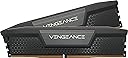
The CORSAIR VENGEANCE DDR5 RAM 32GB (2x16GB) kit delivers cutting-edge DDR5 performance at up to 5200MHz with CL40 latency. Featuring a compact form factor, solid aluminum heatspreaders, and hand-screened chips, it ensures stable, high-frequency operation. Intel XMP 3.0 compatibility and onboard voltage regulation via iCUE software empower professional users to customize and overclock with confidence. Ideal for demanding multitasking, content creation, and gaming setups, this memory kit combines premium build quality with future-proof speed.


| ASIN | B09NCPTVX5 |
| Best Sellers Rank | 14,701 in Computers & Accessories ( See Top 100 in Computers & Accessories ) 73 in Computer Memory |
| Brand | Corsair |
| Brand Name | Corsair |
| Column Address Strobe Latency | CL40 |
| Compatible Devices | Desktop |
| Compatible devices | Desktop |
| Computer memory size | 32 GB |
| Customer Reviews | 4.7 out of 5 stars 2,910 Reviews |
| Data Transfer Rate | 12 Gigabits Per Second |
| Form Factor | Compact |
| Global Trade Identification Number | 00840006659464 |
| Item Weight | 37 g |
| Manufacturer | Corsair |
| Manufacturer Part Number | CMK32GX5M2B5200C40 |
| Memory Form Factor | DIMM |
| Memory Generation | DDR5 |
| Memory Speed | 5200 MHz |
| Memory speed | 5200 MHz |
| Model Name | VENGEANCE DDR5 |
| Model Number | CMK32GX5M2B5200C40 |
| Number of Pins | 288 |
| Product Features | Registered Memory |
| Product Warranty | Limited Lifetime Warranty |
| RAM Memory Technology | DDR5 |
| RAM Size | 32 GB |
| RAM memory technology | DDR5 |
| Special feature | Registered Memory |
| UPC | 840006659464 |
| Unit Count | 1.0 count |
| Voltage | 1.25 Volts |
E**E
128GB running like a champ at 5200mhz. Rockon
Im very happy with this Corsair DDR5-5200mhz memory. It looks great on my mostly white build PC and I have it running at 5400 via a user configurable XMP profile in my Gigabyte z690 aero D-BIOS. It was not obvious at first why it was running at 4800 and that I only seemed to have one XMP profile to set. but as I discovered you can have up to 3 xmp profiles once set under advanced memory settings and SPD (Gigabyte z690 aero D) I'm sure this memory can be run at a higher frequency but that will involve changing voltages and timings which can be troublesome if not done correctly, and the BIOS will have to be reset. You can check easily if you have the correct speed by going to Windows Task manager/Performance and Memory tab, or,download cpu-z app. I will purchase another 64bg of this memory to give me a total of 128gb for my system, which will be useful for vst libraries and video editing etc. But this will more than likely require adjusting voltages, etc, to get the required speed. Highly recommended. UPDATE. I bought another pair of these sticks (black) for a total of 128gb I got the 64gb Corsair DDR5-5200mhz kits in the black version for an excellent price; this was to add to my Corsair 64GB DDR5-5200mhz white kit for a total of 128gb for my system. I would have preferred the white version I previously bought for my PC build, but the black sticks were much cheaper than what I originally paid; it was a no-brainer. I have these sticks and the white ones in an MSI z790 edge wi-fi motherboard. I had a Gigabyte z690 D aero, with 64gb white set in my original review , but I had to get another motherboard for various reasons. With just two sticks in my motherboard I managed to get them running stable at 5400mhz. (XMP profiles), which was great, but when I added 4 sticks at 128gb, the fastest I could get was 4800mhz, that was both motherboards. However, Recently MSI updated their BIOS for this board which included fixes for better memory compatibility, so, I decided to try get 5200mhz running again, and to my surprise it worked perfectly, for a while. But, even after passing a memory test and playing a few games without any problems, I got a windows green screen error when I was closing down an app. So then, I decided to try and get at least 5000mhz running, which I have them running at now, stable. Actually, they are running at 5067mhz. I'm very happy with this speed and do not mind losing 200mhz from the speed they are supposed to run at. In fact, the speed difference when I had 64GB running at 5200 and beyond is actually quite negligible, according to various memory tests. Overall, I think this memory performs well and is from a top tier brand, which means better compatibility with motherboards. With future BIOS updates, perhaps 128gb might run at 5200 and beyond, stable, here's hoping. Highly recommended UPDATE 2. MSI released another BIOS update (7D91vH4) for my z790 wifi edge motherboard, which includes improved memory compatibility and many other updates. I updated it and adjusted the Dram frequency to 5200Mhz G2, while disabling the XMP profile, and it has been running stable while doing memory tests and playing games etc. My current system specs: I9-13900k MSI z790 wi-fi edge Gigabyte RTX 4070 aero Asus Essence STX II sound card Kingston 1tb KC3000 PCIe 4.0 NVMe M.2 SSD Arctic liquid freezer II 360 RGB AiO Another 3 nvme drives and two ssd’s
M**E
No problems
Work fine so far, ill wait till gpu arrives and update review.
E**E
Make computer go brrrr (in a good way)
Good price for two DIMMs to double my RAM. Quick delivery too. Couldn't get these to work with my 2x16GB DIMMs (same make and speed), so most likely an issue with my motherboard.
S**E
What was needed.
Had to have another two more sticks to make it look more pleasing to the eye,overkill some might say but hey it looks good.
A**R
cheap and powerful
does the job nicely
H**K
Best priced RAM for performance
Great ram 32gb is enough for anything, if you need more you could buy 2 but highly doubt it. Insanely fast, best value, it is cl40 though but I dont feel a difference between cl32 or 40 so I don't think it matters too much.
A**L
A good kit for 64GB not so good for 128GB
A lot of the work I do is with stuff that requires a lot of RAM, such as simulations and photogrammetry. I wanted to get 128GB of DDR5 as I was on 32GB and that was no where near enough for what I was doing. Unfortunately if you try to use 2 of theses kits together you are likely to run into some instability though this can be fixed by running them without XMP (which is the default state but is also slower). Without using XMP all of my stability issues have gone away. I can confidently say that 64GB of RAM is enough for any game (even if you are hosting a server for the game at the same time which can be a good idea for games like minecraft even in single payer). 64GB of RAM though is overkill most of the time. If you are on AMD then you probably want faster RAM and to only run 2 stick irrespective of what it is if you are running it fast.
J**E
easy Install
easy
م**د
ما يفرق معي الأداء
لست دقيق من ناحية الأداء لكن الجودة ممتازة واللون جيد لو كان اغمق قليلا بدون خرابيط ألوان تعمل جيدا
M**N
Super
Sehr guter RAM, den ich empfehlen kann
J**N
RAM corsair
Buena RAM , lo esperado de la marca, buena construcción y muy agradables a la vista para un gabinete abierto
M**I
素晴らしいDDR5メモリ!
CORSAIR VENGEANCE DDR5-5200MHz (64GB, ホワイト) は、超高速性能とスタイリッシュなデザインが特徴です。インストールが簡単で、64GBの大容量はゲームやクリエイティブ作業に最適。安定性も抜群で、長期使用におすすめの一品です!
じ**き
安いけど問題なく使える
DDR5のメモリのわりに比較的安価だったため、少し不安でしたが数か月つかっても問題なく使用できます。
Trustpilot
1 week ago
4 days ago