


🎯 Elevate your creative game with precision and power — see the difference, feel the edge!
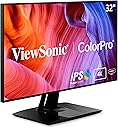
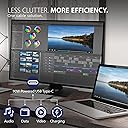
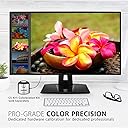
The ViewSonic VP3268A-4K is a 32-inch 4K UHD IPS monitor engineered for creative professionals seeking impeccable color accuracy and ergonomic comfort. Featuring factory calibration with Delta E<2, HDR10 support, and a 14-bit 3D LUT for over 4 trillion colors, it ensures stunning visuals. Its advanced ergonomic stand and eye-care technologies make it ideal for extended use, while USB-C with 90W charging and Ethernet RJ45 streamline connectivity and workspace efficiency.





| ASIN | B08TZVQBT5 |
| Adaptive Sync | FreeSync |
| Additional Features | Anti Glare Screen, Blue Light Filter, Frameless, Hardware Calibration, Height Adjustment |
| Aspect Ratio | 16:9 |
| Best Sellers Rank | #262,706 in Electronics ( See Top 100 in Electronics ) #5,420 in Computer Monitors |
| Brand | ViewSonic |
| Brightness | 350 |
| Color | Black |
| Color Gamut | 1 |
| Connectivity Technology | DisplayPort, Ethernet, HDMI, USB |
| Contrast Ratio | 1300:1 |
| Customer Reviews | 4.1 out of 5 stars 53 Reviews |
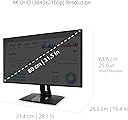
| Display Resolution Maximum | 3840 x 2160 pixels |
| Display Technology | LCD |
| Display Type | LCD |
| Hardware Connectivity | DisplayPort, Ethernet, HDMI, USB Type C |
| Image Contrast Ratio | 1300:1 |
| Included Components | VP3268a-4K Display, Power Cable, USB-C Cable, HDMI cable, UAB-A/B Cable |
| Item Dimensions D x W x H | 10.4"D x 28.1"W x 25"H |
| Item Type Name | LCD Monitor |
| Item Weight | 23.5 pounds |
| Manufacturer | ViewSonic |
| Model Name | VP3268a-4K |
| Model Number | VP3268A-4K |
| Mounting Type | 100 x 100 mm |
| Native Resolution | 3840x2160 |
| Number of Component Outputs | 4 |
| Picture Quality Enhancement Technology | SuperClear IPS panel, 14-bit 3D LUT, HDR10 |
| Power Consumption | 90 watts |
| Refresh Rate | 60 hertz |
| Resolution | 4K UHD 2160p |
| Response Time | 5 milliseconds |
| Screen Finish | Matte |
| Screen Size | 32 inches |
| Screen Surface Description | Matte |
| Specific Uses For Product | Business, Desktop, Photo Video Editing |
| Total Number of HDMI Ports | 2 |
| Total USB 2.0 Ports | 4 |
| Total USB 3.0 Ports | 1 |
| Total Usb Ports | 1 |
| UPC | 766907012361 |
| Unit Count | 1 Count |
| Viewing Angle | 178 degrees |
| Voltage | 240 volts_of_alternating_current |
| Warranty Description | Three-year limited warranty on parts, labor and backlight |
| Warranty Type | 3 Years Limited Warranty |
A**R
Game changer for my photography
I just got it in, it’s a perfect color match to my prints out of the box. It’s beautiful and works great with MacBook Pro. (To note: I tried another popular brand first and it did not work out for me, calibration didn’t work. Love the ViewSonic so far!)
S**Y
Works fine in 4k
Color is great. Works fine in 4k with Win10 if you change "Scale and Layout" to 200%
G**W
Very nice 4K monitor, but USB hub and ethernet does not work well with MBP.
I have a new M1 Max Apple 16" MacBook Pro and this screen, while really nice, is not as versatile as I would have hoped. On the positive side, the screen has tremendous real estate (being 32" of 4K resolution) and the ability to rotate the screen between landscape and portrait is great. The monitor does supply 90W of power via the included cable, which is great as well. (Not quite the 140W provided by the power supply provided with the laptop, but as long as it is not under much of a load, the 90W works fine for charging the battery.) Now, with that being said, there are some annoying issues that I have experienced. When I plug the monitor into the laptop, I have to turn the monitor off and then back on, otherwise the Mac does not see the screen. Additionally, the USB hub and the ethernet plug in the monitor do not connect to the computer. Sometimes it seems to work (with an external drive that needed a separate USB hub to provide power), but that is only occasionally. It is kind of frustrating, but I must use two cables where only one should be necessary (one for the video signal and power to the laptop, and another for the USB hub I had to purchase separately). So... With that all being said, I'm okay with the monitor and, for the money, really cannot complain when there really are limited options available for a Mac user at this price point. If you have a Mac and are expecting this monitor to meet all of your connection needs, however, you will probably be disappointed.
S**X
An absolute Horror Show
Got several of those for the studio. Every single one died with the double image flicker syndrome within a year. Dealing with warranty claim with ViewSonic is an absolute horror show and the main reason wahy I ended walking away from this brand.
C**A
Great!
The best one I had!
C**S
Great monitor
I work in radiology.. use it for viewing images.. excellent quality.. worth the money.
L**G
good monitor
you need to install the driver. The generic one may not work
S**.
Good bang for the bucks!
Excellent TV, however I have learned my cataracts were the issue. Now I have an extra 65” TV🤑
D**R
Bester Monitor
Hoher Preis.....Ja, aber man bekommt auch was dafür. Ich bin von diesem Monitor so überzeugt, dass ich mir hier bei Amazon den zweiten Bestellt habe. Die Farben sind brilliant, gerade mit den Voreinstellungen. Ich nutze die Monitore zur Bildbearbeitung, aber auch für meine PS5. Angeschlossen sind beide an einen MacBook Pro M2Pro. Bevor man sich ein Apple Display holt, sollte man sich für den Preis lieber zwei von Viewsonic kaufen. Klare Kaufempfehlung.
L**R
High-performing monitor but support documentation and software is notable by its absence
The "ViewSonic VP3268a-4K 32-inch 2160p UHD Professional Monitor, 100% sRGB, Pantone Validated, Colour Blindness Mode, USB Type-C, HDMI, DisplayPort, Ethernet, for Graphic Design, Photo & Video Editing" is not a monitor for every computer user; it has features that some will almost insist be provided but others that may not best suit specific uses. Its 14ms refresh time will be far to long for gamers but for graphics work, pictorial design, desktop publishing and other demanding roles will be suitable and are well-supported. It stands alone by offering 100% sRGB and full Pantone validation and very few others offer either yet alone both. It comes with a stand and column that is pre-assembled and accounts for the bulkiness of its packaging. The column mount only needs be slotted into the VESA mounting and it is then essentially ready for use once the power lead and a choice of video cable are connected. The large circular botton is for power and the reaminder form its OSD system. Its negative points are few, its weight aside, but there are software issues. ViewSonic provide a link to signed drivers for both Windows 10 and 11 but neither installs, ending in a suggestion to download the unsigned driver as an alternative but it does not exist on ViewSonic's support page; Windows native ViewSonic Driver wworks well enough and supports audio via DP (probably also via HDMI although not yet tested). It is unknown whether the Mac software installs and functions correctly. The other two issues relate to optional software, vDisplayManager 2.0 which supposedly offers screen division, PIP and other facilities and Colorbration Plus that supposedly works with several screen calibration devices including those from ColorMunki, Xpress and several more either in addition to or substituting for their relevant software. While both install, they freeze and never run in their Windows versions. Whether or not that applies to the Mac versions is again unknown - there is no longer any Mac hardware on-site that could confirm functionality. That those events relate to a monitor with an RRP close to £800 are issues that could not reasonably be anticipated and urgently need to be addressed. Were they known in advance, a different and less expensive choice may have been made although without 100% sRGB or Pantone compliance. A range of necessary cables is included but there is a dearth of information about its OSD operation. A guide exists for a related model (VP3256-4k) which provides most answers but there may be minor differences between the two models and their features. While all the slimmer buttons work within the menu system (top button selects it), most others also have other unrelated functions, again not documented, but come with dire warnings about incorrect settings. None are labelled but as they are located in the bottom right-rear corner (from the front), the labelling would not then be visible. Overall, a good monitor for specialist users and their needs but there are elements that need investigation and resolution by the brand.
A**R
Great image, shame about everything else
Positives: The image quality is very good (to my eye at least - I didn’t measure it). The connectivity was good - it has KVM functionality which isn’t well publicised. You can control settings from your computer using Viewsonic software. Negatives: Menu system is infuriating - 5 or so fiddly buttons on the back. Stand is ugly in person (I swapped for a monitor arm). No USB ports on the side - didn’t realise how much I’d miss that! Fit and finish of bezel around the screen is poor (had same issue on my Dell u2722D). Viewsonic control software is slow and clunky. 90W charging didn’t work (could be my Dell precision 5540 laptop but not sure). Viewsonic support is sub-contracted out to a useless company in the UK - truly pathetic level of response. My monitor made a loud buzzing noise and then a loud pop - following which it emitted a ‘burnt’ smell. Not sure what let go but that was when I sent it back to Amazon!
L**R
Guter Fotoschirm
Bild ist Top. Die Möglichkeit der Hardwarekalibration ist bei dem Preis super ...
P**K
Sehr gute Farbqualität
Sehr gute Farben, einfache Installation, schnelle Lieferung
Trustpilot
2 months ago
3 weeks ago