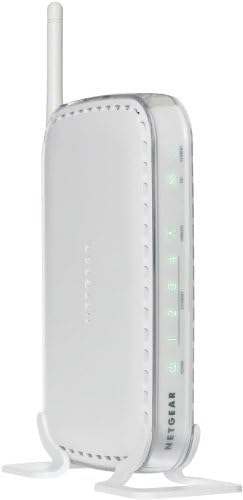
NETGEAR DG834G Wireless-G Router with Built-in DSL Modem
Product ID: 37629487
⚡Built-in ADSL modem 24 Mbps downstream
📶802.11g wireless up to 54 Mbps
🔌4-port 10/100 Mbps auto-sensing switch
Desertcart purchases this item on your behalf and handles shipping, customs, and support to USA.
🚀 Upgrade your home network to pro-level speed & security—stay connected, stay ahead!
The NETGEAR DG834G is a versatile Wireless-G router with a built-in ADSL modem delivering up to 24 Mbps downstream speeds. Combining five devices in one—modem, router, 4-port switch, 802.11g access point, and SPI firewall—it offers fast wireless connectivity up to 54 Mbps, easy ISP auto-setup, and robust security features including VPN pass-through. Ideal for millennial professionals seeking reliable, high-speed internet with seamless multi-device support and business-grade protection.
| ASIN | B0000D8HK1 |
| Antenna Location | Home |
| Best Sellers Rank | #772,332 in Electronics ( See Top 100 in Electronics ) #130 in Modem Router Combos |
| Brand | NETGEAR |
| Color | While |
| Compatible Devices | Personal Computer |
| Connectivity Technology | Ethernet |
| Control Method | App |
| Controller Type | Switch |
| Customer Reviews | 3.7 out of 5 stars 84 Reviews |
| Data Transfer Rate | 0.05 Gigabits Per Second |
| Frequency | 2.4 GHz |
| Frequency Band Class | Single-Band |
| Global Trade Identification Number | 00606449029918, 10606449029915 |
| Is Modem Compatible | Yes |
| LAN Port Bandwidth | 10/100 megabits per second |
| Manufacturer | Netgear |
| Maximum Upstream Data Transfer Rate | 24 Megabits Per Second |
| Mfr Part Number | DG834G |
| Model Name | DG834G |
| Model Number | DG834G |
| Number of Ports | 4 |
| Other Special Features of the Product | WPS |
| Security Protocol | WPS |
| Special Feature | WPS |
| UPC | 606449029918 |
| Warranty Description | 2 Year Hardware Warranty |
| Wireless Communication Standard | 802.11g |
| Wireless Compability | 802.11g |
S**1
NetGear DSL Modem with Wireless G Router
I purchased this to replace my 2Wire DSL modem that Qwest sold me. Since my DSL speed was 2 MB less than what it should be I called and Qwest Tech Support blamed it on my DSL modem (familure story, huh?), but they would be only too happy to sell me another of theirs. I looked around online for a new DSL modem (screw you Qwest!!!) for a new replacement. I paid particular attention to reviews on all the candidate items, noticing most seemed unreliable, with overheating being a major problem for most, as well as connectivity and installation problems. This DSL modem had better reviews, so I hit the old purchase button. First: NO heating issues so far (after two days)as my DSL is on 24-7. Modem feels moderately warm on the base, but no more if not less than other components on my desk. Second: Installation was so easy it was scary! All you need do is have your log on (ID and password)from your provider and the installation software does the rest. It has preset options for four or five different major ISP's and software detects protocal (PPPop etc.) and sets everything correctly. Again, you'll need your DSL log on from provider as they usally establish that themselves so you probably don't know yourself. Wireless setup for 802.11 was just as easy with WPA-802.1x+WPA2-8021x, WPA2-PSK, and WEP security available. I usually connect to my iPhone wireless and speed with WPA2-PSK was very good. Third: You can configure just about everything you want from website blocking to access schedule (and more), so us techies can have oodles of fun rearranging all the sets to heart's content. Good logging too! The only thing I don't like (which is really petty) is that the wireless light stays on all of the time instead of only going on when a wireless connection is active. All in all: VERY GOOD DSL modem, extremely good bargain (at $39.99 plus free shipping), EXTREMELY easy to install, and very flexible for changing sets, parameters and security profiles. I highly recommend this product and I'm very happy I chose NetGear!!! *** No- I do not work for NetGear, own stock or have any relatives or friends working there.***
S**T
ONLY buy this if you have Verizon, ATT or Quest DSL the ones listed WONT WORK WITH OTHERS!
I was so excited until I followed the instructions and it wouldnt auto-detect my providers settings. Then I was on the phone with Tech for about an hour and they know nothing! The router looks sweet and had alot of features but if you dont have the DSL providers that are on the Box that are NAMED, I would not get it because it doesnt work with all DSL providers. I mean we tried everything know to man to get this to work with my PPPoA connection. I think that the Mode is limited on this one and I will not be purchasing Netgear products no more because the Customer Tech help dont know more than the regular guy. I would stay away from this one.
L**G
Good modem combo with only one flaw
This is a very good DSL modem combo. It runs 24x7 with no problems at all. The only trick for it to work with ATT DSL is setup the right VPI/VCI as 0/35. Otherwise it won't find any dsl signal. Different ISPs might get different VPI/VCI. Just google and try it. Or let the modem search it for you. But you need to wait pretty long time until it finishes the search routine. The DDNS only works with dyndns.com. But that's not a big deal. dyndns.com is pretty good for free DDNS service. The port forwarding also works good. Firewall setup is very straight forward. The Wifi signal gets excellent range. It also gets Mac address list filtering. The wireless printer server, VOIP (Italkbb) and Skype all works excellent with it. The ONLY problem is that it cannot send the logs files to my email address. The reason is the netgear router send the emails through the default SMTP port 25 without TSL/SSL encryption. But port 25 is blocked by almost every major ISPs in United States. So that's the dilemma. Either ATT needs to unblock port 25 specifically for your account or let the netgear fix their bad firmware to embed the TSL/SSL SMTP on other ports at your choice. Maybe I am asking too much for this little dsl combo modem. All in all, it is perfect for home use.
J**N
Works but..................
Once you get this set up it works great. Initial set up is fine, but some of the security settings don't let you see the Router Wirelessly, which is the reason I bought it. The first one that was shipped tech support told me that the product was defective after they went through their "trouble shooting" process. Second one had the exact same issue, rather than calling customer service, I messed with the settings myself and was able to see the router wirelessly on my computer and iphone, and at that point it works great. It gets good speed, can stream videos, haven't tried NetFlix yet, but it streams South Park Studio just fine. Overall a solid product, tech support sucks really bad, and pretty sure that it was outsourced to India, and the folks working there are only following a script. If you are savy enough to figure out the security settings, then this is a good inexpensive wireless router/modem.
J**B
Solid performer, not as user friendly as older Netgears
I've had this combo modem/router for almost a year (purchased here at Amazon) and have no major complaints. 802.11g speed is more than sufficient for DSL-speed web surfing and printing, which is all we use the router for (no gaming or file transfers between home computers). We have a single-story house, and all devices are generally within 50 feet (usually more like 30 feet) of the antenna. The one minor complaint I have is that while a previous Netgear 802.11b router I owned automatically detected all wireless devices within range, and presented them in a list to select for authorization, this router fails to detect any of the devices -- although there is a blank list area where available devices should be displayed. Result: I have to manually check and input the MAC address for each device when I want to add it. Although there's a small chance I failed to set something up correctly, I should stress that I basically followed the out-of-the-box instructions and would have done everything the same as I did several years ago with that 802.11b router.
M**K
Needs firmware upgrade
Router was constantly dropping connections and I was about to throw it out with the trash but then I upgraded the firmware and tried it again. Never lost a connection after that, worked great. I would recommend, but you will definitely need to upgrade the firmware.
M**L
Flawless..
Bought this after a long research on all-in-one dsl modem/router, and time well spent. Was having issues with my ATT 2WIRE and i use a macbook, so wanted something with best reliability and low cost. This is a much older modem/router (54 Mbps), but does a much better job than newer ones. It comes with open wireless setting, i was running a secured wireless connection within 10 minutes of opening the package, so the setup was a breeze(although, i knew what i was doing). Low cost reliable product with no flaws. It's a classic..
A**V
Awful
Even with the latest firmware, it doesn't perform well. I suspect there is memory leak in the firmware, which causes it to almost stop working after a couple days of uptime; even its configuration webpage won't open. Have to power cycle it then. WHen I try to transfer files between computers that are connected to it, the transfer speed is lower than if I just downloaded the file from internet. When one computer is streaming from youtube, traffic between computers will stutter. Its firewall configuration doesn't allow to open the ports I need. There is only predefined set of services that can be enabled; you can't configure your own.
Trustpilot
1 month ago
1 month ago