Desertcart purchases this item on your behalf and handles shipping, customs, and support to USA.
🚀 Elevate your workspace with LG’s 4K powerhouse — clarity, color, and convenience in one sleek package!
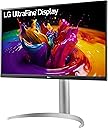
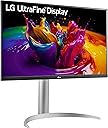
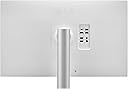
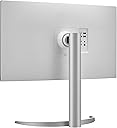
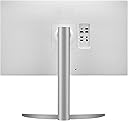
The LG 27UP850-W is a 27-inch 4K UHD IPS monitor featuring a 3840x2160 resolution, 95% DCI-P3 color gamut, and VESA DisplayHDR 400 support. It offers a versatile ergonomic stand with height, pivot, and tilt adjustments, plus a powerful 96W USB-C port for simultaneous charging and data transfer. Designed for professionals seeking crisp visuals and streamlined connectivity, this monitor combines productivity-enhancing features with a minimalist, virtually borderless design.


| ASIN | B08YJMMYBX |
| Adaptive Sync | FreeSync |
| Additional Features | Anti Glare Screen, Height Adjustment, Pivot Adjustment, Tilt Adjustment |
| Aspect Ratio | 16:9 |
| Aspect ratio | 16:9 |
| Best Sellers Rank | #19,214 in Computers ( See Top 100 in Computers ) #537 in Computer Monitors |
| Brand | LG |
| Brightness | 400 Candela |
| Color | Silver |
| Compatible Devices | Computer |
| Connectivity Technology | DisplayPort, HDMI |
| Contrast Ratio | 1200:1 |
| Customer Reviews | 4.3 out of 5 stars 330 Reviews |
| Display Resolution Maximum | 3840 x 2160 Pixels |
| Display Technology | LED |
| Display Type | LCD |
| Hardware Connectivity | DisplayPort, HDMI, USB 3.0 Type C |
| Has Color Screen | Yes |
| Image contrast ratio | 1200:1 |
| Included Components | HDMI, DisplayPort, USB-C Cables, Monitor, Power Cord, Stand, Warranty Card & Owners Manual |
| Item Dimensions D x W x H | 29.2D x 56.9W x 61.5H centimeters |
| Item Weight | 13 Pounds |
| Manufacturer | LG |
| Model Name | 27UP850-W |
| Model Number | 27UP850-W |
| Mounting Type | Wall Mount |
| Native Resolution | 3840x2160 |
| Number of Component Outputs | 3 |
| Picture Quality Enhancement Technology | DisplayHDR 400, IPS Panel |
| Power Consumption | 96 Watts |
| Refresh Rate | 60 Hz |
| Resolution | 4K UHD 2160p |
| Response Time | 5 Milliseconds |
| Screen Finish | Matte |
| Screen Size | 27 Inches |
| Screen size | 27 Inches |
| Screen surface description | Matte |
| Specific Uses For Product | Business, Personal |
| Total Number of HDMI Ports | 2 |
| Total USB 3.0 Ports | 2 |
| Total Usb Ports | 2 |
| UPC | 195174007754 |
| Unit Count | 1.0 Count |
| Viewing Angle | 178 Degrees |
| Voltage | 240 Volts |
| Warranty Description | Limited: 1 Year Parts & Labor |
F**I
Great 4k productivity monitor. Really good picture quality.
I wanted to get a monitor with USB-C power delivery. I had shortlisted a couple of options, all of these have USB-C PD : BenQ EX3203R 32 Inch - QHD@32 inches, 144hz, USB-C. 144hz would be nice, but QHD at that size would look pixelated. The only plus point was that it was cheaper. SAMSUNG S80A - Same specifications as the LG but was a bit pricier. LG Libero - Comes with inbuilt detachable webcam, 27-inch QHD 60W USB-C PD. A really cool and unique monitor. I would have bought this if it was 4k instead of QHD. After considering these options I finally decided to go with the LG 27UP850-W since I used to own the LG ultra-wide 29UM69G. The 27UP850-W I received had no dead pixels or blooming so quality control is good. It's bright enough for my room. I have placed my setup right next to the window and I usually set the monitor to 70% brightness during the day, which is more than enough. I use my setup for coding and some content viewing and the LG excels at both of those things. 4k resolution gives you huge real estate for multitasking. You can have multiple windows open side by side and see more content without loss of detail. Picture quality is exceptional and the text is really crisp which reduces eye strain. The 96-W power delivery, image quality, and 4k sealed the deal for me. The 2 additional USB ports in the back are a nice feature. If you're looking for a productivity monitor then you should definitely buy this. Don't buy this if you're looking for good HDR as it barely supports it because it just can't get bright enough for HDR content. You can notice the difference between HDR and non-HDR content but it's not worth it. It's not even half as good as my OLED.
H**H
Highly recommended
I've used an older model of the same series (550) and I have to say, this one is a big upgrade. The bezels are sleeker. The display is fantastic. Very good clarity, accurate colors. USB-C is an added advantage, as I don't need to use my Macbook's power cable separately. Being able to adjust the height of the monitor is also an underrated advantage with this monitor. In this price range, you just cannot go wrong.
T**B
Top quality
You have to see the quality of this screen's images to believe it. I connect it to my Mac (Retina screen), and I don't feel that my experience has been downgraded. A catch for this price.
E**R
Great quality Monitor
I have been looking for this model for a long time. It's newer and powers my macbook M1 2020 directly via usb c cable. The monitor has excellent picture quality. I've been using it for over a month no issues or problems noted.
K**Z
Worth it!
It’s a great investment but after buying I felt to go for another monitor which has ergo stand because stand of this monitor is taking bit extra space. Over all one of the best and worth spending..
S**A
LG Screen stopped working 7 months after purchase !!
They sell defective LG monitors!! my LG 27UP850-W stopped working suddenly after 7 months of purchase and they offer no warranty!!! do NOT BUY from this store!!!
T**A
Great monitor
I am in love with monitor. Easy installation and great image.
R**R
Dont bother
Keeps going blank after few minutes. Tried to reset and changed the fps. Still no help
L**A
Mal soporte
A los 2 meses de adquirirlo le salió una raya negra y no me brindaron soporte ni Amazon ni LG ya que me encuentro en Mexico
P**O
Great monitor for my macbook and color accurate.
It is one of the best monitors I have. After researching a lot to get my first and new monitor, I went for this. As a video editor, I wanted a color-accurate display, which worked with my MacBook. The only con is its stand which comes with it. It takes a lot of space on the desk but getting a monitor arm solves the space problem. Speakers are meh, go for a sound bar or table speakers. The clarity is good as well, comes very close to Mac's retina display.
B**A
High-quality resolution without eye strain
Really good monitor. The image quality is as good as my macbook. It has a broad range of brightness settings to find something that doesn't strain the eyes without altering hues. I physically swivel between landscape and vertical orientation way more than normal folks and its not breaking or loosening the firmness. The stand is aesthetic and very stable.
V**A
Great monitor for Mac Studio
Choosing a monitor for your new M1 Mac mini of Mac Studio is difficult if you’ve already ruled out the Studio monitor because of the price. I agonized over this for a long time, read HUNDREDS of reviews of many different alternatives. I was confused by the many comments about scaling the resolution, how it would interact with my Mac, controlling such things as volume, brightness etc. All things that, on my previous iMac, were not an issue. I hope that this review will help anyone in the same situation feel more comfortable with buying a non apple monitor. First of all, the ergonomics of this monitor. The stand is excellent, height adjustment is so simple, the stand looks great and installing it to your monitor is literally a matter of seconds. The 1 cable connection using the supplied USB-C cable is very tidy and works perfectly. Out of the box, with the display parked beside my wife’s 5K iMac screen, this monitor is slightly less crisp. However, after some tweaking using the very functional joystick/toggle on the bottom of the display, the difference is minimal and more than acceptable to me. I saw several reviews talking about problems waking from sleep on the previous UN model; the problem does not exist here. Monitor sleeps right after I put my Mac to sleep and promptly turns back on when I wake my Mac up. As far a scaling goes, I was confused as to what that was going to do do the sharpness and all round look of the display. It’s totally a non issue. You can change the display resolution in you system preferences to whatever is easiest for you to see and the screen looks awesome. I set the Mac sound output to use the monitor’s audio and I control it just like I always have, from the keyboard. As for brightness, even though this display is speced as 400 NITS, it is plenty bright, I generally have my brightness set at minimum and it’s great. Colours are great and everything is crisp and sharp. The downloadable On Screen Control (OSC) is not quite perfect for this monitor, but adjusting this monitor with the joystick works well. Hopefully LG will update the OSC software. There is a free app available on the web called Monitor Control that lets you control brightness and contrast from your keyboard and it seems to work well. I hope this helps anyone who was as confused as I was. This monitor works great with my Mac Studio and I am very pleased with my purchase. Highly recommended.
P**V
Just perfect. I don't know why you would look elsewhere
I have now been using this monitor for about 5 months and can give my review. It is just the perfect monitor if you are looking for a 27". My main computer is a 2021 MacBook Pro M1 Pro. I wanted a monitor to supplement my laptop screen so that I can have the option between using it like a desktop or carry it away like a laptop. The screen quality is perfect. My old desktop was a 5k monitor 27" iMac and I d not see any noticeable differences. The features are great. It charges my laptop just from connecting it so I now save space on having a charger. The 2 usb3 ports in the back are perfect for connecting my Webcam and anything else (not to mention that the MacBook Pro has no USB3 ports so it saves me from needing a dongle too). The easy ability to move the monitor higher and lower are phenomenal. Watching movies/Netflix, etc is great. The picture quality is wonderful. I would recommend this monitor to anyone.
Trustpilot
1 month ago
2 weeks ago