Buy anything from 5,000+ international stores. One checkout price. No surprise fees. Join 2M+ shoppers on Desertcart.
Desertcart purchases this item on your behalf and handles shipping, customs, and support to USA.
🚀 Elevate your workspace with ViewSonic’s sleek 24" powerhouse — where style meets performance!
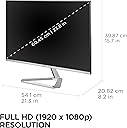
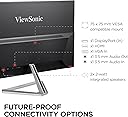
The ViewSonic VX2476-SMHD is a 24-inch Full HD (1920x1080) IPS monitor featuring a 100Hz refresh rate and FreeSync for smooth visuals. It offers flicker-free and blue light filter eye-care technologies, multiple preset modes, and versatile connectivity options including HDMI, DisplayPort, and VGA. Its ultra-thin bezel design and premium build make it a stylish and reliable choice for professionals seeking immersive viewing and ergonomic comfort backed by a 3-year warranty.


| ASIN | B01GV9H1RS |
| Adaptive Sync | FreeSync |
| Additional Features | Anti Glare Screen, Blue Light Filter, Eye Care, Flicker-Free, FreeSync |
| Aspect Ratio | 16:9 |
| Best Sellers Rank | #9,940 in Electronics ( See Top 100 in Electronics ) #334 in Computer Monitors |
| Brand | ViewSonic |
| Brightness | 250 |
| Built-In Media | Audio Cable, Power Cable, Quick Start Guide, VGA Cable, HDMI Cable, VX2476-smhd Display |
| Color | Black/Silver |
| Color Gamut | 102.0 |
| Compatible Devices | Desktop, Laptop, Smartphone, Speaker, Tablet |
| Connectivity Technology | DisplayPort, HDMI 1.4 In, VGA |
| Contrast Ratio | 1,000:1 |
| Customer Reviews | 4.6 out of 5 stars 892 Reviews |
| Display Resolution Maximum | 1920 x 1080 Pixels |
| Display Technology | IPS |
| Display Type | LED |
| EU Spare Part Availability Duration | 5 Years |
| Global Trade Identification Number | 05057103158515 |
| Hardware Connectivity | DisplayPort, HDMI, VGA |
| Has Color Screen | Yes |
| Image Contrast Ratio | 1,000:1 |
| Item Dimensions D x W x H | 8.2"D x 21.3"W x 15.7"H |
| Item Type Name | 1080p monitor |
| Item Weight | 2.97 Kilograms |
| Manufacturer | ViewSonic |
| Model Name | VX2476-smhd |
| Model Number | VX2476-SMHD |
| Mounting Type | Desk Mount |
| Native Resolution | 1920x1080 |
| Number of Component Outputs | 3 |
| Picture Quality Enhancement Technology | SuperClear® IPS Panel technology |
| Power Consumption | 26 Watts |
| Processor Count | 1 |
| Refresh Rate | 100 Hz |
| Resolution | FHD 1080p |
| Response Time | 4 Milliseconds |
| Screen Finish | Anti-glare, Hard coating (3H) |
| Screen Size | 24 Inches |
| Screen Surface Description | Anti-glare, Hard coating (3H) |
| Shape | Rectangular |
| Specific Uses For Product | Business, Desktop, Personal |
| Total Number of HDMI Ports | 1 |
| UPC | 098378883707 766907848410 606449115888 |
| Unit Count | 1.0 Count |
| Viewing Angle | 178 Degrees |
| Voltage | 240 Volts |
| Warranty Description | 3-year Limited Warranty |
| Warranty Type | 3 Years Manufacturer Warranty |
L**E
Wonderful and easy to set up.
The monitor arrived without damage or flaws. It worked at the right resolution and refresh rate on the first try with Windows 10. The default settings were painfully bright. Setting brightness and contrast for comfort was intuitive. All colors and tones looked fine with sunny day action camera video. The metal stand was heavy and easy to put together. Tilting the screen back went well, with just the right amount of friction. I am very impressed with this monitor. It had a sharpness option, so I set it from 50 down to 0. Text looked clear and pleasing. Everything appeared to be high quality. The power LED was white and tiny. The input ports looked and worked well. The power adapter had two cords like a notebook PC (presumably for sending different plugs to different countries). Its power brick was 105 x 46 x 29 millimeters, or the size of a large phone charging battery. Viewing angles were excellent. I'm glad ViewSonic offered IPS panels. I can move my head around a lot and still see a stable, evenly backlit image. Awesome monitor. It worked with SVGA output from an Nvidia card. There were subtle diagonal bands descending when the entire screen was light blue. I presume the GPU, my unbranded video cable, and the monitor couldn't get two megapixels perfectly in sync sixty times per second. Still images looked fine. So did normal screens of text. I had to use Nvidia control panel settings to control highlights, since the monitor's brightness and contrast controls didn't get rid of clipping from the raw signal. I'm happy that 1080p SVGA works and can be reasonably well calibrated. The computer has HDMI output, so perfection and stability are easy to achieve. SVGA input is a good feature if a graphics card fails and I have to fall back to integrated graphics. The review will be updated if any problems arise. I have only been using the product for half a day. ViewSonic made a great first impression!
S**T
Beautiful looking monitor with awesome display
Ever since the pandemic started I had been working with just my 13” laptop monitor screen. I realized that it was time to invest in a monitor to have a better display instead of struggling with a small screen, so I started looking up 22” monitors initially. I found this ViewSonic very attractive and decided to go in for it based on the positive reviews. While purchasing the 22” monitor I found the 24” in the same ViewSonic model for only an extra 10 bucks, so ordered the 24” instead. I couldn’t be more happier with it. I no longer have to squint into my 13” laptop screen since I now have this beautiful monitor with a crisp, sharp display that beats all the monitors I’ve used in the past. I only wish the height was adjustable, but otherwise everything is just perfect. Assembly and installation is super easy and quick. I would strongly recommend the 24” monitor from a price and performance perspective. Go for it!!
B**N
Excellent Monitor for a Great Price
I've been using this screen for about a month and I'm loving it. I've used it primarily for work - spreadsheets, Word documents, photo editing, and video creation all look great. I've also watched a few movies on it and was also impressed with how clear it is. The sound is pretty good, too, considering most monitors don't even come with sound. I wouldn't use the sound for movies but for work purposes it's good. Setup was a breeze - it was recognized right away. Making adjustments is also easy to do. I've played around with the settings and it provides ample options to find the one that's best for your eyes. I've found no flicker at all. I also love not having the large frame around the screen as many monitors have. Overall, ViewSonic remains the best option for quality monitors at the best prices.
T**.
This monitor goes down to 15khz and works with my Amiga 1200 without any kind of buffer or doubler.
I've been hunting for old LCDs that could go down to 15khz for retro computing but wasn't having much luck. The ones that are confirmed to do this are well known in the community and run on the expensive side when sold used. 15khz is needed to use what we'd consider very low resolution screen modes today, like 320x200, 640x256, etc. If you have an 80s or 90s computer, you probably need this if you want to avoid pushing video through a middle device like a retrotink or an OSSC to essentially double the size of the video to make it compatible with modern monitors. They can be expensive devices, and prone to problems especially around switching screen modes. Debugging a broken computer when you're not even sure if it's broken or if it's your video feed box that's acting up is a layer of confusion you don't need. I then thought, maybe I can modify an older LCD in some way - but that's not getting very far. Maybe a future project I don't have time for right now. Plan C. Maybe there's some esoteric monitor used by some bespoke industrial platform that's still modern enough to be on sale but can handle 15khz. I expected to need to spend a lot but at least it would be on something new and generally available. I did spend a lot of time searching and digging through specs of dozens of candidate monitors, and found a bunch of false leads until I came across this monitor, which does indeed claim to go all the way down to 15khz screen modes in it's specs. Being fairly new (2016) and still readily available, and at a pretty cheap price ($139+tax in August 2023), I was skeptical. But hey, this is Amazon, if it didn't work I could just return it anyway. So while I've only had this a few days, I can absolutely confirm that the monitor I received does indeed handle 15hkz modes. I've attached pictures of using it at 720x240 (15.7khz at 60Hz, NTSC) and 720x288 (15.8khz at 50Hz PAL), and I've pushed it down to 320x200 and taken it up to interlaced modes, where it does work, but it still flickers too badly to be comfortable to use normally - this monitor will NOT act as a flicker fixer. I've used workbench, and I've played games. The built in speaker will pass to tell you audio is working, but you're not going to want to use it beyond that, it's pretty terrible, but audio quality is not why you'll buy this monitor. I plan to try it with 8 bit TTL systems next (like the BBC Micro), and I'll come back and edit this comment with success or failure. I got the 24 inch version (VX2476-SMHD), there are larger and smaller but I don't know if they'd work. I do know that the 15khz mode on this monitor ONLY works on the VGA port. I tried using multiple VGA to HDMI adapters to get my Amiga 1200 to talk to the monitor over HDMI and it never saw a signal. Maybe I was doing something wrong, but I wouldn't buy one of the larger versions of this that doesn't have a dedicated VGA port on it without being prepared to immediately return it after initial testing. This monitor also has HDMI and DisplayPort connections for 1080p display, so you can share it with other more modern systems and not feel like you bought a whole monitor just for a few hours of usage every few months, if your retro usage is light. (I think you can ignore the horizontal lines in my pictures, I'm pretty sure that's my A1200 and not the monitor. They don't show up on HDMI inputs from other systems, nor do they affect the on screen displays.) EDIT: I'm back to report that I was able to cable this monitor up to my BBC Master 128 and it works perfectly, I get a stable crystal clear image across all screen modes, and it holds the correct aspect ratio too. This monitor gives you a display that I consider to be BETTER than what RGBtoHDMI or the RetroTink 5 returns, and it just works. The cable was a simple RGB DIN to VGA, I made this by taking an RGB DIN to SCART cable and changing the SCART end to VGA female. I have the 27" version of this monitor on order now, I will write a separate review over there once I've verified it also performs similarly. Edit: 2024-11-20: It's been 14 months and I still love this monitor. I did indeed purchase the 27" version and it too handles 15Khz just the same. I came back to also add that this monitor was featured on a video on the Chris Edwards Restoration youtube channel, search for 'A 2024 Amiga Monitor' to see him put it through it's paces. The price is even $5 less now than I paid. I'm about to order another one :)
M**S
Good monitor with a just few flaws
I bought the 1080p version of this monitor. It is a great monitor with a few odd design choices I don't love. The Good: The color is crisp and vibrant and the tiny bezel looks really great (measures somewhere around 1/4 in or 1/2 cm.) I kind of wish I had bought two at the Prime Day price to see them side by side with that small of a bezel. This thing is also very thin. I saw the product images beforehand, but in real life it's just crazy how thin the panel is. The Bad: The silver accents are not great. I didn't think I would care, but that shiny silver strip along the bottom of the panel reflects my blue LED keyboard really brightly. Also, the power cord is non-standard. I thought I'd be able to just swap out my old monitor and plug in the previous HDMI and power cables, but this monitor has a power brick and special power cable. The stand is not able to be height adjusted, which I didn't actually expect at the price, but it is worth mentioning. All in all, I would still buy another one of these, and am very much considering paying full the price for a second (got mine $30 off on Prime Day). EDIT: The monitor was on sale for $20 off so I bought a second one. However, this one arrived with a shattered screen. Be aware that the shipping method is a little janky with this item. The original monitor box is inside a larger amazon box with a single piece of crumpled fill paper (that is protecting nothing). That means the outer box will likely be crushed if other items are stacked on it. Replacement was shipped for free and received 4 days later. EDIT 2: Four years later and I am still using both of the monitors. However, I just noticed an issue. The color on one has either changed or was always different. I generally work in my main program on one monitor and have folders and/or websites open on the other for reference. I happened to extend a white window across both screens and noticed a huge color difference. One monitor has a very bright white and one is very warm. I tried running color correction on both monitors and the warmer colored monitor just can't get a bright and accurate pure white no matter what I do. It almost looks like when you set it to reduce blue light (but I don't have that enabled). I am only using the brighter white monitor as my main work monitor now.
B**O
Thing, bezel-less, bright
I am actually blown away by how thin, sexy (bezel-less) and retina-searing bright this monitor is for the price! Totally worth it for me - it basically reminds me of a modern phone or tablet with those qualities. The on-screen display menu (OSD) is actually very intuitive once you realize that the keys are basically softkeys that change function depending on what contextual icon is shown above them. The colors are amazing once you calibrate the monitor through the OS settings, and again the brightness almost sears the retina - I had to turn it down with the built-in OSD menu :-). I recommend that you give this monitor a try.
A**E
Elegant looking, edge to edge, fantastic image quality.
I bought 2 of these to replace my 2 aging monitors on the desktop. I was surprised when they arrived and I saw how small the box was. I was even more surprised upon opening the box to see all that was included. They supplied every possible cable EXCEPT the Display Port cable. The packaging was a work of art. Setting these up was painless, but you do have to apply a bit of force to push the panel down into the stand until it snaps in place. It was nice that no tools were needed to set these up. I don’t game, so can’t comment on its use for that. These look amazing with practically 0 wasted space on the edges. I have these set together and they look great. I can’t believe how incredibly thin these are. I’m using these with my onboard Intel UHD630 graphics. One on display port and one On HDMI connection. They both look fantastically bright and crisp. However, for the life of me, I cannot get the 2 displays to appear exactly the same. The display port monitor shows white with a slightly yellowish tint and the HDMI monitor shows a slightly bluish tint. Neither of them are bothersome for me, but there is a definite slight difference when displaying web pages or documents spanned between the 2 monitors. I have fussed with each screens settings in both the on screen settings and the display properties in Win 10. I just can’t get them exact, so I’ll live with it. As others have stated, forget about the built in speakers, there’s jut no joy there. My PC kept defaulting to the HDMI audio every time I booted up. At first I thought my sound wasn’t working because I heard nothing. Once I realized the default output was being sent to the monitor speakers I disabled both outputs in the Windows sound settings. At first the menu settings were annoying because the buttons for the are recessed, and the power button sits behind a small light that indicted power on. The menu buttons are not bothering me now as I’ve gotten used to the navigation, but hitting the power indicator light when turning these on is still annoying. No deductions for this, however. Elegant looking, edge to edge, fantastic image quality (although slightly off between the 2 displays), these were a great bargain.
S**N
ViewSonic are a reputable Brand for monitors
excellent monitor, easy on the eyes, value for the money, works well with Mac or Windows.
C**N
tres agreable reglage facile
Je recommande se produit
M**.
Good monitor
I have the 24" 1080p version. I've had it a couple of weeks now and although at first I did not like the image quality, I've changed my mind. Either my eyes got used to it or I suppose there's a slim chance it needed some burn-in time. At first, text looked very blurry to me but I'm ok with its text rendering now. I did need to change the "Sharpness" setting: "main menu" > "manual image adjust" > "sharpness". It was set at 50%, setting it to 75 or 100% (there are 5 level options) improves the text rendering. The stand is a bit wobbly, but that seems to be the case with many monitors these days. It is very slim and sleek looking. I ended up buying another one. I've found it excellent for my uses. Works great, nice and clear, light, easy to move around, no issues at all. I find the hdmi & displayport inputs on the back very useful as they're easy to access compared to ports that are pointed down on other monitors.
A**A
Excelente, el mejor valor-precio
Excelente la nitidez, brillo, tamaño, calidad de materiales, accesorios incluidos (cables), y opciones del monitor. Las bocinas no suenan fuerte, pero son claras con el audio. La pantalla con la protección anti reflejante es ideal para los que trabajan en ambientes luminosos. Una excelente marca, un excelente producto.
P**9
Ottimo rapporto qualità prezzo
Ottima qualità di immagine e risoluzione, nessun problema con il refresh e nessun affaticamento della vista anche con uso prolungato. Collegati due pc uno in HDMI e uno in VGA. Casse integrate poco potenti.
ポ**ー
薄くて軽い
4年使ってますが、壊れることもなく使えてます。薄くて軽いし、色も綺麗なので満足です。
Trustpilot
1 day ago
1 month ago