Buy anything from 5,000+ international stores. One checkout price. No surprise fees. Join 2M+ shoppers on Desertcart.
Desertcart purchases this item on your behalf and handles shipping, customs, and support to USA.
🖨️ Print smarter, not harder — your last printer standing!
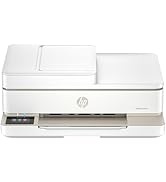
The HP Smart Tank 7301 is a high-capacity, wireless all-in-one inkjet printer designed for home office pros who demand volume and value. Featuring cartridge-free refillable tanks with up to 2 years of ink included, it delivers sharp, borderless prints at up to 15 ppm B&W and 9 ppm color. AI-powered layout optimization, seamless mobile connectivity, and a mess-free refill system combine to minimize downtime and maximize productivity. Ideal for those who want reliable, cost-effective printing without the fuss of frequent cartridge changes.


| ASIN | B09CJ2V6WM |
| Additional Printer Functions | All In One |
| B&W Pages per Minute | 15 ppm |
| Best Sellers Rank | #39,683 in Office Products ( See Top 100 in Office Products ) #51 in Ink Tank Printers |
| Brand | HP |
| Built-In Media | HP Smart Tank 7301 All-in-One Printer; HP 32XL Black Original Ink Bottle; HP 31 Cyan Original Ink Bottle; HP 31 Magenta Original Ink Bottle; HP 31 Yellow Original Ink Bottle; Ink caution flyer; Setup guide; Reference guide; Regulatory flyer; Power cord |
| Color | Gray |
| Color Depth | 24 Bits |
| Color Pages per Minute | 9 ppm |
| Compatible Cartridge | HP 32XL 135-ml Black bottle (~6000 pages), HP 31 70-ml Cyan bottle (~8000 pages), HP 31 70-ml Magenta bottle (~8000 pages), HP 31 70-ml Yellow bottle (~8000 pages) |
| Compatible Devices | Laptops, PC, Smartphones, Tablets |
| Connectivity Technology | Wireless |
| Control Method | App, Touch |
| Controller Type | Amazon Alexa, Android, Hand Control, iOS |
| Customer Reviews | 3.6 out of 5 stars 1,986 Reviews |
| Display Type | LCD |
| Dual-sided printing | Yes |
| Duplex | Automatic |
| EU Spare Part Availability Duration | 2 Years |
| Hardware Interface | USB 2.0 |
| Initial Page Print Time | A4 Black 14 sec; A4 Color 16 sec Seconds |
| Ink Color | Black, Cyan, Magenta, Yellow |
| Item Dimensions D x W x H | 14.33"D x 16.83"W x 9.46"H |
| Item Type Name | Inkjet Printer |
| Item Weight | 16.98 Pounds |
| Manufacturer | HP, Inc. |
| Maximum Copies Per Run | 99 |
| Maximum Copy Resolution Black and White | 600 dpi |
| Maximum Copy Resolution Color | 4800 x 1200 dpi |
| Maximum Copy Speed Black and White | 13 ppm |
| Maximum Media Size | 8.5 x 14 inch |
| Maximum Print Resolution Black and White | 1200 x 1200 Dots Per Inch |
| Maximum Sheet Capacity | 250 |
| Maximum print Resolution Color | 4800 x 1200 Dots Per Inch |
| Model Name | ST 7301 AIO |
| Model Number | 7301 |
| Model Series | Smart Tank 7301 |
| Number of Drivers | 2 |
| Number of Ethernet Ports | 1 |
| Number of Trays | 1 |
| Other Special Features of the Product | Auto Document Feeder, Borderless Printing, Display Screen, Double Sided Scanning, Refillable Ink Tank |
| Output sheet capacity | 250 |
| Paper Size | 3 x 5 to 8.5 x 14 Inches |
| Print media | Card stock, Envelopes, Glossy photo paper, Labels, Paper (plain) |
| Printer Connectivity Type | Wireless |
| Printer Output Type | Color |
| Printer Type | Inkjet |
| Printing Technology | Inkjet |
| Processor Count | 1 |
| Resolution | Black 1200 x 1200 rendered dpi; Color 4800 x 1200 optimized dpi color (When printing from a computer and 1200 input dpi) |
| Scanner Type | ADF, Flatbed |
| Series Number | 7300 |
| Special Feature | Auto Document Feeder, Borderless Printing, Display Screen, Double Sided Scanning, Refillable Ink Tank Special Feature Auto Document Feeder, Borderless Printing, Display Screen, Double Sided Scanning, Refillable Ink Tank See more |
| Specific Uses For Product | Office |
| Total USB 2.0 Ports | 1 |
| Total Usb Ports | 1 |
| UPC | 195908302407 |
| Unit Count | 1.0 Count |
| Warranty Description | One year limited hardware warranty from the date of purchase; user replaceable parts have separate warranty periods. |
| Warranty Type | Limited Warranty |
M**E
Nice printer and fairly easy setup
This thing was pretty easy to set up. I'm not big on using a smart phone for setting up computer peripherals so I ignored that part in the Setup Guide. Since I planned to connect my printer with a USB cable, I just skipped ahead in the Setup Guide to the Manual Installation instructions. The first step is filling the ink tanks which is pretty simple and takes only a few minutes - make sure you follow the directions. Then came the first hiccup - you have to install 2 printheads onto the print carriage. The tiny picture in the book wasn't much help in figuring out how to put the printheads in place. But take a breath and just examine the things for a minute and you'll figure out how to snap them into place (they only go in one way and the printhead cover won't close unless they are correctly installed). If, like me, you are using a USB cable to connect the printer, I'm not sure why you have to download and install the "HP Smart Software". But I did as instructed and followed the instructions which weren't much more than "plug in the USB cable" and you are ready to go. Then hiccup #2: for my first print job, I attempted to print a picture from the Windows Photo app. Click on "Print" and nothing. Oh No! But then I noticed a error message at the bottom of the print dialog - something about a conflict with another device. I then turned OFF the switch labelled "Let the app change my printing preferences" and voila! The printer sprang to life and printed my picture. And no problems since. This could have easily been a Windows issue having nothing to do with the printer, but I mention it just in case it happens to someone else. HUZZAH! 1. Simple setup for USB connection. 2. color prints look very nice (see my Caveats below) 3. small physical footprint for an All in One - respectful of the limited real estate on your computer desk 4. Fairly zippy print speed 5. Two sided printing works fine 6. I really like the automatic "Sleep Mode". You don't have to worry about turning off the printer when you are done with your job. And it will instantly awaken when you need to print something. I just leave the printer ON 24/7 and let it sleep away when I'm not using it. 7. This model has an ID Card copying feature. It will copy both sides of an ID card and print both sides to the same sheet of paper. I haven't tried this, but the feature looks useful (you will have to download the 104 page User Guide from the HP web site to see how this function works). 8. This printer will print envelopes but, again, you will need to refer to the 104 page User Guide to see how to load the envelopes. GRUMBLE: 1. Buttons on the Control Panel are not well marked and difficult to see - get out your label maker! 2. print head installation a little tricky 3. Copy function (including the auto feeder) works well but copying is a little pokey. These petty grumbles will not let me waiver from my 5 star review. A couple of caveats about my review: 1. As I set my printer up with a USB connection, I didn't attempt to set up, or even mess with, the WiFi mode. 2. I've never used an Ink Tank printer before so I can't comment on that function. But filling the tanks was quick and simple. A couple of other reviews had complaints of spilled ink, but the supplied ink bottles appeared pretty spill proof to me. Even turning them upside down to fill the tanks didn't result in a single spilled drop. 3. The few color prints I have made are documents and cartoons I printed on plain paper. I have not attempted to print any photo quality prints on photo paper so I can't comment on the print quality of photos. 5. I have no need for the SCAN function, so I've never tried it. Finally, you will benefit from downloading the comprehensive 104 page User Guide from the HP Support web site. It's in PDF format so you can read it from Adobe Acrobat Reader.
K**Y
DO YOU LOVE PALOMA'S?!
Do you love Paloma's? Well you better because this printer will drive you to drink! It is so frustrating...I've had this printer 2 years and just finally got around to writing how just awful it really is. I should have returned IT after I first bought it but it but I thought maybe it was user error and then finally it was just too late. IT IS LOUD. Do not buy this printer if you have napping children in the home or value your sanity. IT SHAKES THE WHOLE DESK. Do not buy if you are working at a desk, it will shake your monitor off. WIRELESS ONLY WORKS ON THE FIRST PRINT JOB. The wireless loses connection all the time and you have to turn it off, back on, maybe back off and then finally it will connect. But after the 1st print job you're done. It will not connect again...buy a USB cable for consistent printing. WHERE'S THE ON-OFF BUTTON? Never found it, so the 12 times you need to turn it off and back on you're crawling under the desk with a flashlight. GREAT INK VOLUME. It holds a lot of ink but you have to have this printer completely level, you can't move it once filled. If you want to change locations it says to suck the ink out...impossible. PRINT QUALITY...GOOD COPIES NEEDED? There's no touch screen so if you need 100 copies...guess how many times you're hitting the print button? 100 times. You can drink quite a bit of tequila before getting to 100 finger taps. TOP LOADER NEVER WORKED. The top loader has never worked...it came out of the box defective but I didn't realize it until it was too late to return. You have to lift the lid and scan or print one page at a time. Where's that pitcher of Paloma's? COLOR QUALITY: GOOD TOP ONLY OPENS 1/2 WAY. So the top lid only opens half way up and makes a terrible plastic on plastic "pop." It's only a matter of time before it snaps off. HONESTLY: I only use this printer when I want color copies, you have to use a USB cable attached to your computer, that way you can type in 100 copies, select dual sided printing, and you can finally drink your Paloma in peace. Do Not Let It Run Out of Paper!! You’ll be so frustrated you’ll just drink tequila straight out of the bottle. VALUE: horrible. DO NOT BUY...
D**C
Easy set up and works as advertised
Others held that this thing was a nightmare to set up. I did not have that experience. Connected with wi-fi right out of the box. Filling the ink wells is straight fowaed. It may be a little glitchy sometimes with the error light flashing and it's not immediately clear what the problem is. Restarting generally solves the problem. IT also likes to tell there is a paper jam, when if fact the paper tray is empty. It has done what I need it to do, no major complaintss.
R**N
Pretty Good
I bought this because refills are cheap. I had a Canon color laser printer and each cartridge was $110 per color (RBY+Black). I used remanufactured toner and the colored toner would streak. It would even streak if I specifically said Black only as I hit print. For years I put up with the streaking until my daughter cried because her project had streaks. I wanted something that my mind is not calculating cost per print every time I hit print. It was this or the Epson EcoTank. I did not look at the Canon due to PTSD, even though it was a quality printer sans the toner situation. I shied away from the Epson because I had one 20 years ago but it clogged due to inactivity. I chose the HP due to its reputation, ADF, and familiarity with the HP brand. HP is VERY good at easily finding software on their website. I find drivers for items that are over 15 years old. The setup was pretty easy even though I went the Manual setup route. I REFUSE TO REGISTER TO SET UP ANYTHING. If you don't register, the manual was pretty clear if you are halfway decent with any setup instructions. After doing everything and plugging it into my wired network, the software downloaded found the printer without issue. If you go wireless, you might have to register for an account. The print quality seems good, not as crisp as my old laser, but that's expected. The ink was SUPER easy to fill. I was worried about spillage, but the bottle has to be pushed into the "Pin" to puncture the seal and fill. It was clean and simple. I don't know if topping off the ink will work, but I'm not there yet. If you want the colors to "POP", you might need to invest in better paper. I am using office quality which is not great at all for ink. 96 brightness or above is what you will want with it designed for ink for best results. If you are printing just text, who cares? Cons: The PIN number you need is under the scanner glass. You need it frequently, especially if you access the admin portal of the device. I made a label and affixed it to the side. The paper tray is dainty. I expected a guide to butt up against the back of the paper, closest to where you would stand. Nope, it's just there. My old printer had a guide that was adjusted to keep the paper from flying backward. Time will tell with this. Double-sided scans are manual. This means you scan one side and then flip the paper and scan again. My old printer did both sides in a single pass. This is not a deal breaker, but is something to consider if you need it vs nice to have.
D**J
Great printer! HP quality and refillable tanks.
This has been an excellent printer! I’ve used HP printers for years and was very frustrated by the cost of ink cartridges. This one finally is the best of all worlds – an HP quality printer with refillable ink tanks. My family and I print in black-and-white and color without having to worry about the cost per page anymore. I’ve only refilled it once, which was easy to do (with non-HP ink, which is worked out fine). The only thing I would improve on this is the display and user interface - there are some buttons and a somewhat hard-to-read display on the unit itself, but most functions are driven from HP app on your phone. The app is fine, but sometimes I wish I could just do things like scanning straight from the printer without the app.
D**E
Highly automated but complex
It turned out that I got a defective printer that got replaced but in the beginning the automated process wouldn’t work because of the defect. It took two days of serious effort and frustration to reach a human who ended up being very patient, calmed me down, and found the cause. The replacement is working fine but if I had to do it all over again….?? A tiny lcd display is no substitute for a user friendly, multi featured touch screen. This printer’s automation is via its app. I prefer the good old days. UPDATE: 2025_June My printer has failed again (after 16 Months) and needs to be replaced again, but return method is unacceptable. After many days without printing, trying to solve the problem, waiting for an RMA label, packing and shipping the defective, then waiting even longer for a replacement printer is nuts! Asurion warranty uses the same process, so has not been an acceptable solution to the problem. HP has now RENEGGED on replacing printer arguing that I ALREADY recv'd a replacement (the one to resolve the original DOA brand new printer. FURTHER UPDATE: This 'Protection Plan' proved worthless for me. I purchased it for 3yrs. When I first ordered the HP 7301 All-in-one printer, I never got the first one to work. After HOURS of debugging and online support from HP it was determined that the printer was defective and needed to be replaced (FIRST printer never did setup or work AT ALL). Recently that printer failed again after about 13 months but well within the Asurion 3yr coverage. I then spend MANY HOURS over three days before being told once again by HP that the printer needed replacement and that they WOULD replace it. After many more hours escalating to a supervisor, since I had no means to package up and return the printer myself, that they would send a replacement in advance and allow me to send the defective back in the new printer's box. I had been without printing at this point for SEVEN DAYS. After I waited TWO MORE DAYS for them to 'check inventory' for the same model, I got a call from HP informing me that I was not going to get a new printer because: I HAD ALREADY HAD ONE REPLACEMENT and that was ALL I WAS ENTITLED TO. Of course this was the original printer to replace the brand new one that was DOA on its initial delivery. I lost all count of the massive number of hours I had invested to this point before HP RENEGGED on their commitment made to me more than twice. The current status is that I have a totally useless printer, had to buy a new printer, and have been stiffed for the cost of the HP printer AND the so-called Asurion 'Protection Plan'. In my opinion, Asurion put me through every possible hurdle to deny coverage under the plan, then after agreeing multiple times to send me a replacement (I have all the chat transcripts), they RENEGGED on coverage, which I believe was their intent from the outset. The notion that I had ALREADY received a replacement and was therefor ineligible for another is ABSURD on its face. The original replacement was needed to resolve a brand new DEAD ON ARRIVAL printer!!!
P**K
This is an excellent home office tool!
I have had this printer for 2 months, as of this review and it has performed satisfactory. It is quick and quiet. I did use a YouTube video for the setup and I watched it a couple of times before starting the task. There was a moment where it didn't seem to connect the way it was described but that was just a processing delay and not a malfunction. I did hesitate because of the ink fill function but now I am pleased with the idea of not having to buy cartridges every so often. I decided on this model after having Copilot do a search based on what I needed a printer to be able to do and the printer I was replacing. I also wanted it not to be subject to any of the HP updates I had read that caused the printer to not work. This was very helpful because I did not have to spend time going to different websites or stores to find the right price or product. I also think, based on it performance that the $300 price was a good value.
T**R
Not a true all-in-one
What’s not to like? The setup was tolerably easy, if you have all day. And I can’t lie; the thing prints like a dream. So what’s the problem? Well, it’s not a true all-in-one. If you don’t want to have to subscribe to HP’s online fax service, which will no doubt be a subscription service sometimes in the future — read the fine print — send the thing back. It doesn’t have the ports for a telephone cable, that should be your first tip-off. Try using the available port and your wi-if goes dead. That’s the second tell. The third tell is in the fine print. This is not a true all-in-one machine. All in one means print, scan, copy AND fax inclusive in the box. Don’t fall in love with the spectacular print jobs only to have to pay through the nose in a year or two to continue using the subscription service for your faxes. I dunno, maybe you’re not like me. But I kinda want to be told loud and clear that somewhere down the line I’m going to have to pay a service that’s supposed to be inherent in the machine. Just seemed a little deceptive to me. Yeah, the thing produces amazing prints and all that. And it is good to see the industry finally listened to their customers who were sick of getting played over the whole overpriced inkjet cartridge scam. But don’t string us along with the whole cloud subscription business just to pull the rug out from under us in search of new revenue. Just tell me what the deal is up front; sallmsayn.
C**K
Great value
It's not that easy to set up but then again we are not very tech savy. Once you get used to it, it works great. The ink usage is very good and would recommend for a home set up.
C**.
No customer service, faulty printer
Worst printer I have ever used/seen. Issues right out of the box with it connecting to the internet, it was unable to print a single thing completely. While trying to connect to the wifi the printer began flashing every single light on the printer. I then tried to contact HP directly and got their AI based support that refused to let me talk to a real person. After going through each step about 3 times it then informed me that HP had closed early for the day and no one was there. I also found out online that the warranty had started August 2023 and that is had expired August 2024.... In March 2025... Needless to say the printer was returned to Amazon for a full refund and I purchased a Canon Megatank instead just to print off the return label. I would never recommend an HP printer nor would I ever buy another in the future.
M**A
nice but expensive
great quality, easy to set up and use
O**E
Not the fastest
Not as fast as my older HP, but if speed isn’t your criteria it’s a pretty good printer. Easy install and good for a home printer, certainly wouldn’t fill the bill for a business printer, in my opinion.
K**N
Happy I won't have to buy ink cartridges
Prints well, scans and copies well, lots of ink in the tanks - it is a great printer and worth the expense.
Trustpilot
2 months ago
1 month ago