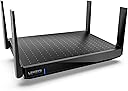
🚀 Upgrade to Hydra Pro 6E — Where speed meets limitless connectivity!
The Linksys Hydra Pro Mesh WiFi 6E Router MR7500 delivers tri-band AXE 6600 performance with a dedicated 6 GHz band, supporting over 55 devices across 2,700 sq ft. Designed for ultra-low latency and multi-gigabit speeds, it’s ideal for professional-grade streaming, gaming, and smart home setups. Easy to set up via the Linksys app, it features intelligent mesh technology to eliminate dead zones and five Ethernet ports for wired reliability.


| ASIN | B09DRDWXWF |
| Antenna Location | Home |
| Antenna Type | Retractable |
| Best Sellers Rank | #14,506 in Computers & Accessories ( See Top 100 in Computers & Accessories ) #490 in Computer Routers |
| Brand | Linksys |
| Built-In Media | product, manual |
| Color | White |
| Compatible Devices | Personal Computer |
| Connectivity Protocol | Wi-Fi |
| Connectivity Range | 2700 Square Feet |
| Connectivity Technology | Wi-Fi |
| Control Method | App |
| Controller Type | App Control |
| Coverage | up to 2700 square feet |
| Customer Reviews | 4.4 out of 5 stars 550 Reviews |
| Data Transfer Rate | 6600 Megabits Per Second |
| Frequency | 6 GHz |
| Frequency Band Class | Tri-Band |
| Has Internet Connectivity | Yes |
| Is Modem Compatible | No |
| Item Dimensions L x W x H | 13.54"L x 19.09"W x 10.75"H |
| Item Type Name | wi-fi router |
| Item Weight | 2 Pounds |
| LAN Port Bandwidth | 1000 Mbps |
| Manufacturer | Linksys |
| Maximum Upstream Data Transfer Rate | 6600 Megabits Per Second |
| Mfr Part Number | MR7500-AMZ |
| Model Name | WIFI 6 |
| Model Number | MR7500-AMZ |
| Number of Antennas | 4 |
| Number of Ports | 4 |
| Operating System | RouterOS |
| Other Special Features of the Product | 1.8GHz Quad Core Processor, 4x4 MU-MIMO, Advanced Security, Dynamic Backhaul, Easy Setup with the Linksys App, Expanded Spectrum with the 6GHz Band, Gigabit Ethernet LAN Ports, Next-Gen OFDMA Technology, USB 3.0 Port |
| Router Network Type | hybrid |
| Security Protocol | WPA2 |
| UPC | 745883819683 745883846061 |
| Unit Count | 1.0 Count |
| Warranty Description | 3.5 years |
| Wi-Fi Generation | WiFi 6E |
| Wireless Communication Standard | 802.11ax |
| Wireless Compability | 802.11ax |
M**R
Great integration with Velop 5 mesh
I had a Linksys Velop wifi 5 mesh, running it in bridge mode to provide a large area with wifi coverage. The network was using an Asus router with it's wifi turned off as the only router, with the Velop mesh for all the access points. That worked well, except in bridge mode, the guest network actually wasn't separated from the primary network, so guest users could access devices on the primary network if they knew how to do that. And I got a new phone that supports WiFi 6. So I bought this router and successfully replaced my old router. The configuration went pretty smoothly. I had to do a factory reset on all the Velop nodes, essentially destroying the existing Velop wifi 5 mesh. Then connected the new router to the cable modem, and did the router setup using the Linksys app on my phone, to create the new main node for the new mesh. Then used the Linksys app to add the unconfigured nodes to the new mesh, one at a time. BTW if you are using hardwired backhauls (connecting the Velop nodes to the router using Ethernet cables) you need to not connect the cables when configuring the node - it has to be added to the mesh via wifi. Connect the cable after the node is in place, and then power cycle the node to get it to use the hardwired backhaul. The end result is a fast wifi 6 central router combined with a wifi 5 mesh for reaching out to a large area. The phone seamlessly switches from 6 to 5 when walking around, it does exactly what I had hoped for. Now that I'm not running bridge mode, the guest network is actually secure. The router does support a USB disk drive, which basically just worked when i plugged it in. Very happy. What I would like to see added would be more advanced control of the router. There is a local router control panel, which you get to via a web browser at the router's IP address. This provides some amount of configuration, but not as much as I would like. Asus provides much more in this area. I intend on replacing the Velop 5 nodes with Velop 6 nodes at some point, which will be an easy task. Overall an excellent product with an excellent outcome, and didn't need Linksys tech support to get it done.
D**M
Easy to set up
I've been a fan of Linksys for many years. I did IT work in the past and worked with other routers and have found that Linksys is best for reliability, set up and quality. My EA9500 was over 7 years old and still working perfectly, but I figured it was time to delve into a mesh system. I was using a main router and 2 'older' Linksys routers as 'bridge' routers. I hadn't really had any issues, except that all the equipment was over 10-15 years old. I did a lot of research and decided on the Hydra Pro 6e for my main router, and the Atlas Pro's as the 'child nodes'. I have a 2800 sq ft house (1st floor and basement), with my main router in the basement. I placed one child node in the master bedroom (wired), another in the living room and the 3rd in my garage, (both wireless). (It should be noted that with all the devices in my house, from cameras, to TV's, phones, etc., we have 37 devices). So far, I have no 'dead' areas and all devices show a strong signal. Setup was very easy - I logged into the router through the IP address to set up my cameras, and then used the app to finalize the settings. In the future, I may run CAT5e to the other nodes just for reliability. This seems to be a great combination and I would recommend it to anyone looking to get a mesh system.
W**A
Excellent Wi-Fi Router
We upgraded our home Internet plan to a 2.5 Gig plan from 1 Gig. Too many phones, laptops and TVs all going at once for the 1 Gig plan we were on. I upgraded our Modem and needed to upgrade our Router as well. I tried several Routers but simply was not satisfied with their performance. I decided to give the Linksys Hydra Pro a go. It has worked flawlessly from the get-go. We have a 6,200 sq. ft. house and literally every room gets Wi-Fi without any issues. Even though it's rated for 2,500 sq. ft ... the reach, at least in our environment, is far more than that. I'm not using any extenders or additional modules in the house. Every TV for example (which is on either Apple TV or Amazon Firestick 4K Pro) gets exceptional picture and audio without any buffering or broken audio. We have no cable boxes in the house ... all TVs are on Xfinity Stream. The only thing I can say is that the only firmware update we have gotten since installation was out of the box during the initial installation, I believe, it was done in January or February. I don't think Linksys is big on updates. That said, the main point is that the Router itself works exactly as stated and has worked without any issues whatsoever. From my perspective, and even though it may be a little outdated at this point, it is a great Router and I will keep it on-line for as long as I can.
Z**K
Works well
The router works okay so far though I had a hard time setting it up. I tried setting it up manually without the app or a linksys account, but then it is stuck in setup mode. So, I had to use my linksys account and their app to set it up. Then I was able to go into the router with a web browser and make the necessary changes. Another thing I did not like was that there is no access to advanced wifi settings anymore.
D**R
Have been using this for months and am pleased with this product
Good and Powerful Router. Has a good signal and easy setup with app.
I**L
AVOID THIS PRODUCT - VPN issues & Smartphone apps misbehaving
Do NOT buy this router. After almost owning this router for 2 years, I wish I had known it was the root cause of all my internet issues and would have returned it IMMEDIATELY. Instead, I'm now out $175 and have a faulty router. Initially, they annoyingly obscure being able to setup the router through traditional means. HEAVILY encouraging you to download their smartphone app and making an email account. You are able to bypass setting it up through their app, but now the router is stuck with a "purple" light indicating it's ready for setup, for 2 years now. They also annoyingly obscure additional settings of the router, with a small "CA" hyperlink at the bottom of the router's webpage. Since owning this router, I had LOTS of issues with VPNs on my desktop. I went through 4 different VPN services, and was baffled that, for some reason, they would all start lagging horribly, and straight up cut-out for almost an entire minute. This went on for months switching through different VPNs, trying different settings, and even looking into my router. Eventually, I discovered, either the "Application Layer Gateway SIP" or "Express Forwarding" option was responsible for everything. As soon as I turned off both of those, my VPNs all stopped having issues. No longer lagging, no longer disconnecting from the service. Now forward several months after. I noticed that my Android smartphone seemed to have issues installing apps from the Google Play Store, or downloading updates. It could download everything just fine, but it would get stuck at the installing step. The only way to resolve this, was to install a VPN onto my smartphone. I also noticed, this resolved my issues with Discord and the Tenor GIF service not loading GIFs during search. After several months, I realized that all my problems were gone if I DID NOT connect to the Wi-Fi of this router. For some reason, being connected to the Wi-Fi of this router, without a VPN, breaks things on my smartphone. Unfortunately I have no clue what setting/feature on this router would be responsible for these problems, so I'm stuck using a VPN always on my phone. And then lastly, the icing on the cake. Their own Linksys app barely works. For starters, it kept saying I wasn't connected to the internet so it couldn't detect my router. Then finally, it detected I was connected to the internet, but then said I wasn't connected to Wi-Fi. What an absolute joke. I am never buying a Linksys router ever again.
D**B
Good replacement router
Had a down router and apparently it was more than 7 years old and Linksys no longer provides support for routers that old. Found this. First it is relatively cheap ( compared to others more expensive with many of the same features, so I thought). Good coverage on a basic 2 level Ranch style house. The only problem is during set up. Now I have 2 routers I maintain but they are set up the same. It says quick easy setup. After a hour and 3 router resets I was able to get this working. This router doesn’t have a separate 5 gb account- just the regular 2ish gb ( which I didn’t know). Fortunately , the other house doesn’t use the higher gb speed-> so I just manually setup the router with just the one account and had it up and going in a few minutes after. Overall, if you want a basic home WiFi router- buy this.
F**R
Its a Linksys the name says it all
This router is such a power house , very functional the Linksys name says it all. It can be expanded with nodes for greater coverage and you can add a USB device to it for remote accessing data stored on it. Its a bit tricky to set up at first but maybe it was just me the app was good but I prefer the old school way of using 192.168 thats just me . It was well worth the investment and upgrade . Absolutely would buy again.
T**M
Good unit - meshing is difficult
The device is pretty good, it has good range and has increased our wifi output significantly from the old router. I now get 600+mbps. The issue is that I have lost so many hours of my life trying to mesh this new router with a few of my other linksys routers. The linksys support desk is super responsive but after my 10th service ticket I lost the will to live. I paid a guy to come and do it and after a few hours he worked it out... So my message is, if you think you can set this up on your own - think again !
D**A
Muy buen equipo
Actualice mi anterior Linksys por este equipo de 4 antenas, el equipo anterior comenzaba a batallar con 20 dispositivos conectados, este equipo tiene 40 dispositivos wifi conectados y no tiene problemas de desempeño
N**H
Good product. Works well.
Fast shipping. Accurate product description. Communication was fine. Overall excellent.
J**L
No lo recomiendo
Aqui las razones por las que no lo recomiendo: 1. La frecuencia 6Ghz no funciona (probado con equipos con AX210 y AX411) 2. Los canales no pueden configurarse manualmente incluyendo los de la banda 160Mhz 3. Pobre interfaz de configuracion, abismal diferencia con la interfaz de los routers WRT 4. Forzoso a usar una app de celular para configurarlo por primera vez Siento nostalgia por aquellos viejos tiempos donde Linksys era autoridad en routers caseros, hoy, ni de cerca.
M**L
I don’t suggest
I’m using D-Link 853, this is less than that. Looking for better than current one but this was worst than that.
Trustpilot
3 weeks ago
2 months ago