Desertcart purchases this item on your behalf and handles shipping, customs, and support to USA.
🎮 Elevate your game and workspace with the ultimate 4K powerhouse!
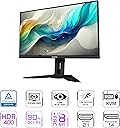
The GIGABYTE M32U is a 32-inch 4K UHD IPS gaming monitor featuring a 144Hz refresh rate and 1ms response time for ultra-smooth visuals. It supports AMD FreeSync Premium Pro for tear-free gaming and includes versatile connectivity options such as USB-C KVM, HDMI 2.1, and DisplayPort. With 10-bit color, 90% DCI-P3 coverage, and VESA DisplayHDR 400, it delivers vibrant, accurate colors. Its ergonomic design offers height, tilt, swivel, and pivot adjustments, making it perfect for both professional productivity and immersive gaming.


| ASIN | B083GRVFXN |
| Adaptive Sync | FreeSync |
| Additional Features | Adaptive Sync |
| Aspect Ratio | 16:9 |
| Best Sellers Rank | #140,797 in Electronics ( See Top 100 in Electronics ) |
| Brand | GIGABYTE |
| Brightness | 350cd/m2 |
| Built-In Media | Power cable, HDMI cable, DP cable , USB Cable , QSG , Warranty card |
| Color | M Series |
| Color Gamut | 123 |
| Connectivity Technology | USB |
| Contrast Ratio | 1000:1 |
| Customer Reviews | 4.4 out of 5 stars 654 Reviews |
| Display Resolution Maximum | 3840 x 2160 Pixels |
| Display Technology | IPS |
| Display Type | SS IPS |
| Hardware Connectivity | DisplayPort, HDMI, USB 3.0, USB 3.0 Type C |
| Has Color Screen | Yes |
| Image Contrast Ratio | 1000:1 |
| Is Electric | No |
| Item Dimensions D x W x H | 9.62"D x 28.16"W x 23.04"H |
| Manufacturer | GIGABYTE |
| Model Name | M32U-SA |
| Model Number | M32U-SA |
| Mounting Type | Wall Mount |
| Native Resolution | 3840x2160 |
| Number of Component Outputs | 2 |
| Picture Quality Enhancement Technology | HDR, 10-bit color, 90% DCI-P3 |
| Power Consumption | 140 Watts |
| Refresh Rate | 144 Hz |
| Resolution | 4K UHD 2160p |
| Response Time | 1 Milliseconds |
| Screen Finish | Glossy |
| Screen Size | 32 Inches |
| Screen Surface Description | Glossy |
| Shape | Round |
| Specific Uses For Product | Gaming |
| Total Number of HDMI Ports | 2 |
| Total USB 2.0 Ports | 1 |
| Total USB 3.0 Ports | 2 |
| Total Usb Ports | 4 |
| UPC | 889523024232 |
| Unit Count | 1 Count |
| Viewing Angle | 178 Degrees |
| Voltage | 240 Volts |
| Warranty Description | 3 |
C**D
Excellent "Budget" 4k 144hz Monitor for Xbox + PC
I bought this monitor for $600, $200 cheaper than msrp and at least $200 below the competition for 4k 144hz monitors. If you see it at this price, and are in the market for a 32 inch monitor for gaming, buy it immediately before stock runs out. I didn't want to spend this much, but it's worth every penny. Pros: - 4k at 32 inches is just perfect (see review below for details) - 144hz is excellent for gaming (although 4k requires a good computer or next gen console to drive) - Bright IPS panel looks stunning (I can't speak for color accuracy, but it looks fantastic to my eyes) - Hdmi 2.1 for next gen consoles (I use with a series x, it is amazing) - Good stand (It's plastic, but it has good adjustment and is very understated for a gaming monitor) - Usb hub (I thought I wouldn't care about this, but it is actually immensely useful) - Usb c input (Haven't tested this yet, but I plan to soon once I get the right cable) Cons: - Some backlight bleed (Not really noticeable unless HDR is on though, and most will not use HDR anyway) Neither: - HDR - it exists, but with like 12 dimming zones, it's really a personal preference whether or not to use it. I enjoy it with bright games as it makes the colors pop a bit more, but I don't think I'll use it for dark games or movies. It's better than I expected, so it's not quite a con, but don't but this monitor for HDR. I was in the market for a 32 inch monitor. Having used different monitor sizes, I've found 32 inches to be the sweet spot for me in terms of screen real estate for desktop usage. At the same time, it is also fantastic for more casual gaming. If you are competitive, go 27 inches and 240 hz, but for the casual gamer 32 inches is much more immersive. I was all set to purchase the Gigabyte M32Q, which is essentially the exact same monitor as this but with a 1440p resolution instead of 4k. It retails for around $400 on sale, so about half the price of this M32U without a sale. I was actually using a placeholder budget 1440p 32 inch office monitor with a VA panel before I purchased this. So I experienced 1440p at 32 inches. Then, I saw this monitor on sale for $600; it was such a good deal that I went for it. I cannot go back. 4k looks so much better than 1440p at this screen size for desktop use it is hard to describe. Text is so much sharper and the monitor is much more enjoyable to use. Now, there is some backlight bleed, but this is unfortunately fairly typical for ips panels, and it is only obnoxious in HDR mode. In all other circumstances, the monitor looks fantastic. For gaming, it also looks insane, although it is extremely difficult to run games at 4k 144fps, so you will often have to rely on DLSS or running at non-native resolutions (that's what my series x usually does). So in conclusion, if you want a 32 inch monitor for both productivity and gaming, get this. Even at $700-$750, get it. It is hard to describe how much better the pixel density is. However, if you want a monitor exclusively for gaming, and you have anything less than a next gen console or rtx 3070, get the m32q. But, for those who can afford it and utilize it properly, this monitor is amazing.
F**D
Best 4K Monitor that isn't OLED
I’ve had the M32U for a long time now, and it’s been one of the best monitors I’ve owned. The 32" 4K 144Hz IPS panel still looks great — sharp image, accurate colors, and no dead pixels or uniformity issues. Gaming feels smooth. HDR is meh, and the Wife loves the built‑in speakers even though they are basically placeholders. The stand is a little deep, but once it’s set up, you don’t think about it again. Overall, the panel quality and long‑term stability make this a solid choice if you want a 4K high‑refresh IPS without spending OLED money. Mine has held up extremely well. Rating: 4.5/5 — dependable, sharp, and still a great value in its class.
Y**Y
Dependability meets Quality.
I bought this for Christmas in 2022 as a present to myself. I’ve been running this (daily) since the beginning of 2023. 4K quality is crisp, HDR is solid, easy UI to comb thru. 3+ years in, not a single issue has ever happened. No dead pixels, no connectivity issues, just all around good quality. The biggest downside to the monitor is honestly just how heavy it is, but that could also be seen as high quality parts used for the build.
C**R
Excellent choice for home office workers
I needed a monitor to replace my 28" 4k monitor with a TN panel. It was fine for my home PC, but when I started working 100% at home I wanted to use it for my work Mac as well. I used a USB-C to HDMI dongle and plugged the Mac into a spare HDMI port on the monitor. It was basically fine but certain text combinations like gray-on-gray were fuzzy. Black on white was fine when scaled up so I used that. Not ideal but I got by. For switching my mouse and keyboard, I used a cheap USB 2.0 hub and manually swapped between Mac and PC. Then I would manually select between video inputs on the monitor. This system worked, but after two years of it I decided it was time for an upgrade. I wanted to stick with 4k, but go slightly larger so I didn't have to sit so close. I did a couple days' research and settled on this monitor. It supports the latest protocols: DisplayPort 1.4, HDMI 2.1, USB-C, and AMD FreeSync. It even has a built in KVM switch. I connected my PC to one of the HDMI ports. My Nvidia 3080 supports HDMI 2.1 and Freesync, so I'm getting 4k at 144 kHz. Text is crisp, the colors are vibrant, and no ghosting that I can see when playing Deep Rock Galactic or Doom Eternal. I did have to up the brightness to 90% though. The larger screen means I can sit slightly farther back for the same resolution, meaning less neck strain. However, it didn't look good at all on the Mac, at first. The HDMI connection gave me the dreaded pink tinted screen. After Googling around, the general consensus is that comes from using a low end cable. So I tried USB-C. The monitor didn't recognize that at all. I went to Best Buy and got an official Apple USB-C cable. It took a while for the Mac to recognize the new monitor (driver install?) and then suddenly it popped into life. I also turned off font smoothing. Now the Mac looks terrific - 4k at 60 Hz with crisp text and no gray-on-gray fuzziness. Just in case, I also got a new HDMI cable that specifically said it supported HDMI 2.1. That did fix the pink screen issue. Now HDMI and USB-C look the same to me. For comparison, my 15.4" Macbook Pro retina screen has 220 DPI. A 32" 4k monitor has 138 DPI. That's a big drop, but with a larger monitor you can sit farther back. At my normal 24" viewing distance I'm not seeing much difference between this monitor and the Retina display. Then I tried the KVM switch. I plugged my mouse and keyboard into the monitor. For PC, there is an odd USB-B-with-an-extra-hump connector. For Mac, you use USB-C. In fact, that cable can carry video too. So that's two cables for keyboard and mouse (USB-A), two to the PC (HDMI2.1 and USB-B), and one to the Mac (USB-C). Plus the power cable. Thanks to the people who mentioned the power switch underneath the monitor. That sucker is well hidden and the instructions are terrible -- they just say "Powering on" and point to the side of the monitor. The button is underneath. How many service calls and RMAs could they avoid by making that more clear? The included stand is really good. It is VESA-compatible and allows you to raise, tilt, and swivel. It even has a large slot for cable management. The KVM switch works surprisingly well. No major problems with it so far. One tap on the button and it switches between Mac and PC in about 3 seconds. However, the KVM switch automatically switches when one signal cuts off, which can be annoying. For example, when I reboot my PC and I want to see the BIOS screen, it flips to Mac instead. The simple fix is to disconnect the Mac before rebooting. I wish there was a way to disable that feature, but I couldn't find one, even with OSDSidekick.
J**.
M32u - great monitor
Got the monitor and set it up on my monitor arm mount. Was a bit heavy for the arm, and really had to gronk it down for it to stay, so I put a couple external speakers under it…. Just in case 😬 It included 3 power cables which I thought was odd, 1 US, 1 EU, and no idea what the 3rd was. Kind of a waste for me. They incl the usb b for the kvm, hdmi (though when hooked to my rtx 3080 it only showed 60hz), and the display port which correctly recognized 144hz. Rather than the extra power cables, I would have appreciated a usb c cable. I had a few thunderbolt3 cables but the monitor didn’t recognize them. I grabbed the usb c cable from a portable monitor, which worked but is really short; connected usbc to a 2021 MacBook Pro (which recognized the 144hz as well). No dead pixels that I could tell, thin besels, great refresh rate on both win11 and macOS 12.x. Came with firmware b7, but no way to update via the mac, but from win11 it was pretty painless. The OSD apps firmware feature could stand some UX updates, as selecting the firmware from the hd was a bit clunky. Update took about 10min, which seemed long, but updated fine. I was a little concerned with the hdr and being ‘only hdr 400’ which seems low to me, especially compared to the mac’s 1600 peak nits, but seemed to compare against it fine. I think while I was messing with the controls I saw something about multi-input, I hope that means it can split the screen and display both my Mac and my pc, need to check on that tomorrow. Negatives: Not many, more of preferences… 1) Data cables were too short to run down the monitor arms and tuck away 2) wish it had to incl the usb c cable rather than extra power cables I will just recycle. 3) a screen this size as a desktop monitor should have been curved. 4) this is more of a quirk- while I had it switched to the win11 machine for the firmware update, I noticed that the Mac continued to try to display apps on it. For example my MS Teams app had been on the ext monitor and I couldn’t get it to come back down to the built in display. The Mac didn’t recognize the display had switched inputs. After the firmware update I switched back to the Mac input and everything continued as expected.
A**R
Excellent monitor, with some major issues
Overall this monitor is great! Display is bright and there's no light bleeding or uniformity issues. Picture quality, brightness, and gaming are all top-notch (and I give it 5 stars across the board). But there's some pretty serious issues that bring the overall score down significantly - buyer beware! First, the monitor consistently has issues recovering from sleep (either deep sleep or even if you walk away for 5 minutes and it *just* went to sleep). Nothing short of turning the display off and on again will restore it - and doing so will mess up the desktop layout. Sometimes not even that will work (the display will just freeze and you can't turn it off) - you need to physically unplug the power and plug back in to get any response. This is a serious pain for any setup, especially a multi-display setup like mine. My other monitor (a BenQ) has no such wake issues, and neither did any of my previous 5 displays. This is definitely an issue with this display, and it makes it almost unusable. The second and more serious issue is the quality of the drivers. I tried to install the OSD sidekick drivers/software, but the setup froze, and the USB drivers it installed disabled my mouse (!) and would regularly freeze the desktop. I unplugged the USB connection and went through and manually removed the new drivers in safe mode and the system recovered, but this is a pretty bad experience, and ruins an otherwise excellent display,
N**.
Luck of the draw I guess
Great monitor, very large and plenty of resolution to do workstation tasks but also has a high enough refresh rate, and with Freesync, it can game with the best of them. Just make sure you have a good enough GPU to handle this beast. Turned on HDR in windows settings and it looks amazing. Blacks are dark and deep and colors are vibrant, I installed the profile and driver for windows from the Gigabyte support site so windows had the correct color profile and resolution details. Can't attest to HDMI inputs as I am using Display port only (if you want to utilize the most features out of this monitor you should only be using display port. HDMI does not have the bandwidth to handle 4k HDR at 144hz.) I lucked out and did not receive a monitor with noticeable light bleed or dead pixels. No issues whatsoever out of the box but it is still new and time will tell on reliability. I will update if anything happens.
S**S
Great Monitor
I love this monitor. I didn't even realize it had speakers until I started wondering why my sound was so much better (I was using old USB Logitechs). Anyway, I can't speak of color accuracy or to any of the dizzying array of metrics used to critique displays, but for me, it's perfect. Very clear picture and very uniform. No backlight issues. No dead pixels. The KVM feature needs to be better documented, but I got it working just fine, switching between work and home computers fairly easily. Note you'll need OSD sidekick installed on both machines if you want to use the keyboard hotkey to switch the KVM. This may be an issue for corporate workstations, which generally have policies regarding third party software. Regardless, the KVM button on the back is accessible enough that it makes switching a pretty quick affair. I'm building a new computer for gaming and not quite sure if the KVM will introduce enough latency to matter, but that could be an issue for others. I do not "twitch" game, and I'm bad enough it won't matter. Overall, I am very pleased. One of my best purchases in recent years. Improved my quality of life considerably limping along with the garbage I was using before.
J**Y
Great value for the specs!
I have used the monitor for a few days now and so far there have been 0 issues. I'm usually quite sensitive to things like dead pixels or poor backlights/colours but have not found any problem (some amount of backlight bleed is to be expected for every IPS display). I'm upgrading from the s2721dgf Dell 27in 165hz 2k monitor and it is indeed a great upgrade. This is perhaps the best monitor you can buy in the 800CAD range since monitors using identical panels go well over 1000CAD as of the writing of this review. 1 Year Update: I have been using this monitor for a year since this review. Here are some issues I found: 1. If you have a keyboard/mouse connected to this monitor, when your PC goes to sleep, you can't use the keyboard/mouse to wake up the PC. This was not a problem on my Dell monitor, so I ended up connecting my accessories to my Dell monitor instead. 2. After updating Windows from 10 to 11, monitor when at max 4K 144Hz sometimes have weird artifact (I'm using AMD RX 6800XT). Here are some weird issues that have since been resolved: - when colour is grey-yellowish, it becomes a weird patch of lighter grey. - when watching youtube, screen will randomly flash white for maybe 1 frame when moving the mouse (not always, haven't found a consistent trigger) - these issues only happened after Windows upgrade. And the above has since been resolved on its own possibly from GPU driver/Windows updates. Currently, I still notice very 1 minor issue: - when at 4K 144Hz, watching youtube going back and to fullscreen, the screen will very briefly flash black. I tried different display settings and only after setting refresh rate to 120Hz did this stop. But the flash is very subtle and brief so it's not a concern. - note that I don't know what firmware version I'm currently on, so it's possible your mileage may vary. Other than the above issues, this monitor has been great. Text especially Chinese looks much clearer on 4K than my old 2K monitor. Fantastic for text writing/coding uses. Hence, keeping the review at 5 stars.
D**Y
Excelente!
No encuentro nada malo que decir, encantado con la compra y desempeño de este monitor, excelente relación calidad precio, super cierto lo que han dicho de este monitor, por algo ha sido recomendado por muchos youtubers, gamers y sitios como rtings.com, si estás indeciso sobre comprarlo, no sufras y cómpralo sin miedo, no te vas a arrepentir, todo lo contrario.
M**Z
Muy bueno.
Justo lo que buscaba para mi ps5, en ocasiones lo conecto a mi computadora de escritorio. Llego en perfecto estado.
H**N
Great monitor for 4k 144hz usage
Great size for content consumption, productivity and gaming. I love that this is a all-in-one monitor that is flexible to use. Currently using a PC with a 3080 on it and playing 4k gaming is awesome. Not hitting full out 144hz on demanding titles but it's better compared to a 60hz 4k panel. Can't comment about console use since I don't have one. Should do some calibration on it, I found this panel was slightly higher in Red values which made it look a little bit off. After adjustments it is a great looking panel that won't break the bank. Fair warning though, Gigabyte QC is a bit questionable. Bought a M32U before this one that I had to return at Canada Computers due to a hot (always on) pixel. I've read on other threads that people's experiences varies quite a bit. Construction quality is fine for this monitor. Not much gamer aesthetics or RGB. I have it on a monitor arm anyways so I'm quite okay with how it looks. If you want a gamer looking monitor, you'll definitely pay the tax on it by a few hundred bucks. Bought it when it was on sale and would recommend waiting for it to go lower.
F**O
Muy buen monitor gaming
Todo funciona perfecto. Tiene muy buena calidad de imagen, aunq en mi uso personal lo ocupo también como televisor extraño el control para apagarlo una vez que ya no lo ocupe
Trustpilot
3 weeks ago
1 month ago