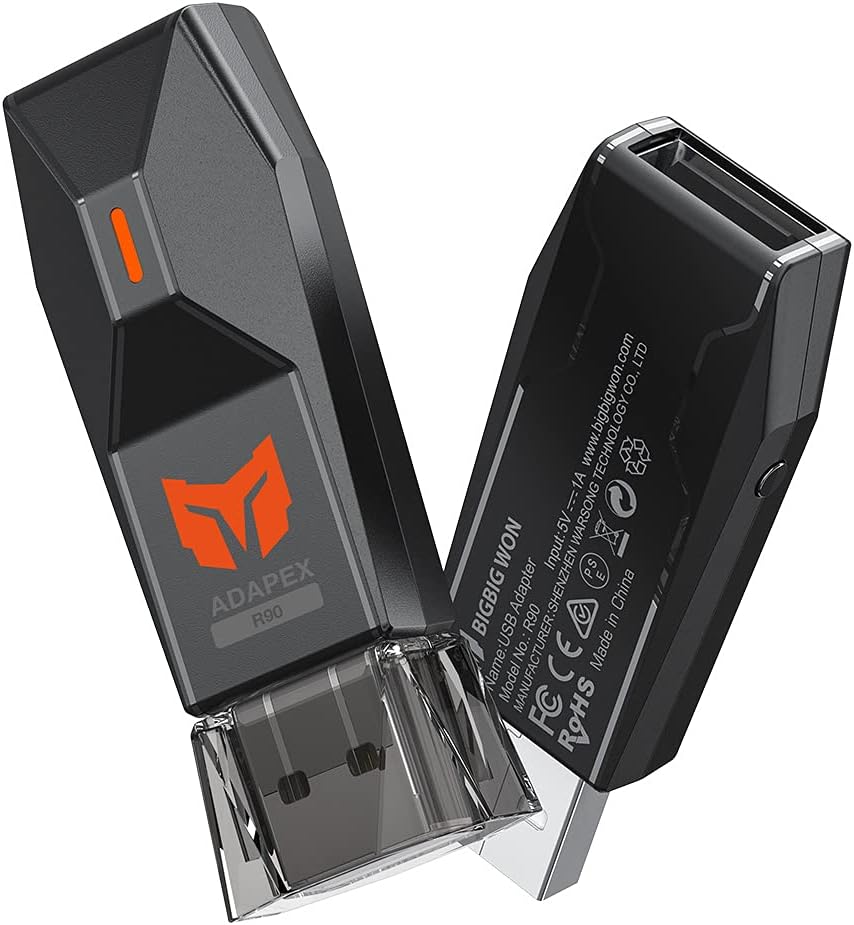
🎯 Elevate your game with wired precision and universal power!
The BIGBIG WON Wired Controller Adapter offers seamless wired connectivity for Xbox Series, Xbox One, PS5, PS4, Switch Pro, and Windows PCs. It eliminates lag with a stable USB connection, supports advanced controller customization like vibration and turbo settings, and features a compact design perfect for on-the-go gamers. Compatible with official controllers only, it enables PS5 controllers to play PS4 games and supports dual controller connections on select consoles. Backed by quality assurance and responsive customer service, it’s the ultimate adapter for serious gamers seeking flawless cross-platform control.


| ASIN | B09BFR28JZ |
| Best Sellers Rank | 16,707 in PC & Video Games ( See Top 100 in PC & Video Games ) 16 in Xbox One Adapters |
| Country of origin | China |
| Customer reviews | 4.0 4.0 out of 5 stars (2,038) |
| Item model number | BIGBIG WON-R90 |
| Product Dimensions | 2.7 x 1.3 x 5.8 cm; 10 g |
U**Y
Does the job pretty much flawless
Tried it for connecting a wireless Xbox One controller in a docker Switch and really delivers. Only problem is that on very rare times turning on the controller won't turn on the console so you need to hit the power in the console manually. For the price and considering that it was hard to find controller adapters in the past, I think this product deliver in all fronts.
M**A
Does work perfectly with Elite 2 controller on PS5
I just wanted to use my Elite 2 controller with my PS5 and it does work perfectly but not on PS5 Games, only PS4 Games which was fine by me.
S**A
Its pretty good for the price
Brought this to use my Dualsense at an FGC Local last Friday. Controller easily connected to multiple playstations and I never lost connection once. Only issue is that there is a slight amount (like barely noticeable) of input delay but excluding that its very good for the price
F**.
Faulty products
I had brought 2 of these adapters. 1 of them was fine, but the second one constantly disconnected. Since they said there is 12 month warranty, I asked them about this. They sent driver updates which would not work as the adapter was faulty and was not recognised by the PC. After this they just ignored emails instead of sending a replacement. This is disrespectful and a scam.
S**6
Perfect
I bought this item so I could use my Xbox controller on ps4.it is incredibly easy to use just plug in the front of ps4.it constantly emits a Bluetooth signal so all you have to do is press Bluetooth button on Xbox controller and it connects and you are good to go.no complaints at all
S**N
Excellent
I have connected my ps5 controller to everything easily.
D**D
PS5 Controller loses connection to PS4 now and again.
Keeps losing connection after about 20 minutes of playing unfortunately. Hopefully there will be a driver update because this is the only adapter I've found to make a ps5 controller work on ps4!
M**N
Superb for those with spare controllers
Absolutely brilliant but of kit. I bought a PlayStation without a controller and needed another for my switch for 2 player. This killed 2 birds with one stone. I can use my Xbox one controller or dual sense on both saving a big chunk of change buying new controls for both.
M**O
Ho utilizzato questo adattatore per connettere il controller della PS5 alla mia PS4 per più di quattro mesi, e devo dire che è stato un acquisto fantastico. La connessione è sempre stata stabile e non ho mai riscontrato episodi di disconnessione! L'unico problema che ho riscontrato è che, quando spengo la console, il controller rimane acceso. Anche se è un piccolo inconveniente, è facile da gestire: basta tenere premuto pulsante di connessione per 10 secondi sul controller. Nel complesso, consiglio vivamente questo adattatore a chi desidera utilizzare il controller della PS5 sulla PS4. Ottima funzionalità e performance!
A**.
Weil mein davoriger Adapter nicht mehr ordentlich funktionierte, wie zb dass er via Wireless keine Controller mehr verbinden konnte, Habe ich mir ein neuen Adapter geholt. Dieser verspricht hierzu problemlose Verbindung mit den Xbox Series Controller, welcher bei vielen Adapter verschiedener hersteller drahtlos nicht verbunden werden kann - logisch, wenn diese vor den neuen Konsolen auf den Markt kamen und die Series Controller eine zu neue Bluetooth technologie haben. Dieser Stick erfüllt aber die notwendigkeit, einen Series Controller drahtlos mit der Nintendo Switch oder PS4 zu verbinden. Mehr noch: es ist bei mir auch der erste stick der es den Controllern erlaubt, screenshots oder videoaufnahmen zu speichern. Ich habe es mit meinen Series Controller und meinen Dualshock 4 ausprobiert, bei beiden konnte ich videos und screenahots erstellen. (bei DS4 ist dass das Touchpad, beim Series Controller die sharetaste) Eine eingabeverzögerung ist nicht zu spüren, es sei denn, man versteck den stick hinter gegenständen, wie zb innerhalb der Dockingstation der Switch. Meine plus (+) und minus (=) punkte zum ganzen produkt: + extrem leichte und Schnelle verbindung zwischen Controller und Adapter + Keine verbindungsabbrüche mitten beim spielen (als test: 4 runden GUP Dream tank match DX, jeweils 15 minuten pro match) + beim Series, Dualshock 4 und höchstwahrscheinlich beim Dualsense 5 Controller werden Alle tasten, also auch die für die Screenshot und videoaufnahmefunktion der Konsole verwendet + keine Software Updates, Treiberupdates oder sonst etwas für den Stick nötig, einfach Plug and Play. = Der Stick kann sich nur mit einen Controller verbinden, man bräuchte für 2 Controller 2 dieser Sticks. = Der stick kann leider nicht mein Xbox Wireless Headset erkennen, obwohl das Headset via Wireless wie beim Controller und Xbox Konsole genauso verbunden werden könnte - das wäre zum beispiel bei Multiplayer gut gewesen, da die switch im Multiplayer die Bluetooth verbindung zum BT headset beendet. Der stick hätte da super einspringen können. = Der stick könnte auch mit älteren Konsolen kompatibel gemacht werden, ist er leider nicht. Mein Fazit: der stick ist super. Ich kann ihn nur empfehlen. Mein Wunsch an den Hersteller: Bei den Alten Konsolen wie die Xbox 360 oder der PS3 wird es zunehmend schwerer ein Originalen Controller zu bekommen, da diese ja auch nicht mehr Produziert werden. Es wäre ja genial, wenn es ein Adatper gäbe, der auch für die alten Konsolen neuere Controller verbinden lässt, zb dass ich mein Series Controller an meiner 360 Slim verwenden könnte. Ich spreche mich aber auch für den Support vieler älteren Konsolen aus - Der Xbox, PS2, PS3, Xbox 360, Nintendo Wii, Wii U, und was am genialsten wäre, und wenn überhaupt möglich, mittels OTG Adapter auch zb an einer PSP oder PSVita. Die PSP kann man ja am Fernseher Verbinden, wäre ja geil dazu wenn ich mein Xbox Controller verbinden könnte weil das mit der PSP als Controller zu verwenden sich komisch anfühlt. Ein Wireless Support wie für das Xbox Wireless Headset wäre auch super, für die PS4 oder der Switch könnte das richtig gut werden. Ich hoffe dass das mal umgesetzt wird. Das wunsche ich mir sehr.
D**.
Excelente, solo fue conectar y vincular, he conectado un mando de Ps5 en un Ps4, funciona correctamente.
R**N
私の環境を書き残します。 下記の環境では全て正常動作しています。 参考にしてください。 使用ゲームパッド:Xboxコントローラー(4N6-00003) 接続先:Window11(PC)、NintendoSwitch、GoogleTV(SONY) こちらは2.4GHz帯を使用して手持ちのコントローラーと接続、ドングルを介すことによってUSB接続を実行できるものになります。 まず基本知識としてBluetooth接続も2.4GHz帯域を用いて接続をしています。 2.4GHz帯、ドングルを使用し独自規格を用いて通信を行うこの製品は2.4GHz方式での接続と位置づけて良いでしょう。 この商品が使えるか心配な場合、手持ちのコントローラーが有線接続に対応しているならば一度、有線で接続してみてください。 コントローラー〜ドングル間は無線接続ですがUSBを挿すため認識としては有線コントローラー扱いになるため、です。 Bluetoothと2.4GHz(ドングル)では接続方法が異なりBluetoothは接続安定性が欠けるため頻繁に接続切断、キー入力されっ放し等が起きていましたが、これらは全て改善できました。 余談ですがAndroidTVやGoogleTVといった所謂スマートテレビにも直接接続可能。 Bluetooth対応してるものであれば大体繋げられると思います。 ゲームストリーミングのアプリを使用しリビングのテレビでゲームしたり自室へ移動してPCでのゲームをしたりする場合もBluetoothだとペアリングし直す必要がありますが、R100PROも一緒に持って差し替えれば再接続の煩わしさも無くなりました。 私のテレビのUSBがカバー内へ隠蔽されるタイプだったのでUSB延長ケーブルを1m追加購入、延長し裏側へ両面テープで貼り付け、抜き差しを容易にしてみました。
C**O
Funcionaba bien, aunque nunca pude conectar mi control de PS5 a la PC. Fue entonces que decidí buscar actualizaciones del firmware. Al realizar la actualización el adaptador dejó de funcionar por completo. Lo reconoce windows en USB y me deja agregar archivos, pero ya no conecta ningún control.
Trustpilot
2 weeks ago
1 week ago