


💼 Your data’s best travel companion—secure, speedy, and always ready to go!
The Western Digital 4TB Blue My Passport is a compact, portable external hard drive featuring USB 3.0 for fast data transfer, hardware encryption for robust security, and WD Backup software for effortless automated backups. Compatible with Windows and easily reformatable for Mac, it offers reliable, on-the-go storage with a sleek design and Alexa-enabled ordering for ultimate convenience.
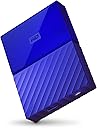


| ASIN | B01LQQH842 |
| Additional Features | Alexa |
| Best Sellers Rank | #385 in External Hard Drives |
| Brand | WD |
| Built-In Media | Portable hard drive^USB 3.0 cable^Quick Install Guide |
| Cache Memory Installed Size | 4 |
| Color | BLUE |
| Compatible Devices | PC |
| Connectivity Technology | USB |
| Customer Package Type | Standard Packaging |
| Customer Reviews | 4.6 out of 5 stars 1,179 Reviews |
| Data Transfer Rate | 1 Megabytes Per Second |
| Digital Storage Capacity | 4 TB |
| Enclosure Material | plastic |
| Form Factor | Portable |
| Global Trade Identification Number | 00718037849492 |
| Hard Disk Description | Portable |
| Hard Disk Form Factor | 2.5 Inches |
| Hard Disk Interface | USB 3.0 |
| Hard-Drive Size | 4 TB |
| Hardware Connectivity | USB 3.0 |
| Installation Type | External Hard Drive |
| Item Type Name | WD My Passport Portable Hard Drive and auto backup software ,Blue ,4 TB (WDBYFT0040BBL-WESN) |
| Item Weight | 0.54 Pounds |
| Manufacturer | Western Digital |
| Model Name | My Passport |
| Model Number | WDBYFT0040BBL-WESN |
| Number of Items | 1 |
| Special Feature | Alexa |
| Specific Uses For Product | personal, gaming, business |
| UPC | 843715110943 718037849492 |
| Unit Count | 1.0 Count |
| Warranty Description | 2-year limited warranty |
C**L
Helps my workflow with WD My Books, love it comes in 4TB size.
I've used WD passports in the past and at least the ones I owned have been fairly reliable...so far so good with WD external drives. I moved to My Books as the passports didn't go past a few TBs and the WD My Book's larger drive size was also cheaper per TB but since then as with all technology things change and the My Passport now comes in a 4TB size that's only about $10 more than the 4TB My Book at the writing of this review. I'll also be moving to cloud services soon as a secondary backup as I've lost pictures when my laptop crashed so I don't want to solely depend on external drives anymore even if WDs have been reliable in the past as things can happen. I chose the blue color to start and plan to order more in other colors so I can tell the drives apart. I love the size and portability. While the My Book can potentially provide more drive space it isn't as small or portable and the Passport so I've missed this little guy. It was basically plug and play on Windows 10 and so far it is working seamlessly with Windows 10. In fact I just moved a bunch of folders in Adobe Lightroom onto it and there were no problems. Link to 8TB My Book if you're interested: WD 8TB My Book Desktop External Hard Drive - USB 3.0 - WDBBGB0080HBK-NESN I have a USB hub and with the My Books if I plugged more than one in at the same time it wouldn't read them at the same time, only one drive at a time could be recognized. With the passport it reads it separately from the My Book drives I have so I can transfer files back and forth and as they're USB 3 transfer is pretty good which is great for my workflow! I've just received my drive so I will update this review if I have anything to add or run into any problems. I snapped a few pics of the box and the drive. The box isn't anything fancy if you're looking to store the drive in it. It measures around 4.5"x6.25" The box came in a sleeve to show the color of the drive inside. The drive and connection cord was in a brown insert that reminded me of those brown grey paper egg cartons. The cord looks to be around 15 to 16 inches and the drive itself around 4.25x3.25 inches. The housing is blue plastic and came protected in clear wrap which was easy to remove. I seem to remember my first Passport had a metal and plastic housing but I guess all plastic perhaps is a bit lighter. There was a multi language insert for the warranty and tech support info and a paper insert that just had the website for help. There's a pic of the bottom showing it has small square rubber feet at the corners to help protect whatever surface you put it on. The plug and on light are on the bottom side of the drive. Hopes this helps potential purchasers.
L**K
A Splendid Portable Hard Drive
Over the years, these external hard drives have had their storage capacity become larger and larger. While this one doesn't have the largest capacity available on a portable hard drive (a Seagate model has 5 TB), it is the least costly one per Terabyte at the present time. I bought four (4) of these drives (the blue ones were the least costly at the time of purchase) in order to back up the data from my "main" computer. I had formerly used 2 TB portable drives but I can use those drives for something else. Having four of these drives (plus one more 2 TB one which I keep in our safety deposit box at our bank), all of which have the same backed-up data, pretty much ensures that I'm not going to lose any of my data, pictures, music, or other information. I have to tell you that backing up to these drives is MUCH faster than backing up to those other, older, drives. I'm sure that has something to do with these drives being formatted as GUID whereas the older ones were MBR. I have read that some of these fail; you read that about ALL computer hard drives. In my own experience, I have had exactly one (1) hard drive completely fail and that was after quite of few years of extensive use. (It was a WD one; I have never had a Seagate drive fail but I generally buy WD drives.) My total data comes to a bit over 400 GB (that does not include all of my music or my movies which I keep on separate hard drives - but it does include all of my home videos, much of my music, and all of my photographs). My computer has a GNU/Linux operating system and this drive, as all drives I have ever owned, works perfectly with the OS. I did reformat this WD drive to an encrypted EXT4 file system. Of course I cannot comment on longevity of these four drives. Should anything untoward happen with any one (or more) of them, I shall report that here. However, as I do not anticipate any trouble, I shall give these WD 4 TB portable external hard drives my highest recommendation. Thank you for reading this and for considering my opinion. Lawrence H. Bulk
J**I
Amazing - upgraded to 5 stars with the rugged test of time award! (Read Update!)
The value and performance of this hard drive is beyond anything I'm used to for a 2.5" hard drive. I bought the 4 TB for around $30/terabyte - half that of high end 3.5" external performance hard drives. This drive consistently achieves 105-110 MB/second reads and ~80 MB/second writes in everyday use, even when nearly full - VERY impressive for a 2.5" hard drive. I would have given 5 stars, but I feel the 4 TB version is pushing the notion of "bus powered" to a dangerous degree: On my 2015 Retina Macbook Pro, I can only read the drive from 1 of my 2 USB 3.0 ports! Should the second USB 3.0 port fail, I suddenly lose access to my data (I already have almost 3 TB on it.) This drive doesn't include a Y cable for extra power, but I may try that option, since this drive does not have the option for an external power source. This is the first ever "low cost" hard drive I've purchased, and I think it does admirably well when compared to a 12 TB, $600 external RAID-0 dual bay 3.5" hard drive setup. Of course it's nothing like an SSD, but it's 1/10th the cost - over $1,000 less than a 4 TB SSD! It's a pity more laptops don't provide space for a 15mm 2.5" second drive - it's awesome for archival storage - I mainly use this for video, and it's generally fast enough for FULL-HD streaming. I will update this review later to report on the longevity of the drive. UPDATE: A year later, I'm ECSTATIC! I bought this drive because my newer laptop only had half the hard drive size of my older laptop, so no room for movies. The solution - I bought this 4 TB drive, filled it with movies, and left it in my car. Let me emphasize here - I live in AUSTIN TEXAS, where we get months of 110F weather. My wife always said this will never possibly work - the first hot day will melt that drive. A year later, and this drive still admirably does its job, letting my daughter watch movies in the car! Not only has it endured incredible heat and cold, but many hard drops onto the street. It still takes variable lengths of time to appear on the computer, and sometimes we have to try different USB ports, but if anything it's working better now than it did a year ago. I didn't think a drive this durable was possible! Hence I've added a star. As mentioned, this is NOT a performance oriented drive, but for archival style uses like a video cache, I can't recommend this enough.
N**S
Really Great Product
New model for WD. I have an old 2TB WD External Harddrive which is ugly. The 4TB, that I got in Blue, is really sleek and mainly waterproof even though I do NOT recommend submerging it in water. It's air tight. Especially with the USB cable it comes with. It's kind of hard to put in and take out but, it totally seals the WD and doesn't freaking come out with a little bump or a fall. I like the design, the size and use. I use an old Windows 8 that has been upgraded to Windows 10. This works FINE. You can either set it up to automatically back up or when you plug it in, just select "Open Device to view files" and you'll be in the External Harddrive. Put the WD files into one and keep it on there. Then you can just manually put files on there and your good to go. 4TB is a LOT especially when you use the Harddrve to put your scanned artwork on there. I have like 200 pieces of artwork on there and BARELY touched the usage on the 4TB. Even on the old 2TB, I have like over a HUNDRED HOURS of video on it and I barely touched the usage. So, you can basically put a LOT of stuff on these harddrives. It'll probably take a year or more to fill these babies up. I recommend it to artists, photographers, video bloggers, etc. If my shitty computer, which I had to format 5 times since I got it, can handle a 4TB WD then I highly suggest you get one.
C**T
I now own 2 so far .... ;0)
Great Drive - Very small and only uses one USB cord plugged into you computer to power and run/use it. **** Almost 4TB of Storage in a external drive slightly bigger than a deck of cards!!! *** USB cord is only about a foot long, which I like since I lay it beside the computer anyways when using. (I don’t like long messy cables all over) *** The plastic packaging the drive comes shipped in can double as a great snap closable storage case for the Hard Drive and cable. - So just pop it apart when you get it instead of cutting it open with knife or scissors. It keeps everything compact, neat, when storing / or not in use. I have 2 of these ... one BLUE, and one RED. **** I use them with a Microsoft Surface Pro3 Tablet computer running Windows 10. I store Videos, Photos, MP3s, CD Collection, program files etc ...... etc .... Works Great!!!
N**.
Worth a buy for anyone needing extra space
I was a little hesitant to buy an important electronic tool such as this online--having seen a fair few instances where said devices are broken or unusable--but I was relieved to find that my WD Passport arrived both intact and fully functional. It doesn't require any fancy tools or an excess of time to hook up, and works exactly like a USB drive, and is perfectly sized (and colored) to avoid being misplaced. It comes with the setup instructions already downloaded, so the moment you boot it up it provides you with the instructions on how to set up a password and such. I've already filled it a third of the way and its performance never slowed. At first I worried about it overheating, as I keep it plugged in 24/7, but aside from getting a bit warmer there has thankfully been no major change. The only "problem" I had--and it wasn't a problem with the WD itself--is that my computer refuses to eject it unless I shut the entire system down. This isn't a problem with the WD though, as it worked on other computers, so I imagine it is just a system thing.
B**Y
Best Hard Drives on the market, as always!
Ive been loyal to WD since I had a 450MB on my 486. Ive had books since they started and passports, all sizes up to 10tb currently, and short of an actual SSD, I feel the most comfortable with my data sitting on WD hard drives. Ive owned MANY, and only 2 have ever had issues, and I think that was mostly my fault, lack of defragging, and re-writing them 100s of times, and even on one I still saved most of the data. But for my data that I just leave alone, or play or copy occasionally, I have WD my books over a decade old and they still run like brand new. The blue color is beautiful, and the new square design I really like personally. And 4tb on a passport, wow. Amazing. Whatever you need to store, TRUST WESTERN DIGITAL!
N**E
Amazingly small, super reliable...
I have been buying these types of drives since they cost a couple hundred bucks for 100 GB drives. I have had several sizes all the way as they get bigger and bigger, but this 4 TB drive just seems HUGE capacity for how small it is. Love it! Never been disappointed in the reliability of WD drives and this one is no exception to that! Best drives out there and worth every penny. Once you have had another cheap brand fail you...You will justify a little extra to never lose data again. With WD I have NEVER had a drive fail... Can't say the same about Seagate and others
Trustpilot
3 weeks ago
2 weeks ago