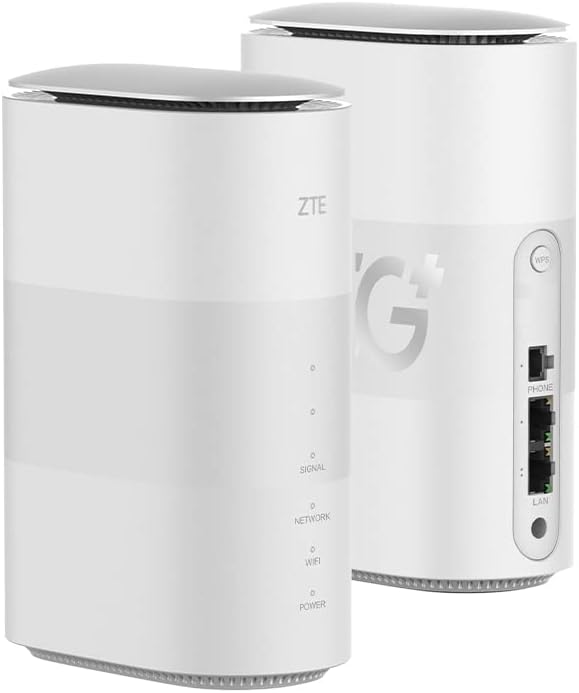
🚀 Elevate your network game with the ZTE HyperBox 5G — speed, style, and power in one sleek package!
The ZTE MC801A HyperBox is a premium unlocked 5G Wi-Fi 6 router designed for indoor use, featuring a Qualcomm X55 modem, dual TS9 antenna ports, and dual-band Wi-Fi supporting up to 1.775 Gbps. It supports up to 30 connected devices, offers advanced cooling via chimney-effect ventilation, and is compatible with multiple 5G, LTE, and UMTS bands. Its USB-C port is reserved for service, and it operates on Linux 4 with 4GB RAM, making it a powerful, future-ready networking solution for professionals seeking ultra-fast, reliable connectivity.
| ASIN | B095XC8S38 |
| Best Sellers Rank | 40,563 in Computers & Accessories ( See Top 100 in Computers & Accessories ) 310 in Routers |
| Guaranteed software updates until | unknown |
| Item model number | MC801A |
| Manufacturer | ZTE |
| Product Dimensions | 18.2 x 12.4 x 7 cm; 1 kg |
A**R
Great 5G Router
Great hardware, uses a Qualcomm X55 modem. £256 including delivery is great value at the time of writing this review I'm in Central London and able to get speeds of 500 - 600 Mbps download and 40Mbps - 70 Mbps upload on Three or Vodafone using 5G. Also noticed when disabling 5G, 4G Carrier aggregation works okay for me. Latency is lower than the cable connection it's replacing. (The speed/latency obviously dependant on the mobile service/area but the device seems capable) The firmware is branded, but this is probably preferable to the direct ZTE firmware. The firmware provided supports the hidden menus for band and cell locking and other things (some firmware versions for this device don't): http://192.168.0.1/index.html#debug_page http://192.168.0.1/index.html#temp_status http://192.168.0.1/index.html#rf_mmw My device arrived with firmware version mc801av1.0.0b6. It's not possible to update this from the GUI, there is an update button (for update over the internet) but no updates are available (there are newer versions for this device in other regions). The functionality seems okay for my requirements so I don't mind. The hardware supports lots of bands which also appear in the band locking page, however it's hard to tell if the firmware restricts this. I'm able to connect on B3 which wasn't listed in the description at the time of writing so I think the device might support more bands than are listed in the description The internal antennas work great. I've also tested with an external antenna and this works well with 5G. Really pleased with the purchase, it seems high quality.
A**R
ZTE 5g Hyperbox
Out of the box it is branded 3 , I didn't know that but I'm on Smarty. At first it would not work then I used the reset hole and it came alive. I had to delete my browser history to get to the login 192.168.0.1 page where the device seems to have been furiously updating, I didn't know that either. I went from 25Mb/s to over 127Mb/s per second speed so I'm happy. There's no on or off switch either. I use my home phone with it through an RJ11 to BT adapter I found here. It's weighty and plush I live nowhere and needed two TS9 antenna found here on Amazon as well. Overall it is quite good and I'm keeping mine.
M**E
Great 5G router, with caveats.
First the caveats: This is not a universal model, having Deutsche Telecom firmware. Apparently the external antenna ports are disabled. No idea why. Do not try to reflash the firmware. You will likely brick it. 5ghz Wi-Fi is limited to band A (36-48ghz) The pluses: The device appears to be pretty sensitive. I live in a good 4g+ area but on the edge of 5g. My 5g phone doesn't get a peep of 5g but there's one spot in the house, a bedroom windowsill where I can get a stable(ish) 5g signal with the router so that's where the box sits. Position AND orientation affects the signal. Typical speed with this borderline signal is about 300-350 mb/s down, 20mb/s up using a Three sim. 4g+ also works well and I have tested two band carrier aggregation (1+3) and three band CA (20+32+3). I think the router can aggregate up to four channels. Speeds vary according to congestion but 100+mb/s downloads in a good signal area are easily achievable. There is a hack available (check YouTube) to enable DNS control and mobile cell locking. The latter feature allows you to lock your primary signal to a particular mast as well as band. The hack uses a Java script from your browser is software only and a factory reset will delete any changes. Do not attempt to flash the firmware. You will most likely brick the device. Accept the limitations such as external antennas not being available or do not buy this router. Wi-fi is plenty strong enough for my smallish house and is very fast (wi-fi 6). Signal strength can be varied between three settings but this affects the 2.4ghz band only. I had intended to run an ethernet cable from PC to the router, but the wi-fi is good enough that I haven't had to bother. There is a limit of 30 wi-fi devices so if your home is highly connected this might be a point to note. Bridge mode is available which allows you to use a separate router and potentially get around the limit. Edit: I cannot confirm this but it may be the case that the external antenna ports DO work but they are limited to 3.5ghz and above. This would render them ineffective for some mobile companies such as Three, and one would have to either rely on the internal antennas or modify the device.
M**S
Not Unlocked!!
Router is advertised as unlocked to any Network, unfortunately it's an old 3 network router that still only runs on 3!! (which I tested using my 3 SIM out of myphone).I wanted to use it with Vodafone sim for better 5g coverage but it would not work.
E**A
Wirking great
Working great for a month now wi fi signal strong you don t have ti di anything just insert the sim and done.Very pleased with it so far
C**E
Very Good!
Really good 5G Router - works perfectly in Uk
J**.
It is 5G
Don’t buy this model if your rural, good quality definitely 5G but the antenna ports DO NOT WORK. My pre positioned 5G Antenna does not make any difference to the signal. Works perfectly with a friends EE 5G router. Could have got it cheaper but was assured the antenna worked. They don’t.
S**H
Happy with the unit and excellent speed of delivery. Unit functinion perfectly and as described
Only thing it does not have an RJ11 telephone port as I expected it would. Not a serious difficulty.
D**Y
Mooi modem, is echter een T-Mobile branded ZTE modem. Dat betekent dat het modem tov een origineel modem komt met gelimiteerde firmware / software met beperkingen in de frequentie band omdat deze blijkbaar ingericht is voor T-Mobile …
J**O
Igual ao anunciado
S**E
ottimo router wifi per ogni tipo di SIM
F**D
السعر ممتاز جدا الجهاز افضل من الصورة خصوصا ان يركبله انتينا
M**M
Der ZTE MC801A HyperBox 5G Wireless Router hat sich in meinem Alltag als zuverlässiges und leistungsstarkes Gerät erwiesen, weshalb ich ihm eine gute Bewertung gebe. Besonders positiv ist, dass der Router auch einwandfrei mit einer Vodafone Karte im 5G Netz funktioniert. Die Einrichtung war unkompliziert und die Verbindung ins 5G Netz war schnell und stabil. Dadurch wird eine hervorragende Internetgeschwindigkeit erreicht, die den Anforderungen moderner Anwendungen problemlos gerecht wird. Die WLAN-Verbindung des Routers ist ebenfalls sehr stabil, selbst mit über 10 angeschlossenen Geräten (max 50 möglich). Dies ist besonders praktisch für Haushalte oder Büros mit vielen Geräten. Ein weiteres Plus ist der zusätzliche WAN-Anschluss, der zusätzliche Flexibilität bei der Netzwerkkonfiguration bietet. Dies ermöglicht es, den Router auch als Teil eines größeren Netzwerksystems zu nutzen. Insgesamt bietet der ZTE MC801A HyperBox 5G Wireless Router eine gute Leistung und Zuverlässigkeit. Seine Kompatibilität mit dem Vodafone 5G Netz, die stabile WLAN-Verbindung mit vielen Geräten und der praktische WAN-Anschluss machen ihn zu einer empfehlenswerten Wahl für alle, die auf der Suche nach einem leistungsstarken 5G Router sind.
Trustpilot
3 days ago
1 month ago