🔥 Elevate Your Gaming Experience with QIVYNSRY!
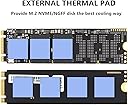
The QIVYNSRY M.2 Heatsink is engineered for optimal cooling of M.2 NVME SSDs, featuring a lightweight aluminum alloy design, easy installation with adjustable screws, and advanced nano thermal pads for superior heat dissipation. Compatible with a range of SSDs and perfect for enhancing performance in gaming consoles like the PS5.


| ASIN | B08QD93S3F |
| Best Sellers Rank | 48,955 in Computers & Accessories ( See Top 100 in Computers & Accessories ) 145 in Thermal Pads |
| Brand | QIVYNSRY |
| Cooler Heatsink Compatibility | Aluminum |
| Cooler Heatsink Material | Aluminium |
| Cooler heat sink material | Aluminium |
| Cooler heatsink compatibility | Aluminum |
| Customer Reviews | 4.7 out of 5 stars 4,104 Reviews |
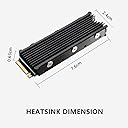
| Item Dimensions L x W x H | 7.6L x 2.4W x 0.6H centimetres |
| Item Weight | 1 Ounces |
| Item weight | 1 Ounces |
| Manufacturer | QIVYNSRY TECH |
| Manufacturer Part Number | EC-015 |
| Mounting Type | Chassis Mount |
| Mounting type | Chassis Mount |
| Product dimensions | 7.6L x 2.4W x 0.6H centimetres |
A**.
Works as expected
The NVMe heatsink I purchased is a straightforward yet effective product that delivers on its promises. It comes with an adhesive pad that is easy to apply, making installation a hassle-free experience. I installed it on a standard-sized M.2 drive that I use as a cache drive in my Unraid server. Before adding the heatsink, I noticed a decline in speeds as the drive warmed up during use. Since installing the heatsink, I have observed a noticeable performance improvement, with temperatures reduced by a few degrees. While it may not completely eliminate thermal throttling, the enhancement in performance is significant. Additionally, the sleek black design of the heatsink helps to conceal the less visually appealing NVMe drive beneath it, contributing to a more polished overall look. In summary, this NVMe heatsink is a simple yet effective solution for anyone looking to enhance the performance and aesthetics of their M.2 drives. I would recommend it to anyone experiencing thermal issues with their NVMe storage.
C**S
Works great with PS5
Needed some more space on my PS5, as some of you will know the internal SSD on the PlayStation is just not enough when you have the likes of GTA V or Call of Duty installed. I’m not as tech savvy as I used to be and always held back on the idea of messing around with things like SSD and anything that resembles circuitry as I’m notorious for breaking things. However, I was fed up with having to constantly delete games so I went ahead and ordered the 1TB SSD on sale (£54.98) and it has been well worth the purchase! Firstly it only took like 5 minutes to install, that’s including attaching a heat sink (has to be bought separately and is suggested for use inside PS5), watching YouTube tutorials and fiddling around taking the PS5 apart, you literally slot it in like an old school memory card and secure it in place with one little screw, done. Seems more than fast enough, took 60 seconds to move 100gb of data over to it and loads up GTA at least twice as fast and the internal SSD would! Also the PS5 reads the usable storage as exactly 1TB so bang on. Time will tell if it lasts without slowing down but it’s been about a week so far and zero complaints. So if you’re like me and have been constantly deleting games to reinstalling them to manage the poor storage on your PS5, I would definitely recommend this!
B**E
Does the job
I have now brought 3 of these It arrives in the simple branded box on removing your meet with everything you need to get going I have to say I'm might impressed as for a £7.99 (what I paid for it) heatsink it's kept my 980 Pro 1 TB NVME pretty cool. Well, at average temps of 47 degrees celcius and max operating temps of 52 degrees celcius (regardles of ambient temps) in comparison to potential ran away temps at 80 degrees plus... it's pretty cool lol but this also depend on the type of case and fans your running, my set up is the Corsair iCUE 4000X RGB with which im running 4 Corsair iCUE LL120 RGB LED PWM plus 2 in the liquid cooling for my CPU Corsair iCUE H100i ELITE CAPELLIX Liquid CPU Cooler allowing for max air flow. These are well made and very lightweight, they are durable and really easy to install, once your drive is in and you have applied the thermal pads and locked the parts in place with the screws provided your all good to go. Highly recommended, at the time of writing this review the price is 7.99 and even at the price I still recommend it.
S**M
Good for the price
I got this so I could upgrade my PS5 storage capacity and a heat sink was recommended so got this one. It's pretty decent to be honest and fitted my M.2 drive perfectly. My only issue was that I had to cut the supplied heat transfer pads to fit correctly as they were slightly oversized. It fits perfectly into the M.2 drive bay on my PS5 allowing you to replace the drive bay cover after installation which is recommended by Sony. The price was very reasonable and it was easy to put together and install. You even get supplied with the correct screwdriver to put it all together which was nice to see. Pretty well made heatsink and fits in a PS5 the way it should. Worth a buy if you're upgrading your PS5 storage
Z**E
I
Great product and everything is in perfect order.
G**S
works and easy to fit
took less than 10 min to fit, comes with extra screws and a little screwdriver (wish it was magnetic tho) this is my first gen4 nvme drive and was shocked that the temps were 70c while playing games on it, I left the sticker on the nvme as i read they act as a heat spreader aswell,but some people say to remove it.but it has taken the temp down from 70 c to around 50 c or so while playing games.. so for £8 not to bad
H**A
Does the job
Very simple, just stick the pad on, put the heatsink over this, fix together and good to go (also came with instructions which is nice). Not much else to say, not had any issues and seems to keep the temperature low and speeds do not appear to be affected.
S**R
Excellent cheap alternative to manufacturers own heat sinks
Fits together, with SSD, easily. The thermal pads are not too tacky, so if you get the spacing wrong you can make adjustments. I didn’t leave enough space at the contacts end of the SSD, to allow proper insertion into PS5 Slim, but it was no problem to disassemble and do again. Very good value for money item. Recommended.
R**K
Cool & Easy
Fits my 4TB Silicon Power 4TB UD90 NVMe 4.0 Gen4 PCIe M.2 SSD perfectly. Easy to install with clear (but tiny) instructions. Bless them for including extra screws, which fit both the heat sink assembly and the hold-down at the "other end" of the SSD. So far, temperature has been perfectly steady at 36C. Well made, looks good, fair price.
A**S
EZ install - VERY EFFECTIVE
My Samsung 980 runs reasonable cool EXCEPT when I'm backing up my C drive. Then the temp (at the hot point) zooms from 115-120f to 175-180f! Installed this and the highest temp ranges from 135-151f. That's a fantastic improvement. The initial performance actually got better after a few days. Perhaps the thermal pad was still settling in? Installation was easy. I watched a video on a generic SSD heat sink install and this heat sink was built the same way. The instructions that came with it... well, I'm glad I watched the video! Comes with 2 extra screws, an extra thermal pad and a magnetic tip screwdriver. And I'm clumsy enough I had use the mag tip to fish out a screw that bounced into a hard to reach place. EXTREMELY happy with this. Heh, the 'extra' thermal pad is likely for 2-sided SSDs
D**!
Nice complete kit.
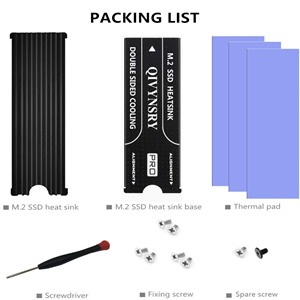
I wish I had the patience to do some benchmarks and science to show some reliable before and after temps under load but I'm running Ubuntu CLI and it would have required research and time I didn't want to invest. Based on everyone else's reviews, this might help reduce temps somewhere between barely and a lot. I would attribute that to the unscientific methods used to test. Many people are talking about IDLE temps, which is like trying to compare the performance of a couple parked cars. The only really test that matters is whether or not this will keep your SSD from throttling under a full load. If it does, then it works. Apart from it's actual thermal functionality, I will say that it is a nice kit for a decent price. It has a nice low key black look that fits in anywhere. The tooling on top is not very smooth. Expect to see a little wire brush marks under the anodization. There's no logos on the top, although there is a brand name on the back plate that you will never see after installing this. You will see the screws protruding into the fins of the heat sink a little (see my images). The odd thing is the product images show the cooler from almost the same angle and with screws installed, yet you cannot see them poking out. I suspect a little photoshop work was done. I personally like to see authentic product images rather than renders and altered images. The manufacturer could probably resolve this problem better and improve the overall look of the product by using black screws, or shorter screws. My kit included everything that was supposed to be included, including of course the heat sink and the back plate, a little Philips screwdriver that is actually worth keeping, 3x full size thermal pads, 7 mounting screws (1 is extra for when you drop and lose that first one). It also includes a tiny little book with some mysterious microscopic script that is unreadable by most humans. The images in this tiny book seem to indicate what items should be included in the box. They also include 1x M.2 mounting screw, which is a nice bonus. These are generally included when you buy a motherboard. Sometimes they're already screwed into the motherboard, sometimes they're in a tiny little bag that is easy to lose. Sometimes...who knows where it went. They're never included when you buy a NVMe drive though...so it's possible that bonus screw could save you some hassle. The included M.2 mounting screw is a bit longer than the one that came with my motherboard though, so be careful. It is not longer because it had to go through any extra material when the heat sink is installed, because it doesn't. I just used my old stock screw. I have had to order one of those before all by itself and that single screw was $10. I probably could have installed this without having to trim the thermal pads at all, but I decided to trim about 3/32 of an inch off the ends just to make sure there wasn't going to be any blue stuff visible. The thermal pads are sort of tacky, but not what I would describe as sticky. I don't foresee any problem removing them later if I wanted to. Do make sure to remove the plastic coating from the pads (one side at a time) when you're ready to apply them. Note: You probably should not remove any sticker from your SSD. Removing these labels will generally void your warranty. They are often made from a metal material to allow for heat transfer anyway.
D**2
Très bon dissipateur.
Rien à dire, Dissipateur Thermique utilisé sur NVMe M.2 Samsung 990 Pro installé sur l'emplacement PS5. Tout fonctionne à merveille et d'une stabilité sans failles. Montage très facile si vous suivez bien les instructions de Sony pour la PS5 et du petit livret pour le dissipateur. N'oubliez pas de retirer les petits films transparents sur la pâte thermiques livrée avec.
G**E
pietropaoli giuseppe
arrivato in ritardo pero di hottima qualita ++++++
Trustpilot
1 week ago
3 weeks ago