


Buy anything from 5,000+ international stores. One checkout price. No surprise fees. Join 2M+ shoppers on Desertcart.
Desertcart purchases this item on your behalf and handles shipping, customs, and support to USA.
🚀 Upgrade your WiFi game—because buffering is so last decade!
The TP-Link Archer T9UH AC1900 USB 3.0 WiFi Adapter delivers lightning-fast dual-band wireless speeds up to 1900 Mbps, enhanced by high gain antennas and beamforming technology for superior range and stability. Compatible with Windows and Mac OS, it features a flexible USB 3.0 cradle for easy deployment and comes with 24/7 technical support and a 2-year warranty, making it the ultimate upgrade for professionals craving reliable, high-speed connectivity.
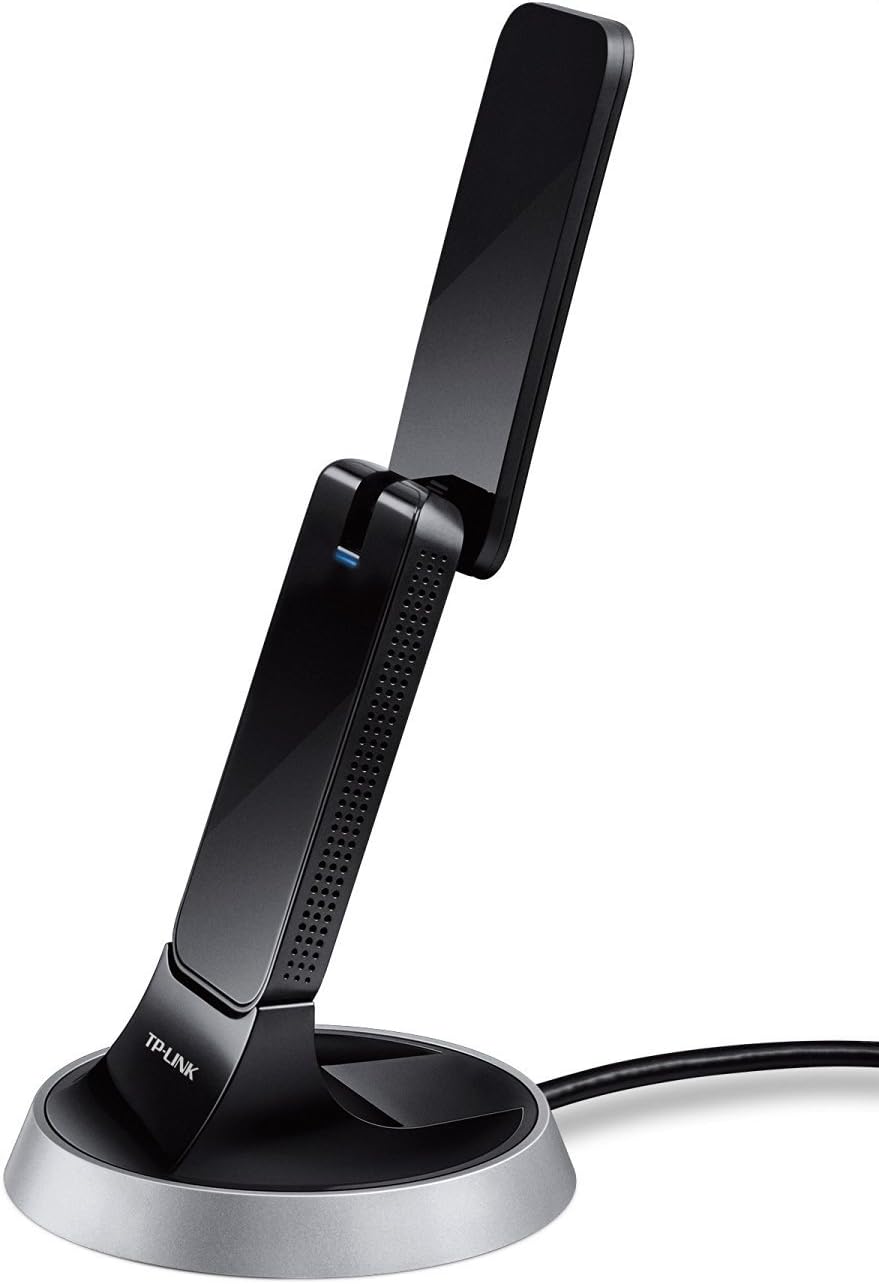


| ASIN | B01GE9QS0G |
| Best Sellers Rank | #780 in USB Computer Network Adapters |
| Brand | TP-Link |
| Built-In Media | Wireless Adapter, Archer T9UH Resource CD, Quick Installation Guide, USB Cradle |
| Color | black |
| Compatible Devices | Desktop, Laptop |
| Compatible Operating System Family | MacOS, Windows |
| Customer Reviews | 4.3 out of 5 stars 1,828 Reviews |
| Data Link Protocol | IEEE 802.11b , IEEE 802.11n , USB |
| Data Transfer Rate | 600 Megabits Per Second |
| EU Spare Part Availability Duration | 2 Years |
| Global Trade Identification Number | 00845973096137 |
| Hardware Interface | USB |
| Item Dimensions L x W x H | 3.96"L x 1.44"W x 0.56"H |
| Item Type Name | WiFi Dongle |
| Item Weight | 0.71 Pounds |
| Manufacturer | TP-Link |
| Mfr Part Number | Archer T9UH |
| Minimum Required Operating System Version | Windows 7 |
| Model Number | Archer T9UH |
| Product Dimensions | 3.96"L x 1.44"W x 0.56"H |
| UPC | 845973096137 |
| Warranty Description | 2-year Warranty |
M**R
Actually reliable and fast speed, quick driver install
My goodness. This is a savior. Summary: Getting the full 250Mbps on a 250Mbps isp subscription, when I was previously getting 70Mbps with my internal wifi card. Stable connection, no increase in ping/latency. I'm used to having direct ethernet fios gigabit connection. So when I moved to a suburban home with old walls etc, I was mortified to see that my laptop's internal WIFI chip was only pulling 70Mbps. I thought about switching out my WIFI chip, but seemed a bit like a hassle, and hard to factor in which dbi to use (stronger more reliable vs distance), walls and interference etc. And this adapter was a simple setup, with one driver download and install (without restart. It integrates the wifi control into your Windows 10 default wifi icon, so you can easily switch between Wifi1 (internal wifi card) and Wifi2 (TP-Link adapter). This worked like a charm! Things to consider before purchasing this adapter though: ~Make sure that the bottle neck of your slow internet connection is caused by your wifi card, not other factors. ~You can test this by connecting a direct ethernet cable from the router to your laptop and testing the speed, AND testing via wifi connection with your laptop right next to the router itself. It should match to the full speed provided by your ISP. If not, the router could be the problem. ~There's an app that scans the wifi channel signals in your vicinity, to make sure it's not conflicting. Go into your router settings and change to a channel that is unoccupied to eliminate interference. This device supports USB 3.0, and I have no doubt that the 5Ghz bandwidth is capable of the full 1300Mbps that it advertises. In which case, the bottle neck would be an ISP's Gigabit connection, if you have one. Otherwise, I don't really see the point in insisting on using it on a USB 3.0 port if you don't have one. USB 2.0 technically supports up to 480Mbps, which is more than what most suburban ISP packages offer.
R**N
Great reception and durability!
It has worked solidly and dependably for my son through four years of College, moving to and from, packed up and beat up, it still works perfectly and durability has been great.
C**B
GREAT After I Realized a Windows SETTING was stopping it from working. EVERYONE TRY What I did!
RE: TP-Link AC1900 USB 3.0 WiFi Adapter for PC (Archer T9UH)- Dual Band Wireless Network Dongle Like a lot of other people I thought this thing didn't work & was about to send it back. Looked up all kinds of reviews for other ones like this and over & over saw the same theme, dropped connections or slow speed. We'd gotten a new Dell PC so our oldish one went to a back office and we got this to amp up it's (outdated) wifi capabilities. No matter what we tried it would only work verrrrrryyyyyy slowly. The other day I started messing around looking at wifi settings and had almost given up when I stumbled across the page that changed everything. Keep in my this is Windows 10 I am talking about so if you have something different, figure it out from what I did: >> NETWORK CONNECTIONS >>ADVANCED NETWORK SETTINGS and then, there it was: >>CHANGE ADAPTER OPTIONS what I saw before me were 5 things (2 of which matter here), and only one (the PC) WAS connected to wifi. What's the problem then? One of the OTHER things that showed up was: "Wifi TP Link Wireless USB Adapter" <~~ NOT connected to the wifi I right clicked to connect it and you could almost hear it peel out. I immediately did a speedtest and laughed my head off when it was blazing fast. And it stayed that way. ***UPDATE: A couple weeks later the same happened, I repeated above and saw it needed to be RE-Connected so that fixed it again. While this is a great product, having to do that, despite having "Automatically connect" checked off, reduces it a star, but looking at other brands reviews I still feel I picked the best of all the options. At least this has a quick easy fix by searching Windows for NETWORK CONNECTIONS and doing above*** So all that time the slowness was just the old computer (normally fast when hooked up directly to the internet) trying to chug along and suddenly become a wifi PC with it's wifi tech from 15 years ago...it wasn't the adapter at all, because the adapter, though it showed all the signs of being hooked up properly, wasn't REALLY doing anything due to that one setting deep inside Windows that no one indicated was a thing when using this. And I found it. ME. The unlikeliest of tech gurus on the planet. Try it! It seems like we have two new Dell PCs now with this upgrade. You're welcome! :)
K**N
Best USB Wifi Adapter Period Download speed went from 56MB to 150+
I recently purchased a new desktop. Long story short it's a custom desktop that's built very well with wifi available on the motherboard (the board itself isn't a slouch either). I checked my download speeds on Speedtest and it was barely reaching 57MB and my download speeds on Steam were at 65MB I had an issue downloading the drivers on my adapter after transferring it to the new PC (plugged it into the Red USB port on my mobo which is 2.5G LAN on the MSI Pro B650-P WIFI) This is all on Windows 11 Pro btw. When I finally got the driver to work my download speeds went to 150MB+ up from 57MB and on Steam they're currently at 430MB (Downloading Dirt 2.0) up from 65MB. Holy crap. I bought this back in November of 2023 and the last updated driver from TP-Link for this specific model was 2018, but it still works like a charm. Best investment in a USB Wifi Adapter.
A**M
High-Speed Dual-Band Wireless Connectivity for Your PC
The TP-Link AC1900 USB 3.0 WiFi Adapter (Archer T9UH) is a powerful wireless networking solution that brings high-speed and reliable connectivity to your PC. With its dual-band support, impressive speeds, and convenient USB 3.0 interface, this adapter offers an excellent option for users seeking enhanced wireless performance. One of the standout features of the Archer T9UH is its dual-band capability. Operating on both 2.4GHz and 5GHz frequencies, this adapter provides flexibility and improved performance by allowing you to connect to less congested channels. The 2.4GHz band provides better coverage and compatibility, while the 5GHz band offers faster speeds and is ideal for bandwidth-intensive tasks such as streaming HD videos or online gaming. The AC1900 standard supported by the Archer T9UH ensures fast and reliable wireless connections. With speeds of up to 1300Mbps on the 5GHz band and 600Mbps on the 2.4GHz band, this adapter allows for seamless streaming, smooth online gaming, and rapid file transfers. The beamforming technology further enhances the signal strength and coverage, delivering a stable and efficient connection. The USB 3.0 interface of the Archer T9UH provides high-speed data transfers and minimizes latency. It is backward compatible with USB 2.0, ensuring compatibility with a wide range of PCs. The plug-and-play design makes installation hassle-free, and the compact size of the adapter allows for easy portability and use with laptops and desktop computers. TP-Link is a well-established brand known for its reliability and performance, and the Archer T9UH is no exception. It comes with robust security features, including WPA/WPA2 encryption, to protect your network from unauthorized access. The included external high-gain antenna helps optimize signal reception and transmission, further enhancing the adapter's overall performance. One consideration is that the Archer T9UH's external antenna may take up additional space and require proper positioning for optimal signal reception. While the external antenna provides better range and signal strength compared to internal antennas, users should be mindful of the adapter's placement to avoid obstructions and interference. In conclusion, the TP-Link AC1900 USB 3.0 WiFi Adapter (Archer T9UH) is a reliable and high-performing wireless networking solution for PC users. Its dual-band support, impressive speeds, and convenient USB 3.0 interface make it an excellent choice for enhancing your wireless connectivity. Whether you're streaming multimedia content, gaming online, or transferring large files, this adapter delivers fast and stable wireless performance. Upgrade your PC's wireless capabilities with the Archer T9UH and enjoy seamless connectivity for your online activities.
D**A
Started with 5 star, changed to 1, now up to 3
5 Star. This is replacing a simple plugin wireless N adapter. We were unable to stream 4K movies on the home network so we figured we'd give this a try. Installation was simple. You either plug it directly into a port on your computer or use the cradle to sit it in and run a cable from the port to the cradle. Since this particular computer only had 3.0 plugs on the front and not the back we opted to use the cradle rather than have this sticking out in the front of the computer. It looks nice sitting in the cradle plus this gave it more height over being plugged into the computer which was on the floor so there's no problems there. The included disc didn't work at all with 10x64. It just kept throwing out errors. Going online and downloading the proper drivers was easy enough and those installed without any trouble. It connected to the network with no issues. One thing I don't understand fully is how it chooses the wireless type it uses. For example, when first installed, just a mere 4 hours ago from right now, it stayed on the 2.4 GHz band for about an hour then when I came back and looked again it was then on the 5 GHz band. It says on the box that you can choose between the two bands but it doesn't say how and there's no instructions. So I hope it stays on the 5 GHz band because I don't know how to change it if it doesn't. Also, there's no instructions on how to change the channel that's being used. Of course, this only applies to people who don't already know how to do things like this but there's plenty of them. Including me when I'm trying to install this on Windows 10 on a friends computer. I don't know where anything is on Windows 10 so basic instructions would have been helpful. One more thing is the antenna. It doesn't state how you should place the adapter for optimal coverage in the direction that you want. I know it's omni-directional so it probably doesn't matter that much. It just seems that one way would always be even slightly better than another. But, all of that aside, I then tried to stream 4k movies to 2 different locations in the house that didn't work before. They both streamed with no buffering! So, as of now, this device seems to have fixed my problem. I would recommend this device to others. If anything changes I will come back and edit this review. EDIT 1 Star: This product only worked for about 10 days before the speeds just died. The first 10 days it did great. I could stream anything I wanted with zero buffering problems, which is why I got this device to upgrade from the Wireless N adapter built into the computer. For some reason, I still don't know why, after about 10 days it just went to garbage. I can't stream 4k, Bluray or even DVD quality - and this is on the 1.3Gb home network not over the internet. It states that it's connected via Wireless AC on the 1.3Gb network yet the connection feels like it's dead. I can't stream anything on the home network to any other device in the home. On the internet, speed tests are only getting to around 20Mb where they got to my usual 150Mb before. If I disable this device and go back to the Wireless N adapter built into the PC the internet speeds are what they should be and I can stream DVD and Bluray quality on the home network but still not 4K, which is why I bought this. I wish I knew what happened to it so I could fix it. All I needed was a little extra available speed so I could stream 4K on the home network, it worked great for 10 days, but then something happened and now it performs much worse than my Wireless N connection. I've uninstalled the device, reinstalled it, disconnected from the network, reconnected multiple times, restarted the PC multiple times. Nothing works. It looks like I'll be sending this back for a refund and trying to find a different Wireless AC adapter. EDIT #2 3 Star: After messing with this for a couple of days something made me think of trying a System Restore. So I restored the PC to before I first installed this adapter. After the Restore I reinstalled this adapter and, of course, it works wonderfully. My Internet speeds are where they should be. I can stream DVD, Bluray and 4K quality movies over the home network with no buffering. It's working as well as it did when I first installed it. Now, do I keep it or still return it for not really being trustworthy? I have about 2 weeks still to be able to return it so I'm going to use it for a week at least. If it messes up so much as once it's going back. Edit #3 3 Star: Well I have 5 days left to return it and it did mess up just earlier today but it wasn't the adapters fault. I don't think anyway. Windows did an update and after that it had reverted all of the Network settings to Default. This messed everything up but once I got the settings back where they should be it worked again. Not really the adapters fault so I'm not going to blame it. One thing I have noticed though, and it's kind of annoying, is how the adapter connects after a reboot. After a reboot the adapter will show it's using Wireless AC protocol but it will be on the 2.4GHz band and a low channel, 3 for me, for about 10 minutes. After about 10 minutes it then jumps to the 5GHz band and a higher channel that's in the hundreds. So, for me, the Internet is very slow and home network video streaming is completely out until it jumps to the 5GHz band. I don't know why it doesn't start connected to that instead of the 2.4GHz band. I'm going to keep it, reluctantly, simply for the fact that when it does work it works very well. That said, if you've read this far and know of another brand or model that works solidly every time do let me know in the comments!
J**N
Fast and Reliable: A Review for the TP-Link Archer T9UH AC1900 USB WiFi Adapter
The TP-Link Archer T9UH AC1900 USB WiFi Adapter is nothing short of a game-changer for my computing experience. It's a powerful, reliable, and versatile addition to my desktop setup, and I couldn't be happier with its performance. The dual-band capability is a standout feature. It seamlessly connects to both 2.4GHz and 5GHz networks, ensuring that I always have access to the best available signal. Whether I'm streaming HD videos, engaging in online gaming, or handling bandwidth-intensive tasks, this adapter keeps up without a hitch. The high-gain antennas are a real asset. They provide a stable, strong connection even when my router is a bit far away. Signal drops and lag are virtually non-existent, thanks to the robust signal reception facilitated by these antennas. Setting up the Archer T9UH is incredibly easy, thanks to the user-friendly installation process. It's plug-and-play for Windows and Mac users, which means you're up and running within minutes. The compatibility with a wide range of operating systems, including Windows 11, is a huge plus. Additionally, the USB 3.0 interface ensures lightning-fast data transfer speeds, making it not only a WiFi adapter but also a handy tool for moving files quickly between devices. The sleek design and compact form factor are practical. It doesn't take up much space on my desktop, and its unobtrusive appearance blends seamlessly with my computer setup. In conclusion, the TP-Link Archer T9UH AC1900 USB WiFi Adapter has exceeded my expectations. Its dual-band capabilities, high-gain antennas, and easy setup have transformed my desktop computing experience. If you're looking for a reliable, high-performance WiFi adapter that supports a variety of operating systems, this product is an excellent choice that delivers outstanding value. A definite 5-star rating!
S**T
Worked for 6 months; NIC's with Realtek chips are a common problem
Worked for 5 or 6 months. Very fast connectivity, 5G sixty feet, and one story away (2400 sq ft, two story house). Typical router to NIC connection was at 800 MBPS. I upgraded the router to a TP-LINK AX11000 two months ago, because of gradual degradation in the signal to my laptop. Now the 5G NIC connection tops out at 390 MBPS, and quickly degrades to 130 MBPS, to the point where it can't hold a lag free signal gaming, and streaming flickers. I've tried 4 or 5 replacement USB NIC's over the past two years, and all are problematic. From the research I've done, Realtek has been pumping out some bad chips, and most NICs of this class (AC1900, similar) have Realtek chips. When it works, it's extremely fast. I get about 475 MBPS direct from the cable modem, and was able to get up to 300 MBPS to my laptop using this NIC. Then both signal stability suffered (i.e. jitter, you can see it on speedtest "latency", jumping from 26, 75, 50, 500, 750, 250, etc, ending up total latency > 100), and speed (200 mbps, then 100, then below 100. Reboot the PC, and/or this NIC (disable/enable), it pops right back up, then starts degrading. Sometimes it last for an hour or two, sometimes 15 minutes. If I tried to run this in for a warranty claim, TP-link would claim it's my router, my network configuration, my laptop, and I'd be off and running for 25 hours of directed debugging. I was in the IT business 35+ years (network, databases, software development, etc.), I've done the testing, and I know this NIC is fried. I'm just giving up. I've got conduit in my home, and I'm biting the bullet, running CAT6 hardware throughout, to end the endless wireless issues. This is my second TP-link router, and first NIC, and I won't be buying TP-LINK products anymore. Just be aware, avoid Realtek-chip based network equipment, if at all possible.
S**L
I use it more than 1 year and I regret it
As I said, I have been using the product for almost 2 years, so more than 1 year... I bought it because it is a popular brand and expensive. Of course, the reasons why it was expensive were that it had better quality or more features... When I bought the product, I was having problems with the internet cable. Wi-Fi was pretty good but I was having problems with the cable. I do internet work all the time, so internet is very important to me. I immediately ordered one of this product. Unfortunately, when I bought the product, I could not use it at all. Waited months... I have now moved to a new house 2 bedrooms 1 living room a normal width house. I installed this wireless plug-in on my computer. The modem is in the other room. There is only 1 wall between us, the doors are open and the distance is about 4-5 meters. But I am having signal problem. According to the statement: -LIGHTNING FAST WIFI - AC1900 (600Mpbs on 2.4GHz band or 1300Mbps on 5GHz band) wireless speed with the next generation Wi-Fi - 802.11ac -USB WIFI ADAPTER - 2.4GHz and 5GHz band for flexible connectivity -ULTIMATE RANGE - High gain antennas ensure superior range and stability -BEAMFORMING TECHNOLOGY - Delivers a more targeted and highly efficient wireless connections But a device with these features should give better results. While it should be able to detect Wi-Fi from 50-100 meters in the mentioned features, I am at a distance of 5 meters and I get 3 bars of service. I recently bought another device that pulls 5 sticks and makes me happy. I don't know why, but I think the device has a problem. Although there are 3 bars, the speed ratio is quite good, but not sufficient. Because I'm constantly uploading and downloading. What I need right now is to have 5 sticks and to be able to use my internet fully.
A**A
Não obtive ganho de sinal.
Facil de instalar Porém não obtive ganhos em velocidade ou sinal.
A**O
Excellent Product
The adapter signal is strong and speed is fast without any drop out problem. The come-with CD provides driver and easy steps for easy installation. I would recommend it to my friends and everyone.
R**R
No problems found.
Needed one for a downstairs computer running a wireless connection from a router upstairs. Only konks out when the router does. Never has this thing stuffed up while the router is running. Highly recommend.
J**S
Estabilidad y Velocidad igual al cable Ethernet
El producto cumple con lo que promete, tanto en 2.4g y 5g dan velocidades y ping igual al cable de ethernet. es de largo alcance es superior a la mayoría de antenas
Trustpilot
1 week ago
2 months ago