Desertcart purchases this item on your behalf and handles shipping, customs, and support to USA.
🚗 Elevate your drive with sound and smarts that keep you connected and cruising.
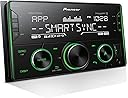
The Pioneer MVH-S622BS Digital Media Receiver delivers 50 watts of rich stereo sound powered by Bluetooth for hands-free calls and music streaming. Featuring Pioneer’s Smart Sync app, it offers integrated navigation and voice control, while SiriusXM compatibility ensures premium satellite radio access. Designed for seamless connectivity with smartphones, tablets, and Amazon Alexa, this receiver transforms your car audio experience with cutting-edge technology and user-friendly controls.


| ASIN | B07Y9T6CSR |
| Audio Encoding | Stereo |
| Audio Output Mode | Stereo |
| Audio Output Type | Bluetooth |
| Best Sellers Rank | #177,047 in Electronics ( See Top 100 in Electronics ) #321 in Car Stereo Digital Media Receivers |
| Brand | PIONEER |
| Color | Black |
| Compatible Devices | Smartphone |
| Compatible devices | Smartphone |
| Connectivity Technology | Bluetooth |
| Connectivity technology | Bluetooth |
| Connector Type | 3.5 mm jack, USB type A, HDMI, RCA |
| Control Method | Voice |
| Controller Type | Mechanical knob |
| Controller type | Mechanical knob |
| Customer Reviews | 4.5 out of 5 stars 800 Reviews |
| Format | WAV, WMA |
| Global Trade Identification Number | 30884938434547 |
| Item Dimensions D x W x H | 25D x 45.2W x 12.9H centimeters |
| Item Highlight | Digital Media Receiver, SiriusXM, Color Change, FLAC, Voice Control, 50W x 4 Output, 13-Band EQ, AM/FM, Hi-Volt RCA Preouts |
| Item Weight | 1.5 Pounds |
| Manufacturer | Pioneer Electronics |
| Manufacturer Contact Information | Commerce, CA 90040-3101,US |
| Mfr Part Number | MVH-S622BS |
| Model Number | MVH-S622BS |
| Number of Channels | 6 |
| Number of Items | 1 |
| Other Special Features of the Product | Amazon Alexa, Pioneer Smart Sync |
| Output Power | 50 Watts |
| Output Wattage | 50 Watts |
| Special features | Amazon Alexa, Pioneer Smart Sync |
| Supported Internet Services | SiriusXM, Navigation |
| Surround Sound Channel Configuration | 5.1 |
| Total HDMI ports | 1 |
| Total Number of HDMI Ports | 1 |
| UPC | 884938434546 |
| Unit Count | 1 Count |
| Warranty Description | 1 Year |
| Wattage | 50 watts |
| Wireless Technology | Bluetooth |
A**R
Awesome system.
Had it for a few weeks now and I love this stereo works well looks good you dont need the app for anything i never even installed it. Pair it with some good speakers and it sounds amazing.
F**.
Excelente
Excelente me encanto
A**R
A level above other brands
Feature packed stereo that sounds and looks great. Installed this head unit in a 1999 Buick Lesabre. The 31 band EQ and time alignment accessed through the smartsync app is the killer feature of this amp allowing 85% the function of a standalone DSP without the extra cost. I love that you can change the color of the stereo and on maximum brightness can see it clearly in summer. 4V preouts and clean signal up to volume 61 out of 62 is bang on. My only complaints are the app trying to play locally stored music when I open it sometimes and the pause button being the furthest button away from the driver (WTH?!).
W**H
👍🏻
وصل وصل ومن احسن ما يكون
D**.
Great radio, but make sure to delete the unnecessary app from your phone!
FYI: YOU DO NOT NEED TO KEEP THE SmartSync APP ON YOUR PHONE TO USE THIS RADIO’S BLUETOOTH! All I wanted was a Bluetooth radio for my car. I got it. But maddeningly, this radio seemed to require a separate app called “SmartSync” to have its Bluetooth function. I knew that made totally 0% sense, so here’s the steps I used to get rid of the BS. 1. Press the radio button called “SRC” (source). Click until the radio screen display says Bluetooth. 2. Connect to the radio on your phone’s Bluetooth. 3. The radio and your phone will prompt you to download an app. Download it. (Eughhh don’t let the app access any of your data or location) 4. When the app is running on your phone, the radio will work with Bluetooth. When you close your app, the radio will stop playing music. This is the BS I was referring to earlier 5. To stop the BS, LONG-PRESS on the “SRC” button while the app is open and your phone is connected to the radio. I had to play around with the radio a bit, disconnecting and re-connecting my Bluetooth to get it to work. Try this with the app open and closed. 6. Once you get it to play music with the app closed, delete the parasitic app from your phone. The app is frivolous and unnecessary, and frankly only there to harvest your info from your phone. Aside from that little bit of frustration, this radio is great. I purchased this radio for my old 2007 car which is so old it didn’t even have an Aux cord input! Installing it was a pain (needed to purchase a bracket to put in the dash) but the radio has gorgeous LED lights and works great.
Trustpilot
5 days ago
1 month ago