Desertcart purchases this item on your behalf and handles shipping, customs, and support to USA.
๐ Control your entire smart home ecosystem with one hubโbecause your home deserves the best.
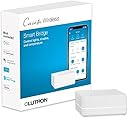
The Lutron Casรฉta Smart Hub (L-BDG2-WH) is a powerful, easy-to-install smart home controller that supports up to 75 devices. It connects seamlessly with Alexa, Apple HomeKit, Google Assistant, and more, using Clear Connect technology for ultra-reliable, Wi-Fi-independent communication. Manage lights, shades, temperature, and music effortlessly from your smartphone or voice assistant, creating personalized scenes and schedules to elevate your home automation experience.


| ASIN | B00XPW67ZM |
| Actuator Type | Rotary |
| Best Sellers Rank | #132,011 in Tools & Home Improvement ( See Top 100 in Tools & Home Improvement ) #257 in Dimmer Switches |
| Brand | Lutron |
| Brand Name | Lutron |
| Circuit Type | 1-way |
| Color | White |
| Compatible Devices | Amazon Alexa, Apple HomeKit, Google Assistant, Ring, Serena shades, Sonos |
| Connectivity Protocol | Wi-Fi |
| Connector Type | Plug In |
| Connector type | Plug In |
| Contact Material | Brass |
| Contact Type | Normally Open |
| Contact type | Normally Open |
| Control Method | Voice |
| Control Type | remote, voice |
| Controller Type | Amazon Alexa |
| Current Rating | 0.3 Amps |
| Current rating | 0.3 Amps |
| Customer Reviews | 4.6 out of 5 stars 1,884 Reviews |
| Global Trade Identification Number | 00784276099332 |
| Included Components | (1) Caseta Wireless smart bridge |
| International Protection Rating | N.A. |
| Item Dimensions | 37 x 75 x 119 millimeters |
| Item Weight | 0.5 Pounds |
| Lower Temperature Rating | 32 Degrees Fahrenheit |
| Manufacturer | Lutron Electronics Company, Inc. |
| Material Type | Plastic |
| Model | L-BDG2-WH |
| Mounting Type | Wall Mount |
| Number of Items | 1 |
| Number of Positions | 1 |
| Operating Voltage | 5 Volts |
| Operating voltage | 5 Volts |
| Operation Mode | automatic |
| Operation mode | automatic |
| Part Number | L-BDG2-WH |
| Specification Met | UL |
| Switch Type | Temperature Switch |
| Terminal | Screw |
| UPC | 784276099332 |
| Unit Count | 1 Count |
| Upper Temperature Rating | 104 Degrees Fahrenheit |
M**I
Highly recommend this hub
Works as described and easy to set up.
D**K
Eficiencia
El producto es bastante responsivo con Siri al igual que su aplicaciรณn, al presionar los botones o dar la orden a Siri no tarda ni un segundo en realizar el apagado de las luces, totalmente recomendable para aquellos que quieren tener un hogar inteligente.
E**E
Save energy. Works with HomeKit
I use the Lutron Castea system in conjunction with Apple HomeKit. They integrate seamlessly and easily while the combination allows a multitude of features. In addition, the Casseta Homebase network frees-up bandwidth on the 2.4Ghz band of my WiFi mesh network that would otherwise be taken-up by smart switches from any of the other vendors such as Kasa. Our four-story 3000sq.ft. townhouse functions nicely with a single Homebase connected via Ethernet to a Deco mesh node on the second floor. At first, I glossed over such features as adding remote switches and programming scenes via the Caseta app. Now I find they add tremendously to my home. For example, I have a Pico on the dining room table that adjusts all the lighting in and near the dining room for an evening meal with one touch. Same for the home theater; same for our primary bedroom at bedtime. I added a pico in the hallway using just a double gang faceplate on an existing single gang switch without any wiring at all. Now I can initiate the primary bedroom evening lighting scene - or turn on all the bedroom lights full strength - before I enter the room. There is even a pico with a built-in nightlight. If you have outdoor temporary lights, perhaps for the holidays, there are weatherproof outdoor switches you can program. All our permanent outdoor lighting is on the Caseta network for security and, of course, you can program switches for when a room is occupied via HomeKit. We also use the system for electrostatic air cleaners that help to keep our home dust and allergen free, turning them off when people are around and running them in vacant areas at night and when no one is home. As a bonus, energy bills have diminished a bit despite living in data center land. Take that AI.
A**W
Excellent bridge.
Got this to replace a Wink bridge after they, rather abruptly and rudely, swapped to a pay model. Unboxed, connected to my router (patch cable included) and downloaded the app while the unit powered on. Used the app to create an account, pressed the button on the back when prompted and my iPhone connected within seconds. At this point the firmware update installed and within minutes it was ready to go. I attempted to add my first dimmer and nothing happened. I tried a few times and with different switches still nothing. The app prompted that I might need to reset the switch since it had been connected with Wink. The method on the switch didn't work and I googled my issue. Instead of using the three taps on the "on" button hold and three taps I found tapping off five times and holding until the lights flash, then tapping five more time (each set of five in half a second or so) forced a factory reset. This worked for me. Once the switch connects the app asks where it is located (kitchen, bedroom, bath, etc) and what kind (pendant, ceiling fan, etc) and automatically groups them based off this info. I had all my 12 switches programed and operating with half an hour. Alexa integration was easy, Lutron is not a default app and you'll need to find it, once done it was only a matter of logging in. I found the voice controls react much faster than Wink, lights go on/off almost immediately where Wink took a couple seconds. Overall voice control feels way more professional and streamlined while Wink seemed more like a DIY patchwork. The app is very basic and straight forward although it is customizable. Controls mimic the style of the physical switches you tap the switch you want to control and a "switch" pops up and slide your finger up/down for dimmers and tap on/off, I like the Wink style of a group of circles with title much better and it allowed me to easily control multiple switches.
P**O
Muy bien
Funciona muy bien con HomeKit
Trustpilot
4 days ago
1 week ago