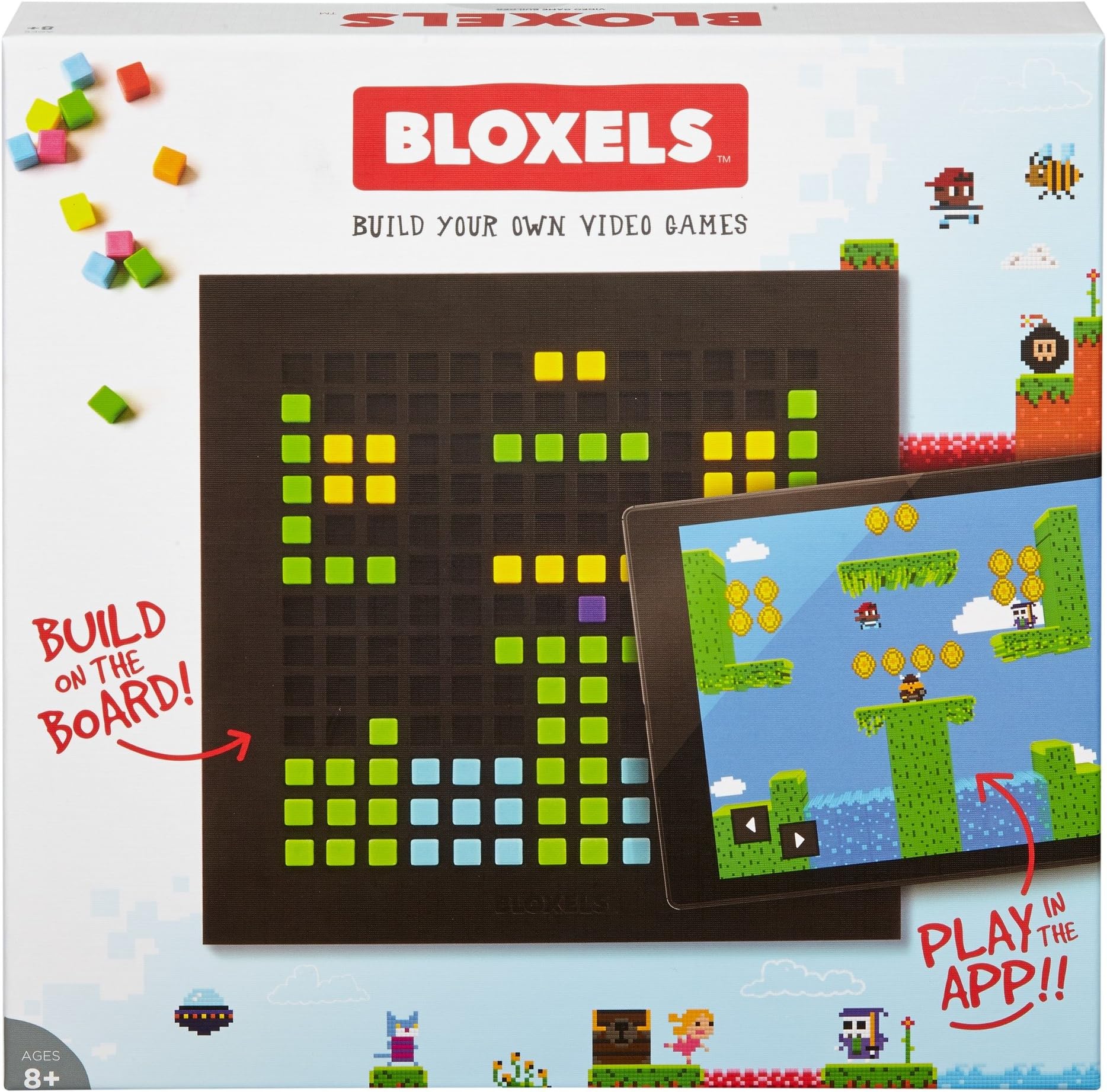
Mattel Bloxels Build Your Own Video Game - Discontinued from Manufacturer
Product ID: 33044705
🎮Hands-on game creation
📱Free companion app
🟩320 colorful blocks
🕹️ Level up your creativity—become the game designer everyone’s talking about!
Mattel Bloxels is a discontinued yet revolutionary video game creation platform combining physical blocks and a free app to empower users aged 8+ to design, digitize, and share custom pixel-art games. Featuring a 13” x 13” gameboard with 320 color-coded blocks, it transforms hands-on creativity into playable digital worlds, fostering a vibrant community where creators can trade and remix content. Ideal for aspiring game developers craving a unique blend of tactile and digital innovation.
| Best Sellers Rank | #370,749 in Toys & Games ( See Top 100 in Toys & Games ) #9,524 in Board Games (Toys & Games) |
| Brand | Mattel Games |
| Customer Reviews | 4.0 out of 5 stars 2,758 Reviews |
| Genre | Video game |
| Global Trade Identification Number | 00887961481143 |
| Number of Players | 4 |
| Publication Date | August 9, 2017 |
| UPC | 673681780969 887961481143 |
R**L
So much fun, it's hard to put down!
I first saw Bloxels at a Mini Maker Event with my 8 year old and got very excited to get it for him for Christmas. I love the concept of being able to make your own video game, all on your own, complete with your own characters and villains. I also like the fact that it simulates the old school video games. We went through the challenges after Christmas and he was able to complete it with no issues. What I thought would probably be one of his favorite gifts was not so. It actually became one of my favorite gifts. He hasn't taken to it yet and isn't interested in even starting his own game. However, he will happily play the games I create. I got a bit confused when I started to build my game. But after that, I understood the steps and my games have been improving. I have to admit, I'm a bit addicted to this app. Many things such as characters, animations and props can be made/built directly on the app. However, if you want to add "brains" to the enemies, such as the size, power, coins collected when defeated, etc. that needs to be built on the board. And YES, you need a tablet to play and build. I believe you can also use a phone but the screens would be too small in my opinion. I do agree that the photo capture functionality needs some work. Most of the time it doesn't capture the correct block color. There's an adjust functionality after you capture the photo to adjust the color of blocks and sometimes that works but a lot of times I have to retake the photo over and over again. So now I only use the board to add brains to the enemies I create. I read in the reviews that other buyers found there aren't enough blocks in this set. This is a starter set and you can buy additional blocks to add. However, I find there is enough to build characters and props for my games. If not and you need more blocks you can capture your photo then go in and edit and add the additional blocks in the app. If your child is really into programming, coding and building their own games I would definitely recommend this. If they are only interested in playing video games, like my son, then maybe not so much. I think perhaps when he's a little older he may be interested in creating his own game. I would say the age group would be 8+
K**Y
Ingenious use of tools to spur creativity
Excellent Technology based activity for kids. It is even fun for me the adult who bought it. There is a learning curve to using the blocks with a tablet and setting up a game world. The worlds themselves are extremely versital and can be created however you can imagine it. The downside is that the lighting has to be just right for camera recognition to get the colors of the blocks right. That is important as the colors map out what the surfaces in the game are: solid ground, water, fire/lava, exploding blocks and so on. Also, making use of the vast array of user created content is a challenge as there are so many options and choosing what is needed is tough. Finally kids will need parental help initially working out which template to use: gameboard, character, background. It is fun and worth the initial effort
A**E
Fun and Challenging!
My boyfriend and I got this for his nieces (7 & 10). Pros: Once you get the hang of the app this is a really fun game. It allows for a ton of customization and lets kids take on different roles in designing and building a video game. Planning out levels, designing characters, adding stories, etc. Honestly, I think this would even be a fun project for adults. Extra perk - the board makes it so that two kids can easily work together on a game simultaneously (i.e. one kid designs a character on the board while the other can design a room directly through the app). Once I explained the basics of how it worked the 10-year-old was designing her game with minimal issues. Cons: The app is overwhelming a little overwhelming at first. It's probably too much for most kids to figure out on their own, and might be a challenge for non-tech savvy adults. It's also unclear who the instructions and app are geared to. The visuals make it seem like it's explaining directly to children but the word choice is distinctly more mature (most 8-year-olds aren't going to intuitively know that to set options for a given block they should click on the "configure" button). Other commenters have noted this, but you need a decent camera for the app to work smoothly. I tried it on both a Galaxy 6 phone and an iPad 1, and while it worked perfectly on the phone, the capture ability on the iPad was shockingly bad. This isn't a total dealbreaker though because you can manually correct the image through the app if your photo isn't exactly right. The sheer amount of options makes the game really cool, but also more complicated than is necessary and I think it might benefit from having two settings that vary in complexity. For example when you design a character, you're asked to create an idle, walking, and jumping character with a few frames for each. If you only design the idle character then it will disappear while walking and jumping. This is a great learning opportunity for older kids, but might be a bit too much to keep the attention of younger ones. Overall I think this is an awesome game and totally worth getting if you're a tech savy parent or have an older child.
P**M
Could have been spectacular. Instead, merely "pretty cool."
This was a gift to the kids last year for the holidays. A year later, I can write an informed review. This is a *really cool* product in concept and potential that is somewhat less cool in actual execution. First, the great: - Tons of room for creativity - Really gives kids a project to get involved in - Really gives kids a sense of confidence - Lots of fun when things are rolling well Now, the less great, which have to do with the technology interface: -(1)- We have been generally unable to make the tactile part of this work—the actual putting little blocks into the grid. The problem is that the app relies on a phone or tablet's camera to capture images of the board as you lay out the graphics—and it invariably gets all of the colors wrong. Greens turn into blues, blues turn into purples, and so on. We have tried it on two different Android tablets (a Samsung Galaxy Tab and a Kindle Fire) and on an iPad Air. Basically, the image processing in the app just isn't sophisticated enough to deal with average lighting conditions and average tablets. Perhaps if you have a spectacularly high-end, recent tablet or really neutral, well-controlled lighting your experience will be different, but for us it's three tablets, in sunlight, ambient room light, lamp light, and multiple different rooms and... bupkis. Happily, you can just lay out the graphics in the app yourself without having to use the camera and the blocks. But that removes a bunch of fun from the start. -(2)- The app (especially onboarding) is buggy. You know how some apps and services sort of "get lost" as you sign up if one little thing doesn't go quite right, and then you're trapped in a kind of never-neverland where it's asking you to do things without giving you a way to do them, or removing options that should be there based on your not having completed steps that it never gave you the chance to complete and so on? Yeah, we had that experience each time we tried another tablet. It just doesn't go smoothly. There's a lot of "hmm, try tapping that" and "but it says we have to..." and "I don't see that option..." and so on. -(3)- The app is not intuitive and not well-documented. The kids eventually got there between exploring and reading and so on, but it took a while. If your kids are not absolutely dedicated to figuring this out and making it work, I can see how it might turn into a "can't figure it out now, maybe I'll come back to it someday" kind of toy. -(4)- The app is *heavy* in its resource usage. It stresses our tablets—all that we tried—right to the limit, resulting in lags, some UI weirdness, and a lot of used space. I get that this is probably just par for the course given the features (especially the social gaming features) they're offering, but that also takes some of the fun out of it. Sometimes the kids just get frustrated with the lags and so on and move on to something else. All in all, given the price and the ultimate potential over time, and the eye-opening concept that "I can build a game!" I'd say that it's worth the buy for the right kids. They should be: - Bright - Motivated - Patient - Creative - Self-directed But it's sort of a shame that this isn't a "knock it absolutely out of the park" product because it feels like one of those products that had the absolute potential to be, but was maybe just let down a little bit by trying to do too much and/or getting just a little bit sloppy about releasing without being ready. Three stars and a "recommend with significant caveats."
J**I
Both editions are great education tools.
I first saw the Star Wars edition at a local discount store. When I saw it, I was so excited at the concept. Being a former programmer, I bought it right away even though the kids weren't excited about it. After we opened it, both of my 8 years old twins understood the concept right away. No guidance from me necessary. After two full days of playing the game non stop, I bought them the Original edition which is a lot more customizable. We had to watch youtube videos for guidance. The boards from the two editions are not interchangable, ie, the original Bloxels app will not capture images built on the Star Wars board and vise versa. I don't mind having to buy both, that gives us twice as many blocks so we are not limited to 40 of any color. True that you do not need to use the board to design characters but I prefer the physical board over designing on screen. The boys seem to have more trouble capturing the game board in both editions than I do. I don't know if their hands aren't as steady as mine or I have a better sense of the distance, angle and lighting that work best. If they have trouble capturing the game board, they will hand the tablets over to me. I can always capture the game board eventually. Sometimes it takes a good 15 seconds of trying different angles and distace to work. I found that it works best during the day time if the room gets good sun light but not under direct sun light. At night, it is a lot harder. We only try to capture the board during the daytime. We tried both apps on two iPad Air 2 and an iPad Pro 10.5. I do not see any performance difference. I have been looking for an easy entrance to get the children interested in programming, at least abstract thinking in general. Both Bloxels apps fit the bill. Even though the app has a few glitches it is not to the point of unusable, the concept is very good that I am willing to ignore the flaws.
A**Y
Probably for Older Kids. Horrible Instructions.
I really think everyone writing these 5 star reviews was given the product free because this is not a 5 star product. I have triplet 7 year old boys who are great at video games- they have figured out how to play all of them on their own. Minecraft, Skylanders Imaginations, Lego Dimensions, Mario Maker and all the other interactive Wii-U games. They build masterpieces following Lego instructions. Bloxels has them stumped. The instructions are horrible - I wouldn't even call them instructions. They are more like a brochure. They have figured out how to do a few things that keep them entertained for about 10 minutes but no where near the depth that this game advertises. **Updated - we tried to find tutorials on how to really use this to get the most out of it and there aren't any that we could find tailored to kids. I feel bad about my one star review because I am sure the people behind this worked hard on it and it has so much potential. My advice to them if they are reading all these low reviews rolling in after Christmas is this - Hire someone with experience to write your instructions for you. A step-by-step guide. When you say things like "on the configure screen," have a picture of the screen with a big circle around how you get to that screen. The instruction booklet does not need to "sell" the product or look fun - it needs to be clean, easy to follow and detailed. You could release this updated booklet on your website and include it in future packaging. Look forward to getting more acquainted with the product and will update review as necessary.
B**L
Coolest Gift I've Ever Purchased
I bought this for my 9 year old son and another one for my 9 year old nephew. They both LOVE this game. It's so creative and challenges them to think of interesting scenarios and how to problem solve for their character. I've even played it myself and will happily admit how quickly it captured my attention. Definitely the best game I've ever purchased for any kid. I do suggest that this game is enforced as a table top game only. My nephew tried to play with it on the couch and tipped the box over and the tiny little blocks went everywhere. Now there is a firm dinning or coffee table only rule.
J**Z
We are HUGE fans! Better than I thought!
This "game" is the coolest! I bought this for my 5 year old son and he loves it! It can be as simple or elaborate as you want it to be. We build a couple characters and imported them into the game... it's so neat seeing your creation come to "life!" He usually likes to just use characters he made on other people's video games, which you can access through an online community built into the app. But you could get as detailed as you want to; create textures for the ground and import them, make huge levels, design traps, bad guys... it's really impressive! A huge win for any video game enthusiasts, future coders and dreamers alike.
G**.
Para niños creativos y tecnológicos
No parece tan divertido, a mis hijos (8 y 6 años) nunca les llamó la atención la caja, varias veces se los mostré en la juguetería sin éxito, pero cuando lo recibieron como regalo les fascinó porque les permite crear sus propios personajes y mundos de videojuego 👾 Pixel por Pixel y crean los cuadros de movimientos que tendrá de una manera muy intuitiva.
M**E
App ook betalen
Precies zoals op de foto. Maar als je het spel wil spelen op de tablet, moet je ook nog de app betalen. Dit is eenmalig, maar kost wel weer 20 euro! Dit valt flink tegen!
V**N
Cool product
Cool product! Good for kids!
L**E
Hours of fun!
we had purchased this for our 10 year old to play with. Turns out to be hours and hours of fun! The child can draw with with the cubes various characters and game items. Then take pictures and import their creations into the game and then instantly becomes playable! They were so excited to see their creations come alive and be used in a game! Awesome product and would buy again 5/5 stars!
M**B
Hours of entertainment!
Highly recommended. My 10 year old daughter has thoroughly enjoyed experimenting with the different features in the app and building, uploading and playing the games she has made. She has taken great enjoyment in checking how many others have played her game too! She used the game board to begin with, designing her first room layout and character, but as this feature is also within the app she quickly found that she preferred using this rather than using the physical game board and blocks - so although this is a great idea, in practice I have found the physical element of the game board and blocks to be redundant.
Trustpilot
1 month ago
1 month ago