We remain fully operational. Our teams are working around the clock to ensure your deliveries continue safely.

DOWNLOAD THE APP


Copyright © 2025 Desertcart Holdings Limited
DOWNLOAD THE APP
Buy anything from 5,000+ international stores. One checkout price. No surprise fees. Join 2M+ shoppers on Desertcart.
Desertcart purchases this item on your behalf and handles shipping, customs, and support to USA.
🎮 Elevate your desk game with the keyboard that adapts to you!
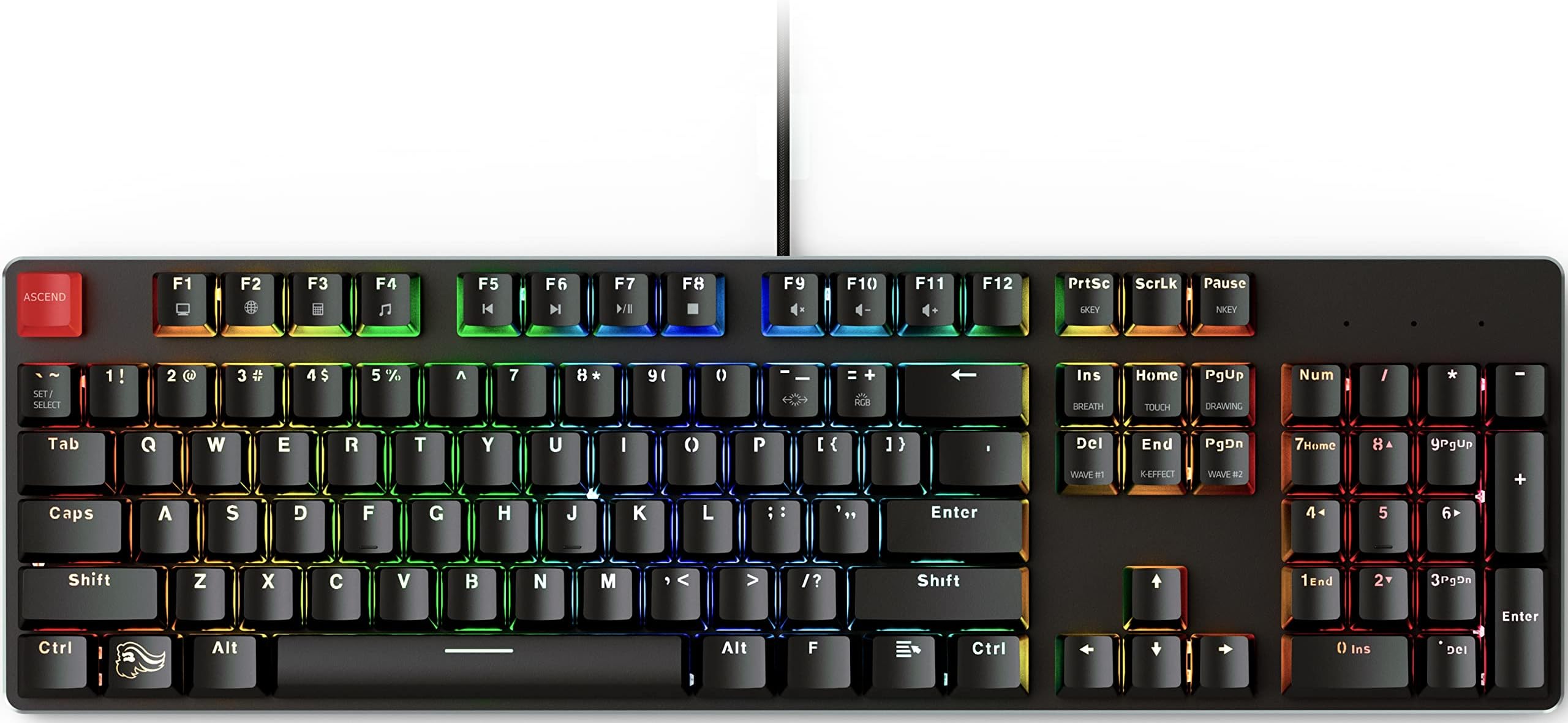
The GLORIOUS GMMK 100% is a full-size, USB wired mechanical keyboard featuring hot-swappable switches, per-key RGB lighting with 16.8 million colors, and a robust aluminum top plate. Pre-installed with quiet tactile Gateron Brown switches, it offers ergonomic design with adjustable angles and broad OS compatibility. Perfect for gamers and professionals seeking a customizable, durable, and stylish keyboard backed by a 1-year warranty.











| ASIN | B01D8YNJH0 |
| Additional Features | Modularity, Customizable RGB lighting, Full-size layout, Aluminum top plate |
| Antenna Location | Gaming |
| Best Sellers Rank | #56,672 in Video Games ( See Top 100 in Video Games ) #2,639 in PC Gaming Keyboards |
| Brand | GLORIOUS |
| Built-In Media | Hot-swappable switches, Pre-installed Gateron Brown Tactile Mechanical switches, Keycap puller, Detachable USB cable |
| Button Quantity | 104 |
| Color | Black |
| Compatible Devices | MacBook, PC, PlayStation, XBOX |
| Connectivity Technology | USB |
| Customer Reviews | 4.4 out of 5 stars 565 Reviews |
| EU Spare Part Availability Duration | 1 Years |
| Enclosure Material | Acrylonitrile Butadiene Styrene, Metal |
| External Testing Certification | Não aplicável |
| Global Trade Identification Number | 00857372006198 |
| Hand Orientation | Ambidextrous |
| Item Dimensions L x W x H | 17.3"L x 5.1"W x 1.4"H |
| Item Type Name | mechanical Keyboards |
| Item Weight | 907 Grams |
| Keyboard Backlighting Color Support | RGB |
| Keyboard Description | Mechanical, Gaming |
| Keyboard Layout | QWERTY |
| Language | English, English |
| Manufacturer | Glorious |
| Model Name | GMMK-BRN |
| Model Number | GMMK-BRN |
| Number of Keys | 104 |
| Number of Sections | 1 |
| Power Source | USB |
| Processor Count | 1 |
| Recommended Uses For Product | Gaming |
| Special Feature | Modularity, Customizable RGB lighting, Full-size layout, Aluminum top plate |
| Style Name | Black |
| Switch Type | Tactile |
| Theme | Gaming |
| UPC | 857372006198 |
| Unit Count | 1.0 Count |
| Warranty Description | 1 Year Limited Manufacturer Warranty |
| Water Resistance Level | Not Water Resistant |
R**.
Perfect keyboard for me, Absolutely stunning! #GabeN is a superhero!
I love this Glorious Gaming Keyboard! I am new into the mechanical keyboard field, but I am glad I chose a board with high build quality such as this and one that allows you change out the switches. You can purchase additional Gateron SMD-LED, Cherry RGB, Kailh's, and I heard some other switches worked as well. 3-pin plate mounted switches, but even PCB would work with minimal modding. I was looking for my perfect keyboard, but that honestly hasn't dropped yet. I was looking for one that is RGB / Standard 104 keys / Swappable Switches / Waterproof. It's not out yet, but it will be eventually. This is only Red LED's, but has many cool options and effects you can play around with! The people who told you about mechanical keyboards will love this one! I can't wait for the next product that Glorious Gaming will release! They are manufactured in America, maybe the parts come from elsewhere, but you could've fooled me with how well-built this keyboard is, and It's only going to get better from here. Negatives about this keyboard, but not deal breakers for me: -Some have complained about the side of the keycaps being glossy and easily scratchable when using the keycap puller, but you just need to use care when pulling the keycaps off, and you could really do it without the puller. I recommend to purchase a wire keycap puller for this issue. Besides that, the keycaps feel great, and are amazing to type on! - I came from using a typical membrane keyboard. -No RGB options yet, but I hear that might change in 2017! -No TKL, but again, I believe they will have one ready soon. -No Detachable USB cable, but otherwise the quality of the USB cable this board comes with is outstanding, and I can see it lasting for years. -Not Waterproof, but I am just being a little picky here, but man.... that would be sick! Overall, I think I may need to purchase another one for work...
T**B
Hotswappable Mechanical Keyboard
Excellent Mechanical Keyboard that is only made better by giving you the option to swap out switches. Comes installed with Gateron Brown switches, a responsive tactile switch that isn't overly "clicky" and still has a nice responsive feel. If Gateron Brown Switches aren't your thing its easy enough to swap them out for switches of your liking. For the price it is a nice keyboard, well made with aluminum housing, no flex, braided USB cable, and no gimmicky features that you don't need in a keyboard. RGB is tastefully done and easily changed. Keycaps are serviceable and will get the job done, they have a nice feel to them, and like the switches are easy to change if you prefer a different style. I appreciate the media keys and as well as the "my computer", "calculator", and "internet" buttons (function key + F1, F2, or F3). If you are looking for a mechanical keyboard and aren't into the keyboard modding scene then I can see no reason to buy a different mechanical keyboard. This will do everything you need and if there is something you don't like it easy enough to change it. If you are new to keyboard modding this will make an excellent entry level board to get started. Being able to hotswap switches is a really nice feature, especially if you aren't sure which switch you prefer. If I had one complaint it would be that the USB cable isn't detachable like the ones on the smaller boards offered by GMMK. Great board at a great price. If you purchase this I would highly recommend the wooden wrist rest by GMMK to go with it, it is super comfortable and looks great as well.
S**8
Solid Keyboard that feels well built and is responsive without being noisy
I have never modded my keyboard before, and to be quite honest, I will probably experiment with the switches in this keyboard at a much later time. My review is of this keyboard as it arrived. Quite honestly I'm blown away. I didnt expect the build quality in this keyboard to feel so solid on a $109 keyboard. Because for the most part when you buy into a mechanical keyboard it will be pretty expensive, depending on the brand. This keyboard feels heavy, and solid. When I placed it down on my desk, It didnt move at all as I started typing and using it. My previous keyboard was a Corsair K-70 Red, and it was noisy. I feel I get a better travel between the keys in the GMMK keyboard with barely any noise. I am no longer into professional gaming, so for me the switches that came default with my keyboard feel decently good and althought I might experiment with switches at a later time or add 4 switches for WASD at a later time, its not going to be for any need, and more to experiement. Something i have to agree that I have read in other reviews is that the letter format in the keys is different and rather weird, and some of the symbols looks a little bit strange, but nothing that would be super confusing. I may at a later date change them, but for now the keys feel ok to the touch and after you have used a keyboard for as long as I have, you dont look at the keys too much and as long as your hands fly over the keybord you wont really read the keys... The lighting in this keyboard is superb. Something I like is that this keyboard offers no gimmicks and no extras, there is no volume keys (other than the ones that you can activate via Fn keys... I liked a lot that I was able to independently colorize the keys i needed the most so they are always the same color, while the rest of the keys are another different color. The software you use is nothing out of this world, could be better so to speak but for what it is and it does its work just fine. For $109 you are not going to find a better keyboard and even better one that is compatible with a large variety of switches and keycaps. I am quite happy with it...
D**U
Great keyboard, but not perfect.
This keyboard is surprisingly good, but has a couple of flaws that I would like to highlight at the end. First, the good. The feel of the keys is outstanding, even for ABS keycaps. They have a subtle texture that is nice to touch that doesn't feel as sterile as a more smoothly finished surface. I am generally a fan of brown switches (quiet tactile) and the included Gateron Brown switches are perfectly solid. The switches themselves don't make much noise... most of the typing noise comes from the keycap bottoming out, so depending on how hard you type, you will experience more or less typing noise. The downloadable software allows you to change the polling rate from 250Hz up to 1000Hz. It came out of the box at 250Hz. It also allows you to change the backlight color scheme however you want, whether you want each key different individually, or just want to use the default color schemes that are included. Two flaws, however, one fixable and the other... not so much. First, as you can see in the photo, the formation of the legends appears... incomplete. You can see especially on the @ and the #, they are definitely malformed. This isn't a huge deal, but it just feels unpolished, and will be a non-issue for those of you who intend to replace the keycaps anyways. Because of this, I'm probably going to look at a solid double-shot PBT keycap set sooner rather than later. The second is that while the keyboard software allows you to set three different profiles for the backlight, you cannot switch between them without using the keyboard software, i.e. you have to launch the software every time you want to change it. There are no hotkeys or key combinations to change the profile. You can change the color scheme among the defaults with key combinations, but not any custom lighting you may have defined within the profiles. This seems like something of a overlooked item on the part of Glorious... not a huge flaw, but definitely inconvenient, and based on what I've read, not something they seem interested in addressing, as the software for this keyboard is older than the software for the GMMK 2 and Pro. I also wish the USB cable was detachable, and that there was USB passthrough, but that's just nitpicking at this point. Solid keyboard, otherwise, and a great value.
B**D
Great Keyboard, Impossible to Beat for the Price
I received a defective keyboard, it would constantly reboot probably because amazon packed it in an oversized box with no padding. I ordered another directly from glorious and that one worked perfectly fine, and was the same unit as far as I can tell (except barebones version) The keyboard is top notch and beats almost every mainstream keyboard, even the ones that cost significantly more. The RGB is bright and has a good variety of colors, the switches are mounted to a solid aluminum plate, the bottom is grippy and doesn't slide around. All in all you can build an awesome keyboard for not a lot of money with gmmk. The bottom shell is plastic and only the top plate is metal, but honestly I find that the typing experience isn't worse than my $200+ drop ctrl, it might even be more pleasant because plastic handles sound deadening a little better than aluminum. There's no flex and it grips to the desk well so I don't think anybody would complain about the plastic base at this price point. The stabilizers are not good out of the box, but because this is a modular board they can pop off easily without any tools, I found them simple to remove just by pressing the tabs. Once removed you can band-aid mod, clip, and lube them for barely any cost - a couple bandaids and some $3 dielectric grease. Absolutely massive difference after modding the stabilizers, they have absolutely no rattle and feel and sound incredible. Since this is a modular board and these mods take at most a half an hour - no complaints with that. Overall it's a great board, if the full sized one had a detachable USB C it would be pretty much perfect in my eyes, the latest model of tenkeyless and smaller do have it - so maybe consider one of those instead if you need that.
P**E
Wonderful quality, wonderful price. Perfect.
If you are the kind of person who wanted to try different switches by different makers without having to get lucky in finding a reasonably price keyboard that fits your interest, this is the perfect keyboard. The red lighting is my personal choice, so if that is not the color you like, then you won't like this keyboard. The different effects are fun to play around with and are nice to have there, but are nothing that will sell this to a person on the fence about buying a mechanical keyboard. What will sell this to anyone interested is how simple it is to change switch types. Changing out the switches to something different is as simple as removing the key caps on any standard mechanical keyboard (it comes with a key cap puller and a switch puller). Everything about what this keyboard stands for is wonderful! The zero branding is perfect for me. The build quality of the base is fantastic. It's heavy enough that it won't move when I type or game, but light enough that it isn't cumbersome to move around my table top. As someone coming from Cherry Black switches, the light presses needed for the Gateron Browns this ships with was a bit of a change, but that is in no way a reflection of the quality of this keyboard or Gateron, just new to me. If my hand were forced to giving a negative, I'd say it's the key caps that this comes with. The font is not my favorite and they feel a little light. BUT, I would never consider lowering this rating from 5 starts just because of the caps. With how flexible mechanical keyboards are when it comes to the caps in the first place, this "issue" is a really really small thing to nit-pick. This keyboard really is the future of how mechanical keyboards will be made.
D**A
Damaged Keycaps
Overall, the keyboard is good. Sounds nice, looks nice, has some cool options for RGB lighting that you can change on the fly, but as a gamer, I have a problem with the Left Shift key and Enter key. The outer posts for the Enter key cap chipped at some point three months in. For the most part, the key is still useable, but there's a chance of it slipping sideways and falling off. The Left Shift key meanwhile needs to be pressed in the center of the key. Seems like a minor detail, but when you're gaming, your pinky may not always be in the very center of the key. Often, I'm pressing down on the edge of the key which doesn't register as a press on the key. When gaming, pressing a key and getting no response can be extremely irritating and can get me killed! It's just as frustrating when typing and I can't capitalize a letter without having to stop and adjust my hand to press the right spot on the Shift key. Again, overall an okay keyboard, but I've never had another one near this price with two important keys being less than perfect.
A**N
I am pleased with this purchase but it does have some issues.
I actually really like this product. Has downloadable software on the seller site for the rgb, tho very vague in which version to download. I went with the "other" version, as the other serial numbers for software versions did not list my serial, and luckily it works with this board. Though to be fair the this software might ask to change your keyboard firmware warning was a bit scary, especially if I was downloading the wrong keyboard software and firmware, but it worked, so guess I dodged a bullet. Otherwise very customizable rgb via the software. Worst part about ordering this board on amazon and not the sellers site tho is that if you order the black on on the site, its fully customizable, including switch upgrades, keycaps, board size, but when you order it on amazon, its brown switches and brown switches only. I feel like they had a surplus of brown switch versions they needed to get rid of and they just dumped them on amazon. I ordered this before I knew you could get it on their site, and free prime shipping is what really made me order it, thought I think if orders are over 99$ on their site, shipping is free anyways, so not sure if thats really an issue, but as I said, I didnt know that before I got this keyboard. Things I would improve, the numpad stabilzer location. It comes with a switch remover but the stabs are very close together and angled with very little space to get into around the + sign and the ENTER key. It was hard to wedge in the provided switch remover to take them out, and I was unable to use my other switch remover to do this task, as you need a completely FLAT switch remover to fit into these very small clearance areas. I dunno if this is changeable but I would look into it. Its hotswappable so people are going to want to remove those switches, and man were they a pita to remove. I would also change lack of rgb lights when computer is turned off. My old keyboard and mouse both have lights when the computer is off, and both of the mentioned keyboard and mouse are from different companies, so its pretty easy to say that this is mostly a rgb standard among MOST companies, but NOT for this keyboard. Once the computer is off, keyboard is dead. There are no lights, no nothing, The lights themselves are not THAT bright. If you are using a keycap set that does NOT have see thru icon, then you will only get a light backlit rgb light, which isnt very bright. If you do use a keycap set that is provided with the build you will most likely either get the keycaps that have the see thru icons on them so rgb will be visible to see what the keys say, or you might also get the pudding caps which have the lower base white see thru bottoms that also show a lot of the rgb along with the see thru icons. Most keycaps in general tho do not have rgb icons and even the key cap sets they have that are on their site for sale do not have rgb friendly icons, though tbh they are fairly nice looking with gradient style colors. So just keep that in mind if you decide to swap out keycaps, cause you could be removing a lot of the rgb lights needed to make this keyboard look really cool. More about keycaps. These keycaps that come with the board have function key information built onto the keys. The board itself has some hard wired built in functions for rgb that you can use WITHOUT the software. Sure you wont be able to customize each key without the software but you can still use the function keys and pressing the right keys to input commands for the board to change colors and rgb style effects. BUT if you buy any other keycaps to customize the board, you will no longer have these marked labeled keys to know what to press to do what. You will be totally in the dark. The gradient keys offered on the site that they sell do not have any of the function commands printed on the keys for these keyboards. I know this cause I have them on this board. So the only way you will still know which keys do what functions is to keep the original keys or memorize it. There are two pages of commands for the function keys in the manual to tell you what keys do what, so good luck with that memorizing. Hope you really like those keycaps you are going to swap out for or at the very least you got the software installed and are set to use the board as is without wanting to change setting on the fly. If you take the board to another place and put it on another computer you will not have access to your saved settings either. You will have to use the function keys to really get any functionality out of the rgb settings, so having other keycaps on this board will be a problem. I have a mouse that has a usb mini drive that you plug into its wifi receiver that keeps all my stored setting in it, this might be an idea to implement with wanting to travel and keep your saved settings for your board at new location, but I dont know that they will really be so concerned to look into this. Maybe if it was for the smaller boards, that people travel with more, it might be something worth looking into. Or if you really were a rgb fanboy that wanted your board set up no matter where you went or go. Like to conventions or twitch cons, etc. then you might be more concerned with having saved settings at all time. Either way, its not currently an option to take your saved setting on your board. You can import and export your settings to the software, though there is no profile log in for specific users to access to save settings on a server or anything like that. But you could just reinstall the software on the new computer and bring a usb drive and import your settings? Wow just saying all that seemed like more hassle then I want to go thru for some rgb lights, so yea pass. I asked the companies discord chat where they say you can go for support, about this lack of rgb lights when computer was off, and was told that I didnt need lights when computer was off. Ok odd. Good to know you know what I need. I honestly went there just to find a hard answer of yes or no, if this was adjustable, I found neither of those. Most of the people responding to my question either ignored it or didnt know a hard yes or no as to why the lights were inactive, or if there was any way to activate them. Would be nice to know, hey this is deactivated for safety and not wanting the keyboard to overheat, or maybe oh there is a way to activate it, here do this. Or just NO its not possible, its hard wired into the board to NOT do this, but no, there were no answers, So dont hope for much support with this keyboard. But regardless of my complaints it does work as intended, and I do like the board.
Trustpilot
2 months ago
3 weeks ago