Buy anything from 5,000+ international stores. One checkout price. No surprise fees. Join 2M+ shoppers on Desertcart.
Desertcart purchases this item on your behalf and handles shipping, customs, and support to USA.
🚀 Upgrade your home network to pro-level speed & control — because buffering is so last decade!
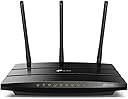
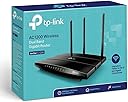
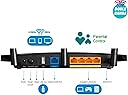
The TP-Link AC1200 Archer C1200 is a dual-band gigabit router delivering up to 1.2Gbps combined WiFi speeds (300Mbps on 2.4GHz + 867Mbps on 5GHz). Featuring four gigabit LAN ports, USB 2.0 sharing, guest network support, and advanced parental controls, it offers robust, reliable connectivity for multiple devices. Manage your network remotely via the TP-Link Tether app and enjoy seamless integration with Alexa and Google Home. Ideal for bandwidth-intensive streaming, gaming, and smart home setups.


| ASIN | B01IUDUJE0 |
| Antenna Location | Home |
| Antenna Type | Internal |
| Best Sellers Rank | #61,329 in Computers & Accessories ( See Top 100 in Computers & Accessories ) #1,461 in Computer Routers |
| Brand | TP-Link |
| Built-In Media | AC1200 Wireless Dual Band Gigabit Router, Archer C1200, Ethernet Cable, Power supply unit, Quick Installation Guide |
| Color | Black |
| Compatible Devices | Personal Computer |
| Connectivity Protocol | ethernet, wi-fi |
| Connectivity Technology | Wi-Fi |
| Control Method | Voice |
| Controller Type | amazon_alexa, vera |
| Coverage | Wide and extensive coverage |
| Customer Reviews | 4.2 out of 5 stars 6,824 Reviews |
| Data Transfer Rate | 1200 Megabits Per Second |
| Frequency | 2.4 GHz |
| Frequency Band Class | Dual-Band |
| Global Trade Identification Number | 00845973096052 |
| Has Internet Connectivity | Yes |
| Is Modem Compatible | No |
| Item Type Name | TP-LINK Dual Band Wireless AC1200 Gigabit Router, 2.4GHz 300Mbps with 5GHz 867Mbps, 1 USB Port (Archer C1200) |
| Item Weight | 0.5 Kilograms |
| LAN Port Bandwidth | 10/100/1000 megabits_per_second |
| Manufacturer | TP-LINK |
| Maximum Upstream Data Transfer Rate | 300 Megabits Per Second |
| Mfr Part Number | Archer C1200 |
| Model Name | ARCHER C1200 |
| Model Number | Archer C1200(US) |
| Number of Antennas | 2 |
| Number of Ports | 5 |
| Operating System | Windows 98SE, NT, 2000, XP, Vista or Windows 7, Windows 8/8.1/10 MAC OS, NetWare, UNIX or Linux |
| Other Special Features of the Product | WPS |
| Router Firewall Security Level | Basic |
| Router Network Type | Wireless Router |
| Security Protocol | WEP, WPA, WPA-PSK |
| Special Feature | WPS |
| UPC | 845973096052 |
| Voltage | 9 Volts |
| Warranty Description | 2 Years |
| Wireless Communication Standard | 802.11ac |
| Wireless Compability | 802.11ac |
O**L
Replacing my old router (which was "good enough" on paper but not in practice) cured all problems, super happy with this router!
UPDATE 2/7/17 - Still lovin' it. Just an exceptional, solid router that just plain works. Range is amazing, and it just delivers with a fairly complicated setup (again, I have Fire sticks, half a dozen tablets, multiple wireless desktops upstairs and downstairs, PlayStations, multiple IP cameras including one outdoors about 100 feet away from the router, you get the picture). THE ONE HANGUP I had was that it didn't have a dedicated WPS button; well, I was just flat out wrong. There IS a tiny WPS button on the backside right next to the base of an antenna next to the LAN ports. I'm used to seeing the button on the front of routers, and it is so small I just didn't see it on the back, and there was no mention in the basic documentation (but a helpful Amazon user found more info on the TP-Link website and let me know - thanks for that and thanks for reading my review!). ORIGINAL REVIEW: I recently gave Uverse the boot, and went back with Time Warner (now Spectrum). Uverse forced me to use their lousy router (replaced 5 times - don't even get me started - horrible couple of years). I also had a router that was about 5 years old (Cisco / Linksys), and so I figured I would be good to go. Well, performance of my IP cameras, laptops, and Amazon Fire Stick were not so great with my new setup. I figured it was Time Warner's fault, but decided to take a gamble and just flat-out replace my router. So I arrived on the TP-Link AC1200 due to the low price but high performance specs. And I have to say I am blown away with the performance. I have been running it for over a month, and not ONCE have I had a hiccup where I needed to reboot the router. I have now been able to easily do port forwarding for my IP cameras, and connect as many devices as I want, with zero issues. Even my Fire Stick now performs like a champ (almost zero hesitation, even running wirelessly in a bedroom about 50 feet from the router). The range is excellent, signal strength excellent, reliability excellent, and I'm thrilled. My ONLY complaint is that much to my surprise (and maybe because I still have a mindset and skillset more relevant to 2010?!?), there is not a dedicated WPS connection button. All of my IP cameras use WPS to connect, and so each time I had to open up a browser window, log into the router, and go to the advanced settings in the wireless screen to temporarily enable WPS. Not a show stopper because I rarely need this function, but it is a pain to have to go through those steps. Who knows, maybe that is a "security feature", but for me it is just a little extra trouble. Regardless, the incredible performance and stability of this unit has made it WELL WORTH the upgrade over my previous router which on paper still "should" have been good enough for my needs. Very highly recommended!
M**A
Excellent router and even better for the price!
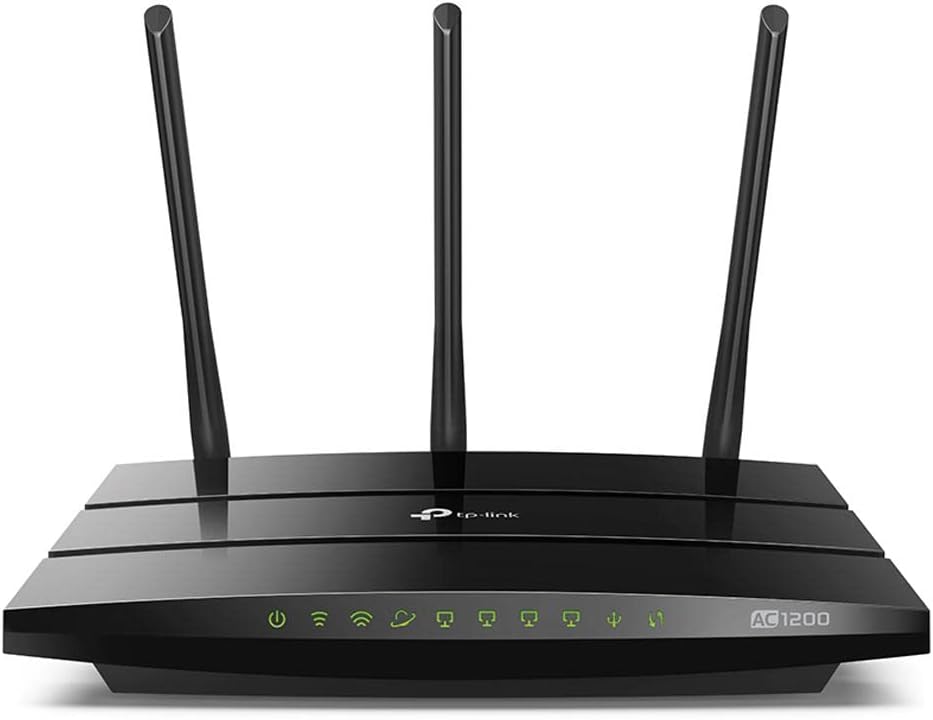
I bought this for my senior mother who had an old D-Link router that cut in and out. At least we thought it was the router and not her cable as Cox insisted it wasn't on their end. This had great reviews and my mom didn't need a lot of fancy stuff or a wide range so I picked this one. I'm really glad I did. The set up was easy and my mom doesn't even have a decent new computer. She uses a PC tablet but I set it up using my iphone. There's this Tether app that makes it really easy. I used the same network name and password from her old router but it offers a 2G and 5G network. Not only that but you get a guest network too. I didn't expect that from a router this economical. The Tether app even allows me to make changes from my home that's a whole state away from my mom's router. I can see if she's having problems from one state away. The other good thing about this router are the lights on the front. They light up for different things. For example, we couldn't get online for a few moments and thought "Here we go again--is it the cable or the router?" We looked at the router and the little symbol that looks like a satellite dish and says "internet" was red not green so it was the cable. This light makes it clear when the cable cuts out which I love. But the problem of it cutting out all the time hasn't happened and it's been 3 weeks so it probably was the old router. My mom doesn't use video streaming services--just simple wifi for her kindle, tablet and a Samsung smartphone but with myself, wife, and 3 kids using kindles, iphones, and laptops, it worked great. So it worked well with both Mac and PCs. When my Apple Airport gives out one day (and Apple has said they aren't making any more) I will most likely get a TP-Link router--either this model or the step up from it.
L**Z
Very reliable Wi-Fi Router at a good price
I stopped paying my ISP for their cable-modem and purchased my own equipment. This Wi-Fi Router really met my expectations in terms of coverage and reliability at a very good price. It is pretty easy to setup, it has worked OK so far to provide dual band signal in my 2 stories house with up to 6 devices connected at the time. Even the playback of Video services is good with no buffering at all. I highly recommend it for small to medium-size places. I'm removing 1 star just because the "TP-Link Tether" app is useless, it is not a big deal but only worked OK a few times and then just stopped connecting to the router. It is deleted from my phone now
R**S
Updated review. Changed from 1 star to 5!!! Go TP-Link!!!
Update as of 1.18.2018: Upon writing a review (1-star), I was contacted by TP-Link customer support with offer to resolve the issues outlined below. I ended-up creating an account on TP-Link technical support site and RMA this router to the company. The process was fast and easy. New router arrived with updated firmware. Old router put back in the box with pre-paid shipping label being already shipped to me with new router. The new router - NO ISSUES. FAST and FURIOUS just as it was intended. Across our 3,200 sq feet home steady speed of 100 mb/s, as supplied by our ISP. So, raising the review from 1-star to 5 due to company being proactive, fast at resolving issues and listening to voice of customers. I'm IMPRESSED!!! Original review: From super strong signal and reliable to ZERO reliability... Purchased in April 2017 and in less than eight months this router has become a headache. I work from home and being on 100 mb/s cable internet our journey with this TP-Link started well with strong 2.4 and 5G signals. VPN and a lot of web traffic - this router was pulling its weight quite well. About a month ago, the router restarted during one day 3 times on its own. Since then, it has never failed to restart every other day for no apparent reason. As I cannot afford dropped VPN or IM communication to wait until this router restarts - it has become completely unreliable. Contacted customer support via chat. The first thing they ask is to see what the requirements are on the power supply without asking if I am currently utilizing this connection or not. Without thinking - pulled the supply out to see what the numbers say and... internet is down with chat being disconnected. Contacted again via chat - staple questions if I am misusing this router, has it been dropped, etc. NO SOLUTION provided after 15 minutes of what it seemed this specialist chatting with others at the same time. Absolutely no focus on my conversation with delayed responses. I cannot recommend this TP-Link to anyone. Or this brand for that matter.
D**H
Can't Stay Connected - Poor Customer Service
I know this router has a lot of positive reviews but I had some issues with it, and if you would like to see more bad reviews just check out the reviews on TP-Link's website for this router, because it is only rated 2-stars there. First the Pros: Very easy to set up, basically plug it in, download their app on your phone, and follow the instructions. But that is about it. It has MAJOR CONNECTIVITY ISSUES. Mine would not keep a consistent connection to the internet for more than 5 minutes. On the front of the router there is an internet connection light. When it is green you are connected, when it is orange, there is internet but you cannot access it. It might stay green for 10 minutes if I was lucky before it switched to orange and I could no longer connect. I called my internet provider and they said everything was working properly on their end. I just bought a new modem right before I purchased this router, so I know it is not my modem. So before I decided to say this was a bad router I wanted to talk to their customer service to see if maybe there was something they could do. Well don't try to call their hotline, because you never get to speak to an actual human. It is just a recording asking you to press a number corresponding to your problem. I pressed 1 for router connection problems at home and it asked me to wait for the next available tech. By the way, they also tell you what number caller you are, I was #1, but I still had to wait about 10 minutes to proceed to the next stage. After the 10 minute wait, it is another recording choice, so I pressed a number again to tell them what was wrong, only it didn't work! The recording just kept repeating no matter what button I pressed, and then the recording just hung up. I tried this 2 more times with the same results. Terrible hotline service, no customer support. I had a Netgear router before this that worked perfectly for years. I only upgraded to see if I could increase my internet speeds a little. After I disconnected the TP-Link router and reconnected my Netgear from 2011 the connectivity issues completely went away. I am going to return this router and go back to Netgear. I do not recommend this product and will probably never purchase a TP-Link product again. I hope this helps.
B**N
Great and FAST
I did a bunch of research before I chose a WI-FI router and after a few hours of research this one kept coming up so I started researching this one specifically for an hour and I love everything about it. How it looks with its glossy surface, with those LED lights illuminated on the front of it giving it that advanced technological look to it! It's also super nice that it's level when you set in on a flat surface, not only that but the two holes on the bottom are a nice addition so later on I can hang it on a wall. The router is very solid and well made, so I wouldn't be worried if it fell. All three of the antennas can rotate and move in any direction so you can position them exactly how you want which is a nice addition. The setup for the router is super easy and took me five minutes and it was up and running. Having the 2.4 GHz WI-FI signal and the 5GHz signal is a huge plus, especially because one of my devices can't connect to the 5GHz signal. The range on the 5GHz signal is fantastic, going out of my house and still having a strong connection 50 feet away from the house. It's super fast and as a test for that I had 6 devices streaming youtube in full HD and it didn't even buffer. It handled it like it was nothing. The app setup is very straightforward with many helpful options and the app gets 5 stars as well. The controls on it are fantastic and having 4 output Ethernet ports is super nice! The USB port works great as well!
S**7
Looks as great as it performs. Great price for a dual band router. Happy.
AC1200 review. Paired this with the TC-7610 modem. Fanciest router I've ever owned. Was about to purchase a combo modem/router for a new living arrangement, but really happy I did this instead. I could tell I wasn't getting good wireless speeds with previous combo units I had used. Love the design. Really sleek and modern looking without being too over the top. I'm getting great speeds out of the lower tier 10mbps service I have for the time being. I'll admit, on my LG G4, using the 5ghz band, I'm a little surprised that around one small corner and through one bedroom door, maybe 15 feet away in total, I still don't get a full signal indicator. Maybe it's something more to do with the G4, who knows. Seemed like the 5ghz connection would drop every so often too, but again, that's something I read about happening on the G4. And I don't have any other 5ghz stuff to test right now. 2ghz band is working great for all my other devices. Easy setup, convenient management software. I like that I can turn off the LED lights. My first time using TP-Link and I'm really pleased. For $20 more than the Netgear combo I was going to buy, I have a full modem and router and no more low wireless speeds. Love the design and look of this router. I'm in a small condo right now so I'm not sure how well it would broadcast in a house. Hopefully I'll get to test that soon. As long as these products don't die soon or anything, I'm a totally happy new TP-Link customer. They seem to have a longer warranty than most others anyway, so I don't anticipate any problems.
C**B
Great router, good price
I bought this dual band TP-Link AC1200 wifi router to replace an older non-dual band TP-Link router, and the difference of performance is impressive. With the old router my wireless was horrible, but last night I tested it on my iPhone 7 and I got 261 mb/s down and 33.7 mb/s up. Now I cant speak for long term durability yet since I just received it yesterday, but as far as performance and first impressions and ease of install, I would easily give it 5/5 stars. My old router although not near as strong of a performer as this new one, did last for years and still works. So hopefully this one being the same brand will last too. Im even thinking about buying another one of these to use on the other side of my home to boost my signal over on that end as well since they are such nice routers. I will try to update this review on durability later if I can, or if I run into any problems. If you are looking for a strong performing yet easy to install dual band wireless router for a decent price, this seems to be a great choice. Recommended. UPDATE Out of the two of these routers I bought, the first one went bad. I was having a bad time with my internet acting up, dropping me out of games, videos, etc. Had to have 2 cable techs come out, and we finally narrowed it down to one of these routers. The other router seems good still, but this first one I bought is bad. I called Amazon already and they are issuing me a refund. I think I just got a bad one, and will reorder a new one of the same model as they perform very well normally. I will update this again later if I run into any problems. Lowered down to 3 stars until I have a chance to test out the replacement router once I order it.
J**E
Great router
I did a lot of research before buying these. After switching over from the standard Optus router I was using my speeds doubled on NBN, and with better wifi signal. I was lucky to get above 50mb/s before, now I consistently get 95-110mb/s. Easy to setup and use, no issues whatsoever. Wrote this review after daily use for 6+ months
R**E
empfehlen
wenn ich in China, benutze ich immer TP-link, das ist die erst mal ich kaufe in Deutschland die Wifi. alles in ordnung.
K**S
Speed of 2.4 Ghz is half the speed of 5 Ghz.
Earlier review 1: 1 star-I was very excited about this router but it came as a big disappointment. Router came with all other accessories as promised. Range is quite good. However it doesn't connect to the internet. I have ordered for a replacement of this router. Let's see if it works. Earlier review 2: Range looks good. However the speed barely crosses 50 Mbps (I hv a 100 Mbps connection) in 2.4 Ghz frequency band. It supports 100 Mbps in 5 Ghz. Good router except for that speed drop for 2.4 Ghz channel. I dont know why it is like that...Also surfinig is an issue. Set up was easy. I wasnt taking any chances this time. Present review: I am writing after 20 months of usage. Product is very good. Get good speeds in 5 Ghz. Worth the buy
J**A
esta bien
esta bien tiene buena relacion calidad precio
C**N
Çekim gücü çok iyi.
140m2 evin her yerinden 3 çubuk ve üstü çekiyor. Fakat dikkat etmeniz gereken tek şey 5Ghz de kullanmanız gerekli. 2.4 de çekim kayıpları oluyor. Çekse bile full hız da olmuyor
Trustpilot
1 week ago
4 days ago