


🚀 Elevate your workspace Wi-Fi — stay connected, secure, and ahead of the curve!
The Cisco Business 140AC 5-pack delivers enterprise-grade MU-MIMO 802.11ac wireless access points with 2x2 streams, 1 GbE port, and flexible PoE-powered ceiling or wall mounting. Designed for small businesses, it offers robust security via Cisco Umbrella, easy setup through mobile/web apps, and scalable mesh networking to eliminate dead zones. Backed by limited lifetime protection, it’s a reliable, high-performance solution to future-proof your business connectivity.
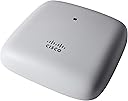



| ASIN | B087QTZL4Z |
| Antenna Location | Business |
| Antenna Type | Fixed |
| Best Sellers Rank | #122,297 in Computers ( See Top 100 in Computers ) #415 in Wireless Access Points |
| Brand | CISCO DESIGNED |
| Built-In Media | CBW140 Access Point, Support contact pointer card, Mounting bracket, Ceiling rail mount clip, Cat5 Ethernet Cable and Quick Start Guide |
| Compatible Devices | Cisco Business Wireless Access Points, Cisco Business 100 Series Mesh Extenders |
| Connectivity Protocol | Wi-Fi |
| Connectivity Technology | Wired, Wireless |
| Control Method | App |
| Controller Type | App Control |
| Coverage | Extensive coverage for multiple devices and users |
| Customer Reviews | 4.2 4.2 out of 5 stars (116) |
| Data Transfer Rate | 1 Gigabits Per Second |
| Frequency | 2.4 GHz |
| Frequency Band Class | Single-Band |
| Has Internet Connectivity | Yes |
| Has Security Updates | Yes |
| Is Modem Compatible | No |
| Item Type Name | Wireless Access Point |
| Item Weight | 372 g |
| LAN Port Bandwidth | 1 Gbps |
| Manufacturer | CISCO SYSTEMS - ENTERPRISE |
| Maximum Upstream Data Transfer Rate | 1167 Megabits Per Second |
| Mfr Part Number | CBW140AC-B |
| Model Name | CBW140AC |
| Model Number | CBW140AC |
| Number of Antennas | 2 |
| Number of Ports | 1 |
| Operating System | Cisco IOS |
| Other Special Features of the Product | Access Point Mode, WPS |
| RAM Memory Installed | 1 GB |
| Security Protocol | WPA2 |
| Smart Home Compatibility | Not Smart Home Compatible |
| UPC | 889728276030 |
| Unit Count | 1.0 Count |
| Voltage | 100240 Volts |
| Wi-Fi Generation | Wi-Fi 5 |
| Wireless Compability | 802.11ac |
C**K
This Access Point is awesome— this is the second one I’ve installed. They are pretty much plug and play with an excellent interface if you need advanced settings. These are smart enough to select different channels from each other. I have FIOS and seeing WiFi speeds over 300mbs. Excellent build quality and shipped with an excellent mounting bracket. This is a Poe device so must be used with either an injector or Poe router or a Poe switch.
J**.
Me ha costado trabajo su instalación y configuración, no es amigable.
M**I
I had comcast modem/router and the wifi was coming and going constantly. Then I bought Arris surfboard modem/router to replace the comcast router, and it works fine, except for WiFi. It is not stable. More stable that the Comcast router, but still disconnecting etc. Then I bought a TP-Link business grade WiFi Access Point to use for WiFi. It also would disconnect when both of my kids are in their school zoom sessions and I am working from home at the same time. Once or twice a day and almost always during my son's zoom :-) I returned the TP-Link AP, and bought this Cisco AP. Not a single problem!!! Easy to set up, connect, works like a charm, no disconnection. This is a week or 10 days since I bought it.
H**R
This thing is cool. Using this power-over-ethernet (POE) access point our wi-fi will stay up even when the power goes out. We create multiple network names (SSIDs) to isolate work/personal/streaming types of devices from one another. It takes 5 or 6 minutes for the AP to boot before you can connect to it, just keep this detail in mind when setting things up.
A**R
What a frustrating experience. No way to power the product without POE. Added IP injector, easy start guide says scan QR code which loads Cisco mobile app. No instructions how to set up. I picked new setup location, menu choices seem intuitive but will not allow me to check any boxes and continue. Called Cisco support for directions but they are unable to give me a support ticket unless I register at Cisco.com. Went to register, filled out information, it sends an access verification code to my email account but the website refuses to take the access code. Called Cisco back to find out what to do next: they are unable to help me and actually told me to contact amazon. All of this because they didn’t include instructions on how to set up their device. What a waste of a couple hours of my time. I’m returning this item: stay away from CISCO products.
Trustpilot
2 weeks ago
3 weeks ago