Desertcart purchases this item on your behalf and handles shipping, customs, and support to USA.
๐ Dominate your digital domain with lightning-fast, lag-free WiFi!
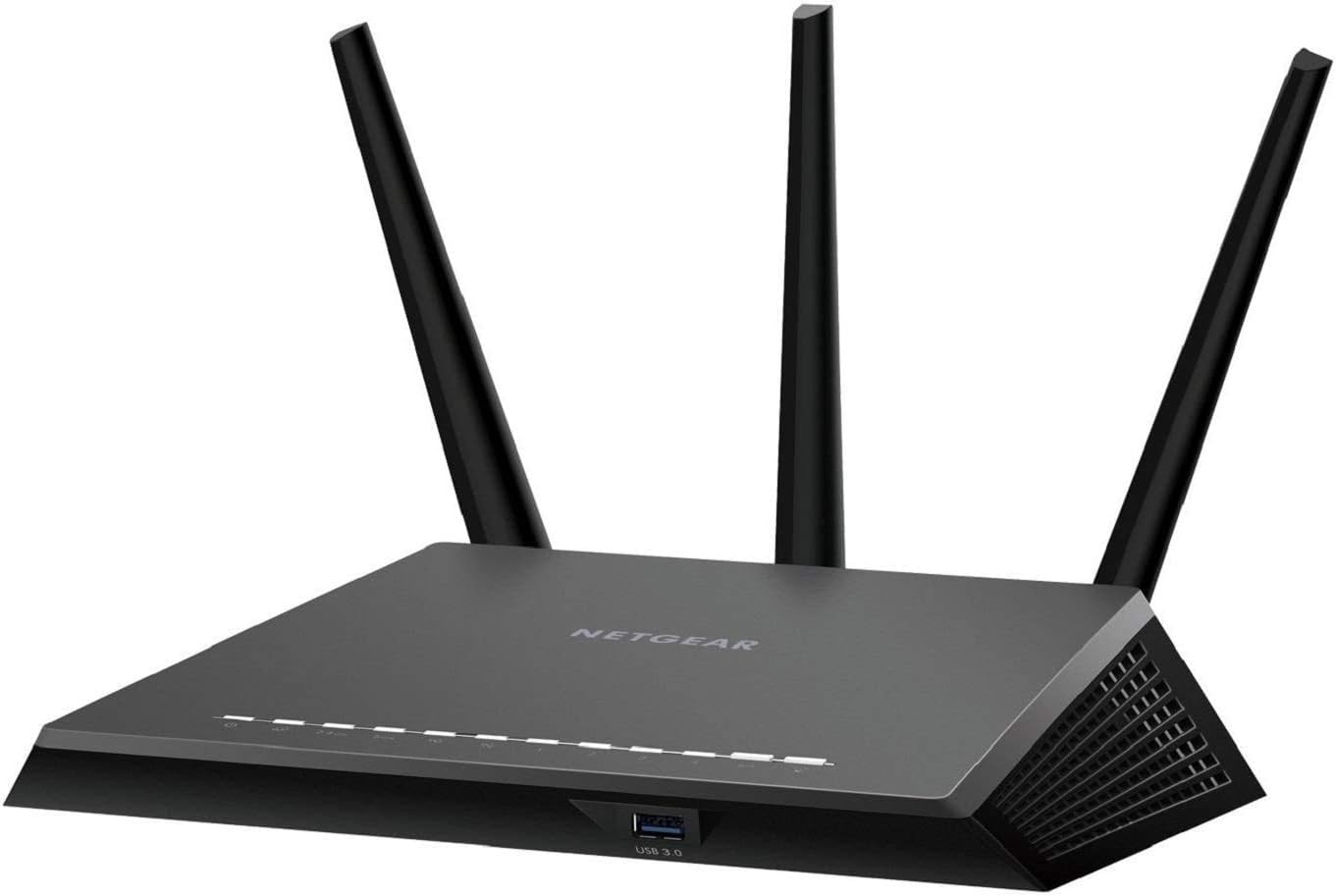
The NETGEAR Nighthawk R7350 AC2400 Router delivers ultra-fast dual-band WiFi speeds up to 2400Mbps, powered by a dual-core processor and advanced QoS for seamless gaming and 4K UHD streaming. Its high-power amplifiers and three external antennas provide robust coverage up to 2500 sq ft, while 5 Gigabit Ethernet ports and a USB 3.0 port ensure rapid wired connections and media access. Manage your network effortlessly with the intuitive Nighthawk App, making this router a top-tier choice for professionals demanding speed, reliability, and control.
| Antenna Location | Gaming |
| Antenna Type | Fixed |
| Asin | B082CCCQHH |
| Best Sellers Rank | #30,578 in Computers & Accessories (See Top 100 in Computers & Accessories) #816 in Computer Routers |
| Brand | NETGEAR |
| Color | Black |
| Compatible Devices | Smartphone |
| Connectivity Protocol | Ethernet, Wi-Fi |
| Connectivity Technology | Wi-Fi |
| Control Method | App |
| Controller Type | Android |
| Coverage | 2500 square foot |
| Customer Reviews | 4.4 4.4 out of 5 stars (2,208) 4.4 out of 5 stars |
| Data Transfer Rate | 2400 megabits_per_second |
| Frequency | 5 GHz |
| Frequency Band Class | Dual-Band |
| Lan Port Bandwidth | 10/100/1000 megabits_per_second |
| Manufacturer | Netgear |
| Maximum Upstream Data Transfer Rate | 1200 megabits_per_second |
| Mfr Part Number | R7350-100NAS |
| Model Name | R7350 |
| Model Number | R7350-100NAS |
| Number Of Antennas | 3 |
| Number Of Ports | 3 |
| Operating System | RouterOS |
| Other Special Features Of The Product | QoS, WPS |
| Router Network Type | LAN/WAN |
| Security Protocol | WPS |
| Unit Count | 1 Count |
| Upc | 606449144246 |
| Wireless Compability | 802.11ac |
User
Great Router
Replaced an old +10 yr old router that was only getting 15Mbps (out of the 100Mbps we pay for.) Now we are getting 40-45Mbps, higher if closer to the router. Old router was also dropping signal several times a day (very annoying.) Zero drops with the new router after about a week. Quite happy with the Nighthawk purchase so far.This router sends out 2 Wi-Fi networks: a 5G network and a normal one. The 5G sends out a faster speed but to a smaller area, so if you are having trouble with slow speeds or disconnects, check to see if you are on the regular network (which covers a larger area.) Netgear also asks you to use a mobile device to install the router, but there is an option to install the router if you don't have one available. Setup was not difficult. So far, so good. Thanks!
User
Good router when working
Wifi signal worked very well for 3 months but after that would not produce a wifi signal. Contact customer. They tried to help and after 4 hours the tech concluded that the router was not sending a wifi signal and agreed on replacing it but the company did not have one I stock and decided to give me an upgrade after I sended the old one back. The replacement arrived but it was the one I sent back to them. They mentioned that they would send out the rorrect one and they apologize for the delay. They wanted me to pay to have the same one I sent back already again a second time and because the mistake was thiers and it was not fair for me to have to send this old one back a second time. I did not get the replacement router from netgear. Customer service does not work they work it should. They will answer the phone but they will not honor thier customers at all. So they will try to get you to fill out a survey to give them a wonderful experience with andrhats when they will stab u in the back.
User
The best router EVER!
I don't know why several other reviewers were upset they had to create an account on the Netgear app. It did make me a bit hesitant buying the router but what the heck, I bought it, made an account, and I'm so happy with this purchase. I like being able to control, change settings, etc from the app, soooo easy! The range on this is excellent, I've walked about 150 feet from the router and never lost signal. This thing is unreal fast! Get off the fence and buy it you won't regret it!
User
Not as good as the predecessor.
I bought this to replace a Netgear R6300 that was having intermittent problems. Based on the reviews I had high expectations but I was a little underwhelmed. First off, aesthetically, it doesn't look nearly as nice sitting prominently in my living room. Second, setup is touted as being easy but I felt the whole process took longer than necessary and the multiple reboots annoying. Third, and most importantly, the signal strength/coverage area isn't as good as what I achieved with the R6300. I used to be able to pull into my driveway and in the few seconds it took to park and remove my phone from my back pocket, I would already be connected to the wifi. Now it takes several minutes for it to switch over. With the 3 exposed antennas, versus the internal antenna on the the R6300, I expected the opposite. All of that out of the way, it does its job. I have consistent 89+/- Mbps download speeds with occasional spikes to 215 Mbps via the data cable (my ISP says up to 60 Mbps with my package). The intermittent loss of signal are resolved. In all honesty, if I could find another Netgear R6300 or the equivalent I would choose it over this model but Netgear is no longer offering that style so this will have to do.
User
No Netgear Acct. Required
There are a couple of reviewers who say that registering with Netgear is required to set this router up. I can 100% assure you that is NOT the case. First of all, it's a great router. It's fast and has incredible coverage. What more do you want from a router? Now, if you use the automatic setup app, you might get prompted to set up a Netgear account. If you follow the instructions to access the manual setup screens using a browser, then you'll never see a prompt to set up an account. I've included a screenshot of the manual setup. You can see that it's well laid out and you can easily get where you need to be. If you look down at the very bottom of the screenshot you can see there's a link to "Documentation". Be sure to go there and download the PDF that's titled, User Manual. It's got 163 pages of detailed information for you so you can set everything up correctly. Get this router and use the manual setup, you'll be really glad you did.
User
Randomly drops internet, constant, unable to fix
So I purchased this product a few months ago... Netgear: lots of antenna, beasty looking, stats show good coverage for wifi. Should be a great product.I set the package up, plug and play super easy. Set up my networks. Added my devices. Tested and everything was working GREAT. Excellent coverage, excellent speeds, everything was as it should be.After a day, the internet signal went out. Ok, I reset the router. Still no internet signal... must be something wrong with ISP. Reset modem, problem solved.It happened again. And again. Internet connectivity goes out completely, doesn't resolve until I reset the cable modem. This happens after a half hour sometimes, other times it'll work for 6 hours. It happens completely randomly: during heavy wifi traffic, during no traffic, while streaming, while gaming. In the early AM, during peak hours, in the middle of the night. No pattern I've been able to discern.Thought that was weird because it was literally just working. I put the rental router back on, it works fine. THROUGHOUT THIS ENTIRE PROCESS THE OTHER ROUTER WORKS FINE.So I put the Netgear back on, and tried to troubleshoot it myself.Firmware updated.Full factory reset and reconfigure.Various manual settings changes (static IP, lower MTU size, etc), whatever I could find on the forums.None of it works. The router STILL drops internet, still completely random.At this point I contact Netgear support - who are SUPER NICE, I totally enjoyed working with support. They've been great, super clear, super helpful - well spoken. They've had great suggestions (most I'd already done, and did again), they had some new suggestions, all I've tried and STILL the router keeps losing that internet connectivity.So at this point I'm at my wits end... 1 star product.I would've really hoped this could have been a simple plug and play set up, good to go out of the box. I get SOME configuration, but the amount of troubleshooting for this product seems unreasonable to me at this point. I've lost my return window, my own fault... but I really did think I would get it to work.Beware lemons!! If it has this internet dropping problem BEWARE!
User
Overall I am very pleased with this router
The other customer reviews prepared me for the different setup approaches. I took the manual approach and it took a little more than 2 hours, but I am a computer programmer. I was prepared with my "junk email" address for the Netgear account setup. Also, if it says you need a firmware update be sure to do that because (it seemed to me) I couldn't get to the Internet without doing so. I also took others advice and made my SSID and security ID the same as my last router to minimize grief from all the many devices. Finally, when I unplugged the router in order to connect to my UPS it takes a bit for it to initialize (just like a cable modem would). Watch the indicator lights until they stabilize (or take a walk and come back later). But all these things I listed are just so things go smoothly for others, it's not like you replace a wireless router or have it lose power very often at all, right?The reason I am pleased is what others have reported: the range and speed seem great, having watched a lot of streaming TV this afternoon and evening. I also checked and have WiFi signal throughout our house and even out in the yard. The unit arrived quickly and the price was very reasonable. I followed the documentation link from the router admin page and downloaded a 163 page user's manual.
User
Net gear account NOT required
This is a good router with a lot of really excellent features. I have read the complaints about requiring a Netgear account to log in and I can assure you it is not true. Netgear's rather unfortunate insistence that you create a user account comes in the form of defaulting the local login to an online page, however this can e easily bypassed by simply disconnecting the WAN internet connection. First of all, connect and configure the router offline - that is, not connected to the internet via your cable modem - using the typical 192.168.1.1 gateway address and credentials supplied with the unit. Once configured you can connect the WAN port. Any time you need access to the configuration simply disconnect the WAN, log in, and reconnect. Your session will remain active until you log off or reboot. It is really too bad so many people have been scared off by Netgear's tactics - they are missing out on what is otherwise a great device.
Trustpilot
1 day ago
2 months ago