

Desertcart purchases this item on your behalf and handles shipping, customs, and support to USA.
๐ Connect with Confidence!
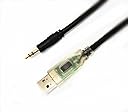
The EZSync USB Cable is a robust and flexible solution for connecting your OneTouch glucose meters to diabetes management software. With a 5-foot length, LED indicators for data traffic, and compatibility across multiple operating systems, this cable ensures seamless data transmission and user-friendly operation.


| ASIN | B01DSGSQUI |
| Best Sellers Rank | #9,843 in USB Cables |
| Brand | EZSync |
| Brand Name | EZSync |
| Cable Type | USB |
| Color | Blue,Red |
| Compatible Devices | Laptop, PC |
| Compatible Phone Models | Likely compatible with smartphones, specific models not listed |
| Connector Gender | Male-to-Male |
| Connector Type | Auxiliary, USB |
| Customer Package Type | Standard Packaging |
| Customer Reviews | 4.0 out of 5 stars 85 Reviews |
| Indoor Outdoor Usage | Indoor |
| Item Shape | Round |
| Manufacturer | PureniteTech |
| Model | EZSync001B |
| Model Name | EZSync052624 |
| Number of Pins | 4 |
| Other Special Features of the Product | Tangle Free |
| Part Number | EZSync001B |
| Special Feature | Tangle Free |
| UPC | 725022296292 |
| Unit Count | 1 Count |
J**N
EZSync USB cable works great on my Mac
Works great for me on my Mac, currently using OS X ver. 10.11 (El Capitan). No problems with setting up the EZSync USB Cable connection, driver installation etc., just by following the instructions, in order, as provided. Internet connection required. This allowed data to be easily uploaded from both of my glucose meters (a OneTouch Mini and a OneTouch Ultra2), so all my measurements are faithfully recorded and synced by the on-line software. When inserted, the EZSync USB cable connection lights up and flashes as it communicates with the computer. When you plug the other end into your meter, it again flashes as data is being transferred, and a pop-up message displays to let you know it is safe to disconnect when the data transfer is complete. Takes just a few seconds. Can't be much easier. A zillion times better than writing down the values from the meter or putting them in a spreadsheet. The data you upload (which includes for each test the date and time, meter ID, glucose result and any annotations) is stored on your OneTouch on-line account, and is always accessible for reporting and sharing with your healthcare provider. I love it.
S**L
Sync your OneTouch data to your PC with ease
My doctor wants me to upload my Glucose readings. Of course OneTouch and all these other #$%#s want you to use a paid app now. I was able to find the installer for the old desktop software(which of course OneTouch no longer has on their website) and use this cable to sync my data from the meter to my PC. Very helpful and saved me $$ in the long run.
B**S
Neat!
Who knew one's lifetoutch could be paired with an internet resource to monitor type II diabetes. Neat!!+
N**K
It just works
I have two meters OT UltraSmart and OT UltraMini. 1) plugged in the USB business end. Windows 10 discovered the device and already had a driver for it. Came up as COM11. 2) Downloaded several different meter management apps. Decided that OneTouch Reveal was the best solution. 3) During installation of Reveal, it asks what meter(s) you have, so right out of the gate it acknologes that some people have more than one meter. 4) I didn't feel like messing arround so I just installed support for ALL meters, because who now, mabey I'll be getting a new one some time. 5) Set up a web account and was ready to go. The Data Transfer tool runs on the PC, but data live in <the cloud> 6) On my UltraSmart I plugged in the transfer cable, turned it on, then pressed "Detect Now" on the data transfer program. 7) It did its thing and copied the data from the meter to the website, but noted that my meter had data that was misaligned, and asked me if I would like to reset the meter. Well sure, let's start clean. 8) Swapped meters over to my UltraMini, redid the "Detect Now" Not thinking to turn the meter on, turns out on the Mini, you don't turn the meter on before hand, it will detect that you are trying to download data and turn itself on in data transfer mode. 9) data from both meters were merged on my web account and it just works.
L**G
Terrible, not work, no driver.
The cable does not work. It does not work on my Windows machine. It does not work on my Mac. The driver was not detected properly. I spent hours trying to find the correct driver. The driver was not coming with the package. There was nothing with the package.
R**1
High Quality Cable - Recommended
Product is exactly as described. Well-constructed, high quality cable with strain reliefs at both ends. USB end has clear plastic covering that allows you to see internally protected LED link and data activity indication. Did not need drivers on Windows 10 - cable is plug and play with this OS. Using with OneTouch UltraSmart meter and OneTouch Reveal Diabetes Management software. Loaded ~25 readings from meter to app in just a few seconds. Cable came with a descriptive card that tells you how/where to download drivers (if required) and obtain OneTouch Reveal software. The card provides a web link to get the latest version of the instructions online in case anything changes. Cable comes with a one year warrantee and 90 day "hassle free" return. Very pleased with this purchase. There may be cheaper versions of this cable out there but you get what you pay for and this appears to be a top-notch product.
H**0
I Love This Thing
This cable works perfectly. I downloaded the Reveal software from the indicated website, installed it and it works great. By the way, I also installed the regular Onetouch software ver. 2.3.3 and the cable also works with that software as well. I like the Reveal software better. It seems to be more sophisticated and versatile. I used the above software with two different meters. My original Onetouch Ultra and my new Onetouch Ultra 2. No problems with either. I'm running Windows 10 PRO 64. The cable is about 6' long and is very playable (not stiff like my original cable).
L**E
Wrong size plug
I checked to see if it was the correct one for the Premier Classic machine and it never really said it was not. Received it and it is too big for the monitor. Hoping to find some kind of adapter
Trustpilot
2 weeks ago
4 days ago