Buy anything from 5,000+ international stores. One checkout price. No surprise fees. Join 2M+ shoppers on Desertcart.
Desertcart purchases this item on your behalf and handles shipping, customs, and support to USA.
🚀 Triple your screens, triple your impact.
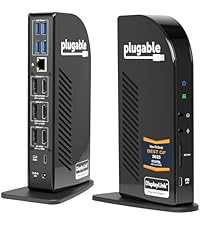
The Plugable USB-C Triple Monitor Docking Station is a powerhouse 13-in-1 hub designed for professionals craving expanded workspace and seamless connectivity. Supporting up to three HDMI monitors (4K on primary), 100W laptop charging, and universal OS compatibility, it transforms any USB-C or Thunderbolt laptop into a multi-display productivity machine with robust port options including Ethernet, SD, and USB-A. Ideal for millennial managers who demand efficiency, style, and future-proof tech in one sleek package.


| ASIN | B01FKTZLBS |
| Best Sellers Rank | #430 in Computers & Accessories ( See Top 100 in Computers & Accessories ) #50 in Laptop Docking Stations |
| Brand | Plugable |
| Color | Space Grey |
| Compatible Devices | Windows 10 / 11, macOS 10. |
| Customer Reviews | 4.4 out of 5 stars 1,567 Reviews |
| Global Trade Identification Number | 00819927010852 |
| Hardware Interface | USB Type C |
| Item Dimensions L x W x H | 12"L x 6.7"W x 17.5"H |
| Item Weight | 400 Grams |
| Manufacturer | Plugable |
| Mfr Part Number | UD-ULTCDL |
| Minimum Required Operating System Version | Windows 10 |
| Model Number | UD-ULTCDL |
| Number of Ports | 13 |
| Product Dimensions | 12"L x 6.7"W x 17.5"H |
| Smart Home Compatibility | Not Smart Home Compatible |
| Total Number of HDMI Ports | 3 |
| Total USB Ports | 4 |
| Total Usb Ports | 4 |
| UPC | 819927010852 |
| Unit Count | 1.0 Count |
| Warranty Description | 2 Year Limited Parts and Labor |
| Wattage | 100.0 |
C**7
Reliable and Sturdy. Handles 2 HDMI, 3 USB-A and ethernet connections flawlessly on my setup
This is a high quality, stable docking station that handles two HDMI screens, camera accessory, mouse and keyboard, along with ethernet connectivity. My prior (cheaper) docking station would flicker and occasionally disconnect. Not this one. Also has a front USB-C port to charge my phone which handles it well. A tad pricey but I don't foresee needing a new one any time soon.
M**.
Finally my Macbook is no longer in dongle hell!
I am running a Macbook Pro 2016 with Touchbar. I've been looking for a dock that would ultimately end the "dongle hell" as I've been running off of those dongles for over a year and between them sliding out, poor performance or simply having to disconnect and connect other dongles to accomplish other items, it was a frustrating experience. Enter in when I decided to purchase this item last week, DisplayLink technology which is leveraged in the docking station has had issues with Mac OS 10.13+, however, the latest beta of Mac OS Mojave has re-added support in for DisplayLink allowing these to work properly and I went ahead with the purchase. I have been quite pleased, there is certainly performance differences such that DisplayLink causes some delays and that can be an aggravation factor at times but having the ability to be back to a "normal" setup, I can honestly say, I am more than pleased with the experience thus far. Read below for the full review. Pros: * Multiple Displays * Plethora of Ports * Built-in Ethernet * Headphone and Microphone Jack Cons: * DisplayLink Software Performance * Secondary USB-C port limited to 1.5A * No Memory Card Reader * Third Monitor Port not HDMI/DP Initial Setup: I initially unboxed everything and downloaded the DisplayLink installer, I ended up having to manually configure the DisplayLink agent for the mac as it did not auto-install itself. The installation will require a reboot. After doing this, I then hooked up all of my monitor cables and a couple USB devices. I connected my Mac power adapters USB-C / Thunderbolt cable from the docking station to my Macbook. I could only get a single monitor to display (The 2K one not the 4K which is a direct pass-through). After going through all other options, I used the provided cord instead of the one from my mac power adapter and the 2nd display turned on and ready to use! Therefore, DO NOT use your mac power adapters cord but rather use the provided cord with the unit, otherwise the 4K HDMI/DP WILL NOT WORK. Up and Running: The unit is nice and compact, leaving me with being able to hide it behind my monitor and attach it to the laptop. I can easily switch between more of a "desktop" environment and go mobile quickly without worrying about the 5 dongles that used to be thrown about and worrying about connecting each one (or as it happens, searching for said dongle after it falls off of the desk). I am now using 2 HDMI ports, the Ethernet port, all 3 USB ports. The only port I am not using is the headphone port as there is not a need to do so since I work from my home office and noise is not of a concern. The performance has overall been "good" not "great". This is mainly due to the DisplayLink drivers sometimes causing a bit of a visual lag or causing a lag with the Macbook itself. This is not a consistent problem but does happen from time to time. That's not necessarily a hardware issue but rather a software issue with DisplayLink which will slowly be ironed out (they are not known for their quickness in resolving problems). Future Considerations? * Having a memory card reader. * Having a secondary usb-c / thunderbolt port that is not limited to 1.5A. * Removal of DisplayLink technology * Change the 3rd display port to be the same as the HDMI/DP
M**L
Works better than expected
I read alot of reviews and bought this used. I have used it with my Galaxy book which only has a USB C video out. This works great. It charges my little laptop and will run my TV and projector. Sound can be played out thru the USB or out thru the 3.5mm. Surround sound works well also. I had some driver issues at first but those have been resolved. No issues anymore. It can also just be used as a charger if I need it for only that. It's very versatile. Worth the money if you need it for that. I have not been able to get it to work with my note 8 though. It does not seem to support phones. Or at least the one I have. I have no others in which to try it. *Update 07/2019 I have moved twice now with my job. I still have my galaxy book and it's in my living room as I no longer use it for work. It's hooked up to the TV with a USB to hdmi dongle and doing fine. I didn't think I would use this dock anymore tbh. But I had bought a laptop to do a bit of gaming and light music mixing and editing with and like many older laptops I'd had over the past several years they would have had an hdmi out along with a vga. This laptop did not. But it did have usb 3.0 so I plugged the Plugable back in and ran a USB 3.0 to USB C which I had been using to charge my phone but was rated to transfer data and do video. And it took actually nothing but getting the connections correct and I had 3 monitors. 1 hdmi, one usb C running thru the dock and one running one the laptop itself. All were separate and extended. None mirrors. I can play Netflix or YouTube on any of the 3 and can see no lag. I have not tried gaming but I doubt it will hold up as well but who knows. I'm not the expert. I'm just surprised it works at all. I can plug in all my keyboards and my mouse into the plugable as well. No issues. I even have a Logitech wireless keyboard plugged into it. My sound is routed elsewhere thru a soundboard and such but I'm still impressed it works. This hub is impressive and keeps delivering no matter what I throw at it in so many different configurations. This is a long review for me. I don't review tech. I usually don't care enough to review it but when something impresses me I will give it the many accolades. After how this started out so expensive and with poor reviews. Well it was just ahead of its time. Like my 1997 Onkyo home theater system that them costs thousands and still holds up. I like older tech that really was way ahead of its time. Or can stand the test of time. But usually in tech it's the one who can improve on the innovation that makes the biggest impact. Not the inventor. The innovator.
K**G
Plug and play solution
This works great! I have three external monitors connected to my laptop and no problems. I originally had this connected to an older laptop (4 years old) and was having problems with one of the monitors. The tech support (Josh) was excellent. They responded quickly, spent a lot of time helping me solve the problem. Eventually I changed to my newer laptop (1 year old) and it worked perfect from the start. The addition of additional ports on the docking station as well as an Ethernet port allows for faster connectivity and enhanced productivity by allowing even more devices to be connected. If you want a plug and play device out of the box for multiple external monitors, this is the solution. I included a picture of my setup (excuse the mess as I had just finished painting and was setting the room back up). You can see the monitor count and their identities on the screen.
J**R
Versatile dock!
EDIT: Reviewed too soon? 01/7/2025 I have been having issues lately with USB peripherals losing connectivity. Today while working and participating in a Teams meeting i lost control of my keyboard, mouse, video, audio, and network. After a few minutes it came back on then I lost all video. I had to completely power down the device for a minute and it came back online. This has me greatly concerned as I really enjoy this device but I do not think I should have to reboot reguarly or power off the dock when not in use. Docks are designed to be always on and used when ready. Does the vendor check these reviews? I would like to talk to them to give them more detail on my current issue. Since upgrading from Intel to M-Series MacBooks, I've had to use a Dell WD22TB4 Dock for my Dell 32-inch monitor and a UGREEN DisplayLink USB 3.0 dock for additional monitors. This was to work around the Apple M-series limitation of supporting only one external monitor. I've been searching for a single dock that could provide the same capabilities and support my MacBook, Microsoft Surface I use for work, Legion Go gaming handheld, and Steam Deck gaming handheld. The Plugable 13-in-1 USB-C Triple Monitor Docking Station is exactly what I needed. The primary HDMI port uses "alt" mode, allowing direct connection to the monitor like a traditional dock. It supports 4K @ 60Hz but can also do 120Hz on 1080p and lower resolutions, which is not advertised! The other two ports use DisplayLink technology, which requires a dedicated driver and enables ChromeOS, macOS, and Windows to connect the additional two monitors. Note: SteamOS does not support DisplayLink. However, if you have a Steam Deck, Bazzite is a SteamOS-like operating system that comes with DisplayLink support. I chose this dock over others with similar capabilities (even cheaper ones) due to the overwhelming positive reviews and its 100W passthrough charging capability without needing an additional power adapter. All my devices charged to capacity surprisingly quickly. Overall, I'm very pleased with the performance of this dock. It has reduced the number of devices I need and eliminated intermittent issues caused by daisy-chaining docks. My only complaint is that it does not have an audio out port on the back, requiring me to bring my audio cable to the front. While it has four USB 3.0 Type-A ports, an additional USB-C port on the rear would have been nice as well.
D**N
Amazing customer service
This was purchased back in 2024 and still runs beautifully allowing me to dock my work laptop on the same system as my home desktop. Great device. However I did have an issue with the power cord after moving from the US to the UK (i.e. I left the power cord in the States) and needed a replacement. Not only did Plugable take care of me, they replaced it with a UK version of the power cord and shipped it to me free of charge. Incredible customer service and absolutely would buy from them again.
D**N
Display outs stopped working
Edit: less than two years later and the display output ports all died; they either have noise and artifacts or they don't sync properly despite trying other cables and monitors in each of the ports. My new dock uses the same cable, same monitor without issue. On top of that this always played weird with my computer and would never want to output to the external displays after a reboot unless I opened up the laptop, waited for it to go to the external display and then closed my laptop again. It was annoying. On top of that forget it if it was ever disconnected at all. My mouse and keyboard would drop every few seconds over and over until a reboot. Kind of sours the whole convenience aspect of having a TB3 dock if I can't just up and go then come back and plug in with it working fine. My new dock doesn't have that issue, so I am blaming this one. Edit over. Original review was as follows, probably should have updated it earlier with my frustrations. At the time of this writing it didn't seem like there were many docks that met my specifications: -Dual monitor output -Thunderbolt 3 with host charging Well that's pretty much it other than expected features (USB for mouse and keyboard and 3.5mm for audio). Most offerings seemed very expensive and/or they had uninspiring reviews and/or they just didn't have all the features I wanted. So that's it. Does what it's expected to do. Not much to know here, it has the ports you see in the pics and they all work. I run two 1920x1080 monitors off of it (HDMI & DVI) and the host computer display works simultaneously, but I disable it so I can close it and throw it on a vertical stand. I've only had it a few days now but it works as expected so far and will charge the host computer while doing it all (I will update this review if any issues crop up as long as I am using it). Doesn't seem to even get warm to the touch, either for what that's worth. My specs: HP Spectre x360 13t (model: 13-ac023dx) Windows 10 x64 Home and I didn't have to download any drivers for it but to be fair I was completely up to date on Windows updates (including the Creator's Update). So why four stars instead of five? I don't particularly care for the way it looks, that's why. It works though, so I can't be too hard on it, just doesn't tick that last, vain requirement of "look pretty". I'll take an ugly, working dock any day over a pretty, non-functional one though.
B**Y
Superior quality excellent size definitely worth the money
We added this to our system at church for our video broadcast audio broadcast interior and exterior monitors. Follow the directions is the best advice I can give. Do not plug it into your computer until after you have installed the drivers and rebooted follow all instructions. I know some people think myself included. Think we got it. I personally have over 45 years of computer experience Alpha tester for Apple, Microsoft and Google so I’m used to winging it. However, follow the directions. It’ll save you a lot of headaches and time. The quality is superior. We are using it on a Mac mini M4 standard basic unit because of this system we are able to use eight monitors with no problem whatsoever keep in mind Apple says two for a Mac mini M4 basic. So my best advice follow the directions and it works amazing !
O**Z
Works Perfect with Macbook Pro M3 Pro
Been using it 2 weeks and so far had no issues. Worked off the bat with my Macbook Pro M3 Pro. Was able to connect to 3 external monitors directly from this docking station, so only 1 cable connected from my Macbook to the docking station as well.
Z**O
Funcional
Cumple las funciones por la cual hice la compra. Sin embargo, el video DVI NO es muy fluido por lo que esa conexión no es apta para trabajos de precisión. Sería un excelente dispositivo si se pudiera limitar la carga de batería desde el mismo Dock, ya que en ocasiones quisiera trabajar usando el Dock SIN cargar la batería. Otro punto en contra, es que NO se puede apagar el aparato, se debe descontar de la alimentación eléctrica.
B**H
Comes with US power plugs despite being bought on AU store
The good Works well, great support from provider, easy setup The bad Comes with US power plugs despite being bought on Amazon AU store, good news is you can get a replacement cloverleaf cable for a few bucks and it works fine. Tech shouldn't be sold if it doesn't come with the right power plugs for the appropriate region.
N**O
Excelente solução para conectar HD externos
Gostei muito minhas expectativas. Precisava de uma solução para o uso de 2 HD externos com o meu Macbook M1, e o Plugable foi uma excelente solução, além do fato de poder ligar meu monitor Dell externo, que parece até que melhorou a imagem.
ぐ**ち
理想の環境が整いました
パソコン買い替え時期で、今後のことを考えtype-c接続での構成を検討。 ASUS ZenBook3 UX390UA-256G を購入しましたの動作状況報告させていただきます。 Windows10 home 64bit ■ディスプレイ環境 ①Acer EB321HQUBbmidphx WQHD(2560x1440)での動作確認OK ②古いディスプレイなので商品型番は割愛 1.WUXGA(1920x1200)HDMI接続 2.フルHD(1920x1080)DVI変換Dsub接続 上記環境にて正常に稼働しています。 尚、4Kディスプレイはないため確認しておりません。 ■充電環境 正常に稼働しています ■USB環境 メモリ、及びUSB機器 正常に稼働しています 全て、問題ありません。 当機器が届くまでに、OSは最新にアップデートしておりましので ドライバーあてる等、何もしておりません。 当方、システム開発等やっているのですが 家で私室、リビング、外での作業環境が2か所ありますので type-c1本での接続は本当に楽でいいです。 また、家での移動ではPCを起動したままのホットな環境でもそのまま作業できます。 多変、満足な商品でした。 PS:質問等もさせていただきましたが 素早い対応で、適切に案内していただき購入に踏み切れました。
Trustpilot
2 weeks ago
2 weeks ago