We remain fully operational. Our teams are working around the clock to ensure your deliveries continue safely.

DOWNLOAD THE APP


Copyright © 2025 Desertcart Holdings Limited
DOWNLOAD THE APP
Buy anything from 5,000+ international stores. One checkout price. No surprise fees. Join 2M+ shoppers on Desertcart.
Desertcart purchases this item on your behalf and handles shipping, customs, and support to USA.
🚀 Scan Smarter, Work Faster, Live Clutter-Free
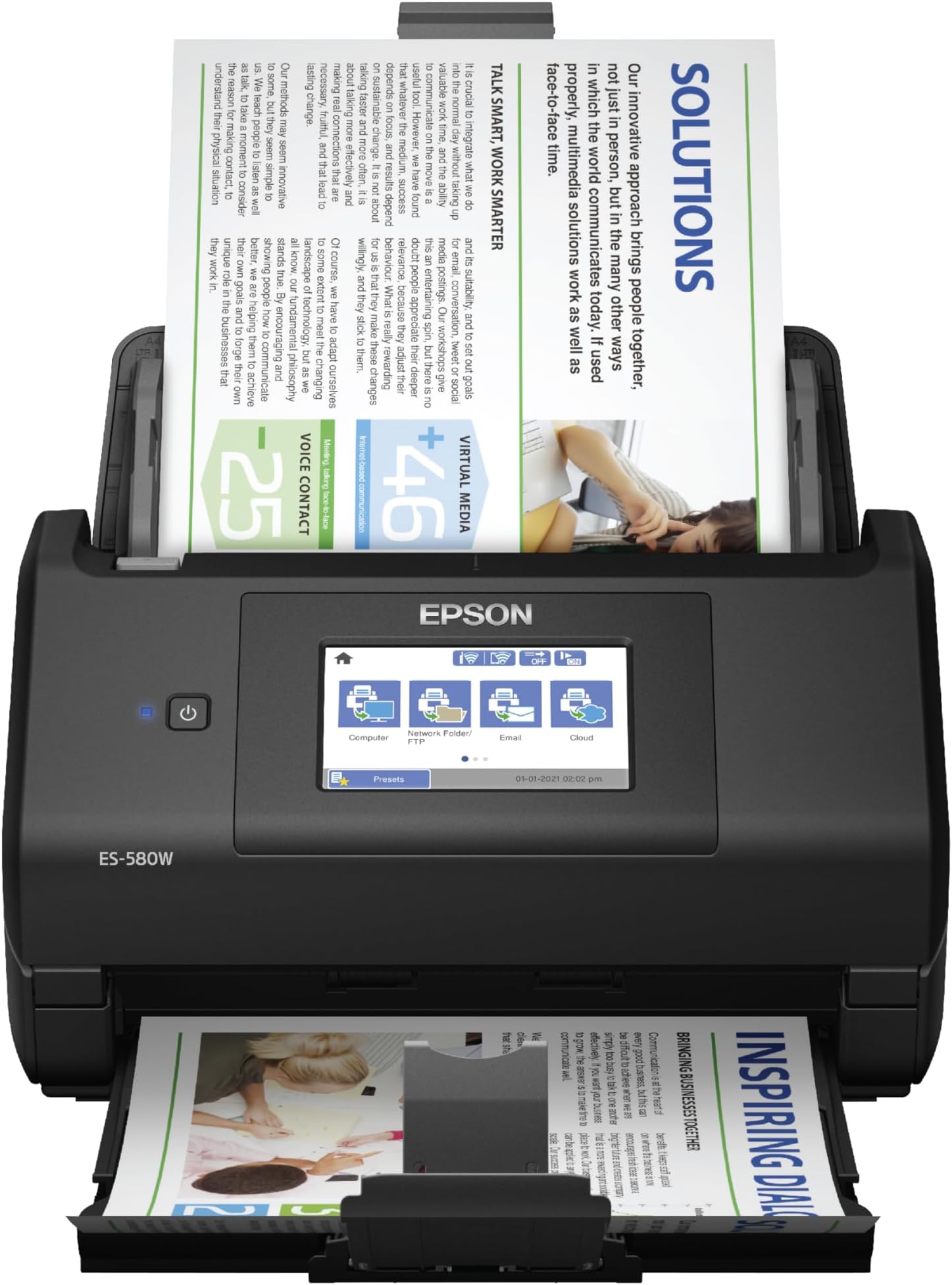
The Epson Workforce ES-580W is a wireless color duplex document scanner featuring a 100-sheet Auto Document Feeder and a user-friendly 4.3" touchscreen. It delivers high-speed scanning at up to 35 pages per minute with single-step double-sided capture, supports direct saving to USB and cloud platforms without a PC, and includes OCR for creating searchable and editable documents. Compatible with Windows and Mac, it’s designed to streamline professional workflows and reduce desk clutter.


| ASIN | B08P3ZT5WH |
| Best Sellers Rank | #3,841 in Office Products ( See Top 100 in Office Products ) #6 in Document Scanners |
| Brand | Epson |
| Color Depth | 30 bits |
| Connection Type | Wi-Fi |
| Connectivity Technology | Wi-Fi |
| Customer Reviews | 4.4 out of 5 stars 931 Reviews |
| Item Dimensions D x W x H | 14.5"D x 9.95"W x 11.25"H |
| Item Type Name | Document Scanner |
| Item Weight | 3.7 Kilograms |
| Light Source Type | LED |
| Manufacturer | Epson |
| Media Type | USB |
| Minimum System Requirements | Compatible with Windows 7, 8, 8.1, 10, and 11 (32-bit 64-bit), macOS 10.7.x to 12.x (10.11.x 13.x for some models). |
| Model Name | Epson WorkForce ES-580W |
| Optical Sensor Technology | CCD |
| Paper Size | 8.5 x 11 |
| Product Dimensions | 14.5"D x 9.95"W x 11.25"H |
| Resolution | 300 dpi |
| Scanner Type | Document |
| Standard Sheet Capacity | 100 |
| UPC | 010343953505 |
| Unit Count | 1.0 Count |
| Warranty Description | 1-year limited warranty in the U.S. and Canada |
| Wattage | 580 watts |
M**N
Great Scanner at Reasonable Price
I purchased this scanner as a replacement for my Brother ADS-2800W, which was a fantastic scanner but is not compatible with Windows 11 and Brother will no longer be upgrading drivers, etc. to support it. The Epson Workforce ES-580W is a perfect replacement. It was easy to install and has all the same functionality that I was seeking (and it's compatible with Windows 11). It has a smaller footprint than my old scanner, which is an added plus. As I try to avoid keeping paper files, I scan a lot of documents to file them digitally (and they are backed up into the cloud). I also scan receipts, bank statements, etc. into Quicken, which requires a TWAIN driver, which the Epson ES-580W provides. It scans quickly and with good quality, whether to PDF or an image file. I'm very happy with this purchase.
S**.
The ABSOLUTE best scanner!
I have been using this Epson Workforce ES-580W for a few weeks now. Can I say I am beyond impressed???? The last scanner I purchased, and still use, is a Fujitsu. I needed to purchase another one to have upstairs, so pulled the trigger on this one. The ability to connect to any of my computers via WiFi is a game changer, even though it does come with cables for wired connectivity. It is super smooth in its scanning capabilities, along with being rather small. I like the fact it can easily scan a thermal receipt without the need of a scanner sheet protector type of feeder. The processing of paper is quick! So just know you will not sit for long periods of time waiting for the device to complete the process. I can say I will purchase another one of these in the very near future to replace the older Fujitsu in my office. To connect/work cord free really puts a smile on my face. The prospect of decluttering even more cables at my office desk is a huge bonus for me. Definitely worth the investment!
A**A
Excellent investment
Buying this was a lifesaver. I work for a local Non-Profit and we needed to save to PDF's 60 years of Newsletters printed 2 sided on legal paper. We are also going to be scanning all our business records for archiving. This is a FAST really reliable two sided scanner that handles the paper really well, along with important very fragile old photographs (in carrier sleeves), getting the photos and the notes handwritten on the back of the photos with ease. Very happy with the unit, great price, easy to use, and a workhorse. We also like that the top feeder comes off with ease, allowing us to store the unit in a small space. The only silly thing with it is the USB port is on the back of the unit if you want to scan to a thumb drive. Minor design fail, but you can add a USB extension dock like we did to get the port in front of the unit. The software to direct scan to your computer is simple to use, is intelligent (skipping blank pages, etc.) and easy to set-up. We also programmed the scanner to do emails to our Secretary and Treasurer, as well as FTP the files to our server.
T**_
Not bad for price
I bought this to replace my Raven scanner. Raven has gone out of business :(. The positives that I like about this scanner are that it is a pure WIFI scanner. After the setup with Epson, you can place it anywhere, and it will scan your documents to the cloud. I have it set at 300dpi, and the scans are good. The scanning speed is also good. No complaints there. The downside is that the software does not remove blank pages like my old Raven did. Thus, the four stars.
J**E
Epson Workforce ES-580W is the real deal - compatibility with latest Apple O/S
I was sceptical looking for good in-home scanner but was disappointed with commercial scanners at Staples and Office Depot. These in-store scanners pale in comparison with this scanner. The Epson Workforce ES-580W is faster, offers more clarity in scanner results. The setup is easy and works seemlessly across laptops and desktop computers. Before you buy make sure you evaluate the operating system (O/S) compatibility. This scanner works with a wider variety of operating systems than comparable scanners and the price point is competitive. I don't have a video but the ones on the site are accurate. Wireless compatibility is easy to connect and the color accuracy and image quality is much greater than I expected. You will not need to waste money going to Staples and Office Depot. You now have a great option in-home.
G**.
Great scanner, reliable and easy to use!
This is the fourth ES-580W I have purchased over the past 3 years. I’ve used multiple sheet fed scanners and none as trusted and easy to use as the Epson ES-580W. This scanner is extremely reliable and comes with excellent and easy to use software. The sheet feeder makes scanning large documents very convenient. Epson continues to improve the firmware and software even years after my original purchase!
D**E
Turns hours of work into minutes.
If you’re not intimidated by a little setup, this is a life saver. What I needed was to set up several presets that send from my email address to another, with different subject lines. With a few minutes of scanning, my bookkeeper can receive hundreds of pages, neatly organized into PDFs, emailed under easy to identify subject lines. And the scans are often even easier to read than the originals. I first saw my dentist’s office staff using the ES-580W. It seemed so efficient, and I had high hopes. I was not disappointed. It has saved me hours and hours of otherwise cumbersome and low quality scanning, organization, PDF conversion, and manual emailing. I HAVE made some mistakes. Like leaving a staple in. It detects a double feed when this happens and throws a paper jam error. With the push of a button, the whole unit hinges wide open like a jaw, and paper jams are easily cleared. I wish printers were this easy. When you close the unit, it asks you to reload your pages where you left off, and resumes the scan flawlessly, or at least it has so far. I’ve seen nothing but consistency from this scanner.
T**H
Rated a 1 or less, not very good instructions. Can not use as is.
This scanner does not come ready to go. You must put it together than figure out how you put software in system. It did come with disc, but not flash drive or a write ways to download the software. For the amount of money $450.00 I would think that Epson would make this very easy. The disc they gave will not go in my computer so that does not work. The only instructions given is how to put it together then you have to figure it out yourself. I did go to a Epson web site but I did not have time yet to see that that works. It this point I can not use the scanner. I would think the instructions would tell you very thing you need to know to use the scanner. The computer now days some don't have a CD slot so the CD is not going to work. If the scanner does not work with what looks like a flash drive slot then I will need to return scanner. The Grinch
Trustpilot
5 days ago
2 days ago