




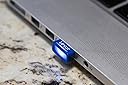
Lexar JumpDrive S45 32GB USB 3.0 Flash Drive - LJDS45-32GABNL (Blue)
Product ID: 26619864
⚡150MB/s read speed
💾32GB storage capacity
🔄USB 2.0 compatible
🔗 Stay connected, stay ahead!
The Lexar JumpDrive S45 32GB USB 3.0 Flash Drive offers a sleek, low-profile design that allows for easy plug-and-stay functionality. With impressive read speeds of up to 150MB/s and write speeds of 45MB/s, it ensures quick and reliable storage and transfer of your important files. Compatible with both PC and Mac systems, and backwards compatible with USB 2.0 devices, this flash drive is a versatile solution for all your data needs. Plus, it comes with a three-year limited warranty for your peace of mind.
| Brand | Lexar |
| Item model number | LJDS45-32GABNL |
| Hardware Platform | PC, Mac |
| Item Weight | 0.32 ounces |
| Product Dimensions | 0.89 x 0.59 x 0.3 inches |
| Item Dimensions LxWxH | 0.89 x 0.59 x 0.3 inches |
| Color | blue |
| Manufacturer | Lexar International |
| ASIN | B012PKUVKG |
| Is Discontinued By Manufacturer | No |
| Date First Available | February 5, 2016 |
A**R
Best Low Profile Flash Drive!
Excellent!I purchased this Lexar JumpDrive S45 USB 3.0 Flash Drive to replace the SanDisk Ultra Fit USB 3.0 Flash Drive, because the SanDisk product I had was overheating to such high temperatures (too hot to touch) that I was concerned about potential damage to the USB port; or worse, my entire laptop! But enough about the SanDisk flash drive... I stopped using it.The Lexar flash drive is exactly what I wanted! The flash drive has an extremely low profile (probably the lowest I've seen, including USB dongles for wireless keyboards & mice) that I am able to leave it plugged in to my laptop without concern for it getting banged up or broken off and I can even leave it inserted when I place my laptop in its very snug carry case, which was one of my requirements when looking for and flash drive.The reasoning behind wanting to be able to leave the flash drive inserted was so that I can boot from the USB flash drive and have a fully functioning Linux OS with persistence readily available. (On a side note; you may ask "Why not just dual boot Windows and Linux? Well, unlike a internal hard drive, I can just pull the Lexar flash drive from my laptop and use it on another computer should the need/desire arise.)As far as performance, the Lexar USB 3.0 flash drive has great read/write speeds when booted to it as a Linux OS. I've had zero issues so far and haven't experienced any lag while running Linux. In fact, I was running a Linux update (large data writes) and it performed as if it were a standard hard drive and completed faster than I expected. And during the update I would touch the flash drive through out the process and it never got more than "slightly warm."Some have commented on the bright blue LED on the Lexar flash drive that illuminates during reads/writes, but in my experience so far, it's no more distracting than that big bright light coming from the screen! However, I did take the liberty to reduced LED's output with nothing more than the skill of a Kindergartner and a Sharpie Marker.Overall... Excellent product and a great price!
A**H
BE VERY CAREFUL WITH THESE DEVICES WHEN YOU PLUG IT INTO THE USB PORT.
It is the only pen drive I have seen with a metal edge that goes into the USB connector. When I plugged it into my lap top there was a cracking sound and the laptop turned off and now wont turn back on. So it looks like the motherboard is fried. Never blew up a pen drive let alone a whole computer before. I have looked at a dozen USB devices just now to make sure and none of them have a metal edge. Now I am sure if you are careful then it wont cause any problems and probably wont be a problem with USB2 ports as well since those are protected and only puts out 500ma. But the USB charging ports can put out over 2 Amps and if it touches the metal edge of this device it will short it out. The laptop being an year old is not worth the trouble to get repaired but it was working just fine and was useful for mainly browsing and email etc so it is still a loss. So just wanted to warn people that do not plug this into USB3 ports and if you do to be very careful in how you plug it in. I will test the device on something cheap to see if it works but I don't want to blow up anything else right now. Usually that metal covering piece is a plastic tab either blue or white that sticks out. So this is a problem only with SOME USB3 ports where the connections go from the bottom to the top inside the port itself, usually this goes outside the USB connector and I cant see it inside the USB2 port right next to the USB3 port. Now I had just plugged in a sandisk pen drive to copy some stuff just before I ejected it and plugged this one one. When plugging it in, Plug it straight in so it wont touch the metal contacts inside the ports. To see the difference just compare this one with another pen drive and look at the plug. This one is metal while all other devices I have just have a plastic tab blue or white or black..I tried taking some pictures but they are not clear since the metal body obscures the metal tab that causes the problem and can you believe I cant find any pictures showing the end which causes this problem? But rest assured that I have other full metal jacket USB pen drives like Samsung and Kingston which have plastic tabs at the end instead of metal which caused the problem.I tried the device on some USB2 ports and it seems the drive itself is fine and did not short itself out. It also shows up as manufactured by micron and had read and write speeds of over 40MB on the USB2 ports which is higher than anything else I have tried.Okay was able to take a picture and look at the different USB devices.The sandisk has the red tab, the samsung has the black tab even though it is much longer and has a similar metal jacket but the metal does not extend into the USB socket itself and the lexar has a metal cover over the blue tab. I suppose I could cut off this metal tab but too late now, I used a permanent marker to blacken the area to be able to take the pic. As you can see, unless one is very careful, it will touch the metal connectors inside the USB port when you insert it.
T**R
It works good and ran faster than my 2
After realizing how slow and small my 16gb 2.0 usb was I decided to get an upgrade. I chose this one mainly because it was small and slightly cheaper than that sandisk one SanDisk Ultra Fit 128GB USB 3.0 Flash Drive (SDCZ43-128G-G46) . It works good and ran faster than my 2.0 (it should) the light isnt that bad unless you sit in a dark room with the USB light 1ft away. I did find a couple of things that are negatives but they aren't really that pressing. Where the black part and the usb part meet, meets at an angle. Its moderately subtle but it makes it annoying to take out of a stubborn port and it makes you think the usb is bent. I got this USB so I could run my gnome flavor Ubuntu OS on the usb and be able to boot from it. When the usb is in for at least 45 minutes the metal part gets pretty hot and since you don't have that much surface to pull it out from you end up touching the metal which likes to jolt you with heat, its not enough to burn you but enough to be annoying. All and all its a good drive and worth the price, now I can play steam games on school computers without even bringing a personal computer and looks stylish with my usb the size of half my thumb.
C**N
Relación precio/rendimiento buena
Simplemente fabulosa! La relación precio/rendimiento muy buena. El problema de rl exceso de luz que emite por el led lo solucioné con cinta de electricista. Se corta un cuadrito justo al tamaño y no molesta más en el auto.Actualización. Unos meses después falló y no volvió a funcionar más. No la compraría nuevamente.
S**L
Best in its class
Worth its cost,good product,great sppd
S**N
A nice compact leave-in USB key that won't overheat
OverviewLow profile USB keys are great as "leave-in" keys for devices that are lacking in storage. I would say this Lexar is better than the Sandisk Fit because it doesn't overheat under use. I bought this to use as leave-in storage for a small Windows laptop with limited storage expansion.Overall, a great value given the speeds and capacity you get from this key.The Good Parts* Relatively fast with its USB 3 speeds (see test results before)* Well priced for the capacity* Does not overheat under load (using an IR thermometer, the temp of the part sticking out of the computer was 30C or less)* Pretty good fit - protrudes about 1/4" from my laptop* Generally cheaper than microSD cards at this capacity and have better read speeds too* Cover has a hole for keychain or lanyard* LED indicates activityQuibbles* Would like even faster speeds, but probably unrealistic given the size of the key -- keys with SSD-like speeds are much larger than this key* The little cover is easy to lose if you're not using it with a keychain/lanyardTest Results2GB file:* Average Write 31MB/s* Average Read 74MB/s (peaked at around 94MB/s)Complex Folder - 17.4GB - 28,161 files of mostly small files:* Average Write: 8MB/s* Average Read: 16MB/sNotes* I did not test this with a USB 2.0 port* To be safe, I recommend buying when sold and fulfilled by Amazon to ensure you are getting a true Lexar flash drive.
Q**1
期待していただけに残念
それほど急ぎではありませんでしたが、注文から到着まで時間を要しました。到着後、早速使い始めたのですが、何が原因か分かりませんが使用不能となってしまいました。ノートPCの外付けメモリとして活用を予定していましたが諦めました。期待していただけに残念です。
J**S
Reseña editada
Compré esta memoria en un precio muy bajo en comparación a productos similares en el mercado, es USB 3.0, de gran capacidad y tamaño reducido. Después de menos de un año ha dejado de funcionar, no puedo hacer ni un formateo a bajo nivel para recuperar la funcionalidad, se perdieron tanto los datos almacenados como la memoria misma. Ya está fuera de la ventana de devolución, no sé si sólo a mí me ha pasado, pero es algo a considerar.
Trustpilot
1 month ago
2 weeks ago