
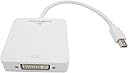


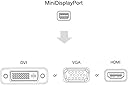
Ausfahrt 3in1 Mini Displayport to HDMI DVI VGA Adapter Cable for Mac Book, iMac, Mac Book Air, Mac Book Pro and Mac
Product ID: 26238443
Review: Connect and go watch...but not on HDMI. - UPDATED - Used it w/the VGA and it worked fine but not when connected via HDMI, on my MacBook Air. Review: Worked for 10 min, then quit - I bought this to add an external monitor to my Lenovo W530 laptop, which has a mini-display port. The Samsung 2433BW monitor has both VGA and DVI input ports. When I first connected the monitor using this adaptor connected to the DVI port on the monitor, it worked and I had a dual display setup. However, after about 10 minutes, the external monitor went dark and gave me a "no signal detected" (from the adaptor) message. I restarted my computer several times and the same thing occurred. I then tried connecting the adaptor to the VGA port on the monitor. Again, the setup worked for about 10 minutes, and then I received the "no signal detected" message. I gave up and went to Best Buy and bought an Insignia mini-display port to DVI adaptor for about $26. It has been working fine for the last 2 days. At least for my PC configuration, I recommend trying a different solution than this adaptor.
| ASIN | B01758QD3C |
| Brand | Ausfahrt |
| Connector Type | HDMI |
| Customer Reviews | 2.8 out of 5 stars 4 Reviews |
| Finish | Hdmi |
| Finish Type | Hdmi |
| Item Dimensions | 7.6 x 5.7 x 0.8 inches |
| Item Package Quantity | 1 |
| Item Weight | 0.1 Pounds |
| Item dimensions L x W x H | 7.6 x 5.7 x 0.8 inches |
| Manufacturer | QCT electrionics technology CO., LTD |
| Mfr Part Number | 5322074 |
| Model Number | 5322074 |
| Package Quantity | 1 |
| UPC | 190073515188 |
| Unit Count | 1 Count |
M**T
Connect and go watch...but not on HDMI. - UPDATED
Used it w/the VGA and it worked fine but not when connected via HDMI, on my MacBook Air.
J**E
Worked for 10 min, then quit
I bought this to add an external monitor to my Lenovo W530 laptop, which has a mini-display port. The Samsung 2433BW monitor has both VGA and DVI input ports. When I first connected the monitor using this adaptor connected to the DVI port on the monitor, it worked and I had a dual display setup. However, after about 10 minutes, the external monitor went dark and gave me a "no signal detected" (from the adaptor) message. I restarted my computer several times and the same thing occurred. I then tried connecting the adaptor to the VGA port on the monitor. Again, the setup worked for about 10 minutes, and then I received the "no signal detected" message. I gave up and went to Best Buy and bought an Insignia mini-display port to DVI adaptor for about $26. It has been working fine for the last 2 days. At least for my PC configuration, I recommend trying a different solution than this adaptor.
C**Z
Perfect!
I can't believe how well this works! All I had available when I bought my Mac Mini was an older VGA-only monitor. This made it work great. I've also used the DVI side of it. I wish Mac OSX would support my normal dual monitor setup correctly, but that's no fault of this adapter. It works perfectly in Bootcamp-ed Windows 10. Oh the only thing I should add is that the length of the cable is just right - you can plug it in and have enough room to connect cables to it without a ton of excess cable. Update: It's several months later and this little guy is working great. Also since switching back to my dual-monitor setup, I'm using the DVI output and it works perfectly. The VGA limitation I mentioned in the original review is definitely OSX-related. Also I was travelling over the holidays and had to buy another adapter to get VGA into an older monitor. That one (Belkin) did not work at first, forcing me to remote into my computer to access and enable the display (total P.I.T.A.!). I had my awesome wife bring me this one from home and it worked like a charm.
O**.
Five Stars
The product seems to be built well and functions as intended.
Trustpilot
1 week ago
2 months ago