Desertcart purchases this item on your behalf and handles shipping, customs, and support to USA.
🚀 Upgrade Your Connection, Own the Network!
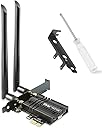
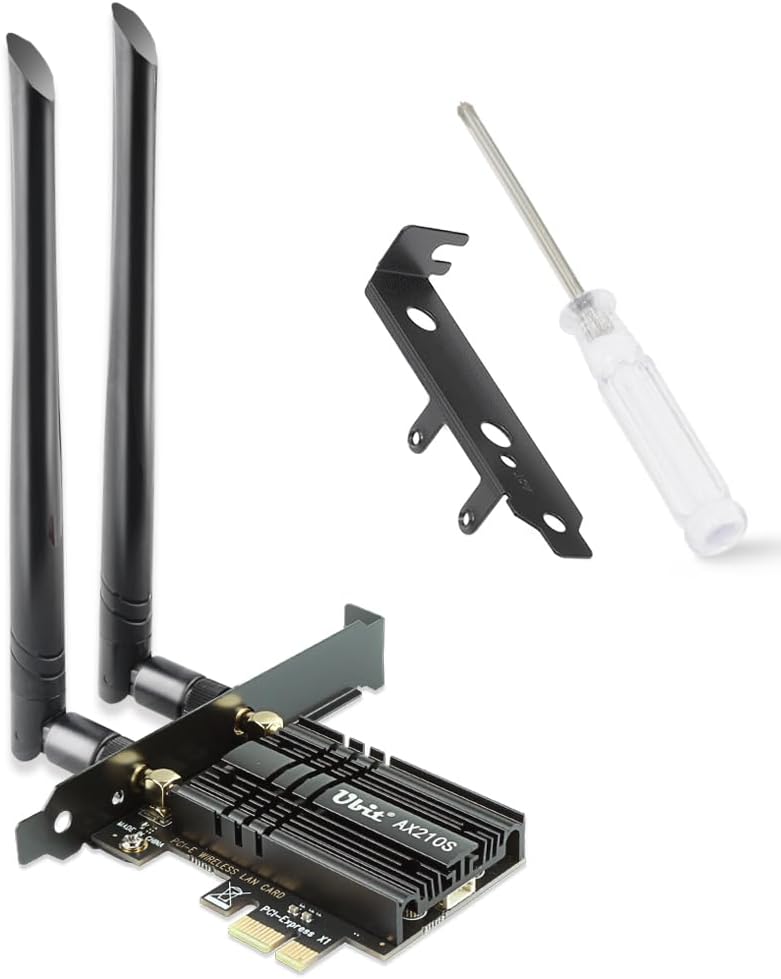
The Ubit Tri-Band WiFi 6E PCIe Card leverages Intel’s AX210 chipset to deliver ultra-fast 5400Mbps speeds across 2.4GHz, 5GHz, and 6GHz bands, combined with Bluetooth 5.2 for enhanced device connectivity. Designed for Windows 10/11 desktops, it features MU-MIMO and OFDMA technologies to minimize latency and maximize network efficiency, making it ideal for gamers, streamers, and professionals demanding reliable, high-performance wireless connectivity.


| ASIN | B08NVR8M8X |
| Best Sellers Rank | 5,351 in Computers & Accessories ( See Top 100 in Computers & Accessories ) 14 in Network Cards |
| Brand | Ubit |
| Brand Name | Ubit |
| Color | Black |
| Colour | Black |
| Compatible Devices | Desktop |
| Compatible Operating System Family | Windows |
| Compatible devices | Desktop |
| Customer Reviews | 4.4 out of 5 stars 8,262 Reviews |
| Data Link Protocol | Bluetooth |
| Data Transfer Rate | 5400 Megabytes Per Second |
| Data link protocol | Bluetooth |
| Data transfer rate | 5400 Megabytes Per Second |
| Hardware Interface | PCIE x 1, PCIE x 16, PCIE x 4, PCIE x 8 |
| Hardware interface | PCIE x 1, PCIE x 16, PCIE x 4, PCIE x 8 |
| Item Weight | 0.2 Kilograms |
| Manufacturer | Ubit |
| Manufacturer Part Number | F11W-AX210S-Black |
| Minimum Required Operating System Version | Windows 10, Windows 11 |
| Model Number | Intel ax210 |
| Number of Items | 1 |
| Number of Packs | 1 |
| UPC | 760627780883 |
| Unit Count | 1.0 count |
R**S
Exceptional Performance and Connectivity with Ubit WiFi 6E Card
I recently upgraded my desktop setup with the Ubit Tri-Band 5400Mbps WiFi 6E PCIe card, and I must say, it's a game-changer. The installation process was straightforward, and the card fit perfectly into my PCIe slot without any issues. The first thing I noticed post-installation was the significant boost in my internet speeds. The WiFi 6E technology makes a noticeable difference, especially in bandwidth-intensive tasks like streaming 4K content, online gaming, and large file transfers. The tri-band functionality, including the new 6GHz band, provides a more reliable and less congested network, which is a massive plus for me as I work from home. Another feature that stands out is the integration of Bluetooth 5.2. It offers a stable and fast connection for all my Bluetooth devices, including headphones and peripherals. This dual functionality of WiFi and Bluetooth in one card is very convenient. The range and signal strength are impressive. I have my router on the bottom floor,of a 3 storey house yet the connection remains stable and strong on the top floor with no need for MESH. I haven't experienced any dropouts or significant speed drops, which was a frequent issue with my previous card. I was getting 120Mbps average now seeing 500Mbps+ In terms of compatibility, the AX210 chipset works seamlessly with my Windows 10 setup, and I didn't face any driver-related issues. It was pretty much plug-and-play, with the system recognizing the card instantly. Do download the drivers from www.evisionde.com. I followed the video and the driver didnt work. To sum it up, the Ubit WiFi 6E PCIe card is an excellent investment for anyone looking to upgrade their wireless connectivity. It offers superb speed, range, and reliability, making it ideal for various online activities. Highly recommended!
S**H
Great wifi card and really easy to install!
I installed this yesterday in a cyberpower pc on an ASRock A520M-HVS motherboard. I have never done this before or built my own pc so I was nervous, but the case just unclipped and once in this was super easy. Literally 2 screws, to insert unscrew the metal cover bit as per the video on this page. Clipped in the Bluetooth cable into the WiFi card, slotted it in the empty slot, screwed it in securely where I had taken the metal plate out. Then I plugged the Bluetooth cable into an empty USB socket (I was worried as I had to run the cable over the graphics card but it was long enough and turned out this was no problem). Then it was just a matter of clip the case back on and screw the antenna on and job done. The pc was running windows 11. It didn't work instantly because the drivers needed updating. Ironically it said they were up to date but because it didn't have Internet access it was wrong!! So I googled the device name and drivers on another computer and downloaded them onto a USB. Then on the pc, it was just a case of right clicking on the start menu to go to device manager, then finding the device under network adaptors, and clicking to update driver by browsing for file. As soon as the drivers were sorted this worked instantly. Just restarted the computer, put in the WiFi password and could use Bluetooth. Tested with a PlayStation controller and speaker and no problem connecting. WiFi speeds on a speed test were getting 70mbps, which is the top speed for my router and any other devices in the house. Really pleased with how simple the whole thing was to install both Bluetooth and WiFi!
A**R
Works out of the box with Windows 10
The Wifi/Bluethooth card was delivered quickly in a small brown box and comes with everything needed to install it including a small screw driver. Your experience my vary, but my installation was straightforward. Just slotted the card into a short PCI slot which connects the wifi. You do need to connect a wire from the card to a USB 2.0 header socket on your motherboard if you want Bluethooth to work as well. I had one USB 2.0 socket spare and most motherboards should, but if you don't this might be an issue (you can work around it by getting a splitter add-on board for the USB 2.0 socket on your motherboard - about £10, or buying a PCI card with extra internal USB 2.0 sockets); it would have been nice if the Bluetooth worked through the PCI slot. Once installed, Windows 10 picked up both the Wifi and the Bluetooth without me needing to install any drivers or updates, so fairly painless. If you have another O/S, you might have a few more steps (apparently the drivers need to be downloaded and installed for Windows 7). So far no complaints, Bluetooth works at a good distance; starts to cut out after about 10 metres (which is reasonable). Wifi is strong and connected to my router on 5Ghz signal, no drops yet.
I**K
Good but needs improvement from chipset provider Intel
UPDATE: the instability of the WiFi got fixed by changing the adapter's properties on Windows. Under the Advanced tab, we changed the property 802.11n/ac/ax Wireless Mode value to 802.11ac to make it compatible with our router (see screenshot). Increased the overall rating to 4. Still need Linux drivers to get to 5 stars. We ordered this for our own work computer. The card is well packed in its box with 2 different size of brackets that it can also fit in slim form factor units. It has a little manual (in English), a screwdriver the 2 antennas, the cable for the Bluetooth and a mini CD for the drivers. The installation is easy like for any PCIe extension cards. We could boot up with a long ethernet cable to have the drivers but we downloaded them before in case of. Windows 10 could find the drivers straight away. However the WiFi kept dropping off, still connected but with no proper IP address assigned by the router. The Intel or the CD drivers are no good. The one found by Windows 10 are the one to keep at the moment. The others messed up. We solved the problem by setting the IP address, subnet, getway and DNS manually. This solved the issue permanently. We'll give 4 stars when this issue is resolved. We have a dual boot with Ubuntu. We're afraid to say that there is no driver at the moment. Again, that's down to Intel which is making the WiFi chipset. When they make a Linux driver, we update this review to 5 stars. The Bluetooth is working perfectly out of the box on both systems, clearly showing that the card manufacturer itself does a fine job. We are happy with our current setting but would expect a smoother experience. The chipset is recent so there is hope for improvement in the future. However we wouldn't use it yet for customers. Last, the price: very good value for money, can't deny that.
R**R
Great wifi card long lasting
Been using this wifi card for around a year now and have built several computers with it, does not disappoint. The Wifi connectivity is flawless as i reach download speeds of 600Mbps and bluetooth allows me to use my controllers and headphones to play games without a wire. Fits directly under my GPU
V**S
Simple but effective - Blutooth a bonus
The Windows 10 (1909 to 2004) update this week screwed up my computer's ethernet adapter which meant that after a reliable 7ms 28Mbps/14 Mbps down/Up service over the last few years I was constantly dropping off the internet and having to reset the adapter and my speeds reduced to 8ms 2-3Mbps/14Mbps. Having to work from home meant that this was unacceptable. The Ubit AX/AC WiFi 6 Card seemed like a good idea and it has the added bonus of Blutooth. It arrived this morning in a simple card box board (The unit, 2 aerials, an accessory low profile backplate and a USB connector wire, 2 screws, a screwdriver, a brief instruction book and a mini CD disc). Installation takes seconds (I had to use a full length PCI-e slot as my GPU fan was too close to the spare PCI-e X1 slot. The instructions were very straightforward and if you don't have a Blu-Ray/DVD/CD player you can download the drivers. Observations: You lose some latency using wifi instead of ethernet but my current speeds are 10ms 44Mbps/18.42Mbps down/Up. You will need a free USB header for Bluetooth and the USB wire connector is a little tight to get in on the card side as the head on the wire and socket on the card are tiny. The added Bluetooth is well worth it as so far I've not noticed any latency watching streamed movies using my blutooth headphones between the audio and the video. I have a wireless 802.11ac Router so this is connected to the 5GHz channel and is one floor and 30 ft from the PC. So far I'm thinking this is money well spent.
H**O
It works but isn’t the best.
It works but it isn’t brilliant. The install was very easy and windows updated the drivers quickly. In terms of speed, on a 5ghz channel, on an Eero, it was beaten by the WiFi 4 receiver built in to my motherboard. It might be that it would work with a better aerial.
S**S
Easy to install, works great
Took no more than 5 minutes to install. I had installed the intel ax200 driver in advance rather than the one that this product points towards and it works perfectly. Driver was installed in advance so worked out of the box, not sure if it would have worked without that driver installed, but I assume Windows 10 would have given it a default basic driver to get it up and running automatically. Connected to my Eero 6 Pro (provided from TalkTalk) and was easily getting between 450-500mb/s when in the same room and very close to the router, which is around what my line speed is. Speed dropped considerably when connected at the opposite side of the house which is a 2 bed, but even at the complete opposite side (literally as far as possible as it could get away from the router in this house) I was still pulling in around 300mb/s. Whether that's the Eero antenna or this, I don't know. Signal was also still very stable, as was monitored with latency showing at the top of screen in a few online FPS games, had very occasional drops, but these were few and far between and only caused a second of lag before going back to normal. All in all, great product that works as intended
F**O
Ottimo prodotto
Ricevuto in tempi brevi, e confezionato ottimamente. Ho acquistato l'Ubit Tri-Band 5400Mbps per necessità di segnale visto che avevo una Tp-link T3U che, dove era posizionata, non rendeva proprio. Il modem si trova al piano terreno mentre il mio studio al piano superiore con una distanza di circa 6m e solaio. La connessione non era stabile e la velocita di Down/Up era di circa 100/40Mbps. Non potendo usare Il modem in Wi-Fi 6 ho preferito, dopo varie ricerche e feedback positivi, di acquistare l'Ubit Tri-band. La scelta è stata azzeccata in pieno, il montaggio è stato veloce e il sistema operativo W11 lo ha riconosciuto senza alcuna difficoltà. Provo con Speed Test e, dopo aver sistemato le antenne in posizione, ottengo velocità veramente elevate, ero abituato al vecchio T3U, Download tra 480/530Mbps e Upload tra 280/310Mbps. Stabilità perfetta fino ad ora e il WiFi6 attivo. Che dire, sono pienamente soddisfatto e consiglio vivamente il prodotto.
R**R
Montajı, bilgisayara kurulumu ve çalıştırılması çok kolay
Yurtdışı menşeli bir ürün ve beklediğime değdi. Montaj için tüm malzemeleri kutunun içinde göndermişler. Wifi kartı, vidaları, blutooth kablosu, kullanma klavuzu, mini cd ve tornavida bile var. Yani hariçten hiçbir şeye ihtiyacınız yok. Kurulum videosu da var internette. Ürünü PCIE X1slotuna yerleştirdim ve vidasını takıp sabitledim. Blutooth kablosunun beyaz ucunu karta, diğer siyah ucunu anakarttaki usb slotuna taktım. Kasayı kapatıp bilgisayarı açtım. Aygıt yöneticisinden tanımlanamayan ağ kartı gördüm ve driverlarını yükledim. Driverlarını kendi sitesinden yükledim. Cd'yi hiç açmadım. Hem 2,5 ghz hem de 5 ghz olarak sorunsuzca bağlandım. Daha önce bende stick şeklinde çok popüler bir wifi adaptörü vardı. Onunla aynı bilgisayardan, aynı mesafeden hız testinde 35 mpbs en fazla alabiliyordum. Bununla 93,21 mpbs'yi gördüm. Zaten 100 mpbs Türknet kullanıyorum. Eminim az yoğunluk olduğu bir zamanda yapsan 100 mbps'yi kesin bulur. Çok memnunum ve düşünmeden alın derim.
U**Y
Great product
Very happy with this. Install was easy and as expected. I can now connect my headset and Xbox controller to my PC simultaneously.
N**G
Very nice
Work out of the box.
P**M
Snabb leverans
Funkar som lovat
Trustpilot
3 days ago
2 weeks ago