Buy anything from 5,000+ international stores. One checkout price. No surprise fees. Join 2M+ shoppers on Desertcart.
Desertcart purchases this item on your behalf and handles shipping, customs, and support to USA.
🚀 Upgrade Your Laptop’s Wi-Fi Game to 6E Speed & Stability!
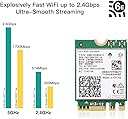
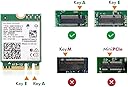
The WISE TIGER AX210NGW is a high-performance internal Wi-Fi 6E card featuring tri-band support (2.4GHz, 5GHz, and 6GHz) with combined speeds up to 5.4 Gbps. It includes Bluetooth 5.2 for enhanced peripheral connectivity and fits laptops with M.2 Key A/E slots. Designed exclusively for Windows 10 64-bit, this module delivers next-level wireless speed, ultra-low latency, and reliable connections, making it an essential upgrade for professionals seeking cutting-edge network performance.


| ASIN | B08NSSJNV1 |
| Best Sellers Rank | 87,982 in Computers & Accessories ( See Top 100 in Computers & Accessories ) 300 in Network Cards |
| Box Contents | 1*Intel AX210NGW, 1*Manual |
| Brand | CHILISON |
| Brand Name | CHILISON |
| Color | AX210NGW Wi-Fi 6E Module |
| Colour | AX210NGW Wi-Fi 6E Module |
| Compatible Devices | Desktop |
| Compatible devices | Desktop |
| Customer Reviews | 4.6 out of 5 stars 1,810 Reviews |
| Data Link Protocol | Bluetooth, IEEE 802.11ac, IEEE 802.11b, IEEE 802.11g, IEEE 802.11n |
| Data link protocol | Bluetooth, IEEE 802.11ac, IEEE 802.11b, IEEE 802.11g, IEEE 802.11n |
| Hardware Interface | Bluetooth 5 |
| Hardware interface | Bluetooth 5 |
| Item Dimensions L x W x H | 30L x 22W x 1H millimetres |
| Item Weight | 50 Grams |
| Manufacturer | Wise Tiger |
| Manufacturer Part Number | AX210NGW |
| Model Number | AX210NGW |
| Product Warranty | 1 Year Manufacturer |
| Product dimensions | 30L x 22W x 1H millimetres |
| UPC | 793420184640 |
G**R
Delivers Exceptional Performance
I recently upgraded my laptop's wireless capabilities with the WISE TIGER AX210NGW WiFi Card, and the difference has been remarkable. The installation process was straightforward, thanks to the M.2/NGFF interface, and it was immediately recognized by Windows 10 64-bit without any driver issues.​ The tri-band support (2.4GHz, 5GHz, and the new 6GHz band) has significantly improved my internet experience. Streaming high-definition content and online gaming are now smoother, with reduced latency and faster download speeds. The inclusion of Bluetooth 5.2 is a bonus, allowing for quick and stable connections to my peripherals.​ In terms of durability, the card feels solid and well-constructed. It's been running flawlessly for weeks, maintaining consistent performance without any dropouts or overheating issues.​ Overall, the WISE TIGER AX210NGW is a cost-effective upgrade that brings cutting-edge wireless technology to older laptops. If you're looking to enhance your device's connectivity, this card is an excellent choice.
D**E
Fixed my laptop WiFi easily
The WiFi on my laptop was very flaky and sometimes would work ok, other times not at all. I decided to open the laptop up and check the WiFi module type etc and then bought this one to replace it. Very easy to do with a little care, and now the laptop WiFi works flawlessly. Well worth the money and transforms the machine.
A**F
A great replacement
Bought this to replace a Wi-Fi 6 (non E) + BT 5.0 MediaTek card that had constant driver issues. Installation was fairly simple and there were no issues specific to this card, but in general the antenna connectors can be fiddly to click in. Windows 11 installed some sort of driver for the Wi-Fi and that then let me go to the listed website to get the full driver package that enabled the Bluetooth too. Haven't had an issue with the Wi-Fi or Bluetooth, and I am constantly using Bluetooth devices (headphones, Xbox controller, mouse, and keyboard).
I**E
As described
Bought this to replace a MediaTek wifi+bluetooth card that came installed in my laptop which had bluetooth stability issues. Packaged well, came with a tiny screwdriver, screw and retainer plate which I didn't use, also drivers on a mini CD which you can probably only use if you have a CD/DVD drive with a tray and I didn't bother with either. Included a slightly odd "you've won a flash drive" flier. Installation difficulty will depend on your laptop, at a minimum you'll have to be comfortable opening it up (find your manufacturer's hardware manual), but mine was fairly simple. For Windows I installed the matching BT and Wifi drivers from Intel's website (before doing that wifi worked, bluetooth was little wonky), for Linux, with kernel 5.15.11 (Fedora 35), wifi and bluetooth both work out of the box. Quite a bit more expensive than the RRP, but these are quite hard to find (only other good source in UK seems to be mouser, whose delivery charge is as much as the card). Working with no problems and certainly better than the card that was replaced.
I**T
bought for HP Pavallion AB0032TX series and worked like a charm
I was skeptical at first but then upon replace this from original I do not need the external wifi which I bought from Amazon almost an year ago for 15 quid I reckon this is by far best product if you know what you are doing with your laptop. I can not connect to 5Hz frequency which was a challenge earlier and now I see the huge difference. Earlier with original wifi card I Was getting arounf 30-35 mbps speed now I am getting around 150 mbps. Its not great but really works for me, as I have upgrade quite a lost on that laptop and cannot afford to loose it yet. Still working for 9 years like rocket. I will say if you want to switch the card do it now. its worth every penny
D**B
Huge speed gains on previous iteration of wifi card.
I bought this, because after having had gigabit fibre installed I was still only seeing ~150mb/s via the Intel 9260n card in my Precision 5530 (essentially an XPS 15). I knew that the router was outputting something close to gigabit speeds as we achieved ~920mb/s via a wired connection. Whilst I'm not naive enough to think I'd get 900+ on wifi on a laptop, I was hugely underwhelmed with the real world speeds. Having messed about with DNS and IP addresses it never got any better, so this week I thought I'd see if a new wifi card might solve the issue and it did - and then some. Consistently getting ~400mb/s d/l and 120mb/s u/l, over wifi now - a roughly 3x gain in speed - and also giving me the added bonus of upgraded Bluetooth and future-proofed internet on my laptop. Very easy to install and ships with a little screwdriver that's size-appropriate for the M2 screw, an extra M2 screw, and a mounting shield for the main and aux antennas. The whole installation took under 15 minutes and most of that was cleaning the fluff out of the fans of the laptop. Couldn't recommend it more. Fantastic product.
M**.
Good performance but slight issue with antenna cable attachment
This product performs admirably. At a reasonably long distance, I was able to receive good link speeds at 5GHz frequency. The performance was backed up by quick network transfers and I was achieving 40MBit/s hard drive copies across the LAN. My only gripe is the connection of the pigtail antenna cables whereby the UFL connection was quite loose and would easily detach itself with the slightest of touches. Overall, I am happy with this product and for the price, it is excellent value for money.
C**N
Future proof client WiFi 6E, great value and just works
I put this card into a Dell 7040 micro pc on Windows 10 to add some decent WiFi capability. Without Ethernet cabling being easy possible in my home office I was getting fairly poor WiFi from USB dongles, (around 30 Meg in both directions, even served by my Linksys AC tri-band mesh in a smallish house). I was looking for this m.2 card at the right time though, the Intel AX210 (WiFi 6E) just becoming available, so I thought I'd try that rather than using the slightly older AX200 (WiFi 6) solution for just a few £££ difference. What it adds is new Bluetooth 5.2 capability as well as the fastest WiFi speeds on this form of dual-aerial supporting card, plus adding the 6GHz band which for WiFi will give more capacity on a less congested frequency range. (When your router and/or mesh supports it - at the moment there's not much in terms of options here for WiFi 6E, but it's coming soon, and I wanted to be ready for it so I can get as close as possible to replicating ethernet wired performance but with all the convenience of wireless). To install on the Dell micro I took the lid off, unpacked the card and slotted it in, and fixed it down using the screw that was already there (check your laptop/pc has this in place, or you'll need to order a screw separately or find one. Note it's a short m.2 card too, not the 80mm ones you use for SSDs, I checked this was a matching type before ordering). I also put a small strip of insulating tape right at the end of the board (by the screw fixing) when putting these cards in to give me confidence as it screws down towards the computer circuit board. It's so that the electrical components don't touch together between card and motherboard (just me probably I know, but only takes 10 seconds and makes me happier that they won't short). Rather than ordering/using a pair of internal antenna in my PC (as the chassis is metal) I bought some external aerial tails IPX4 to SMA, and a pair of external antenna with magnetic bases at the same time - totalling about £12. One aerial outlet on my Micro PC uses the knockout in the case for the SMA aerial connector, and I routed the other cable/socket out an existing notch in the case. I might in future drill out a new 6.5mm hole to fix the 2nd SMA socket more securely. In a laptop you'll have none of this little bit of faffing of course, it's likely you'll just pop the old one out and replace with this one reconnecting the existing aerial connectors, or in a fuller-sized PC you'll have a bracket to screw in with the 2 aerial sockets on it presented to the outside solidly. Here's one tip though that might be relevant to you. Get the drivers onto your machine before you replace your existing WiFi card, as if you take out your existing WiFi solution, and its your only route to the Internet, then you can't download the latest Intel drivers! I just made use of my existing USB WiFi to give me that connection while the new card was detected and drivers downloaded and installed. So in summary, the price was great (mid twenties), and the install relatively simple. It's future proofed me, and my performance is now up in the hundreds of Mbps and maxes out my internet connection rather than it being limited - even though my mesh router is a couple of rooms away. I'm thrilled with how this all went with this card and glad I chose it. (if only the WiFi 6E kit was so cheap and plentiful!)
Trustpilot
3 weeks ago
2 weeks ago