Desertcart purchases this item on your behalf and handles shipping, customs, and support to USA.
🎯 Master precision and comfort—because your workflow deserves the best.
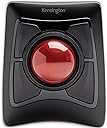
The Kensington Expert Wireless Trackball Mouse (K72359WW) combines a large 55mm precision ball with Diamond Eye optical tracking for smooth, accurate cursor control. Featuring dual wireless connectivity via Bluetooth LE and a USB dongle, it offers versatile, cable-free use. Its ergonomic, ambidextrous design includes a detachable wrist rest for enhanced comfort during extended use. Customizable buttons and scroll speed settings via KensingtonWorks software empower personalized productivity. Compatible with Windows, macOS, and Chrome OS, it also boasts power-saving features and a 3-year warranty, making it a top-tier choice for professionals seeking precision and comfort.


| ASIN | B01936N73I |
| Additional Features | Ergonomic design with removable wrist support, programmable buttons, customizable mouse speed, wireless connection and award-winning scroll ring |
| Antenna Location | Office |
| Are Batteries Included | Yes |
| Are Batteries Required | Yes |
| Best Sellers Rank | #20,619 in Computers ( See Top 100 in Computers ) #3 in Computer Trackballs |
| Brand | Kensington |
| Built-In Media | Trackball^Wrist Rest^Dongle^Batteries (2)^Quick Installation Guide^Warranty Insert |
| Button Quantity | 4 |
| Color | Black |
| Compatible Devices | Laptop, Other, Tablet |
| Connectivity Technology | USB |
| Customer Reviews | 4.2 4.2 out of 5 stars (14,316) |
| EU Spare Part Availability Duration | 3 Years |
| Embellishment Feature | Crystal |
| Enclosure Material | Plastic |
| Finish | Smooth Plastic |
| Global Trade Identification Number | 00085896723592, 07802880611214 |
| Hand Orientation | Ambidextrous |
| Hardware Platform | PC,MAC |
| Item Dimensions L x W | 20.3L x 15.5W centimeters |
| Item Type Name | Trackball |
| Item Weight | 1.35 Pounds |
| Manufacturer | Kensington |
| Mfr Part Number | K72359WW |
| Minimum Required Operating System Version | Windows 7 |
| Model Name | Expert Mouse |
| Model Number | K72359WW |
| Movement Detection | Optical |
| Number of Batteries | 1 A batteries required. (included) |
| Operating System | Chrome, Mac, Windows |
| Pattern | Mouse |
| Power Source | Battery Powered |
| Range | 33 feet feet |
| Style Name | Modern |
| Theme | Computer |
| UPC | 085896723592 |
| Unit Count | 1 Count |
T**M
Comfortable and productive
Took me a while to decide to opt for such a different style of mouse but it’s made a big difference not only to my personal comfort when working for long hours, but also to my work flow, and was surprisingly easy to get used to.
R**S
My choice
Recommend for people who know how to use this track ball
A**R
Go for Kensington Orbit
The Kensington Orbit is far better than the Kensington Expert. Over the last two years, I have encountered many performance issues with the Kensington Expert, mainly with the ring.
A**E
"Cheap" for the price
After many positive reviews, I decided to try the SlimBlade, despite a few of the negative comments regarding the buttons. Please note, the comments on how mediocre this trackball is ARE the accurate reviews. While the device is nice enough, especially the ball itself, I don't think it's worth the high price being charged. The unit itself is rather lightweight and doesn't sit as solidly on the desk as one would expect from a premium piece of equipment. The mouse buttons are cheap plastic, weak, flimsy, tabs and switches that vary between, "did it actually press?" or "am I gonna break it if I press a little harder?" I really like the weight of the trackball, and the scrolling feature (rotating the ball itself) seems to be a love/hate thing...I'm one who loves it. There is so much about the mouse that I want to like and the trackball, scrolling and unit height are those things. That being said, the premium price you pay for the unit, versus the actually quality of the unit that you get are too divergent IMO. Considering replacing this unit for the expert, but that seems to have its issues as well. The quest for a good trackball continues...
F**T
Its BIG and huge
Although I returned it.. But it's very good if someone has no issue with size...
A**M
Ergonomic and ambidextrous
Fits the hand well. Easy to set up. I have been using a well known marble mouse for years, but it appears to be obsolete now. Any on the secondary market are horrendously overpriced, so finding this as a replacement is great.
K**N
Best for Music Producer ❤️
Great product after Using it you can't go back for normal mouse
M**T
Trackball erfüllt Erwartungen bei Menschen mit Körperbehinderung
Den Trackball habe ich nicht für mich bestellt, obwohl ich selbst auch Trackball - Fan bin. Ich bevorzugeaber einen kabellosen Trackball für den Couchbetrieb. Diesen preisgünstigen Trackball hatte ich gewählt, um einem Menschen mit spastischer Behinderung zu helfen. Die Person hatte das Problem, dass sich beim Linksklick die Maus immer verschob, so dass die Maus mit der anderen Hand gegen das Verschieben blockiert werden musste. Dies löste dann manchmal wiederum einen unerwünschten Rechtsklick aus. Das Positionieren des Zeigers und das Klicken wurde so zu einem Geduldsspiel. Mit dem Trackball klappt dies nun einwandfrei. Das Nichtvorhandsein von zusätzlichen Scroll- oder Browsertasten und die grossflächigen, seitlich angebrachten Tastenfelder ermöglichen einen problemlosen Links -, Rechtsklick. Die Person war von dem Trackball so begeistert, dass sie noch einen weiteren Trackball für einen Freund bestellt hat, der auch eine Körperbehinderung mit Spastik hat. Der Trackball ist einfach, aber formschön und scheint gut verarbeitet zu sein. Das Preisleistungsverhältnis stimmt bei diesem Produkt.
S**N
Absolute Quality!
I've been using Kensington mice ever since their early entrance into the market. They never failed me then and they are still #1. This track ball is "wireless". I had a wired Kensington mouse, but got fed up with the wire getting in my way at a very busy work station. It is battery driven and you will know when it's drained by the fact that the mouse pointer becomes lazy and won't go as fast as it should or you have trouble putting the pointer on any specific place on your screen. As far as I'm concerned, you'd be tragically missing out on possibly the best mouse ever made. And I stand behind it!
A**.
Kensington Orbit Optical : Un trackball d'entrée de gamme qui mérite ses 5 étoiles !
Le trackball Kensington Orbit Optical est un très bon trackball d'entrée de gamme, il peut se révéler un excellent choix pour qui veut découvrir à moindre coût le monde des trackballs, et le plaisir d'utiliser pareil périphérique. Les principales critiques que l'on entend au sujet des trackballs sont leur manque d'ergonomie, dépendamment que la boule soit centrale (pour une utilisation ambidextre), ou déportée (généralement dédiés aux droitiers) et l'absence de roulette. L'ergonomie est un facteur à prendre bien entendu en considération, mais celle-ci par définition est liée à la morphologie et aux attentes parfois très spécifiques de chacun, certains trouveront toujours ce trackball trop grand, d'autres trop petit, certains trouveront la boule trop petite, voire mal positionnée. Personnellement je trouve la taille de ce trackball plutôt modeste, il ne conviendra pas aux (très) grandes mains. Pour être objectif, je l'ai comparé au Kensington Slimblade, ainsi qu'au Logitech Trackman Marble... il est sensiblement plus petit que ces derniers. L'ergonomie étant quelque chose de très subjectif, ce sera à chacun de juger, mais après plusieurs heures d'utilisation intensive, je dois admettre que le profil choisi par Kensington n'est pas désagréable, il ne provoque aucune sensation désagréable ni de gêne particulière. Mais où est donc la roulette ? Je ne compte plus les remarques à ce sujet, certains n'hésitant pas à établir un lien direct entre l'absence de roulette et la possibilité d'effectuer un défilement (scrolling). Si il est vrai que la roulette est un confort indéniable pour effectuer un défilement, il ne faut pas perdre de vue qu'un trackball, par définition, permet d'effectuer nativement cette action, et ce au contraire d'une souris classique (sans roulette). En effet, avec un trackball, le défilement (scrolling) peut s'opérer très simplement en pointant la barre de défilement avec le clic gauche et, tout en maintenant le clic gauche enfoncé, vous utilisez la boule comme une énorme roulette... c'est silencieux, précis, bref... un vrai plaisir ! Vous pouvez même vous écarter de la barre de défilement tout en effectuant un "scrolling", attention toutefois de ne pas trop s'en écarter car au-delà de quelques centimètres la fonction de défilement s'interrompt. Il est important de préciser que Kensington propose, tout comme Logitech, un logiciel de contrôle pour ses périphériques, permettant, entre autres, de (re)programmer les boutons voire pour ce qui nous occupe, affecter une fonction particulière au clic simultané (clic gauche + clic droit). Il est donc très aisé d'affecter la fonction "clic du milieu" au clic simultané et de bénéficier dès lors d'un "scrolling" logiciel. Pour les personnes intéressées, vous devez télécharger le logiciel TrackballWorks 1.1.18 for Windows (32-bit,64-bit) sur le site du fabricant. Comme indiqué dans les instructions d'installation, le processus requiert les droits d'administrateur, pour ce faire, sous Windows 7, clic droit sur l'exécutable que vous aurez téléchargé et "Run as Administrator" (Exécuter en tant qu'Administrateur). Une fois installé, le logiciel demandera un redémarrage du système et proposera une interface en français. A toutes fins utiles j'ai posté une capture d'écran sur cette page. En résumé, je trouve que ce trackball mérite ses 5 étoiles car à mon sens : - il présente un excellent rapport qualité / prix - il permet, outre un "scrolling" natif, un "scrolling" logiciel grâce à TrackballWorks - il présente un "design" toujours d'actualité - il est compatible PS/2 - USB (adaptateur USB vers PS/2 fourni) - il dispose d'une longueur de câble appréciable (160 cm)
Trustpilot
3 weeks ago
2 weeks ago