

🚀 Elevate your mobile workspace with power, style, and unbeatable battery life!
The Samsung Tab Pro S 12" is a sleek, lightweight Windows 10 tablet featuring a vibrant AMOLED display, Intel Core m processor at 2.2 GHz, 4GB RAM, and 128GB SSD storage. Designed for professionals and gamers alike, it offers up to 10 hours of battery life with fast charging, making it a versatile alternative to pricier competitors like the Surface Pro and iPad Pro.
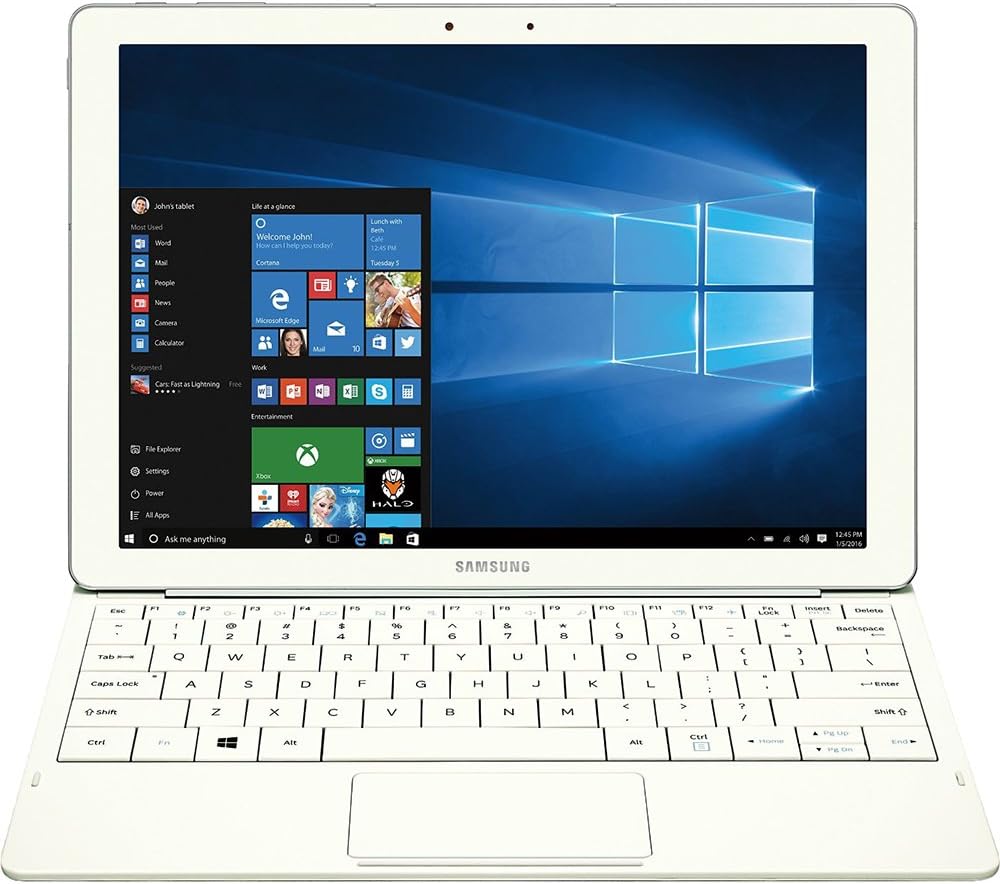


| ASIN | B01AZ7LXTE |
| Age Range Description | Adult |
| Aspect Ratio | 16:9 |
| Battery Average Life | 10 Hours |
| Battery Cell Type | Lithium Ion |
| Best Sellers Rank | #1,011,267 in Electronics ( See Top 100 in Electronics ) #8,544 in Computer Tablets |
| Brand | Samsung |
| Built-In Media | Travel Adapter^Keyboard Cover^Galaxy TabPro S^Quick Start Guide^Health and Safety^Customer Experience Brochure |
| CPU Model Number | Celeron M |
| Camera Description | Front, Rear |
| Cellular Technology | 4G |
| Color | White |
| Compatible Devices | Keyboard |
| Connectivity Technology | Wireless |
| Customer Reviews | 3.8 out of 5 stars 176 Reviews |
| Display Resolution Maximum | 2160x1440 Pixels |
| Display Type | LED |
| Generation | 1st Generation |
| Global Trade Identification Number | 00887276135571 |
| Graphics Description | Integrated |
| Hard-Drive Size | 128 GB |
| Hardware Interface | Solid State Drive |
| Human-Interface Input | Touchscreen with Stylus Support |
| Item Weight | 1.53 Pounds |
| Lithium-Battery Energy Content | 39.5 Watt Hours |
| Manufacturer | Samsung IT |
| Memory Slots Available | 1 |
| Memory Storage Capacity | 128 GB |
| Mfr Part Number | SM-W700NZWAXAR |
| Model Name | TabPro |
| Model Number | SM-W700NZWAXAR |
| Model Year | 2016 |
| Native Resolution | 1920 x 1080 pixels |
| Operating System | Windows 10 Home |
| Operating System Family | Windows |
| Other Special Features of the Product | Fast Charging |
| Photo Sensor Resolution | 5 MP |
| Processor Brand | Intel |
| Processor Description | Intel Core |
| Processor Speed | 2.2 GHz |
| RAM Memory Installed | 4 GB |
| RAM Size | 4 GB |
| Screen Size | 12 Inches |
| Size | 12 inches |
| Specific Uses For Product | personal, gaming, business |
| Style Name | Standard |
| Total Usb Ports | 1 |
| UPC | 887276135571 |
| Video Capture Resolution | FHD 1080p |
| Video Processor | Intel |
| Warranty Description | 1 year coverage for labor, 1 year coverage for parts, 6 months coverage for the battery |
| Warranty Type | 12 |
| Wireless Compability | 802.11abg |
| Wireless Technology | Wi-Fi |
R**S
Fantastic alternative for Surface Tablet Shoppers
I was anxious to get this, as I had been thinking about getting a Surface Pro for a while. I'd also been reading a lot of pro reviews about this, and I have to say, I'm very impressed by this tablet/laptop in its entirety. It's sleek, lightweight, solidly built, and runs everything I need it to quite well. I was also surprised that it does a decent job in some of the games I play, like Guild Wars 2, Tomb Raider, and Bioshock: Infinite. While it may not allow you to run these on anything much higher than low settings, the frame rates are well above 30 fps, which is good enough for me, and the OLED screen makes up for the trade off in graphics settings. It's a gorgeous display, as you've no doubt heard, or perhaps seen on Samsung's other S series tablets. Battery life FAR exceeds anything any Surface tablet offers, and recharge is FAST. My only complaints are the choice of a USB C port, but I do appreciate that Samsung wanted the latest and greatest, and that's remedied easily enough with an adapter. My other complaint, which is also minor, is in the keyboard build. I would gladly have paid an extra 20 bucks for something a little more robust in build quality. It works perfectly fine, as does the trackpad, but an excellent tablet like this should have an excellent keyboard as well. I'm more than happy with the price, performance, build, weight, battery life, and of course, that screen! So despite the complaints, I still feel compelled to give this 5 stars, and I recommend this highly if you're in the market.
S**N
Review for the Galaxy TabPro S 10" Tablet in White.
Light and thin. Okay keyboard Very affordable compared to the competition It has a gorgeous if over saturated display that can be toned down in display settings. If you want a super thin windows tablet with a great screen and exceptional battery life on the cheap this is it. Just remember with a core m 3 and 4 gigs of ram it's not a computing powerhouse but overall a good tablet. The combined cover and keyboard can be tough to fold correctly the first few times, but once you’re over the learning curve, you can easily rest the device on your lap and get to it. Hint the keyboard attachment isn't the only magnetic part of the cover. Align the camera hole and press firmly and magnets should do the rest. May need some manual alignment. The keyboard sits so close to the touch screen. Time and again, I’d reach to adjust the volume and use an F-key, I would instead accidentally move the cursor or click out of a program with my fat fingers. You get used to it and don't do that anymore after the first few hours but it's definitely something you should know about. The keys themselves are great, but not perfect. They’re large with a minuscule gap between them. That can lead to some accidental presses. They’ve got a satisfying click to them, and the typos due to space issues aren’t so bad just irritating. the keyboard is like the surface three keyboard. There's been major improvements in the surface line keyboards but this is what you have. The Galaxy TabPro S has a gorgeous amoled display. Which is a fancy word way of saying it’s got an OLED display, each pixel in the display is controlled individually for better contrast and lower energy consumption. In the last few years OLED displays haven’t really appeared in anything larger than a phone or smaller than a TV because of power restraints. The colors it outputs are rich/saturated a very particular kind of color saturation. Samsung mobile devices default settings tend to prefer pretty, saturated colors to accurate colors and the Galaxy TabPro S isn’t any different if you want accuracy your going to mess with the display settings default is saturated. It makes the windows 10 default background look incredible if nothing else. The Galaxy TabPro S costs $899. That’s cheaper than Apple’s Core M product, the MacBook ($1299), and the 12.9-inch iPad Pro with keyboard cover ($968). It’s even cheaper than the Core M version of the Surface 4 with keyboard cover ($1028).
A**R
Product is not worth the money or servicerablity from Samsung - would definitely buy another brand.
Great Tablet until the keyboard quit working. Worked with Samsung rep online to ensure that no software issues existed. Then shipped the device to Samsung repair department. They returned not fixed and charged me $249.00 again this process went back and forth two more times. The last time was mid-February and Samsung service held device and when I called they reported that the device wasn't repairable and I was eligible for a compatible replacement which I chose a refurbished white device same as my model. However, Samsung exchange department was supposed to have shipped within a couple days.Long story short after 12 follow-up phone calls no one can tell me if and when the revised device will be shipped. I have repeatedly requested my original unit be returned as the tablet worked great only the attaching keyboard would not work. Unable to get a reply from Samsung to date. Hope my other Samsung products don't go on the blink as Samsungs repairs are a joke. Still out my original device - be warned in dealing with Samsung warranty department.
@**E
... some truly impressive characteristics 1) The screen--AMOLED is really nice. Colors pop
This is a unique device with some truly impressive characteristics 1) The screen--AMOLED is really nice. Colors pop, things are clear and sharp. I am sure it helps with battery life also. 2) The size--compared to a surface pro 4, its remarkably thin--you could easily mistake for a typical samsung android tablet. But nope, its running full windows 10 home! 3) Full windows 10--this is not a tablet with a limited OS, this is a full experience. The power is impressive, but keep in mind it does come with some drawbacks and while windows 10 is powerful, it has some drawbacks as a tablet os compared to android or ios. There are far few limitations though. 4) Samsung has some nice software tweeks if you have a compatible samsung phone to pair with it. Fingerprint lock for security with your galaxy phone, share internet access, well thought out. 5) keyboard included. It is quite a bit cheaper than a surface pro 4. The draw backs 1) no included pen. I opted to return before I had a chance to test it, but other reviews indicate it is clearly inferior to an apple pencil or a surface pen. If stylus input is really important, this is not your ideal device. There are reviews you can find on you tube-and they don't look great. This is kind of ironic when you consider how good the stylus is on the galaxy note 7 (aside from the battery issues!) 2) The keyboard plus/minus. I actually was impressed by the keyboard--and the touchpad was small but very responsive and right clicks were no problem. It felt good. The drawback is you only have 2 angles to work with. I have read some mixed reviews but I thought the magnets were actually pretty strong in holding the unit stable. For me the keyboard was not an issue. I have also used a surface 4 pro keyboard cover and it is a better keyboard--better spacing of keys, easier to type on. More color options. 3) USB-C. There is only one USB-C port. And this is how you charge your tablet. The included Rapid Fast Charger does a nice job of charging this quickly and in my experience the battery life was good. I also had a surface pro 4, and battery life was a huge issue for me. Battery life on my surface pro 4 was only 6-7 hours max. Also surface has their proprietary surface port to charge. With USB-C it is possible to get an external battery pack so the battery life should never be an issue..BUT There is only one usb-c port. If you need more ports, you'll need to get a USB-c hub (hdmi out, a usb 3.1 port etc). The specific samsung model works well and also, supports pass-through charging--it has a hdmi out, a usb 3 out, and a usb c port. So yeah you could connect to a monitor, a usb 3 hub to connect keyboard/mouse and then usb c pass through charging to make this into a nice little unit to plug in at work and then take home or around if needed. I have seen some mixed reviews--but apparently, pass through charging can be hit or miss. The samsung usb c hub model works--but other usb c hubs that work with a macbook 2016 for pass through charging DO NOT work. Basically, the usb c port on this is not fully up to spec. It kind of defeats the purpose of a universial standard port if not all accessories that follow the standard don't fully work with it. This really annoyed me. Maybe if they had a 2nd port for charging it wouldn't be a big issue...but...seems like a big oversight to me. 5) No storage slot--other tablets in the same product category like the surface 4 pro have a slot for a microsd card. This is oddly absent on the tab pro s. So you are stuck with just 128 gig of space and its a bit less after the format and windows 10 os installed. It does limit the device in terms of use with no good expansion options. You can access usb drives via a usb-c hub but the lack of a memory card slot is a curious omission. Especially since the only model available is limited to 128 gig. I think this is a good device with perhaps some 1st generation quirks. I had to return mine because I use one specific program and the Windows RDP issues with small fonts on high-resolution was a major issue. There are no realistic workarounds other than plugging into a larger external monitor, so...back it goes. IF this is not an issue for you, this is a good device--as long as you don't mind the usb c quirks and don't need a stylus for major document editing or note taking. The battery life is way better than the surface 4 pro, although with some other drawbacks i had mentioned.
F**A
Samsung found that sweet-spot...
Let me start off by saying that when it comes to a purchase like this I research everything, and probably could be thrown into the category of someone who just has issues pulling the trigger on some things. I defend that by saying that I’m someone who doesn’t have deep pockets…I can’t afford to chase technology and constantly upgrade to the next best thing. What I do buy I expect to last. Built-in obsolescence infuriates me… Take it from a father who’s purchased one too many iPhones for his daughter simply because “there’s no more room on my phone”. As great as Apple is at what they do, I simply cannot allow myself to become part of their flock. I started researching tablets about 9 months ago. The most important factors for me were a large beautiful screen and quick responsiveness. I’ve played around with my son’s Samsung Galaxy Note Pro 10.1 that he uses for college, and I was very impressed with it…sharp and responsive. As much as I liked it, for media consumption I wanted something with a larger screen. I read every review I could find on the Galaxy Note Pro 12.2, with its big high-resolution screen…but for me there were too many concerns about all the (non-removable) Samsung bloat-ware that was included, and a few too many comments of the lag it caused. During the fall I heard rumblings of this new tablet, so I waited to see what would be revealed at CES 2016…and I’m glad I did. There’s one tremendously important question that you need to ask yourself before making a purchase. Do you want a laptop that offers the portability of a tablet, or do you want a tablet that offers the productivity of a laptop? It’s important to be honest with yourself when answering this because it will make your decision a lot easier. If you’re primarily looking for a laptop, at this price point there are far too many better choices. There are traditional laptops (as well as 2 in 1’s) with 1080P or better resolution, lots of RAM & storage, and more built-in ports than you’ll ever need. These are intended to be productivity tools and that’s what their built for. If you’re primarily looking for a tablet that can second as a productivity tool, then I believe Samsung has gotten close to that sweet-spot with the TabPro S. I’ve only had this tablet for just a little over a week and I haven’t had too much time to play, but so far I really like what I see. I’ll try not to restate what’s already been said in all the other reviews, so here are just a few observations… -The screen puts a smile on my face every time I boot the thing up! (Sorry…everyone has said that already, but I couldn’t resist). -If you have any concerns about screen brightness, lay them to rest. Even for my aging eyes it’s plenty bright. Under normal indoor/daylight conditions while web-surfing I’ve been using a brightness level of 50%. I don’t anticipate any issues using this outdoors. -Almost no Samsung bloat-ware, but one of the items they did add I feel is very useful. If you’re not a power-user that needs 100% charge each and every day, there’s a setting that will limit the battery recharge to 85%. All lithium-ion cell batteries will degrade over time…There’s no stopping that. As long as it doesn’t interfere with your day-to-day usage, an 85% charge is a great setting to have to extend the overall life of the battery (and your tablet). -The charging is incredibly fast and takes away any anxiety that you may get when the battery gets low. -Since I haven’t had the unit for very long I can’t comment too much on the quoted 10 hours of performance. From what I’ve seen so far I don’t believe I’ll see that mark, but that’s okay. Since I bought a tablet for the beautiful display…I want to see it! I don’t get overly concerned with battery saving modes unless I see the charge dropping like a rock (which I haven’t seen happen). -Because it’s Windows 10, it pretty much works with everything. Although to be honest, when I first heard that it was a Windows tablet I was not all that thrilled. I had it in my mind that I’d always end up with an android tablet. In addition, when I saw that it was housed with just 4GB of RAM…well for a while I thought that Samsung had missed the mark. However, the more I thought about the versatility of a full Windows tablet the more my concerns faded. Other than the occasional critical updates, Windows (like Android) allows you to control everything…You chose every program and app that is housed on your tablet, which ones run in the background and which ones don’t, and zero bloat ware to slow down the system. This point gets back to that question I mentioned earlier. Shouldn’t 4GB of RAM be sufficient for a tablet? Time will tell if these 4 Gigs will hold up, but I’m cautiously optimistic that this will remain a smooth running device for quite some time. -Speakers are solid and provide good volume for YouTube, Netflix, or Amazon Prime, but when I’m planning on watching a favorite show or movie…I’m putting on a quality set of headphones to get the best experience. -As with any device with zero ports (shame on you Samsung), I did invest in about $75 worth of accessories in the form of a screen protector, various adapters & dongles, Bluetooth mouse and wireless keypad…hoping to make my life a bit easier when I occasionally plan on using the tablet for productivity. I didn’t wait for Samsung’s official adapter. Instead I went with tried and true (highly rated) third-party tablet accessories. All have worked fine without exception. Well that’s about it. A five-star item for now because I’m still infatuated with it, but I won’t hesitate to knock it down if it doesn’t continue to impress. I hope this was at least a little helpful to you. Enjoy!
M**N
Beautiful Device...But not "Pro"-worthy.
It's a beautiful tablet. I loved the screen quality, weight, and how well it processed through my tasks quickly. It is a very well built device! I really wanted to love it, but, a few things keep this from really a "pro" device. 1) no place for an SD card. If you are only going to give us 100GB of free disk space, we've gotta have the ability to add more ourselves. 2) I really disliked the keyboard cover. Very hard to type on for me. And it only holds the tablet in 2 different angles. Neither of which felt right to me. If I'm using this for any length of time, then I'm going to have to purchase a bluetooth keyboard to take it's place. Which, to be fair, is also my complaint with the Surface Pros. 3) No ports, no stylus. Want to plug in a USB microphone, jump drive, or external monitor? No love for us, unless we want to haul along extra adapters/dongles everywhere we go. And you'll have to bring your own stylus if you love working in OneNote and drawing apps. This would be an outstanding $500 entertainment and lightweight working device (i.e. like the iPad). No way to justify $900 price tag. Hopefully there will be a more well-rounded model coming from Samsung - something more worthy of the "pro" title. Give me some ports, more memory, and a better keyboard, and I'll be back!
K**K
Disappointed
While I am sure this tablet hybrid is a good peoduct, the one I received seems to have been defective. The attachable keyboard did not work no matter what I tried. While trying to get it to work, I would tap the keys every once in a while. With just gentle tapping, one of the keys fell off and would not go back on. Even the online keyboard did not seem great. I may have had a setting turned on wrong, but instead of automatically popping up when you go to type in a field, I always had to touch the keyboard on the Taskbar which was somewhat annoying. I assume it would have made a good tablet hybrid had it worked. The screen was beautiful.
J**Z
Thin, light, and surprisingly powerful
When I set out looking for a new computer I was looking for something with enough power for daily use, lightweight, and something that had great battery life. I got all of that and more with this Samsung. First thing you must understand this computer doesn't have desktop power, the best way I can put it is that it has enough power to get you through your daily tasks. Pros: The screen, the screen on this computer is beautiful, I have read reviews but was still blown away when I saw it with my own eyes. Battery life, while you have to disable a few things to reach the advertised battery life, it's still very good, not the best but for it's size I can live it. The keyboard is included, this alone pushed me to select this over the Surface Pro. Feel, the tablet feels solid, I have owned iPads and I have to say that this feels like an iPad in terms of quality of the of the feel. M core processor, surprised by how fast this processor is, I dug up my old Lenovo running an i5 - 3339Y with 4 gb of ram, and this computer was faster at almost all things, from start up to loading videos, to managing a bunch of tabs. Cons: Top heavy, it's hard to lay on your lap while you are on the couch, this is due to the fact that the keyboard is so light. Only one port, yes there are USB Type C hubs that you can buy out there but have only one port is a limiting feature. Connection between the computer and the keyboard, it sometimes fails to connect and you have to sit there and try again. Conclusion: If you want a little and thin computer that can do almost anything that you throw at it this is the one for you. Not a desktop replacement but definitely a laptop replacement. I will update this review when I have more time to spend with it but I have to say this is an amazing computer so far.
C**N
Muy buena compra
Al principio dudaba, sin embargo es una excelente PC. hay que tener en cuenta sus caracteristicas, ya que es una PC para tareas no muy demandantes, en mi caso mi experiencia con ella es de lo mejor.
J**A
increible
muy buen o, mu y bonito, y resi stente. el dise ño de la lap top es ta fre gona, buen precio
G**C
Buen equipo
Muy en equipo para el uso que yo le doy que es moderado está muy bien lo malo que aquí no venía con el adaptador en otras tiendas buena incluido en el paquete
Trustpilot
2 days ago
5 days ago