

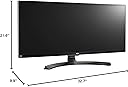
27UD88-W
Product ID: 25106206
Details
- Aspect Ratio21:9
- BrandLG
- ResolutionQHD Ultra Wide
- Screen Size34 inches
- Screen Surface DescriptionGlossy
⚡USB QuickCharge ports
🎨sRGB 99%+ color accuracy
🖥️34" UltraWide 21:9 QHD
🚀 Elevate your productivity with LG’s UltraWide powerhouse — see more, do more, be more.
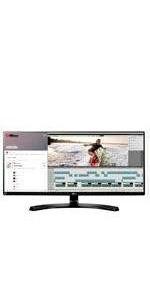
The LG 34UM88C-P is a 34-inch UltraWide QHD IPS monitor featuring a 3440x1440 resolution and a 21:9 aspect ratio, delivering expansive screen real estate ideal for multitasking and immersive viewing. It boasts over 99% sRGB color accuracy for vibrant visuals, a height and tilt adjustable ergonomic stand, and USB QuickCharge ports to keep your devices powered. With LG’s Screen Split 2.0 and on-screen control, it’s designed to enhance professional workflows and creative projects alike.









| ASIN | B01CDYB5CW |
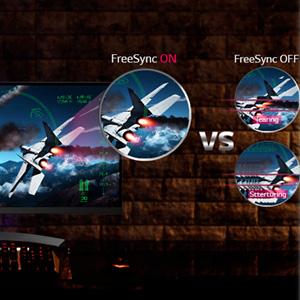
| Adaptive Sync | FreeSync |
| Aspect Ratio | 21:9 |
| Brand | LG |
| Color | Black |
| Color Gamut | 99 |
| Connectivity Technology | USB |
| Contrast Ratio | 5M:1 |
| Customer Reviews | 4.4 out of 5 stars 112 Reviews |
| Display Resolution Maximum | 3440 x 1440 pixels |
| Display Technology | LED |
| Display Type | LED |
| Global Trade Identification Number | 00719192199828 |
| Hardware Connectivity | USB |
| Image Contrast Ratio | 5M:1 |
| Included Components | cd, display port, hdmi, monitor, power cord, stand, vesa 100x100 |
| Item Weight | 18.5 pounds |
| Manufacturer | LG Electronics |
| Model Name | 34UM88C-P |
| Model Number | 34UM88C-P |
| Mounting Type | VESA Compatibility - Mountable: 100 x 100 mm |
| Native Resolution | 3440x1440 |
| Number of Component Outputs | 2 |
| Picture Quality Enhancement Technology | sRGB over 99%, On-Screen Control w/ Screen Split 2.0, Freesync |
| Refresh Rate | 60 hertz |
| Resolution | QHD Ultra Wide 1440p |
| Response Time | 5 milliseconds |
| Screen Finish | Glossy |
| Screen Size | 34 inches |
| Screen Surface Description | Glossy |
| Specific Uses For Product | personal, gaming, business |
| Total Number of HDMI Ports | 3 |
| Total USB 2.0 Ports | 3 |
| Total Usb Ports | 3 |
| UPC | 719192199828 |
| Unit Count | 1 Count |
A**W
Best (flatscreen) monitor I have ever owned.
I bought this monitor to replace a 32” 1080p TV which has been serving as my main monitor. I also have another 27” 1080p monitor for a dual screen setup. I had my eye on the LG 34UM95 but I am not a fan of the aesthetics of its stand. I also wanted (still want) the curved Samsung S34E790C but my wife gets nauseous every time she looks at it. I took a chance on this flat-screen monitor because of it’s great looking base even though I could not find any in-depth reviews. Pros: -Size. This monitor is huge. I almost have trouble fitting another monitor next to it on my desk. It happens to be the same size vertically as my 27” monitor which is nice. -Resolution. The 3440x1440 resolution is great for a screen this size. I have another 29” 2560x1080 resolution monitor and it feels too much like a short monitor. This 34” screen definitely feels wide, not short. The monitor will push 60hz refresh rate on both HDMI and Displayport. -Picture. The colors are fantastic out of the box. I can’t see any backlight bleed common to IPS panels. -Stand. Great tilt and height adjustment. I can move the screen from 2.5” from the desk up to 7”. -Comes with a DisplayPort-DisplayPort cable and an HDMI-HDMI cable. Cons: -Wobbly. My desk isn’t that steady, so any movement of the desk is translated into a lot of wobble in this monitor. I don’t notice this much in the smaller monitors. Summary: Now all I need is a couple more of these monitors! EDIT Sept' 2016: After 5 months this monitor is still working flawlessly. Since my original purchase, however, I have acquired the LG 34UC87M-B curved 34" monitor (pictured next to my LG 34UM88C) and the Samsung S34E790C curved 34" monitor. I really appreciate the subtle curves of these new monitors and I like how they make the screen edges more usable and less "far away". If you plan on having two 34" monitors side-by-side, making at least one of them a curved monitor is a must. I have the curved and flat LG monitors side-by-side (as pictured). I prefer to watch videos and play video games on the curved monitor, while I prefer to do photo editing on the flat panel. Other thoughts: Getting videos to play in the 21:9 aspect ratio while utilizing the full screen is a hassle. The Windows Store video player is the only online streaming platform I could find that easily goes true full-screen on this ultrawide format. Other streaming services will play HD movies in 21:9 format(ish), but will not zoom to be full-screen. See pictures comparing streaming HD movies from Windows Store and Google Play.
E**N
Excellent Monitor in every way.
Purchased this monitor a week ago for $572 on Amazon. I also got an EVGA 1060 SC graphics card to take advantage of the monitor's native 1440 x 3340 resolution & Display Port connection (DP cable included with the LG). This is the flat (not curved) version which I wanted because I use it for business, graphics design & Photoshop. Next to the superb display, the biggest surprises were the stand and audio quality. The stand (internally) is made from very heavy cast metal. It's heaver than the stand that came with my 55" TV. Fully adjustable height & tilt. As for audio, most monitors have tinny weak sound. This LG has very nice sound (be sure to turn up the bass in the menu). It won't replace your living room stereo, but don't splurge on external PC speakers until you try this out. The ultra wide aspect ratio took about a week to get used to, but now I'm acclimated and loving it. I spend a lot less time resizing and arranging windows, and Photoshop is a joy to use on this monitor. Word Documents - view 2 full size pages side-by-side with no reduction in text size. MS Excel - 42 columns x 45 rows with no reduction in text or cell size. Hint: On a PC hold the Ctrl key when closing an applications window to insure it will reopen to the size you left it. I set up my common apps to open to an ideal size this way. I'm not a gamer so I can't give feedback on games, but video is amazing. Screen brightness came set to 100. That's a lot of photons hitting your eyes, so I cranked it down to 70. However, the menu also has preset selections that set optimal brightness for various activities: reading, gaming, photo editing, etc. My only nitpick is I wish it came with 3 or 4 USB ports instead of 2. Overall, the LG 34UM88C-P is an excellent monitor.
C**U
Good enough
My first ultrawide was 29um67. It was freesync capable and in nvidia panel refresh rate displayed the 75hz option after activating freesync in the monitor settings. Great monitor, never had an issue with it. I then switched to 34um95 which had terrible flickering, half of display would go off sometimes, or half would display image like i just cracked it. Turn off/on was solving the problem. I sold it and bought another 34um95. This time no flickering issues at all, the only minor issue was if i'd have a browser open in the middle of the screen and try to scroll a page, i'd see vertical tearing right in the middle of the screen sometimes. I upgraded to 34um88 just because i got it cheaper than i can sell my old 34um95 for. I like the stand much better, it's sturdier with a lot more adjustments. The black color of the stand is also better to the eyes than silver on the old one. I didn't notice vertical tearing in the middle of the screen yet which is an improvement for me. No flickering as well. Color reproduction seems to be excellent as it was on the old one. I thought that all the freesync capable LG monitors allow to switch to 75hz in the nvidia control panel after activating freesync setting, i was wrong. Unlike the older 29um67 monitor, i didn't get the 75hz option in the nvidia control panel this time. I went to the "create custom resolution" (overclocking) setting and typed in 75hz after activating "freesync". Everything seemed working fine. After setting v-sync on i was getting 75fps stable in Unigine 4.0. Then i learned about the testufo website and found out by taking pictures with DSLR camera at 1/5 shutter speed that this monitor skips the frames when overclocking it to 75hz. Actually any change above 60hz does frame skipping. I tried different DP cable, installing/uninstalling LG monitor driver, trying different picture modes, freesync on/off, nothing helped. This is a bummer since my older 29um67 was freesync capable as well and some people on forums achieved 80hz without frame skipping on it. Edit: I have both a certified 1.2 and the original Displayport cable and I found out this monitor flickers horizontally when displayport 1.2 is turned on in settings, same issue the 34um95 had.
T**N
It's a beauty. Really
This is a beautiful, full-featured display and the 34" diagonal size is great. I had considered a curved display, but after reading up on them, decided that the curve wasn't for me. I needed a display that would fit under an already installed wall cabinet, but most of the displays I looked at were an inch too high. Not this one. The vertically adjustable stand make it fit the bill perfectly and the display quality and ability to have any and everything I want on screen were the icing on the cake.
G**E
The only monitor you need to buy
This is hands down the BEST monitor I've owned. First off, its massive. Like, significantly bigger then I expected. The screen real-estate is almost laughable next to my 1080. Pros: -Colors are vibrant, and accurate -Tons of real estate -Picture in picture with 2 separate PC's is an IT persons dream -No scaling (unlike 4k) -Protective layer over panel itself (clean grubby finger prints of peasants that touch my screen against my will) -Built in speakers are tolerable -GTA V looks INSANE at 21:9 (Running with a 980ti/4790k 4.4ghz) Cons: -Some back light bleed, definitely nothing major to complain about -Heavy. This is a set it and forget it monitor. My existing vesa mount struggled with the weight. -Included DP cable is junk. Feels like its made from happy meal plastic, caused some screen-tearing in game -On-screen display software is -OK at best. Needs work. That being said, the cons are gripes, nothing major really. Its a lovely monitor. Highly recommend.
J**K
Cannot go back to anything less..
I've had a 34UC98 before this and absolutely loved the curve for that immersive IMAX theater and gaming experience. The only reason I got this was for the flat viewing angle and 0 distortion needed for graphical work. Other than that, there are not many monitors I can go back to after experiencing a 1440p ULTRAWIDE experience. For work: The amount of desktop space you gain from 1440p alone is quite huge, but to add the 3440 width of ultrawide is a complete game changer. The amount of web pages, data sheets, lists, graphics and videos you can put side by side to multitask and compare is so efficient and a complete must for anyone trying to maximize their workflow. The image quality is superb and the colors are accurate enough for my line of work as a part time graphic artist and web dev. For entertainment: Stunning visuals like always from LG and the wider viewing angles and field of view in most games nowadays is a huge advantage as well as adding to the overall immersion. Response time is decent and the freesync helps smooth out faster paced games for AMD users. Even without freesync, I would say this is a great addition to any pc station for its price. The monitor stands in my desk looking slick with its brushed metallic stand and the adjustable height and rotation helps me make easy adjustments depending on what I am doing on the pc. As a long time user of LG monitors and TV's, none of them have ever given me a problem and have been super reliable whilst always bringing an amazing price to quality ratio - this monitor is no different!
H**L
The monitor performance is great..customer support? Update! purchased another due to performance.
I purchased 3 of these monitors and stacked them for my workstation. Talk about amazing amounts or Real Estate for all my viewing needs. The image quality unsurpassed. Back light bleed is not an issue for me. I had an issue with the display port. CMOS - Bios could not be seen when connected via display port. I contacted LG and they were zero help. I found out after reading extensively about display port monitors that I had to have UEFI mode enabled in Bios for the display port to be recognized when booting to Bios. I also installed Windows in UEFI. Now the display ports worked as expected. I use these monitors for Music production, Photo editing and Video Production. Multitasking has become much easier. Colors are accurate and the images are remarkably clear. Now for the lack of quality control. You can see in the close up image that edge of the monitor close to the LG Logo is all dinged up. Both monitors had alike damage to the bezel finish. I contacted LG about this damage and again they showed zero concern and pointing the finger at the shipper or the seller. The packages were fully OEM packaged still in the boxes and sealed. No damage to the packaging. If you read the reviews you will see LG has many issues with quality control and LG monitors. The 1st seller showed very little concern when inquiring about monitor damage and they were so slow to ship so a return was questionable at best. I won't be buying from them again. I did touch up the dings on the bezels so this will work. UPDATE.......... I've purchased another due to the excellent performance of the 1st two which I have owned a couple of years now. My recent purchase was great! (06/26/2020) Incredible fast shipping and the monitor is as described. (LIKE NEW)! No problems noted at this time. All 3 monitor are connected to my computer via Display Port. nVidia's latest video cards allow for 3 display port connections to the same video card and still maintain SLI for multiple video cards. I already owned 2 of these monitors so I now have a 3 monitor setup on the same computer. This made comparing this purchase a breeze. This seller was Great!!! I'll be back!
W**P
High Quality Monitor
I am very happy with this 34 inch monitor. I have had it for over a month an it is working flawlessly. I had to have I positioned a little to the left of center and the left side does not show any distortion from this angle. I like that it is fully adjustable. It worked out well as the primary monitor and a VP2770 to the right. They compliment each other well. The vertical is exactly the same and easy to move windows back an forth as needed. The main use is investing and I like a lot of charts and other related info open. I use it for development of my investing software and its size makes it very easy to have everything visible to work on. I do not see any visual difference thought the entire screen. I highly recommend it. You cannot beet the price/performance.
L**9
High quality at a decent price
Very pleased with this monitor. Best I had in a long time. Image quality is great in all settings. No flickering, good contrast and great colors. Sound quality is decent under normal circumstances. Probably not so good for gaming, or movies. Adjusting the position is an easy task; no need for a custom stand. Will never go back to my two monitor arrangement. Productivity wise, it's simply no comparison.
A**A
Man this thing is great
Wew, I love this thing. Got a flawless panel, no backlight bleed, no dead pixels, no flaws... Man this thing is great. Had to turn down the green hue a tad though, but other than that colors seem pretty accurate. I do see the appeal of a curved screen though; I probbaly wouldve gotten a curved one if I didn't do art on my spare time. Might get a second one but curved and use two of them. Hard to go back to anything else!
E**R
Very good picture quality BUT very defective cabinet (Update: 2nd monitor is fine)
Updated: I spoke with Amazon and they sent me a replacement. The new unit seems good and I don't see any defects. Amazon's Customer Service is pretty amazing and helpful. I would have given the product a 5 if the first unit I received was as good as the 2nd one I got. But I'm afraid someone else may run into the same issue I experienced. Original review: First of all, I just received this unit, so I haven't had any time to do any real test for the picture quality or dead pixels or backlight bleeding. But from what I can see the picture quality is very good, and the text seems crisp. I'm using it with my MacBook Pro 2018 with a USB-C to HDMI adaptor and everything seems fine. The main and VERY disappointing issue I noticed right after opening the box is that there is a very noticeable gap on the bottom right corner between the panel and the cabinet, and the panel seems to have come off slightly. It's almost as if a glue that puts the corner of the panel and the cabinet has come off or something (as can be seen in the picture). This is NOT the case on the bottom left corner and everything on that side seems fine. Overall it seems like the panel has a good quality but when they assembled the whole thing together it suffered, or maybe it happened in transit I don't know. I will reach out to LG's support and update the review appropriately. Overall I like the picture quality but I'm very disappointed by this very visible and annoying defect on this supposedly high-end monitor.
T**D
Great monitor...although I'm having ONE issue
This monitor is an excellent monitor, however, I am getting little windows that pop up that are inactive (can't get rid of them). The message in these windows cautions me about using the correct cable and telling me that I have set the resolution to 1280X1024 and that the recommended resolution should be 3440X1440, when in fact the resolution is set at 3440X1280. These windows popping up from time to time make use of the computer a frustration experience. I wonder if any other people that have purchased this monitor are having the same problems and if so do you have a work-around? I suspect these windows are coming from the LG CD that comes with the monitor but can't find them. Other that this issue the monitor is a great buy.
J**D
The speakers are pretty bad but I have an external sound source so ...
The extra resolution and width is a huge plus for gaming and productivity tasks. This particular monitor doesn't offer anything special in terms of refresh rate, or curved panel. The speakers are pretty bad but I have an external sound source so it is a non-issue. Works very well as a display. No other bells or whistles
Trustpilot
1 month ago
5 days ago