Buy anything from 5,000+ international stores. One checkout price. No surprise fees. Join 2M+ shoppers on Desertcart.
Desertcart purchases this item on your behalf and handles shipping, customs, and support to USA.
๐ Elevate your data game with Buffaloโs powerhouse NAS โ because your files deserve first-class treatment.
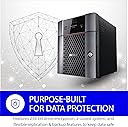
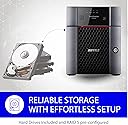
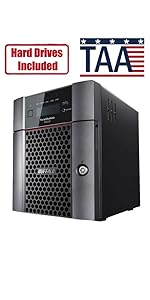
The BUFFALO TeraStation 3420DN is a professional 4-bay desktop NAS delivering 16TB of NAS-grade storage with RAID 5 pre-configured for optimal data protection. Featuring a native 2.5GbE port for fast transfers, 256-bit encryption, and hybrid cloud integration, itโs designed for SMBs and professionals seeking reliable, scalable, and secure network storage. Includes 3-year warranty and 24/7 US-based support.


| ASIN | B08LQWJ2G7 |
| Additional Features | 16 TB Capacity โ 4 pre-tested, NAS-grade hard drives included. Ships in RAID 5 for 12 TB usable capacity; can change to RAID 6 for more redundancy, or RAID 0 for full 16 TB. |
| Best Sellers Rank | #82 in Network Attached Storage (NAS) Devices |
| Brand | BUFFALO |
| Built-In Media | 5e Ethernet Cable, AC Cable, Quick Setup Guide, TeraStation 3420DN, Warranty Statement |
| Cache Memory Installed Size | 16 |
| Color | black |
| Compatible Devices | Laptop, Desktop, Windows, Mac, Linux |
| Connectivity Technology | Ethernet |
| Customer Reviews | 4.5 out of 5 stars 115 Reviews |
| Data Transfer Rate | 2.5 Gigabits Per Second |
| Digital Storage Capacity | 16 TB |
| Enclosure Material | Metal |
| Form Factor | Desktop |
| Hard Disk Description | 16TB (4x4TB) |
| Hard Disk Form Factor | 3.5 Inches |
| Hard Disk Interface | Serial ATA-600 |
| Hard-Drive Size | 16 TB |
| Hardware Connectivity | SATA 6.0 Gb/s |
| Hardware Platform | Mac, PC |
| Installation Type | Ethernet NAS Device |
| Item Type Name | TeraStation 3420DN |
| Item Weight | 15.7 Pounds |
| Manufacturer | BUFFALO |
| Media Speed | 2.5 Gigabits Per Second |
| Mfr Part Number | TS3420DN1604 |
| Model Name | TeraStation 3420DN |
| Model Number | TS3420DN1604 |
| Number of Items | 1 |
| Read Speed | 225 Gigabits Per Second |
| Special Feature | 16 TB Capacity โ 4 pre-tested, NAS-grade hard drives included. Ships in RAID 5 for 12 TB usable capacity; can change to RAID 6 for more redundancy, or RAID 0 for full 16 TB. Special Feature 16 TB Capacity โ 4 pre-tested, NAS-grade hard drives included. Ships in RAID 5 for 12 TB usable capacity; can change to RAID 6 for more redundancy, or RAID 0 for full 16 TB. See more |
| UPC | 747464134093 |
| Unit Count | 1.0 Count |
| Warranty Description | 3-year Buffalo manufacturer's warranty |
M**S
Best Bang For Your Buck for Small Business
Firstly, you get so much value with this item. I ordered the 4 drive 8TB (4X2TB drives) as a file server for my small business. The machine is made in Japan which gives me confidence in its quality, and although this NAS is small, it is hefty, solid and well built. Out of the box you don't get much by way of what to do with it. There is only a quick setup on how to plug it in, but nothing about what to do with it. Visit this site to get started. buffalotech.com/products/terastation-3020-series-desktop I used to help manage a large network years ago, and we installed Buffalo terrastations so I had some experience with them, but really, this unit is super easy to configure and is packed full of value added services such as links to popular cloud storage services, virus protection from TrendMicro, notifications, and several other enterprise level options. The unit comes preconfigured RAID 5 with options for RAID 5 + Hot Swap, and RAID 6 which I chose during setup. I'm a bit rusty with my tech knowledge, and this NAS was a breeze to setup. I highly recommend this product for small businesses and personal file storage use. I would not recommend it for enterprise use as it's missing some redundant features to prevent downtime. Overall, Ding Dong.
B**D
Good back up unit
Been working fine. Little difficult tot install, but finally got it working. No failures yet.
N**.
Solid SMB Hardware Backed by Incredible Support
Our team has been using the Buffalo TeraStation 3420DN for our IT system, and it is a workhorse. The 16TB capacity (shipped with drives included) made the initial deployment seamless, and the 2.5GbE port provides a noticeable boost in file transfer speeds for our office. What really sets Buffalo apart, though, is the support. Iโve been working with them for 5 years now, and Eric from tech support is hands-down the best. Every time Iโve called over the years, he has been incredibly helpful and knowledgeable. Knowing that level of support is available makes this an easy choice for any SMB looking for dependable storage.
Z**N
One of the More Complicated NAS Devices
My photo/video file had exceeded the capacity of my computer's hard drive, so I purchased the Buffalo TeraStation to offload the pictures and videos. I also chose a NAS to allow my wife to access these files on my home LAN. The TeraStation setup is not for amateurs. Be prepared to read some complex manuals and call tech support a few times to get it working as you want. Also, be aware that the tech support guys are used to dealing with IT professionals (I think Buffalo products are more geared toward business applications than home use), and they lose patience with you quickly. On one support call, I gave one of their techs direct access to my computer. He started making changes right and left to the TeraStation setup and my computer without explaining what he was doing. It fixed my problem, but I had no idea how to fix it myself should it reoccur. When their techs get hold of a rookie, they want to fix the problem and move on to the next call. My biggest ongoing complaint is that you must reconnect the device to your network every time the computer restarts, be it from a power failure, reboot following a software update, or normal shutdown at the end of the day. It doesn't connect automatically. That's a problem when routines presume the device is always connected. For example, my Mac does backups on an external hard drive using a program called "Time Machine." I can store that backup on this device unless I am there to reconnect it whenever the computer is restarted. If you have a commercial application for a NAS, TeraStations are very reliable, but if it is for home use, I recommend you go a different way.
S**G
Fast ship
Good plateform for onlline shipping ever
R**Y
A very satisfied return customer
A worthwile upgrade over the TS3000 series of which I own 4. NAS response and throughput seems to be faster, but they did reduce available USB ports by 2 (compared to the TS3000). I imagine this might be an issue for anyone needing more than 2 attached USB drives. It came loaded with 4 ironwolf disks which was a pleasant and much appreciated surprise! The UI is more modern looking yet still familiar. Build quality is what I would call industrial-grade with robust and nicely finished metal chassis and disk trays. Even though my TS3000 units have been working flawlessly for years, they apparently don't receive software updates any more, which motivated me to start upgrading. I just hope Buffalo keeps these TS3040 units in support for a long time to come.
S**R
Hope this lasts long like the old one
The raid finally died on my old terrastation I ran out of spare drives. I bought a couple of spares for this one. The old on lasted around 15 years 10 of those years has at a business with 50 users till we upgraded to a larger server.
M**C
Terrible Setup Experience, Mechanical Drives, Zero Security
The package arrived today about 2 PM. Followed the directions to get this thing up and running in the "Quick Start Guide" and the device immediately bricked in the middle of setup. Tried contacting Buffalo Customer Service, but of course they're not answering on a Sunday. I did receive some voicemail message to the effect that they were "having an emergency." That did not instill confidence. I've been working on getting this thing running literally ALL DAY LONG (it is now 11 PM). After several hours of Googling, reading tons of forum messages, and downloading random utilities, I am able to get this device to boot into what they call "Emergency Mode." Basically it's turned on and connected to the network but all of the storage is inaccessible. So, apart from that, a few things to note: - This thing comes with mechanical WD hard drives, *NOT* SSDs. If you want SSDs, this is definitely not your storage solution. On a side note, I don't know if they've gotten any better, but I have had a terrible history with WD mechanical hard drives and was extremely happy to finally get away from them and move on to SSDs. Until I bought this thing. - The mechanical hard drives goes a long way to explaining the 17+ pound weight of this thing. I also assume my electricity consumption is about to jump through the roof. - For some reason Buffalo has decided to use HTTP instead of HTTPS, meaning all of your communication over the wire is unencrypted and insecure. Need to download a driver from their website? You literally have to do it over HTTP (oh, I tried HTTPS). Prompt to change your password on the NAS? Let's just send that password over the wire unencrypted via HTTP. Do not buy this device if security is important to you in any way. I bought Buffalo because they were highly rated by the Chicago Tribune. That was a mistake. To be honest I have not been so disappointed in a technology purchase in over a decade. Based on my first 9 hours of watching this 17-pound paperweight flash Red warning signals at me during setup, I am less than confident it will last 9 hours of actual use, if it ever actually works.
M**S
Quick and I mean Quick Installation, Raid 5 prepped, ready to share files
I had to replace an aging HP-ML370 G3 (17 years old) server that was about to die with failing fans, and power supplies. The HP was used strictly as a file server for seven users, so the Buffalo NAS was a "no-brainer". I unpackaged the TS3420DN, plugged in power and ethernet, accessed the NAS from a workstation, restored the HP-ML370 backup to the NAS, remapped the shared folders from the HP to the Buffalo NAS and BINGO, everybody was back up and running, and much faster that they ever experienced with the old HP. Bravo Buffalo, you saved the day!
M**N
Glad I grabbed this after researching for a year!
After researching several small business appliances over the years, I'm glad that I pulled the trigger on the Buffalo TeraStation. Super easy to set up and a great value.
Trustpilot
1 week ago
4 days ago