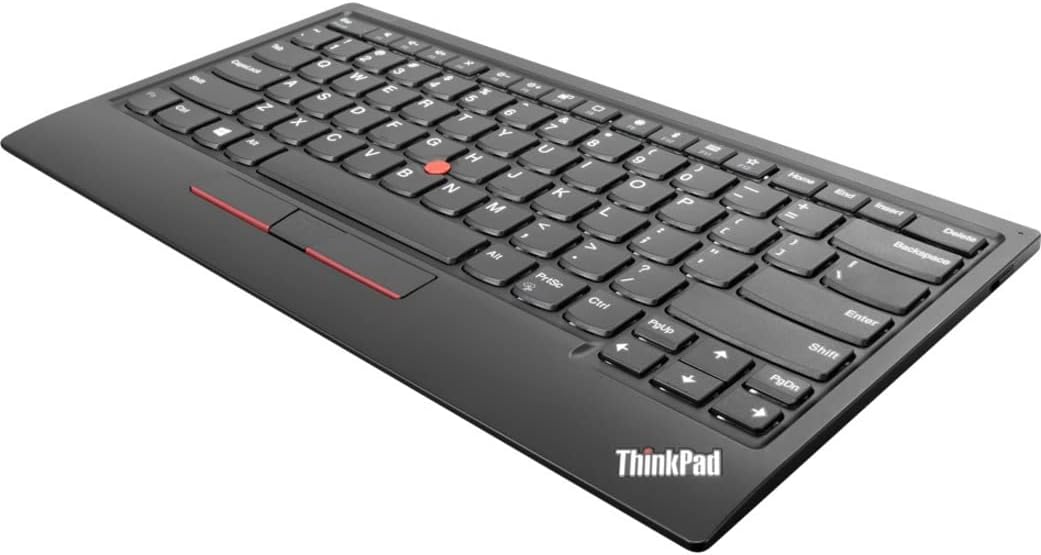
⌨️ Elevate your workspace with the legendary TrackPoint keyboard—where comfort meets control!
The Lenovo ThinkPad TrackPoint Keyboard II delivers the iconic ThinkPad typing feel with ergonomic, dish-shaped keys and an integrated TrackPoint for precise cursor control. Supporting both Bluetooth and Wireless Nano USB connectivity, it pairs with up to two devices seamlessly. Designed for productivity and accessibility, it includes 6-point entry support for visually impaired users and offers plug-and-play convenience for immediate use. A must-have for professionals craving efficient navigation without a mouse.
| ASIN | B08CS1FVF2 |
| Additional Features | Ergonomic |
| Antenna Location | Education |
| Best Sellers Rank | #536 in Computer Keyboards |
| Brand | Lenovo |
| Built-In Media | ThinkPad TrackPoint Keyboard II (US English), USB Dongle |
| Button Quantity | 19 |
| Color | Black |
| Compatible Devices | PC |
| Connectivity Technology | USB-A |
| Customer Reviews | 4.1 out of 5 stars 99 Reviews |
| Enclosure Material | Information Not Available |
| Generation | 2nd Generation |
| Hand Orientation | Ambidextrous |
| Is Electric | No |
| Item Dimensions L x W x H | 13.5"L x 8"W x 1.25"H |
| Item Type Name | Keyboard |
| Item Weight | 1.5 Pounds |
| Keyboard Description | Wired/Wireless |
| Keyboard Layout | QWERTY |
| Manufacturer | Lenovo Group Limited |
| Mechanical Keyboard Switch Model | Mechanical |
| Model Name | ThinkPad |
| Model Number | 4Y40X49493 |
| Number of Keys | 84 |
| Number of Sections | 3 |
| Power Source | Battery Powered |
| Recommended Uses For Product | Education |
| Special Feature | Ergonomic |
| Style Name | Modern |
| Switch Type | Mechanical |
| Theme | Game of Thrones |
| UPC | 194552677664 |
| Unit Count | 1.0 Count |
| Warranty Description | Information Not Available |
G**E
Awesome Bluetooth keyboard with an easy way to control the mouse pointer
I have a lot of Bluetooth keyboard, but I really love this one. The trackpoint makes this one special. It’s much easier to pinpoint areas of the screen to click on than a trackpad. It’s more like a little joystick. Dragging and dropping takes some getting used to, but works very well. I use this keyboard primarily with my AR glasses and it allows me to type and scroll around the screen in bed and on the sofa. Can’t do that with a mouse. The only function I seem to consistently have trouble with is scrolling. It can definitely be done with the middle button, but it’s more difficult than 2 finger scrolling on a trackpad or scrolling with a mouse wheel. Even with that minor issue, I love the keyboard and it feels like I snagged a piece of history since these are getting much harder to find.
D**C
The only wireless keyboard with trackpoint
It's the only wireless keyboard with trackpoint. It's not perfect: - Fn key is in lower left corner and left Ctrl is to its right; they should have been swapped - what bozo at Lenovo had that layout idea? - Quality of the keys is good but very far from the level of true Thinkpad laptops, say T40. - Keys are pretty flat. They should just copy the keys profile from a T40 - that feels so much more comfortable by comparison. - Mouse keys are stupidly flat ... on Thinkpads they are very distinct so one doesn't need to look, just touch and know instantly. - Should have included the typical group of 6 keys (home, end, insert, del, pg up, pg down), separate from other keys, even if that made keyboard a bit bigger. - Arrow keys should be full size - same as normal letter keys. They had the perfect recipe for best keyboard in the world, they used it for decades in Thinkpads ... but Lenovo had to mess it up ... I wonder, is it cheaper to make bad keyboards or new Lenovo engineers are incompetent? Regardless, it gets 5 stars from me ... because I need a wireless trackpoint keyboard and there's no alternative.
M**Z
Good Compact Sized Keyboard, the TrackPoint Stick Rules
This wireless keyboard is a HUGE improvement over my previous USB TrackPoint keyboard. I would have given it 5 stars if it had a number and navigation keypad, I had to buy a standalone but with the two separates, it doesn't really do the job. It is nicely made. The Bluetooth connection is solid and reconnects quickly after waking the laptop. It's a little pricey but worth the cost. I would also appreciated if it had some lighting. Still, the TrackPoint stick is by far the only mouse pointer I'll ever use.
W**E
Works on Android and Windows
This is exact duplicate of the standard Lenovo laptop keyboard. It literally sat on top of a coworkers new Lenovo and there was very little difference in size and layout. I am not a Lenovo user, but, I've been searching for a replacement "desktop/laptop" setup using Android smartphones and external displays. This is helping make my vision a reality as I can get the mouse functionality without a mouse using the trackpoint on this keyboard. It's been a bit tricky but once connected is working as intended. Also, it's very slim and light. Easier to slip this into a travel bag than the low profile options I've found.
D**Y
After some time, keys start sticking...
The keyboard was okay. I used it to connect to raspberry pi devices. After about a year, the keys started sticking on the right side. Weird. No spills, no mess, no dust. I couldn't find any information on how to fix the keys, nor how to order new keys. So I tried myself.... Too soon for a product to start malfunctioning.
D**N
Bad USB connection quality
This is a good keyboard in terms of being a keyboard. The keys feel responsive and the TrackPoint works as it should. However the USB receiver connection is awful. There are some places on my desk where it can get signal, but I find that some letters get lost while typing if the keyboard moves an inch to the right. The receiver has direct line-of-sight to the keyboard, and there are still issues. If you are using Bluetooth, then you might have better luck. I think that if Lenovo tried a third time, they might come out with a really good keyboard. As it stands, the issues make it an OK keyboard.
J**N
RED NIPPLE
I want an aluminum body version. There is a slight bend in the middle of mine like others have reported, but it's mostly not noticeable. The key travel is supreme and has made me realize Logitch's best keyboards are garbage living in this keyboards shadow. I was most excited for the Trackpoint but it needs a higher mouse speed setting than I prefer when switching between Trackpoint and a real mouse. Turn off mouse acceleration in windows for the best results. Battery life seems fine, but it doesn't display accurately, it's always stuck at 28%. That doesn't matter much since good boys/girls use 2.4ghz. All in all a package you can't find anywhere else.
A**O
It is for ThinkPad fans.
It is for ThinkPad fans. Fn is where it should be. Left bottom corner. So Ctrl is easy to be used with blind typing. That's said new trend in ThinkPads is to move back Ctrl into left bottom corner ...
Trustpilot
2 days ago
1 month ago