


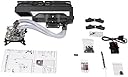
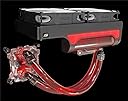


H220-X2 Prestige Liquid CPU Cooler - Dual 120MM Fans
Product ID: 23640948
Details
- BrandSwiftech
- Cooling MethodWater
- Compatible DevicesDesktop
- Maximum Rotational Speed1800 RPM
- UPC877790003005
- Global Trade Identification Number
Review: ... was in a wet box ahah it was leaking good thing it was leaking before i even installed i ... - **UPDATE I bought a second one and returned the first one. Second one work very well temperature at stock went down to 21C and I was able to overclock my i7-5960X at 4.2mhz and temperature during rendering never passed 65C only cons is that is really hard to screw it down on aLGA2011 that is a very thick board i was worry but it was okey but i can imagine on a thing motherboard you *could* damage something I know is a good thing that it hold it down that tight and firmly but it's something to be aware of especially if you have thin motherboards overall bump up to 4 star I just got mine it was in a wet box ahah it was leaking good thing it was leaking before i even installed i dried it up and then place on the table and after 1 hour wet again the cpu block i sent it back with desertcart and getting a second one i hope i am more lucky with next one Review: Beware if you have a Skylake Chip! (Thinner Substrate) - I like the idea of this cooler however bad hardware, design and solder connections gave me a terrible experience with this cooler. The hardware is terrible, the standoffs have no protection from keeping them from chewing into your motherboard, and the water block takes far too much force to get the screws into the standoffs which caused me to warp my Sky lake chip and damage the socket. Got a different cooler after RMAing the cpu and mobo and it works great so it wasn't just operator error. Furthermore, the wires on the PMW board eventually broke from their solder connections inside the small case. Had to resolder myself since Swiftech had just tacked the wires onto the pads instead of properly securing them in the through-holes.
| Compatible Devices | Desktop |
| Maximum Rotational Speed | 1800 RPM |
| Cooling Method | Water |
M**O
... was in a wet box ahah it was leaking good thing it was leaking before i even installed i ...
**UPDATE I bought a second one and returned the first one. Second one work very well temperature at stock went down to 21C and I was able to overclock my i7-5960X at 4.2mhz and temperature during rendering never passed 65C only cons is that is really hard to screw it down on aLGA2011 that is a very thick board i was worry but it was okey but i can imagine on a thing motherboard you *could* damage something I know is a good thing that it hold it down that tight and firmly but it's something to be aware of especially if you have thin motherboards overall bump up to 4 star I just got mine it was in a wet box ahah it was leaking good thing it was leaking before i even installed i dried it up and then place on the table and after 1 hour wet again the cpu block i sent it back with amazon and getting a second one i hope i am more lucky with next one
M**.
Beware if you have a Skylake Chip! (Thinner Substrate)
I like the idea of this cooler however bad hardware, design and solder connections gave me a terrible experience with this cooler. The hardware is terrible, the standoffs have no protection from keeping them from chewing into your motherboard, and the water block takes far too much force to get the screws into the standoffs which caused me to warp my Sky lake chip and damage the socket. Got a different cooler after RMAing the cpu and mobo and it works great so it wasn't just operator error. Furthermore, the wires on the PMW board eventually broke from their solder connections inside the small case. Had to resolder myself since Swiftech had just tacked the wires onto the pads instead of properly securing them in the through-holes.
J**S
Swiftech h220 -x2 PrStGe in lian li 05s
Was late but over looks great and has kept my CPU very cool average 40 degrees running a 7700k
T**S
Its great but...
I was pretty ecstatic when this product was delivered to me. That was short lived. The installation was easy but the pwm splitter it came with is junk. I followed the instructions precisely and nothing worked. The pump would not turn on, the led lights flickered, the fans would not spin causing my PC to not boot up and shut down, possibly due to my cpu overheating. I kept wondering what I did wrong.I then connected the radiator fans, and the pump to my mother board, and voila! my PC boots up, the pump works and the cpu was nice and cool. But here lies the problem, I cant connect the leds and my two front fans because I have only 4 connections for fans on my motherboard. One is reserved for the cpu cooler. So.. my two front fans are unplugged, no led lighting and for some odd reason (this has never happened) the case fan does not spin, I attempted to manually spin it and it spins on its on afterwards. It makes an odd sound, like it is struggling. Thankfully, Ren from swiftech over on there website forum responded to my post and he is sending me a new pwm splitter because after trying to install it again, one of the wires from the splitter fell right out. Now the unit itself it really nice. It's actually much larger than I expected it to be. It just barely fits in my case and there is basically no room between my ram sticks (which has heat spreaders). The apogee xl block is clear and you can see the water flowing through. The tubing is clear as well. It came with 3 dye colors if you desire to use them. I haven't used them yet because I want to see how the leds illuminate the tubing and the block. Its a really well built unit with high quality parts (minus the splitter). Hopefully with the new splitter, I will be satisfied with the unit and I can give it a 5 star rating.
D**9
Great but prep is needed!
It's a all in one. It's made of diy parts, bundled and pre made to a price point. That said.... Pros: easy to clean, if placement is available in front easy to top off, hoses are a good length, no leaks after 2.5 months, lights are nice. Cooling seems to be very good, I can crank up my 6700k to 4.7 and temps (in a colder room) 145Fish. Fans are almost silent, tho low fin density would dictate a air flow fan. Cons: after useing for 2 months I had bacteria growing had to do a clean out, after clean out useing my better paste on CPU and plain water temps seem to be avengeing 8-10F lower, a lot of pressure needed to get screws going for CPU block. Overall dose what I want, room for expansion, keeps a i7 cool, ditch the stock coolant, mount front preference. (Look in photo fill port on top)
E**X
Quality control????
Disappointed..... everything looked good until I try to mount the little splitter, one of the wire fail right off....
M**R
Incredible upgrade from corsair H60. Helped me pass 5ghz on my overclock!
This is a great alternative to doing a full custom loop on your own, at a cost. For those wondering if the prestige edition is worth it, I have to say it most definitely is. The included fans are upgrade to noise blocker eloops which are currently considered to be one of the best fans on the market for radiators. They run at an extremely silent pace and keeps things cool without much of an issue. The other addition is the fact that you have real quick connects on the junctions. One that attaches to the radiator, and two that attach to your CPU block. These fittings will make life easier on you later on when you decide to expand the loop to include your GPU. The pump is tough, and from reviews will easily feed this loop if expanded to include an additional 360mm radiator, and even 2 GPU blocks. The hardest thing for me when I started to design a custom loop, was my case had absolutely no room for a pump and res. Unless I used the CD drive bay area, it was going to be part of the challenge. This makes water cooling in tighter cases much more simple. Just ensure you have the space to have the res hanging down from the radiator. A couple things to note: 1) You will need a precision screw driver to remove the fans if you have to take them off before installing it on your system. OR if you want the system to work in pull instead of push since the fans at current will be pulling air through the radiator out of the case exhausting. 2) The tubing is long... it gets cumbersome to work with, but this is due to the fact that the first generation was just simply not enough tubing to fit some folks needs. 3) you do need that extra space in the top to fit this system. Right now, it keeps my 4790k Overclocked at 5.011 ghz at 81-82 degrees C which is the max of my comfort range. But this is at 1.38 vCore which is the required amount for my overclock at that level. At my stock clocks for fun, 4.4ghz turbo, 1.12 volts, I run 45 under stress loads, and idle around 28 (ambient is 25C). And lastly, my 24/7 overclock of 4.9 @ 1.315 V maxes around 72 under encoding in handbrake. Before! Using a corsair h60 for cooling my CPU. I was unable to run handbrake any higher than 1.25v @ 4.7ghz, and even this would cause a peak to hit 99C! So most of my encoding was done at 4.5ghz 1.18v which still capped around 81 C during handbrake use. This is my personal experience. Yours may vary. But I can attest, it is worth the price. Though order direct from swiftech when you can find it in stock, so you do not have to pay the premiums here!
A**Y
It's good with a few compromises.
The design limits how it can be installed. You can not put the fans on the underside of the radiator and it voids the warranty if you add color to the water, but it's nice you can expand the unit later to add a GPU block later if you want.
Trustpilot
2 weeks ago
5 days ago