Buy anything from 5,000+ international stores. One checkout price. No surprise fees. Join 2M+ shoppers on Desertcart.
Desertcart purchases this item on your behalf and handles shipping, customs, and support to USA.
🚀 Upgrade to the future of Wi-Fi — because buffering is so last decade!
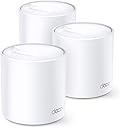
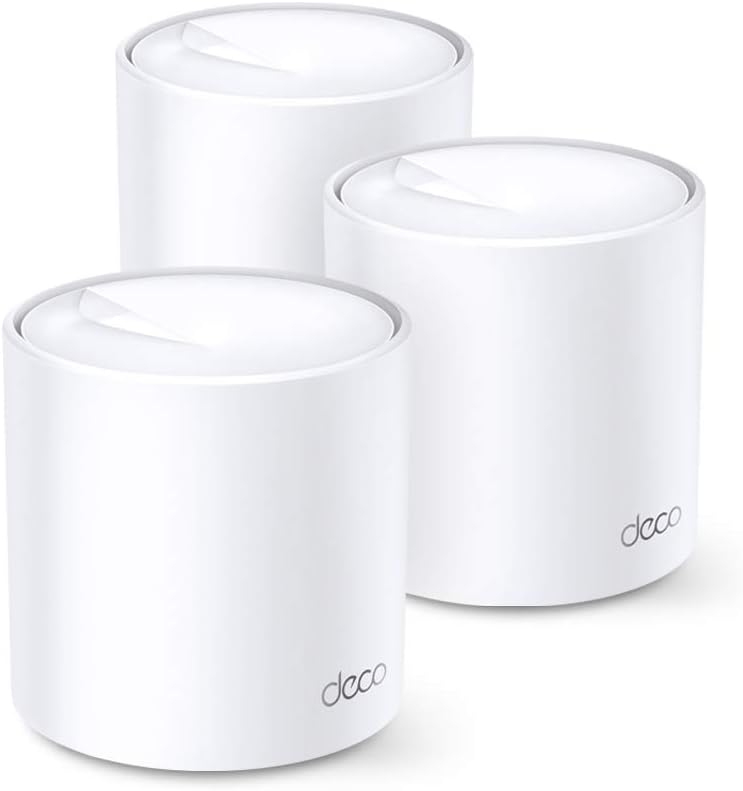
The TP-Link Deco X20 is a cutting-edge Wi-Fi 6 mesh system delivering AX1800 speeds up to 1,800 Mbps and seamless coverage across 5800 sq.ft. Designed for busy smart homes, it supports multiple devices simultaneously with OFDMA and MU-MIMO technology, ensuring ultra-low latency for gaming and video calls. Featuring WPA3 security, parental controls, and easy Alexa voice integration, the 3-pack system replaces traditional routers and extenders with a unified, high-performance network that's simple to set up and manage.


| ASIN | B084KJF5DJ |
| Antenna Location | Gaming, Home |
| Best Sellers Rank | #5,220 in Computers & Accessories ( See Top 100 in Computers & Accessories ) #8 in Whole Home & Mesh Wi-Fi Systems |
| Box Contents | 3 Deco X20 units |
| Brand | TP-Link |
| Brand Name | TP-Link |
| Colour | white |
| Compatible Devices | Alexa |
| Connectivity Protocol | Wi-Fi |
| Connectivity Range | 5800 Square Feet |
| Connectivity Technology | Wi-Fi |
| Control Method | App |
| Controller Type | Amazon Alexa |
| Country of Origin | India |
| Coverage | 5800 Sq. Ft |
| Customer Reviews | 4.5 out of 5 stars 1,192 Reviews |
| Data Transfer Rate | 1800 Megabits Per Second |
| Frequency | 5 GHz |
| Frequency Band Class | Dual-Band |
| Global Trade Identification Number | 06935364086947 |
| Importer Contact Information | TP-Link India Private Limited Office No.1, Tower 2, Level 2, Raiaskaran Tech Park, Andheri Kurla Road, M.V Road, Andheri East-400072 Contact: Toll Free 1800-209-4168, [email protected] |
| Is Modem Compatible | No |
| Item Dimensions L x W x H | 11.1L x 11.1W x 11.4H Centimeters |
| Item Type Name | Mesh Router |
| Item Weight Unit of Measure | 1.07 Kilograms |
| LAN Port Bandwidth | 10/100/1000 |
| Manufacturer | TP-Link Systems Inc, TP-Link Systems Inc. 10 Mauchly, Irvine, CA 92618, USA or TP-Link India Private Limited Office No.1, Tower 2, Level 2, Raiaskaran Tech Park, Andheri Kurla Road, M.V Road, Andheri East-400072 |
| Manufacturer Contact Information | TP-Link Systems Inc. 10 Mauchly, Irvine, CA 92618, USA or TP-Link India Private Limited Office No.1, Tower 2, Level 2, Raiaskaran Tech Park, Andheri Kurla Road, M.V Road, Andheri East-400072 |
| Manufacturer Part Number | Deco X20(3-pack) |
| Maximum Upstream Data Transfer Rate | 1800 Megabits Per Second |
| Model Name | Deco X20(3-Pack) |
| Model Number | Deco X20(3-pack) |
| Number of Ports | 2 |
| Operating System | Windows |
| Other Special Features of the Product | QoS |
| Packer Contact Information | Pacific Technology Private Limited Survey No, 57/3/55, 57/2/56, 57/1/57, Silver Industrial Estate, village Bhimpore, Nani Daman, daman Dadra and Nagar Haveli and Damn and Diu, India 396210 |
| Security Protocol | WPA3 |
| Special Feature | QoS |
| Unit Count | 1 Count |
| Voltage | 240 Volts |
| Warranty Description | 3 years warranty |
| Wireless Communication Standard | 802.11ac, 802.11ax, 802.11g |
| Wireless Compability | 802.11ac, 802.11ax, 802.11g |
A**V
Perfect for home usage
Since I have a 1GBPS internet connection at home, WIFI speeds really matter to me. For me anything below 300mbps on WIFI is waste of my internet plan. I used to have two D-Link 825's setup in extreme ends of the house connected via lan cable to give a full 100% WIFI coverage. But that too maxed out around 350-380MBPS. In November when WIFI 6 routers started pouring in I bought the cheapest one, which was TP-LINK Archer AX10 (AX1500). I replaced my primary D-Link 825 router. I saw great improvement in signal strength and WIFIspeeds. On 2.4ghz channel I was maxing out around 100mbps (same as D-Link 825), on 5ghz (WIFI 5) channel i was able to max out around 500mbps in a range of 10feet (which is roughly 30% more than D-Link 825's output) and on 5ghz WIFI 6 channel I was able to max out around 600-650mbps. This was the maximum WIFI speed I've had. And the reason I was still using one of the old D-Link router was not many high usage devices were in that particular room. About a week or two ago (roughly around 10th May 2021) my D-Link 825 started malfunctioning and the range of signal strength and WIFI speed dropped drastically. Even if I was in close proximity of the router (2feet) i was getting just 50% of WIFI signal and barely speeds of 100mbps. That is when I decided to go for a mesh router. (even though TP-LINK Archer AX10 (AX1500) supports ONEMESH technology, its not as fast as standard mesh router. I was confused between Deco M9 plus and X20. Even though Deco M9 Plus has a better range and performs better at a distance when compared to Deco X 20, I still went for Deco X20 3 piece configuration as this is a WIFI 6 compatible router. The setting up of Deco X20 was really easy. It barely took me 5 minutes to setup the two nodes. I did not need to install the third node as of now as the 2 nodes have been more than sufficient in providing a great signal throughout my house. Because I had a lan cable going in the other room, I connected the node 2 with ethernet which supports ethernet backhaul which is basically WIFI mesh through lan. What this does is creates the 2nd or 3rd node's wifi much stronger giving off better WIFI speeds. Now coming to the speeds, In close proximity (2 feet) I was able to achieve 750mbps of upload and download which is extremely good. For me its been a massive jump. As soon as the distance was increased to 10-20 feet, the speed were around 500-600mbps which was still great. And if it was increased to 30 feet or 2/3 walls apart it dropped to 200mbps which is still very good considering the amount of distance. The application for deco X20 is very user friendly and is very well made. Only if you are looking for wifi speeds above 500mbps (which means your broadband speed should be more than this), go for Deco X 20. If you do not have a plan of 500mbps above or do not intend to upgrade either or if you want a much stronger WIFI signal,, do go for Deco M9 Plus. It does not support WIFI 6, but can still give you WIFI speeds of up to 550mbps in close proximity. It also outperforms Deco X20 in terms of range and speed at distance of 30 feet.
M**L
A must Buy!
• WiFi 6 Performance: The speeds are excellent. I consistently get close to my ISP’s maximum over 5 GHz, and even the 2.4 GHz band holds up well throughout the house. No more buffering during video calls or lag in online gaming. • Seamless Coverage: Before, certain rooms had almost no signal. After setting up the mesh system, even the farthest bedrooms and corners now get solid WiFi. The roaming between nodes is very smooth. • Handles Many Devices: With all our phones, tablets, smart bulbs, and streaming devices running, the Deco X20 still delivers reliably. It doesn’t slow down even when many devices are connected. • Easy Setup & App: The Deco app guided me well. Setup took maybe 10-15 minutes total. Features like guest network, parental controls, and managing connected devices are intuitive
S**N
Meets expected range without wire and Parental control in App
Signal strength is 15% less compare to Original Jio router, But it has 3 access points which helped to extend the reach without wire. I have 2 reasons to buy this device: 1) Connect to 60ft away wifi Cam and multiple walls in between, which streams now the live view seamlessly. 2) Parental control in Deco app to control childs mobile usage.
S**P
Good performance. Easy installation.
Was up and running in 10 minutes. Super easy setup and good performance - getting full 150 Mbps across 2000 sft space. Earlier using simple repeaters was giving 20 Mbps. Yes this needs a tplink account to setup the router but I don't mind...
D**T
works great and fantastic range
fantastic and works great places where I used to get zero connection now Im getting 50mbps for my 80mbps connection. I see many complaints about speed and range so here are a few tips- 1. keep the device in a open space and mount it high on the wall at the level of your clock, dont keep it on the ground. 2. also there should not be big electrical appliances close to it like tv and sound system which can interfere with the transmissions 3. every house is different so you need to place the others decos strategically so they can spread the signal proportionately, if you have multiple floors and place them very close there will be interference amongst themselves. 4. wireless you cannot expect exactly same speeds as the router there will be 15-20 percent drop or even more if your placement is incorrect, solution for that is connecting all decos via ethernet or using a smart ethernet switcher… only then you will get exact speeds 5. works better in open houses with less congestion of furniture and rooms, also note the range 5800sq ft is for all the 3 together and you cannot expect 5800 sqft as its according to US homes, here in India we have concrete walls hence the area will decrease final verdict- fantastic product for large apartments or homes with multiple floors given that you follow the above points in mind. also the device is very easy to setup and configure even for someone who has no experience
T**K
Good value
Excellent product
N**L
It’s a 100% quality product and safe my tv remote
A**H
Works well and with Jio Fiber it's just good
Purchased the 3pack Deco X20. Downloaded the Deco app. Connected the 1 unit with Jio Fiber router with LAN cable and the setup happened in a breeze. After that turned on 2nd & 3rd units ONE BY ONE and added them to the network. All happened seamlessly and no glitches. Just have to be patient until it gets connected. The 1st unit has to be placed near the Jio router with the LAN cable. The other two can be placed anywhere in your home/office provided they get good signal. I've placed one unit far away in ground floor & one unit in 1st floor. Both of them get good range. Speed is good. Connectivity of devices is great. You can set priority for devices from the app. Management of routers & devices are easy.
B**R
Gutes Preis-/Leistungsverhältnis, ein Produkt mit Zusatzfünktionalitäten
Das Deco 20x 3er Set zeichnet sich durch ein gutes Preis-/Leistungsverhätnis aus. Die angegebenen über 500 Quadratmeter Abdeckung werden wohl unter freiem Himmel, bei Windstillstand und in der finsteren Nacht erziehlbar sein, im Haus schaut es freilich anders aus. Aber trotzdem, im Altbau aus echten Ziegeln mit Betondecken kann ich eine brauchbare Abdeckung von ca. 200 Quadratmetern realisieren. Was will man mehr? Aber es gibt noch mehr. Per App, über die sich alles zentral und flott steuern lässt, kann Antivirus, Quarantäne von derächtigen Endgeräten und Malwareschutz aktiviert werden. Sicherlich nicht auf höchstem technischem Niveau und es gibt auch keine weiteren Konfigurationsmöglichkeiten dieser Sicherheitsfeatures, aber auch rudimänterer Schutz in diesen Bereichen ist für den Preis sensationell, denn der Hersteller bewerbt die Funktionen als "free lifetime", ich interpretiere das mal als "gratis für die Produktlebenszeit". Die Jugenschutzfunktionalität habe ich nicht aktiviert, wäre aber auch vorhanden. Der Langzeittest steht zu diesem Zeitpunkt aus, aber die problemfreie, einfache Installation und die Performance lassen bis jetzt nichts zum Meckern übrig. Aktuell eine absolute Kaufempfehlung!
M**K
Great value
Was having issues with my Google Nest Wi-Fi continuously losing connections with devices. So far I’ve only had stable connections and decent speeds. We have around 30 devices in a 2000sq ft house. Family life is a lot calmer with a working Wi-Fi system!
P**A
Beklentileri karşılıyor ancak modemsiz kullanacaklar dikkat
Dubleks evimizdeki internet çekim sorununu çözdü. Yalnız şöyle bur durum var. TP link müşteri hizmetleri ile görüşerek aldım sistemi ve oradan öğrendiğim kadarıyla ismi T ile başlayan internet sağlayıcısının fiber altyapısını kullanıyorsanız modem olmadan doğrudan ethernet kablosu ile modemi aradan çıkararak da kurulum yapılabiliyormuş. Biz de buna sahip olduğumuzu düşünerek aldık. Yalnız kurulumu bir türlü yapamadık (bu durumda internet bağlantı türünü Pppoe seçip ISS’nin verdiği kullanıcı adı ve şifresi girilerek kurulum yapılıyor). Kurulumu yaparken son adımda ethernet kablosu takılı değil uyarısı veriyor. TP link müşteri hizmetleri harika bu arada, onların önerisiyle en son ISS ile görüştüğümüzde kampanyamız fiber internet olmasına rağmen orijinal fiber altyapımız olmadığını öğrendik:)) Çakma mı yani diyorum, yok orijinal değil sadece diyor :D Bakır kabloluymuş bizimki, orijinal olunca malum ISS cam kablolu “orijinal” fiber için binaya ayrı kurulum yapıyormuş. Bizdeki ise telefon hattından splitter ile aldığımız internet (ama ethernet soketine de tam uyuyordu). Neyse, bunu kontrol etmeden modemi aradan çıkararak kurmak düşünülmemeli. Burada ürünle olgili değil internet altyapısı ile ilgili sorun var. Biz de eski modemin üzerinden bağladık. Dubleks, neredeyse 220 m2 evin istisnasız her köşesinde hız ve bağlantı sorunu olmayan internete kavuştuk. Bu arada oyun oynayanlar için ping değerinin düşmesinde pek etkisi olmadı oğlumun bilgisayarında. Mecburen ethernet kablosu ile çözülecek. Genel olarak tavsiye ederim. * güncelleme- 1. Hafta sonunda deco’lardan biri kendi kendine çalışmayı durdurdu. Dolabın üstünde durduğu yerde, hiçbir müdahale olmadan.
R**N
Excelente wiffi mesh
Muy bueno, fácil de instalar, app para el móvil muy intuitiva. Funciona mucho mejor que un powerline. Razón por la cual opté por esta tecnología y resolví los problemas de zonas muertas en mi casa. Velocidades de internet iguales en toda la casa. Muy satisfecho
D**S
Avantages significatifs : rapide, fiable, facile, performant, couverture étendue.
Plus de zones mortes par rapport à mon simple routeur Wi-Fi classique et unique. Connexion fluide même en se déplaçant dans la maison. Configuration avec une interface intuitive et facile via l’application mobile. Installation très facile. Excellent débit Ethernet depuis un autre Deco distant. Pour mon Deco j’ai choisi le mode routeur au lieu du mode bridge, et ai coupé le Wi-Fi du simple routeur. Pour ce choix, il vaut mieux analyser chaque situation au cas par cas (voir conseils sur Internet).
Trustpilot
2 months ago
1 month ago