
Buy anything from 5,000+ international stores. One checkout price. No surprise fees. Join 2M+ shoppers on Desertcart.
Desertcart purchases this item on your behalf and handles shipping, customs, and support to USA.
❄️ Keep your Pi cool, colorful, and crushing it — because lag is so last season!
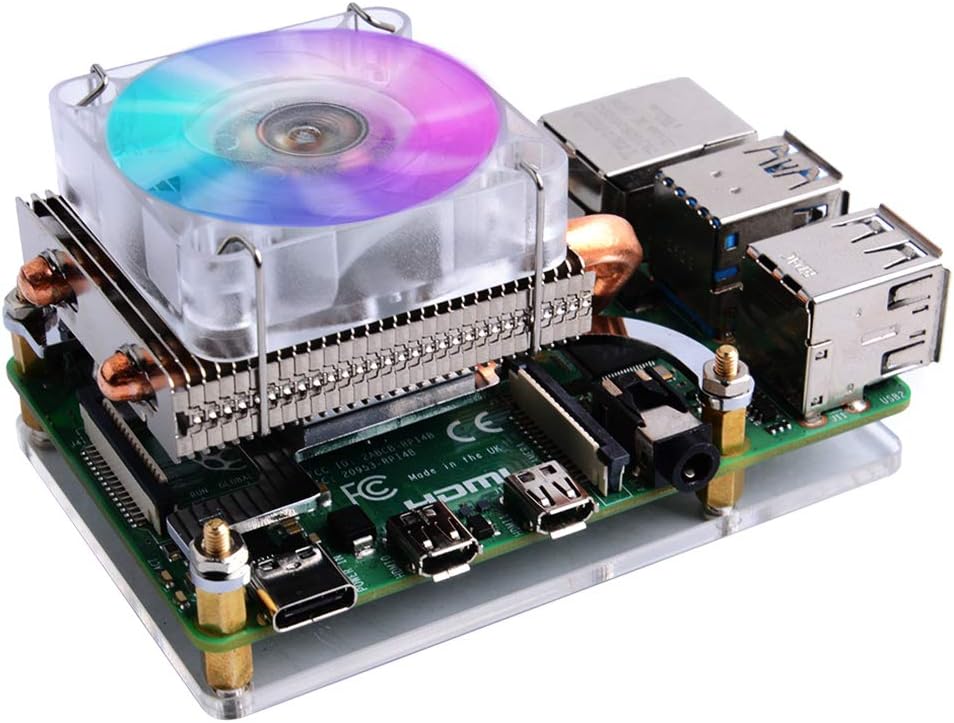
The GeeekPi Raspberry Pi 4 Low-Profile ICE Tower CPU Cooler is a premium cooling solution featuring a 5mm copper heat pipe and a PWM-controlled RGB LED fan with automatic color cycling. Compatible with Raspberry Pi 4 (2GB/4GB/8GB) and Raspberry Pi 3 models, it offers efficient heat dissipation and silent operation powered directly from the Pi’s 5V supply. The package includes all necessary mounting hardware, thermal pads, and an acrylic protection panel for easy installation, making it ideal for overclockers and performance enthusiasts seeking reliable temperature management with a stylish flair.


| ASIN | B07ZV1LLWK |
| Are Batteries Included | No |
| Best Sellers Rank | 89,645 in Business, Industry & Science ( See Top 100 in Business, Industry & Science ) 240 in Computer Heatsinks |
| Brand | GeeekPi |
| Colour | silver |
| Customer Reviews | 4.4 4.4 out of 5 stars (1,186) |
| Date First Available | 31 Oct. 2019 |
| Guaranteed software updates until | unknown |
| Item Weight | 150 g |
| Item model number | EP-0122 |
| Manufacturer | GeeekPi |
| Package Dimensions | 10 x 8.2 x 6.2 cm; 150 g |
| Voltage | 5 Volts |
M**S
Amazingly efficient cooler
Does the job, very, very, very well. Running a nextcloud on it, never gets above 45
M**T
The best cooler!
I put together a custom build arcade machine setup, with custom rgb button lighting via a ultimate i/o board, rgb buttons, digital 360 sticks and an rpi4. Had a couple of tiny lags on a few of the larger games, so wanted to get this sorted. Who wants lags, right? Simple install of this little beauty and well, well, well, look at this: Stats - pre install Clock speed 1.5ghz 53 degrees idle 60 degrees in use Stats - after install Clock speed 2.0ghz (overclocked) 29 degrees idle 40 degrees in use I'd say that's a winner! So, if arcade retropie or similar is your setup and you want to overclock then hey there, get one of these, brings that bad boy down to an acceptable level of temp!
J**H
The coolest of cool Raspberry Pi fans
This is extremely cool. Much like its predecessor, but having less height, this fan is perfect for any Pi (4 in my case). And it is especially good for those who use RetroPie, as I do... Buy it!
J**G
Not cheap.
I would have given it 5 stars except for the price, £12-£15 would have been more realistic for this cooler. It does a good job of keeping the chip cool, but over priced.
T**G
A must for over clockers
Keeps the CPU nice and cold even at extreme over clocking. Awesome and easy to install.
D**N
Fits perfect keeps ice cool even when overclocked
This is a great little cooler just a smaller version of a pc cooler even with heatpipes. I found I got even better performance if I used a tiny blob of thermal paste instead of a heat pad. max temp of 37c at a 2GHZ overclock on a pi 4 with 620 MHZ on the GPU. And the RGB is quite cool too lol but wont work with corsair icue ;-)
D**.
Nice and cool
Works really well. Would recommend
J**Y
Not top class but ok😐
The light is somewhat fancy, but the fan speed is quite slow. I understand that as a 5V device, it might not be powerful enough. Additionally, the heating element is very small, and the pipes are primarily for design purposes. While there's room for improvement, I am still okay with it overall. I would give it two stars because I don't feel it offers good value for money. If it were a bit cheaper, that would be more acceptable. In terms of cooling, it's not very effective, so I would rate it a three out of ten. However, the noise level is good; I would give that an eight.
A**J
I first bought one and then 5 more. Really good, well built (I just dislike the RGB LEDs)! All my RPis are now running 5-10C cooler than befor
D**Y
Interferes with other add-ons
E**N
I picked the downdraft-style cooler by merit of having two heatpipes, and also blowing air onto and across all components of the board. Although, with such power-sipping components, any heatsink with heatpipes at all is easily good enough. Installation: easy. The cooler comes with all the mounting hardware (plus extra standoffs, screws, and nuts), a nice little acrylic baseplate, and some included thermal pads to interface between the processor and heatsink coldplate. (I opted for some Arctic MX-4 I had lying around.) There's probably no need to worry about proper mounting pressure, just screw in everything hand-tight according to the diagrams in the instructions or possibly get a little help from pliers for the nuts. The included fan is a simple 5V, 40mm fan that is honestly just fine for keeping everything cool. There are two jumper wires on the fan that plug directly into 5V and GND on the Pi's GPIO headers. (You can also swap the 5V for 3V3 if you would like the fan to be quieter / dimmer.) The fan makes a slight whine, but it won't be noticeable unless you are in a quiet room with the fan within a couple feet of you without headphones. At least, it's quiet enough that I wouldn't spend another $15 to swap it for a Noctua... for now. Performance: I was able to easily get my Raspberry Pi 4 to 2147MHz core, 750MHz graphics, though the graphics could probably get even higher. I idled at about 32C and had a max CPU temperature of 45C under extended load (~25C ambient), even with a >600MHz overclock. At $20, it's a pretty significant portion of the total cost of a Raspberry Pi setup, but a good cooler is basically the only way to improve the performance you can get out of the processor. This product may be a little overkill but hey, it gets the job done and looks pretty flashy with its TWO heatpipes and miniature fin stack.
K**N
When I noticed that there was only physical contact with the SoC and not the the RAM, USB or Wifi chips I was a little worried that this might not be the solution I was looking for. But it really was. This cooler is very effective. I've got a Pi4 running overvoltage, heavily overclocked with a bunch of hungry accessories like Edge TPU, servo controller, IMU, OLED display (for status only; it runs headless) etc. The whole setup used to run in the 70's or even 80's (Celsius) when it got angry. Something had to be done. With this fan running on the 5V pin it sits around 45C most of the time even while working pretty hard reacting to AI with servos etc. 35C at 'idle'. And I can barely hear the fan - certainly if any other PC or laptop fans are nearby it won't be heard over them. I'm also pretty confident that you could drop down to 3.3v or even disconnect the fan entirely and still experience pretty good passive cooling just from the block, copper pipes and fins. The only real improvement I'd like to see for this relatively simple design would be to extend the block to contact the RAM and maybe add lugs for the USB and Wifi chips. Bottom line: if you need to overclock or push a Pi4 and don't need a tight enclosure, this will do the trick - and it's not a huge vertical block so you do at least have *some* reasonable mounting/enclosure options.
W**R
Lato 2022. Temperatura w mieszkaniu 28 stopni. Na zewnątrz 34 w słońcu. W szafce LAN 10" temperatura 28 do 30 C. Przed montażem chłodzenia, na zwykłym, fabrycznym wiatraku miałem 52 C na CPU bez obciążenia. Z obciążeniem 60 C. Po montażu tego chłodzenia obniżyłem temperaturę do 40 C. W chłodniejsze dni mam 38 C. Na Raspberry działa Home Assistant w docker oraz Adguard Home i NUT server do obsługi UPS. Co daje pogląd. Obciążenie ciągłe CPU na poziomie 20 - 40 %. Jak dla mnie rewelacja. No i poziomy układ pozwala na montaż w szafce. Polecam produkt, gdy potrzeba porządnego chłodzenia.
Trustpilot
1 month ago
4 days ago