Buy anything from 5,000+ international stores. One checkout price. No surprise fees. Join 2M+ shoppers on Desertcart.
Desertcart purchases this item on your behalf and handles shipping, customs, and support to USA.
🚀 Elevate your network game with Intel-powered speed and reliability!
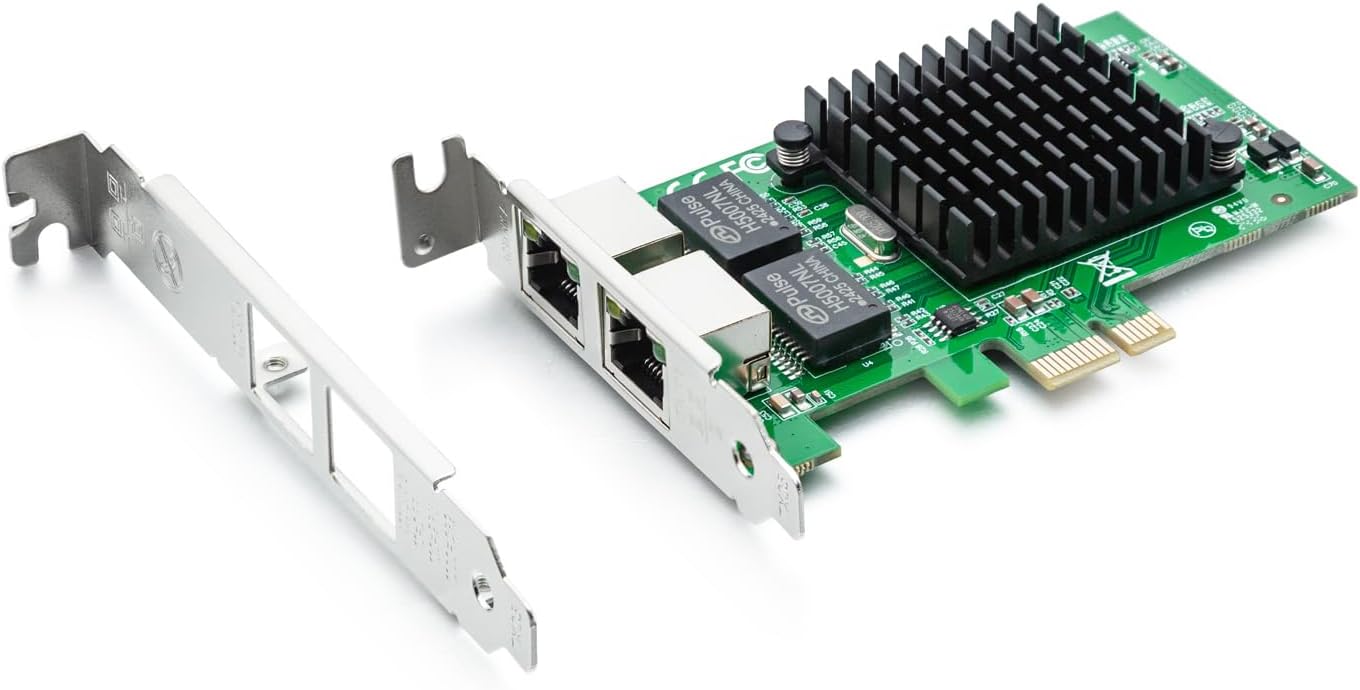
The 10Gtek Intel 82576 Gigabit Ethernet Adapter delivers dual RJ45 copper ports with Cat-5 support up to 100m, powered by the original Intel 82576 chipset for intelligent offloads and stable server performance. Featuring PCI Express 2.0 x1 interface at 2.5 GT/s, it supports a wide range of operating systems and includes both full and low-profile brackets for versatile installation.


| ASIN | B01LXTF48X |
| Box Contents | Desiccant Packet, Low-Profile Bracket |
| Brand | 10Gtek |
| Brand Name | 10Gtek |
| Color | multi-color |
| Colour | multi-color |
| Compatible Devices | Desktop, Laptop |
| Customer Reviews | 4.5 out of 5 stars 313 Reviews |
| Data Link Protocol | Gigabit Ethernet |
| Data Transfer Rate | 1000 Megabytes Per Second |
| Hardware Interface | PCIE x 1 |
| Importer Contact Information | Clicktech Retail Private Limited, 18, Rabindra Sarani, Poddar Court, Gate No.2, Ground Floor Kolkata, West Bengal, 700001. Phone: 18004192373, Email: [email protected] |
| Item Dimensions L x W x H | 11.4L x 6.9W x 1.8H Centimeters |
| Item Type Name | Network Card |
| Item Weight Unit of Measure | 82 Grams |
| Manufacturer | 10Gtek, Shenzhen 10Gtek Transceivers Co. Ltd, Dongguan Branch, Area B, 5th Floor, Building 11, Jinnuo Industrial Park, Technology Avenue, Hetian Community, Houjie Town, Dongguan City, Guangdong Province, P.R. China, Email: @10gtek.com |
| Manufacturer Contact Information | Shenzhen 10Gtek Transceivers Co. Ltd, Dongguan Branch, Area B, 5th Floor, Building 11, Jinnuo Industrial Park, Technology Avenue, Hetian Community, Houjie Town, Dongguan City, Guangdong Province, P.R. China, Email: @10gtek.com |
| Manufacturer Part Number | 82576-2T-X1(E1G42ET)-(Intel-1pc) |
| Model Number | 8541588131 |
| Packer Contact Information | Shenzhen 10Gtek Transceivers Co. Ltd, Dongguan Branch, Area B, 5th Floor, Building 11, Jinnuo Industrial Park, Technology Avenue, Hetian Community, Houjie Town, Dongguan City, Guangdong Province, P.R. China, Email: @10gtek.com |
| Product Dimensions | 11.4L x 6.9W x 1.8H Centimeters |
| Unit Count | 1 Count |
| Warranty Description | 2 Year Manufacturer |
A**H
100% recommend
I have purchased 3 of these at this point. Works like a charm!
A**A
No conecta a 1gigabit
La tajerta funciona tiene 2 puertos independientes, pero no importa si usas linux o windows, la tajeta dice que puede funcionar a 1gigabit, pero jamas enlaza a 1gbit, enlaza a 100mbit, ahi mismo donde otras tarjetas funcionan bien a 1gbit, esta no.
S**G
Use it for pfsense and work right out of the box
B**.
is same as Intel 82576 Gigabit Network Connection adapter
Very good product and working fine with pfsense and good performance with suricata IPS inline mode. pciconf -lcv #Output of pciconf command on freebsd. igb2@pci0:3:0:0: class=0x020000 card=0xa03c8086 chip=0x10c98086 rev=0x01 hdr=0x00 vendor = 'Intel Corporation' device = '82576 Gigabit Network Connection' class = network subclass = ethernet cap 01[40] = powerspec 3 supports D0 D3 current D0 cap 05[50] = MSI supports 1 message, 64 bit, vector masks cap 11[70] = MSI-X supports 10 messages, enabled Table in map 0x1c[0x0], PBA in map 0x1c[0x2000] cap 10[a0] = PCI-Express 2 endpoint max data 128(512) FLR link x1(x4) speed 2.5(2.5) ASPM disabled(L0s/L1) ecap 0001[100] = AER 1 0 fatal 0 non-fatal 1 corrected ecap 0003[140] = Serial 1 6cb311ffff1b17c0 ecap 000e[150] = ARI 1 ecap 0010[160] = SR-IOV 1 IOV disabled, Memory Space disabled, ARI disabled 0 VFs configured out of 8 supported First VF RID Offset 0x0180, VF RID Stride 0x0002 VF Device ID 0x10ca Page Sizes: 4096 (enabled), 8192, 65536, 262144, 1048576, 4194304 igb3@pci0:3:0:1: class=0x020000 card=0xa03c8086 chip=0x10c98086 rev=0x01 hdr=0x00 vendor = 'Intel Corporation' device = '82576 Gigabit Network Connection' class = network subclass = ethernet cap 01[40] = powerspec 3 supports D0 D3 current D0 cap 05[50] = MSI supports 1 message, 64 bit, vector masks cap 11[70] = MSI-X supports 10 messages, enabled Table in map 0x1c[0x0], PBA in map 0x1c[0x2000] cap 10[a0] = PCI-Express 2 endpoint max data 128(512) FLR link x1(x4) speed 2.5(2.5) ASPM disabled(L0s/L1) ecap 0001[100] = AER 1 0 fatal 0 non-fatal 1 corrected ecap 0003[140] = Serial 1 6cb311ffff1b17c0 ecap 000e[150] = ARI 1 ecap 0010[160] = SR-IOV 1 IOV disabled, Memory Space disabled, ARI disabled 0 VFs configured out of 8 supported First VF RID Offset 0x0180, VF RID Stride 0x0002 VF Device ID 0x10ca Page Sizes: 4096 (enabled), 8192, 65536, 262144, 1048576, 4194304
C**N
TrueNAS setup
Not a technical review but my experience from being a sudo-tech. I have a TrueNAS only to host content for Plex. If Plex wasn’t a thing I would never have built two machines over the last seven years. The first one was dated two years ago easily so I had to upgrade. I bought a older MB but still lights out better than before- a ASRock B550 Pro4. What I didn’t know was that MB has a RealTek ethernet chip. I pulled everything in and all was well. I went to move data and my network started to drop. After seeing that I saw an error on the TrueNAS about the network. After researching the problem was the RealTek 2.5. I then bought an Intel 2.5 and found that those don’t have proper driver so that was returned. Then I found reviews about this 1G card and bought it. Immediately plugged in and worked with no extra effort from me. Moved big data files with no errors. I was relieved. How long will this last? I will see. I wish I could have gotten the 2.5G to work to stay up to date but that is fine. On to the next problem!
J**E
Works Great In Proxmox
In my homelab, I have a pretty robust server based around Proxmox 7.1, an AMD 5950X and 128GB of RAM. It's a sweet little playground. I wanted to play around with virtualized firewalls, particularly PFSense. The cheapest way I could find to do it was by adding NIC's to my existing server. I selected this dual NIC primarily because it used an x1 PCIe interface. My mainboard has two of these slots. The 4 port version is an x4 PCIe and my mainboard has none of these, meaning I'd have to use the x16 slot. I generally prefer to reserve my higher end x16 PCI slots for more capable hardware, not a basic 1G multi-NIC. Install was standard PCIe, about as simple as it gets. I read the reviews indicating compatibility with Proxmox and I can attest that it works well in my 7.1 build. I had the typical issue where Linux's dynamic network interface monitoring feature jacked up my interface name and bridge configuration. Easily fixed with a trip to /etc/network/interfaces though. (And to be sure, this is a Linux issue, not a hardware one.) I've had my setup going for a few months now with no troubles. I don't know much about this network card, such as who makes it or where to get drivers that I didn't need in Proxmox. That hasn't seemed to matter. Oh, and if you're interested in virtualized firewalls, I'd encourage you to explore it. I've had a lot of fun with PFSense so far.
Trustpilot
2 months ago
5 days ago