

Desertcart purchases this item on your behalf and handles shipping, customs, and support to USA.
๐ค Print smarter, not harder โ never run dry on brilliance!
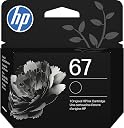
The HP 67 Black Ink Cartridge delivers up to 120 pages of sharp, fade-resistant black prints. Designed exclusively for HP DeskJet and ENVY series printers, it ensures consistent, professional-quality output with water-based ink. Compatible with HP Instant Ink for hassle-free refills, this genuine cartridge is ideal for everyday home, office, and small business printing needs.


| ASIN | B084131T6G |
| Additional Printer Functions | Print Only |
| Best Sellers Rank | #17 in Office Products ( See Top 100 in Office Products ) #1 in Inkjet Printer Ink Cartridges |
| Brand | HP |
| Built-In Media | Item |
| Cartridge Type | Genuine |
| Color | 67 Black |
| Compatibility Options | Genuine |
| Compatible Devices | Works with these HP Printers: DeskJet 1255, 2710e, 2720e, 2721e, 2722, 2722e, 2723e, 2724, 2725, 2732, 2742e, 2752e, 2755, 2755e, 4110e, 4120e, 4121e, 4122e, 4123e, 4130e, 4132e, 4152e, 4155e, 4158e; DeskJet Plus 4122, 4132, 4155 ENVY 6010e, 6020e, 6022e, 6030e, 6032e, 6034e, 6050e, 6052e, 6055, 6055e, 6075, 6075e, 6420e, 6422e, 6430e, 6432e, 6450e, 6452e, 6455e, 6458e, 6475e; ENVY Pro 6455, 6458, 6475 Compatible Devices Works with these HP Printers: DeskJet 1255, 2710e, 2720e, 2721e, 2722, 2722e, 2723e, 2724, 2725, 2732, 2742e, 2752e, 2755, 2755e, 4110e, 4120e, 4121e, 4122e, 4123e, 4130e, 4132e, 4152e, 4155e, 4158e; DeskJet Plus 4122, 4132, 4155 ENVY 6010e, 6020e, 6022e, 6030e, 6032e, 6034e, 6050e, 6052e, 6055, 6055e, 6075, 6075e, 6420e, 6422e, 6430e, 6432e, 6450e, 6452e, 6455e, 6458e, 6475e; ENVY Pro 6455, 6458, 6475 See more |
| Compatible Printer Models | DeskJet 1255, 2710e, 2720e, 2721e, 2722, 2722e, DeskJet 2723e, 2724, 2725, 2732, 2742e, 2752e, DeskJet 2755, 2755e, 4110e, 4120e, 4121e, 4122e, DeskJet 4123e, 4130e, 4132e, 4152e, 4155e, 4158e, DeskJet Plus 4122, 4132, 4155 |
| Customer Reviews | 4.6 out of 5 stars 50,362 Reviews |
| Global Trade Identification Number | 00193015522398 |
| Ink Base | Water |
| Ink Color | Black |
| Ink Colour | Black |
| Item Dimensions D x W x H | 1.43"D x 4.05"W x 4.49"H |
| Item Type Name | Ink Cartridge |
| Manufacturer | HP |
| Mfr Part Number | 3YM56AN |
| Model Name | 67 Black |
| Model Number | 3YM56AN#140 |
| Model Series | DeskJet/ENVY |
| Number of Items | 1 |
| Number of Packs | 1 |
| Other Special Features of the Product | up to 2x more prints |
| Page Yield | 120 |
| Print media | Glossy photo paper |
| Printer Model Compatibility | HP Deskjet 1255, HP Deskjet 2710e, HP Deskjet 2720e, HP Deskjet 2721e, HP Deskjet 2722, HP Deskjet 2722e, HP Deskjet 2723e, HP Deskjet 2724, HP Deskjet 2725, HP Deskjet 2732, HP Deskjet 2742e, HP Deskjet 2752e, HP Deskjet 2755, HP Deskjet 2755e, HP Deskjet 4110e, HP Deskjet 4120e, HP Deskjet 4121e, HP Deskjet 4122e, HP Deskjet 4123e, HP Deskjet 4130e, HP Deskjet 4132e, HP Deskjet 4152e, HP Deskjetโฆ |
| Printer Output Type | single color |
| Printer Type | Inkjet |
| Special Feature | up to 2x more prints |
| Specific Uses For Product | Everyday printing |
| UPC | 193015522398 |
| Unit Count | 1 Count |
| Warranty Description | One-year limited warranty |
| Warranty Type | limited warranty |
E**O
It's a good price from here,got it quicky
I like it but I can't afford it right now no money. I had to spend 9 dol to return it!! Not happy. Never again.
S**L
Reliable, HighโQuality Black Ink That Just Works!
I recently replaced my printer cartridge with the HP 67 Black Ink Cartridge (compatible with DeskJet 1255, 2700, 4100 and ENVY 6000 series), and Iโm really pleased with the results! ๐จ๏ธ Crisp, Clear Printing: The black ink produces deep, sharp text thatโs easy to read โ perfect for documents, school papers, and everyday printing. I havenโt experienced any fading or streaking. โ๏ธ Great Compatibility: It worked seamlessly with my HP DeskJet 2700 series printer right out of the box โ no errors or setup hassles. Installation was quick and straightforward. ๐ Good Performance: The prints come out clean with consistent coverage, and I appreciate that the cartridge doesnโt clog easily even if the printer sits idle for a few days. ๐ก Value for Daily Use: This is a solid choice if you print a lot of text documents. Itโs dependable and gets the job done without headaches. Overall, the HP 67 Black Ink Cartridge delivers reliable performance and excellent print quality. A noโfuss replacement that keeps my printer running smoothly โ definitely recommend! ๐จ๏ธ๐๏ธโจ
D**S
HP ink cartridge
Nice quality ink and easy to install. We have ordered these before
A**E
Great Quality
Works perfect for my HP PRINTER!
L**E
Quick dry
Smudge resistant, drys quickly. But seems to run out of ink quickly
B**T
Use your HP printer infrequently at home? Do not buy the XL-67 or XXL-67, buy the HP-67
If you use your HP printer infrequently at home, I would highly recommend NOT getting the XL-67 or XXL-67 and get this one, the HP 67. If you purchase the XL or larger then you will never be able to use all of the ink in those cartridges...the HP app that installs on your PC will say that everything is OK at the same time that my HP printer is printing only black outlines around the thick black parts, like titles on documents and even QR Codes are outlines and not solid black. And a printed QR Code, when the 67XL is supposedly still full but printing only outlines, will not scan...it does not work. So to summarize: If you are an infrequent user of your printer like me, it is a waste of money to get the XL67 or XXL-67. The regular 67 will show a more accurate fill level in the HP Smart App, the XL and larger WILL NOT. Notice the XL is about twice the cost, and it will not last because of the extra time the printer ink will be in your printer. It must be drying up or it is due to ink cartridge sensor malfunctions. At least on my HP ENVY 6455e this is exactly what happens with XL-67. USEFUL FOR HP PRINTER OWNERS: I'm an x-HP employee so I've been around HP Printers since 1998. The Envy's require using both wireless AND a printer USB type cable at the same time to work. Most HP Printer Problems can be solved by unplugging the printer from outlet voltage at the outlet or printer, for about 20-30 seconds. This clears the memory on the printer which gets data stuck in it frequently. What happens is the PC software knows the printer memory capacity and sends data in those size packets, with data stuck in the printer memory consistently...the available memory is less than what your PC is sending. There is not enough room in the printer memory, as the HP PC software has no way to know that all of the printer memory is not available. So it will not generate any error message at all and just lock up, like it is dead.
L**Z
Works perfectly
Great product that works really well
A**E
Best price.
Best price I found for my printer.
E**A
Good
Good but It lasted very little time
O**N
I think itโs affordable
Works well
L**G
PRICE IS BETTER THAN MOST SOURCES AND CAME QUICK
PERFECT
Z**O
Good ink but runs out quick
The ink itself is really good, but runs out quite fast
S**D
bonne grandeur et longueur
ok
Trustpilot
1 month ago
2 months ago