Desertcart purchases this item on your behalf and handles shipping, customs, and support to USA.
โจ๏ธ Elevate your workspaceโsplit, slim, and type smarter!
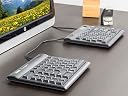
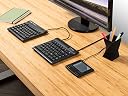
The Kinesis Freestyle2 Ergonomic Keyboard UK Layout features a flexible design with up to 9 inches of separation between modules, a zero-degree negative slope for reduced wrist strain, and low-force tactile keys that require 25% less effort than standard keyboards. Its driverless hot keys enhance productivity without software installation, all wrapped in a sleek, travel-friendly form factor with a familiar UK layout.
| Brand | Kinesis |
| Package Dimensions | 40.89 x 23.62 x 3.81 cm; 1.08 kg |
| Item model number | KB800PB-UK-20 |
| Manufacturer | Kinesis |
| Series | Freestyle 2 Ergonomic |
| Power Source | USB |
| Operating System | Windows 10 |
| Item Weight | 1.08 kg |
| Guaranteed software updates until | unknown |
A**R
Supremely comfortable but you'll probably need the optional wrist rests
I'm typing this review with the keyboard. It's accurate, comfortable to use, easy to adapt to, and pretty quiet for a full travel keyboard.I'm actually using it with a Mac and it works OK, so long as you don't need to use all the hotkeys. For Mac users in the UK you'll have to decide whether you want a Mac-specific keyboard in US format, or use the PC version with a UK layout. I guess it will pretty much come down to how much you'll need to adapt to the single height enter key on a US layout. More experimentation required for me before I decide on that.Build-wise it feels a little flimsy, particularly the pivot hinge. Not a patch on the Goldtouch ball approach to solving that, but do bear in mind that the Goldtouch doesn't fully separate so it will depend on whether you just need to pivot the keyboard or fully separate it.I was surprised to receive a USB keyboard as the product photo doesn't show a cable but on reading the product spec I can see that it states it's USB rather than Bluetooth. Just bear that in mind if Bluetooth is important for your use case.I'm definitely going to order the wrist rests for this keyboard as even though it's negative rise there's still quite a hop up to the keys, certainly compared to a thin membrane keyboard (I'm coming from an Apple Magic keyboard.Overall, very happy with it but with reservations. I wish Kinesis made a Mac version in a UK layout, then it would be perfect.
A**Y
Good product, met high expectations fairly well!
-> Good product, worked as expected. Quite comfortable, easier to adapt to than I expected.-> Some of the little plastic/rubber lump things on the back came off quickly, so it isn't quite as stable as it should be. I've only had it a couple of months so can't comment on durability.-> It's quite pricey, but you know that, so I won't factor that into the review.-> slightly noisier than most new keyboards, it's a bit thicker and mechanical; this doesn't bother me but might bother other people in the same room as you a bit.I bought this after having some minor upper-back posture problems and from some mild tendonitis in my wrist; I think both of these are exacerbated due to hunching over small laptop keyboards.I also bought the VIP3 (tilty) accessory. It makes a fairly big difference, I think, though I haven't used the keyboard without them to compare. But I use it most of the time at the 15-degree tilt and don't notice it, so I'm presuming it's a good thing! I also always separate it, instead of joined at the top and rotated.It was much easier to adapt to than I expected. Took a couple of days of glancing at my fingers a lot, and I still miss a couple of keys (usually only the ones which are across the divide, eg H is on the right but I'm used to hitting it with my left). I use it as part of a standing desk or a sitting desk, sometimes I put the keyboard on my leg instead of having to reach for the screen. It also means the hands have to move less than when on a normal keyboard, so could potentially be faster.I think this is the design on the future and in five years or so they'll be the main type of keyboard. It feels really comfortable to use, I notice it swapping back to a usual keyboard now. My symptoms have gone down for upper back tightness and wrist pain. It's also a bit more fun as it feels kinda like a space ship control...
A**C
Bezt keyboard I've ever used
By far the best keyboard I've ever used. Its comfortable and afaptable to exactly how i want to use it. I agree that placement of keys could be improved (for me the delete key is too far up) but this you get used to; the keyboard in every other respect is outstanding!I think if you but it the accessory kit is critical to obtaining full benefit from the keyboard.
L**A
Great design but don't last well for the price
Really good design, and the key strike feels perfectly fine, no real problems with any of that - any adapting I needed to do was well worth it for the benefits to wrist/arm pain that this split keyboard helps combat. It's great for that.However, for the price, I am VERY disappointed that after 3 months some of the keys started sticking, and now after 6 months, there are frequent problems with missing characters in Word and related cos especially. I'd expect somewhat better for the price - and, worse, having to check and go over writing counteracts much of the benefit of the split keyboard anyway. Ah well.
L**N
Brilliant
Without a doubt, the best ergonomic keyboard I've ever got. I suffer from severe RSI, so can't do a lot of typing, but I find I can do more typing with this keyboard than I can any other. Definitely worth getting if you want to protect your hands and wrists from RSI, or if you already have it, and want to limit it occurring.
K**A
No Help with my RSI and Annoying Layout
My RSI is tendonitis across the back of my hands and this keyboard along with its 'VIP3 V-Lifter and Integrated Palm Supports' didn't help. I think the 'tented' shape (raised in the middle) is probably the way to go, but this isn't raised high enough to make much difference. For the same reason I don't think it would help Carpal Tunnel. It should help if your problems are with pronation or ulnar deviation.Also, if you prefer a full size keyboard or regularly need the Insert key you probably won't like the layout of this keyboard. Its a 'compact' like a laptop but worse. It has extra keys which if you don't want them, can cause problems, eg: if you use the Control key for anything except Copy/Cut/Paste you'll find that the key in the bottom left corner is now Fn which locks on and changes other keys - very annoying when you wanted Ctrl. To use Insert you have to toggle Fn on, hit Pause/Break, then toggle Fn off again! Do any serious keyboard users use Pause/Break more than Insert?I'm trying a Fentek ErgoMagic from the USA next - expensive, and UK key labelling not ideal, but bigger tenting angle looks promising. And importantly for me, its a conventional full-size layout.
Trustpilot
1 month ago
2 weeks ago