Desertcart purchases this item on your behalf and handles shipping, customs, and support to USA.
๐ Elevate your workspace with power, speed, and styleโbecause your productivity deserves the best!
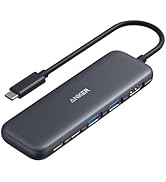
The Anker 8-in-1 USB-C Laptop Docking Station delivers dual 4K HDMI outputs, 85W power delivery, and 1 Gbps Ethernet connectivity in a compact aluminum design. Compatible with Windows, ChromeOS, and Thunderbolt laptops, it expands a single USB-C port into multiple essential connections, ideal for professionals seeking seamless multitasking and reliable performance.


| ASIN | B0874M3KW4 |
| Additional Features | HDMIโข๏ธ, Powered |
| Best Sellers Rank | #35 in Computers & Accessories ( See Top 100 in Computers & Accessories ) #5 in Laptop Docking Stations |
| Brand | Anker |
| Color | Gray |
| Compatible Devices | Full Functional USB C Lenovo/HP/Dell laptops, Macbook/iMac (For macOS, the displays on the both external monitors are identical) Compatible Devices Full Functional USB C Lenovo/HP/Dell laptops, Macbook/iMac (For macOS, the displays on the both external monitors are identical) See more |
| Customer Reviews | 4.3 out of 5 stars 6,527 Reviews |
| Data Transfer Rate | 5120 Megabytes Per Second |
| Enclosure Material | Aluminum |
| Hardware Interface | Ethernet , HDMI , MicroSD, USB 3.0 |
| Item Dimensions L x W x H | 4.65"L x 2.01"W x 0.69"H |
| Item Weight | 0.2 Pounds |
| Manufacturer | Anker |
| Mfr Part Number | A83800A1 |
| Minimum Required Operating System Version | Windows 10 |
| Model Number | A83800A1 |
| Number of Ports | 8 |
| Operating System | Windows 10 |
| Smart Home Compatibility | Not Smart Home Compatible |
| Special Feature | HDMIโข๏ธ, Powered |
| Total USB Ports | 3 |
| Total Usb Ports | 3 |
| UPC | 194644032081 |
| Unit Count | 1.0 Count |
| Warranty Description | 18 months |
M**B
Great All-in-One Hub, With Few Limits
This is a solid USB-C hub if you need to expand your laptopโs ports. It covers all the basicsโdual HDMI, USB ports, Ethernet, and SD card slotsโall in a compact design. Setup is plug-and-play, and itโs been reliable for everyday use. ๏ฟผ The dual monitor support is a big plus, but keep in mind on Mac, both screens will mirror instead of extend. ๏ฟผ Downsides: it can get a little warm with heavy use, and youโll need your own power adapter to get full charging performance. Bottom line: Great value and functionality for most usersโjust know the limitations depending on your device.
R**Y
Works great
Switched jobs had to send back docking port previous company provided couldnt get all three of my monitors to talk or work right went on youtube the man in video said he used anker but it was an older model went on Amazon found this one works perfectly 5 stars. Im using a work Dell pro laptop and using two monitors so now I have three different images one on the laptop one on my left monitor and one on my right at first I wasn't going to use the ethernet port on anker was going to keep it directly connected to the laptop but without doing so i notice a glitch very minor glitch on my right mointor but immediately after i connected the internet ethernet cable into the port that stopped and still fast quick and seamless. Came fast within 8hrs of ordering it. Took it straight out the box plugged it into the laptop connected the two hdmi cables went to windows to display detected the 3 monitors set it in the direction i want things to go and went right back to making money!
A**R
Reliable Dual-Monitor Hub That Adds Useful Ports Without Extra Bulk
Anker PowerExpand 8-in-1 USB-C PD Media Hub Dock is a very practical docking option if you want dual-monitor support without moving to a full desktop dock. The dual HDMI outputs make multi-screen setups easy, the extra USB ports handle everyday accessories well, and pass-through charging helps keep a laptop powered through a single connection. It is compact enough for travel but still feels sturdy for daily desk use. One important advantage is that setup is usually straightforward, though Mac users should know dual external displays may mirror instead of extend because of macOS limitations. Overall it offers strong value for productivity, home office use, and clean cable management.
E**8
Compact, Budget Friendly, Decent Functionality
The design is simple to use, small in size and is very lightweight. The value for your money is good when compared to other usb/hdmi dock hubs. The cable that runs from the device to your PC could be longer as it can be a little awkward depending on your desk configuration. The only problem I had was a small defect in manufacturing specifically with the ethernet port. There was an extra bit of metal casing that made it very hard to remove the ethernet connector after use and/or would scrape the plastic connector until it eventually made clearance in the plastic. It was rectified by simply removing the malleable defect with a small screwdriver. Overall it has been a good buy though and I would recommend it if youโre in need of additional monitor connectivity without breaking the bank.
M**F
Great basic docking station
Easy set up. Very compact. Works great.
J**N
Perfect for dual screen gaming off a laptop.
As pictures show, includes 2 hdmi output ports, 1 usb C 3.1/2(?) Connector for charge only, no data, 2 3.0 usb ports, a ethernet rj45 connector for internet and 2 sd card ports (micro and full)
M**T
Good docking station - when it works
Generally, this docking station functions well and as expected in the year+ that I've had it. The number of ports works well for my setup of 2 external monitors + camera. The connecting cable from dock to machine is short, but not an issue for me. Unfortunately it will go haywire periodically, ~ 1-2x per month or so. One monitor will display gray, or the other, or neither monitor will be detected. In my favorite case, the entire setup blinked in and out of functioning for about 5 minutes before dying completely... in the middle of an interview. I've updated drivers, rebooted, reconnected, all the things, so I've just decided that my particular docking station is lightly haunted.
C**E
Great product
Worked great. I really needed one with 3 hdmi slots but didnโt realize it until I started hooking up my 3 monitors and noticed my laptop did not have an hdmi slot. :)
A**N
Nice
As per description
A**I
Indispensable product for seamless work experience
So far, it's been a great product. It's practical, works out of the box and just makes sense to have.
V**O
Very compact, well built & functional (for now)
This is my replacement hub for the Lention that stopped working after 18 months. I had rated that product 5 Star and it was truly great product till one day it decided not to deliver power from the PD port to laptop. Without power supply passing through, it was useless and I scrapped it. Then started my search for a new hub - the biggest challenge though how to identify one that combines good build quality and functionality with longevity. So, I decided to go with known non-chinese brands and Anker came top on the list. So far, the hub is working like a charm, just like Lention. I am hoping that this will last for at least 3 years to justify the price premium. One small gripe is that the USC C cable attached to the hub is too short (15 Cms, I guess). I keep my laptop in a vertical position with lid closed on a stand and work on the monitor. The USB C port on my laptop is on the upper end of the laptop and when I connect the hub, the hub keeps dangling awkwardly. Had to go with 0.5 M extension cable! I will update this review if this fails in less than 3 years!
D**.
Anker. Always a good pick. Reliable quality
As usual with Anker, this is a high quality product that just does what it promises. Recommend
G**E
Compact hub. Two HDMI works perfect with Windows. Good buy.
Plugged it in to my two monitors and it worked straight out of the box. I'm using a Dell Latitude 5310 running Windows Enterprise. However I could not use a 130W power adapter, but a 65W adapter works fine. I believe that is according to specifications (max 100W). Totally satisfied with my purchase.
Trustpilot
4 days ago
2 days ago