Desertcart purchases this item on your behalf and handles shipping, customs, and support to USA.
🎧 Elevate your sound game—because your voice deserves the spotlight.
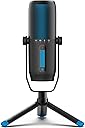
The JLab Talk Pro USB Microphone delivers professional-grade audio with a 192kHz/24BIT sample rate and four versatile polar patterns (Cardioid, Omnidirectional, Stereo, Bidirectional). Featuring on-mic volume and gain controls plus quick-mute, it offers effortless, driver-free USB-C plug & play connectivity. Lightweight and compatible with standard mounts, it’s designed for podcasters, streamers, and professionals seeking studio-quality sound anywhere.


| ASIN | B0885K94MG |
| Antenna Location | Gaming |
| Audible Noise | 95 db |
| Audio Sensitivity | 9 db |
| Best Sellers Rank | #337 in Computer Microphones |
| Brand | JLab |
| Built-In Media | Microphone |
| Color | Black |
| Connectivity Technology | USB |
| Customer Reviews | 4.0 out of 5 stars 541 Reviews |
| Enclosure Material | Plastic |
| Frequency Range | 20Hz - 20kHz |
| Frequency Response | 20 KHz |
| Global Trade Identification Number | 00812887019347 |
| Hardware Platform | Camera |
| Impedance | 200 ohm |
| Item Dimensions | 8.66 x 3.35 x 1.57 inches |
| Item Weight | 501.4 g |
| Manufacturer | JLab Audio |
| Mfr Part Number | MTALKPRORBLK4 |
| Model Name | MTALKPRORBLK4 |
| Model Number | MTALKPRORBLK4 |
| Number of Batteries | 1 Lithium Ion batteries required. |
| Number of Channels | 3 |
| Polar Pattern | Omnidirectional |
| Recommended Uses For Product | Gaming |
| Signal-to-Noise Ratio | 95 db |
| Special Feature | USB |
| UPC | 649661437611 812887019347 |
| Unit Count | 1 Count |
| Warranty Description | 90 days limited warranty |
S**S
Fantastic all around and holds a charge between usage. Great for reading, cooking or ambiance.
My concern with this was battery life while stored since my previous would die after a couple weeks. I left this for over 6 weeks and it was still 100% charged so I feel confident that it will be ready when I need it. The base is stable and the extension can be set to whatever height you want. On high power it's more than sufficient to read a book after dark without any eye strain, while a dimmer setting on a color makes for great ambiance. What's really nice is it will turn back on to the same setting. It turns on by holding the power button for a second, and once on the power button cycles the different colors. A long press turns it back off, and when turned on the next time it will be at that same color and brightness. This is fantastic if you're trying to preserve night vision because you don't get blinded with a bright light every time. The case is sturdy and nicer than expected and does a nice job protecting it when not in use. The one minor improvement I would like is a more substantial clip. There was room for a heavier clip so I wish it had one, the current is tight for using with a carabiner. Overall very happy though
A**.
Good mic for gamers, zoomers and general recordings.
I bought this for my son to replace a dying microphone. He loves it for the recording capabilities and weight. His old microphone was too heavy to use with a microphone arm. This one was fairly light. It goes with a short stand to use on a tabletop or desk. The stand is easily removable so you can use other types of stands. Unfortunately his computer did not recognize this plug n play mic. There's nothing to download to make it work. I decided to replace his usb wire that came in the box with another one and "wallah", it worked! It's an older computer, so perhaps that played into it not working out of the box. It worked on newer laptops and computers in my home. There are rgb lights that might be nice for gamers. My son felt distracted by it. We eventually taped up all lights with black wiring tape because it's constantly on for mute and direction types. The mute button is an important feature. No need to unplug the mic or hassle with the computer to do it. All controls are on the mic itself. My son uses his mic for gaming and zooming for school. He has used it to do recordings for school projects and finds that it does it's job superbly. He's picky so that says a lot. And he takes a long time researching his electronics. We've had this mic for awhile already and it's still going. He uses it for about 12 to 16 hours a day, everyday.
A**N
Great value. High quality fidelity.
I replaced my (borrowed) high end Schure mic and Auphonix screen/mic guard with the JLab Talk Pro. I'm very pleased and my podcast partner/producer agrees that the fidelity is not diminished in any way. A full, rich, studio quality sound blows my Jabra top tier headset out of the water. Easy to use, unobtrusive. Multi-vocal direction options - single user (very directed sound input), two user, group, room. And...you don't have to be one inch from the mic to get the full tonal rich sound thus it's unobtrusive, visually for folks on the other side of a video call.
K**E
Did not work..TWICE!!!
I did a lot of research for a microphone to use for teaching, online gaming and recording. I finally setting on the Jalb TalkPro. The microphone arrived on time and looked great. Well organized package and simple set up instructions. When I followed the steps the the computer did not recognize the device. The mic also would not unmute. When I pushed the button nothing happened and it stayed red. I tired trouble shooting and finally reached out for help. I emailed Jlab asked for help. I got. a message it might take a while to get back to me due to Covid. (no problem, I get it). I then reached out to Amazon for a return when it lead me to work with one of their techs. Long story short that process took over an hour and I left very frustrated (not Jlab's falut). I returned the first mic and orders a second. That one came on time as well. looking to be in great shape. This one would unmute I could tell the mic was picking up sounds but again my computer (a MacBookpro) was not recognizing the mic. like the first time I tired on a second computer with the same problems. During this time of trouble shooting the mic stoped picking up sounds and put itself on mute and would not unmute. That day Jlab got back to me I explained the problem and without any trouble shooting just said I got a faulty unit and should ask for a replacement. I emailed back saying I was already on my second mic and think this project is not a good one. They said they do not believe their projects are bad and will pass on my story to another department. I returned the mic and then went to a different brand and when that came it worked. No problems. Jlab sent me two bad mics in a row and was professional with costumer service but did not try to keep me as a costumer. There are many great reviews for this product. S0 I would say order with caution.
R**Y
Great microphone for advanced users
You're getting a $150 mic for ~$60 + the cost of a USB cable. It's an incredibly good deal, with two important caveats: 1) This mic ships with a defective USB cable. Also, some USB C cables won't fit, if the plastic behind the head of the cable connector is too thick. The cable I ordered when I bought the mic didn't fit. I swapped out the included cable for a thinner cable from one of our phone chargers and it worked. The new cable limits the range of motion slightly because the new cable doesn't have an L-shaped connector like the included cable. 2) This is NOT a super beginner-friendly mic. It does not have digital signal processing. If you're using this for streaming, and you're not very tech savvy or don't want to watch how-to videos, do NOT buy this. DO buy this if you want professional sound quality for cheap (I got it for around $60) and you are willing to spend time tuning it. Certain programs like Discord and Windows Sound Recorder seem to have some automatic tuning included, so you might have an easier time with those. When I first plugged in this mic, it was too quiet even with max gain. I learned that the mic was too far away from my mouth with the included mic stand. (It must be 4-6 inches from your mouth.) I had to go buy a cheap boom arm to mount it on, so as not to destroy my neck. I got a crappy but serviceable one from InnoGear for $17. On initial setup, the mic sounded tinny and distorted in OBS (because I didn't have an equalizer or good audio filters). I found a great video from EposVox on YouTube that walked me through the audio setup process in OBS step by step. Now that I've done the positioning and tuning correctly, it sounds beautiful and I love it. It also looks very slick with the black/blue body and blue/green LEDs. Amazon discounted this product like 60 or 70% for me because a lot of customers are returning it due to the broken USB cable, or because they couldn't figure out how to set it up. I'm giving it 5 stars because it's a really great value for the discounted price and sounds great, but taking off 1 star for the USB cable issues.
P**L
Amazing Call Quality for Teams/Skype/Zoom
I am really happy about this purchase. I am on zoom approx 6-8 hours a day. I have always used headsets, but the problem I was running into was that after 6+ hours on the phone I was losing my voice. I figured our that while wearing headphone with passive noise canceling I was speaking at a higher volume to compensate for not hearing my voice. This microphone has changed that completely. I am speaking at a normal tone or even lower than usual, and when I go back and listen to my zoom meeting it is crystal clear. Do not hesitate if you are on the fence about buying the PRO or one mode lower. This will be fantastic for work. I cannot speak to musical production.
R**D
Great Mic ... unless you're on windows 8, 10, or 11
tl;dr: 2 stars -- sorta good but a huge headache to get there. Not sure if I'm going to keep it. I broadly like everything about this mic but run Windows 10 on the machine I wanted to use it with. The build quality is solid, the stand is a moderate footprint but stable, and the sound quality is good. Well. The sound quality is mostly good. Starting with Windows 8 MS introduced a bug in their USB mic drivers that makes them *extremely* quiet. This doesn't impact mics that have dedicated/custom drivers from the manufacture (some other USB mics, most/all webcams/etc). As far as I can tell the JLab Pro does not have anything like this so in order to get reasonable audio volume out I have to install a collection of audio utilities and fiddle with them. I know that *technically* that makes this a Microsoft problem but (evidently) everybody knows about this and there are ways to work around it as a manufacturer so I'm docking points from JLab here. And a random note: the USB cable that came with it felt like good build quality but didn't work at all or my Mac. Basically if I used it the Mac didn't detect the hardware. Switching to a different cable and it was fine. Overall it isn't ideal and I can't decide if I'm going to return or not. Like I said, I like it when I can make it work and it sounds fine and at a deep discount it may be a reasonable purchase if you have specific circumstances where you can deal with a fickle mic. NOTE: I *am* using the correct mic pattern and the gain on the mic itself is turned all the way up as is the in-windows audio input levels. I call this out since those are the first things to check and this doesn't seem to be an issue that I can configure my way out of with the standard set of tooling available.
B**W
Really nice hardware, good performance, ongoing JLab USB cable failure.
UPDATE: Second unit had same issue; I inquired about sending a generic non-JLab USB-C cable which would resolve the issue but they couldn't/wouldn't. That's a bad look; downgrading from 4-stars to 3-stars. After testing several condenser mics, this is the one I’m keeping. The tripod is very sturdy metal with rubber tips; really nice. Mic has both 5/8” and 1/4” threads for attaching to mic stands and booms; lots of options. Headphone jack on bottom, and a headphone volume knob on back. The onboard headphone volume control is separate from the system volume settings, a real plus. The Gain knob does what you expect, and is a big reason I like this mic. Many mics don’t include their own gain control, relying solely on the OS system setting for Mic Input. My experience with JLab: the unit I bought did not function unless I used my own USB cable. JLab was very responsive however, did an immediate RMA, and is sending a whole new unit to me which I expect to resolve the issue. So bad news/good news, but in the end I’m satisfied. Nitpick: the Quick Start Guide does not show how to change the directional pattern recording modes, and it doesn’t explain what the LED light on the bottom is for (decoration only, no functionality, not an indicator). FYI, the current Amazon description says a lithium battery is required—NOT TRUE—there is no battery needed.
P**K
Happy customer
The quality of the product is top tier. It feels sturdy and well made. Sound is clean and really good as well. The only thing is that provided 3 legs stand cannot be attached directly to the mic if you want it to be lower and not on the fork mount it come with. You cannot screw in legs without that fork holder because USB-C is in the way of that fat screw ;/
D**D
High-Quality USB Microphone for Professionals and Casual Users
The JLab Talk Pro USB Microphone delivers excellent audio quality with a range of features that make it perfect for various uses, from podcasting and streaming to gaming and video calls. What I liked: Professional Quality Sound: The condenser mic captures crystal-clear audio, making my recordings sound professional. Versatile Modes: The 4 directional pattern modes (cardioid, omnidirectional, stereo, and bidirectional) allow flexibility for solo or group recordings. Plug & Play: The USB-C connection made setup effortless. No drivers or extra equipment needed—just plug it into my PC, and I was ready to go. Volume Control: The built-in volume knob is convenient for quick adjustments while recording. Compact Design: It fits neatly on my desk without taking up much space, and the sleek design looks great. What could be improved: While it performs well, I noticed slight sensitivity to background noise in omnidirectional mode, which may require additional soundproofing for optimal results. What I used it for: I’ve used this microphone for gaming, podcasting, and Zoom meetings, and it has consistently delivered high-quality audio. It’s a great all-around mic for anyone looking to upgrade their setup without breaking the bank. Overall, the JLab Talk Pro is an excellent choice for beginners and professionals alike. Highly recommended!
P**E
Excellent value with surprising noise filthering!
Excellent mic for anyone looking for decent "work from home" setup. It simply sit on my desk adapt to my varied positions and distances from it super well, so doing it keeps filthering my mechanical keyboard and mouse clicks flawlessly. No need to stick my face to it or anything. 100% recommend this. For a 100$...Don't let your co-workers suffer your laptop or headphone cheap mic any longer.
D**D
Espectacular
Increíble micrófono profesional a un precio espectacular,sonido inmejorable
R**S
desaire
Estuve muy entusiasmado en adquirir este micrófono. Falló la instalación en 3 de 4 laptops (plug & play), hablé a soporte y me dijeron que es el cable, que debo solicitar el cambio. :( La calidad de los acabados es cuestionable. Por el precio que pagué, uno no se espera este tipo de desaciertos.
Trustpilot
3 days ago
1 month ago