🚀 Boost your WiFi, boost your life — don’t let dead zones cramp your style!
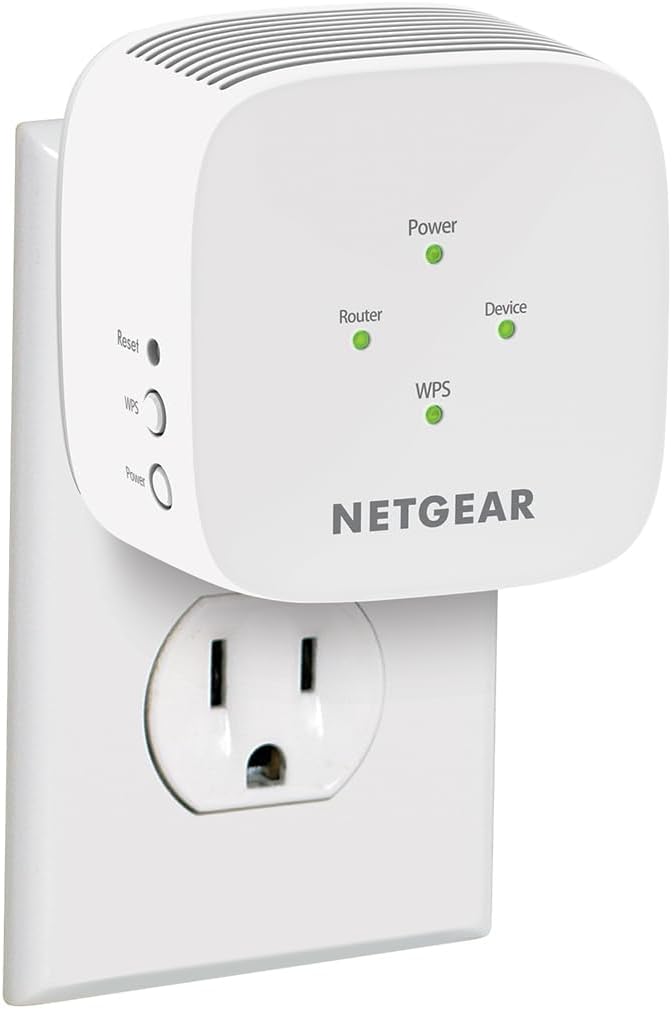
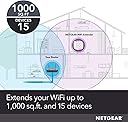
The NETGEAR EX5000 AC1200 Dual Band WiFi Range Extender enhances your existing network by expanding coverage up to 1000 sq ft and supporting up to 15 devices simultaneously. With dual-band speeds reaching 1200 Mbps, it ensures smooth HD streaming and gaming. Compatible with any standard router or modem, it features easy WPS setup and the NETGEAR WiFi Analyzer app for optimal placement, making it an ideal solution for eliminating WiFi dead zones in homes and small offices.


| ASIN | B083R46CV8 |
| Best Sellers Rank | #13 in Repeaters |
| Customer Reviews | 4.0 4.0 out of 5 stars (17,124) |
| Date First Available | January 20, 2020 |
| Item Weight | 5.4 ounces |
| Item model number | EX5000-1AZNAS |
| Manufacturer | Netgear |
| Product Dimensions | 2.55 x 2.85 x 2.85 inches |
R**A
Easy set up
Fairly easy to set up for the technologically inept. I wasn’t able to use the app or the quick set up, but it gave additional instructions and was pretty quick.Works great. I’ve got a 2200 square-foot house and this extends Wi-Fi to my outdoor cameras seamlessly.
A**S
IPERF3 Performance
I have bought 4 of these so far, and 2 I gave away. I've been using IPERF3 for testing with my pair and decided I wanted to know exactly how much speed I was getting from these. When using just 1 as an AP, I got upwards for 180Mbps. The band steering features seem to be working well, and other 802.11ax features, as I disabled the 2.4Ghz interface and noticed a drop in speed by about 20Mbps. In a test with two extenders forming a wireless bridge, one in AP mode, the other in mesh mode, I noticed slightly higher speeds, as much as 210Mbps (with both laptops wired in to the ethernet ports). These devices work really well in this configuration, which is surprising as both of my laptops have Intel AX201 wifi cards. I was expecting the 1 AP configuration to provide more throughput. The worst configuration was using both in the mesh mode with the main router being a Ubiquiti AP that I have no management access to. In this configuration I was receiving about 40 to 60 Mbps. I believe the Ubiquiti might only support 802.11ac in my test. The downsides are that the web configuration is slow, there's no access for SNMP (as this would be excellent for more network insight), and without proper mesh intelligence the performance could (emphasis on could) be bad for an uninformed consumer. However, the web configuration is really well thought out and guides most general use cases to an optimal solution. I'd recommend the Netgear EAX12 for most home and business installations as I'm rather happy with buying my set. If you lose network access when trying to connect to these devices, try accessing the webpage through IPv6 with the device's built in MAC address. Try opening [ipv6address]/list_extender_device.htm in your web browser (with the square brackets) to see the device. There are websites that convert MAC addresses to IPv6 addresses which should help you get access to the device.
L**4
Not bad, but...
I had a very simple requirement - I needed to extend my wifi coverage on two sides of my house. I particularly needed to extend wifi to my detached garage, about 70 feet away from the house. I could have gone with a complete mesh system, but I have a fairly new router and didn't want to spend upwards of $200 for a mesh. This extender worked for me as far as fulfilling my needs. Setup was quick and easy. Wifi coverage extends to where I need it. Wifi speeds 70 feet away are half of my top speed next to the router. So far, so good. Having said that - the Nighthawk app is not well implemented. It needs to be updated and more features need to be added, e.g. naming connected devices, instead of seeing N/A. There is a web based interface that is much more complete, but it similarly lacks certain features. Several times Nighthawk would not connect to the extender unless I first turned Wifi off and back on in my ipad. Lastly, support - called them with a question... They had me try this and that, all to no avail. Don't know why support does not know the answer or try it themselves first instead of making the customer do the testing. This is based on 2 days using the extender. We shall see how it holds up.
A**R
No customer service
No customer service. When trying to set this up, first problem was it has you go to a website that doesn't exist. It just kept circling around for you to open your browser and enter the same website. Then when I went to netgear, it had listings of models to set up and it did not list this model. Then it wants you to download a install program which once again didn't work. Decided to call and the first thing, the automated voice asks if you are over 50 because you could get a discount. I thought, what the heck, lets see what that is. BIG MISTAKE! It was a pitch for a life alert type device and, you can't get out of it. I kept saying no an all that did was send me to another automated voice saying the will set me up with this thing. Hung up and called back, said no to the over 50 question, still got the same pitch. Called from ou land line and, still got the pitch. Decided to use the chat option. At least they didn't pitch me. They wanted a picture of what lights were on, on the extender. I was working on my desktop and didn't want to drag out and plug in my camera so, I told them I could just tell them what lights were on. One green , not a big deal. At that point nothing else was said and my conversation was rejected. Promptly boxed up the extender, processed my return to Amazon and, ordered a different brand, which I had setup in maybe 5 minutes.
C**Y
☺️👍
Works wonderfully and easy to set up. I have weak awful internet in my apartment that could only handle 1 maybe 2 devices and this helps me so much. Now I can have more devices connected.
J**S
Performance OK - printed instructions worthless
I needed a wi fi extender for my new ring wi fi outdoor cam. I bought this extender to bridge the gap between the router/modem to the outdoor cam. Problem was with the instructions and the issues getting the unit connected to my wi fi system. I have a new (2024) Arris Modem/Router Combo that does not have a WPS button. The secondary instructions in lieu of having a WPS button did not work at all using the instructed 'set up wizard'. Two hours later of watching on line tutorials and reading the instructions over and over, I came to the conclusion I needed outside help. I ended up having to access the router via the Arris software as it does not have a physical WPS button. This is an additional layer of security, however made it more cumbersome to pair the two devices. I was really expecting a more "plug and play". More the issue of the Arris, not the extender but the instructions could have been made clearer. Regarding the performance of the extender: The ring camera works well, which was the original intent, but the range/strength is not as robust as I was expecting. All in all, working OK now.
Y**P
Works
Decent.
T**E
Extra boost!
Works great!
C**L
so quick and easy to set up via the app - simple to install, my Foxtel box did not pick it up, so rebooted Foxtel and it picked it up instantly :-) the household was good to go in about 10 minutes.
B**S
So easy to set up this product. We use it for our security cameras that are a bit too far away from the main router. The cameras work great now with better live stream picture.
D**C
This product is not compatible to Australian power sockets Therefore I will return it
S**L
Funciona excelente, buen alcance en señal.
F**A
Es fácil de conectar y la coneccion es rápida pero el alcanze es muy poco.
Trustpilot
3 weeks ago
1 month ago