Buy anything from 5,000+ international stores. One checkout price. No surprise fees. Join 2M+ shoppers on Desertcart.
Desertcart purchases this item on your behalf and handles shipping, customs, and support to USA.
📺 Elevate your Samsung TV to smart status—wireless freedom, endless entertainment!
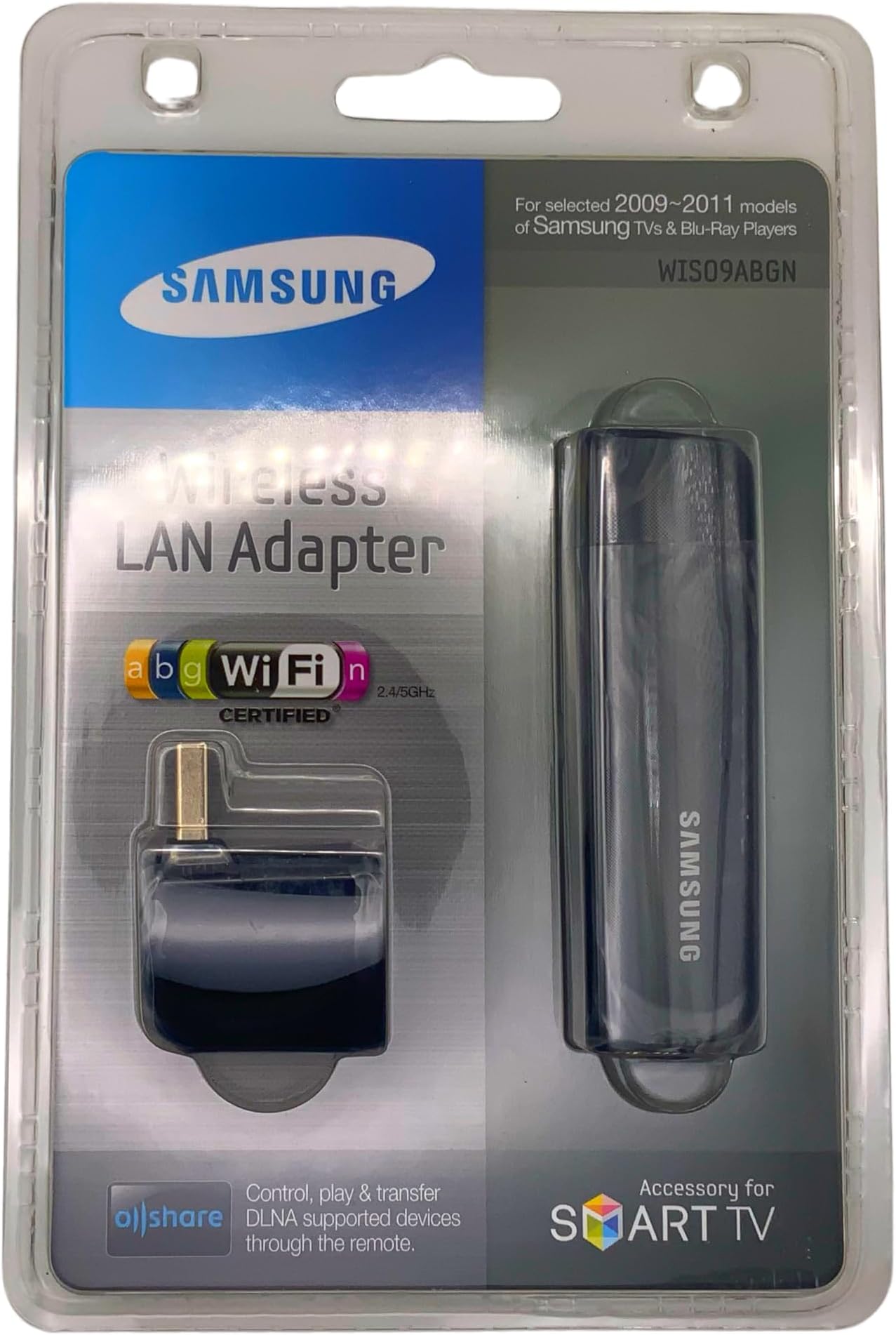
The Samsung WIS09ABGN LinkStick is a wireless USB 2.0 LAN adapter designed to transform compatible 2009-2010 Samsung Smart TVs and Blu-ray players into connected entertainment centers. Supporting IEEE 802.11a/b/g and draft 2.0 802.11n Wi-Fi standards, it enables seamless streaming of Netflix, Pandora, and PC media, plus web browsing and social apps. With robust security protocols and easy plug-and-play setup, it offers a cable-free solution to bring your HDTV online—perfect for professionals seeking effortless smart home upgrades.
| ASIN | B002669XKY |
| Best Sellers Rank | #911 in USB Computer Network Adapters |
| Brand | Samsung |
| Color | Black |
| Compatible Devices | Desktop, Smart TV |
| Compatible Operating System Family | Windows |
| Customer Reviews | 3.8 out of 5 stars 1,519 Reviews |
| Data Link Protocol | IEEE 802.11a , USB |
| Data Transfer Rate | 54 Megabits Per Second |
| Global Trade Identification Number | 00036725230033 |
| Hardware Interface | USB |
| Item Dimensions L x W x H | 3.3"L x 0.8"W x 0.5"H |
| Item Part Number | WIS09ABGNXXEC |
| Item Weight | 0.5 Ounces |
| Manufacturer | Samsung Electronics |
| Mfr Part Number | WIS09ABGN |
| Minimum Required Operating System Version | Android 1.5 Cupcake |
| Model Number | WIS09ABGN |
| Product Dimensions | 3.3"L x 0.8"W x 0.5"H |
| UPC | 036725230033 777780524377 |
| Unit Count | 1.0 Count |
G**E
It Really Works---No Kidding
I was skeptical about this product. First, it was wireless, and we all know what unfathomable events portend just from that. As far as I'm concerned, on the map of technology, there are dragons, mermaids and question marks on the wireless end of the map. Second, this product is proprietary and thus expensive (which Samsung is apologetic about, surprisingly), and as a good consumer I shuddered at that---the only company that has been getting away with proprietary and expensive is Apple, and that is because their stuff actually works (unless you want software content :>). On the other hand, I knew that wireless streaming (at least on a "N" band wireless router, which I have), should be a piece of cake. On my wireless router, I use wireless MAC address filtering, so I had to first configure my router to accept the MAC address of the adapter (this is handily printed on it), and that was no big deal. Then I plug it in (using a 2 foot usb extender, so I can get the antenna to the top of my cabinet for a stronger signal), fire up the DVD player, go to set up, and use the intuitive option menu to configure the wireless network settings--really no different that setting up a wireless PC or printer. The DVD software has a "test" function, and I tested it, and good gawd almighty, it was recognized by my network, got a signal and started doing something with it. I updated the firmware (which it prompted me to do). This took a while, maybe ten minutes. Then I went to the Netflix menu, stepped through the menu to set up my account (which requires you to go to your computer and type in a code the DVD player shows you on the TV)---by the way, WHERE to type in the code is not apparent on the Netflix home page (it is on the help menu, re activation, but its also just netflix/activate or something like that---the DVD message actually gives you the full URL, which I didn't realize). By the way, my "N" type router is about 35 feet and two good walls away from this unit, so its not like I'm trying to bounce a signal off the moon. Anyhoo, two minutes later, I'm showing the wife how all this works, and she pushes me over like Elaine does to Jerry on Seinfeld---"get OUT!!" she yells happily. Telling her that she can watch any of about 12,000 Netflix movies anytime she wants to, without waiting a couple of day for the mail to arrive, was akin to telling her that I just taught our dog how to talk---she was flabbergasted, she had no idea that technology existed. And then she asks me how much this streaming Netflix costs, and I tell her "not a red cent!" (we already have a snail mail plan), and she pushes me over again. It was awesome. Anyway, I picked myself up off the floor, and we're happy campers now. We just watched a show (you need to queue up the instant queue on Netflix, but that's easy). All this being said, if this streaming DVD setup ever breaks down, and I end up missing or dead, tell the police to question my wife.
S**D
Waste of my time
WHen I was at the store I thought I would buy a sony again but went with a Samsung. When I got it home and found out it would not work with a usb from my 2wire to the set,even when the TV said the network was up and running fine. I called Samsung and they said I needed the LAN adapter so that the network would work on the TV. So I got one so I could use apps on the TV. When I put the Samsung Adapter in to the set once again nothing happened. When I called in they said I had one of the newer TV's that they make so I thought all was well. I did not like paying $80 for the thing with out any warning that I might have to after buying the TV to get the apps on to the set.. I thought that was a bit unfair. But after I got it they said later that it would only work for Pictures and music and it would not work on a Mac. The Mac thing was fine, I get that all the time. But I asked them why I was not told that in the 1st place that on my set I could not get the apps at all when they knew the model # and were the ones who said I needed to get the adapter. I wanted it for apps only. If I want to take pictures and look at em I can use my phone or ipod or a list of other thing to look at em with on a TV, heck I could already do THATTTTT.And if I want to hear music on a TV then I can on dish network, turn on my radio,ipod ,phone,or a list of other things around the place that people have anyway. $80 for something that will do that what I already have been doing? Anyone can show pic's on their TV today with out having to buy a {Samsung LAN wireless adapter}. It was so a waste of time. And sending it BACK is a waste of day. I know they did not mean it to be nasty or anything, and the TV is a good TV, they are not telling folk the right things. Don't tell me to buy this thing if it will not work on the TV model# that I have given to you. At lest let me know what it will or will not do on the MODEL# I gave to you.People have been saying they don't like this adapter deal at all, and they are right in saying so. Good TV, Bad deal. .
L**V
Excellent, easy to use!
I thought this product was excellent! I received it Saturday afternoon, and less than 30mins later, I had both a Pandora station streaming, and choosing instant movies for my queue. This product was almost plug and play in my new Samsung Blu Ray Home Theater System (BD1200). I plugged it in, and the first thing I see on the screen is "Would you like to set up a network" (or something very close!). It should be noted that I dont have any security on my wireless network due to living in the stix (no one is really close enough to 'steal' our internet). Therefore, I had no security key to enter which made my setup much easier. I chose the wireless option, and then found the name of my network (it was the only one) and in a few secs I was connected. You have to setup your netflix and pandora accounts using a computer and enter an access code given to you on your TV screen. As soon as that was completed I was good to go! Also, some have stated that the netflix movie quality is not the best, I disagree. Maybe its not HD/Blu-Ray quality, but I never expected that! It only takes 30secs to upload the movie and then you are ready to watch. The only thing I dont like about the netflix is rewinding. You can choose the scene to rewind back to, but then you have to wait the 30sec for it to upload again. Pandora is great if you know how to use it. If you are a newbie, you might want to spend some time on the internet site before you play with it due to the complexities of the system. Its userfriendly, but you have to know how it works! Overall, I love this product. My only complaint is that Samsung should have included this product in my Home Theater System to begin with!
R**E
Easy to install, but hard to find.
I recently purchased the samsung blu ray home theater (samsung ht bd1250) because it had the capability of streaming blockbuster, netflix, and pandora (youtube is included, too, but I'm not sure why you'd want to watch youtube on your tv...). I was told when I purchased the system that the streaming capabilities required the samsung wireless adapter (this product), which was no longer in stock in stores, but could be purchased online. It turns out one of the few places online that still has these (new or used) is Amazon! I purchased a used adapter for ~$5 under retail. Other sites that said they had it actually didn't or wanted to sell it for well above retail. Anyways, the adapter came with a cap (for the USB plug) and a L-adapter so instead of sticking straight out of the back of your samsung device, it can stick 'up'. It's basically a slightly larger version of standard USB wireless adapters for computers and such. **Note** - Samsung devices do not work with other USB wireless adapters! I plugged the adapter /w the L-adapter into the back of my samsung device, turned it on and went to the menu, selected my home network, encryption (WEP), and password, and it worked /w no issues. I have an AT&T Uverse wireless router and have been setting up home networks for a dozen years so this part was pretty straightforward to me. Looking at the manual for my samsung device, the instructions matched what I needed to do to set up the adapter. I live in a rowhouse, so my wireless router is on the floor two stories above my adapter, which is inside a lower cabinet of my wooden entertainment center. Absolutely no issues with signal or uptime. For the samsung ht bd1250, it'll automatically go to the menu with options to select a streaming service if a disc is not inserted (if a disc is inserted, it'll auto-load so you'll have to wait until it loads and then stop the player to return to the menu). If you select a service, it'll then initialize the wireless adapter and it usually only takes a few seconds to connect. Once the progress screen is done, you can then select the service you'd like and then it jumps in. I've had the adapter for about a month and I primarily use the netflix service. With the exception of one movie where it stopped streaming every 15m and kept resetting my movie position, it works just as well, if not better, than my home theater computer that's hooked up to my TV. The quality varies depending on the source, but it's often close to DVD quality (w/o any sort of upscale). I have not tried to stream an HD movie through Blockbuster (don't think netflix has the option) so I can't comment on whether that works as well.
D**N
5 Stars for How Easy It Is - but I hate that I had to buy it
The Samsung LinkStick couldn't be easier to use. Plug it into the USB port on your wireless-ready TV or Blu-ray player, enter the network settings, and, voila, you are connected to your home wireless network. The length of time set-up requires depends on the security settings on your wireless router, of course, but the LinkStick was the easiest part of setting up my new LED TV system. This stick immediately picked up my wireless network and prompted me to connect. Check the specs of your Samsung television or DVD player to see whether you need this, as some of the newer, more upscale models have built-in Wi-Fi and others do not. Also, you will not need this if you can hardwire to your router or if your Blu-ray player has built-in Wi-Fi. But if you want to use internet apps and Yahoo widgets, including Netflix and Pandora, this is a must-buy for most people who want to access the online capabilities of a new Samsung TV on their home wireless network. Although I think it's inexcusable that a company like Vizio includes Wi-Fi in its lower end sets and Samsung does not, even with some of its upper end 3D LED TVs, I just factored the cost of this adapter into the price when I was comparing sets and prices. This gets five stars for how well it works. I hated that I had to buy it, but I'm really glad that I did. -- Debbie Lee Wesselmann
D**S
Things it can and cant do. The things it can do, it does well.
I bought this stick with the idea of using it in conjunction with my computer. I have computers, laptops, and other pricey pieces of wireless technology I have wasted money on. I was hoping that this would be the one stop solution for everything. It was not. Things it does: Connects the TV wirelessly to the internet: There are a handful of widgets that you can download and install to watch things such as Netflix, and ESPN scoreboard, yahoo and youtube videos. There is also an option to update the firmware of the TV (always a plus). Watch some things from your PC (This is where it gets tricky, and please read carefully): When using Windows 7, in media player you can "Push" video to the TV. The TV cannot "Pull" media from the PC. This is great if you have home movies, a music library, or digital downloads of your media. If your media does not play from media player, it is almost certain it will not play on the TV. It is quick and easy to set up, but it requires you to have a lot of the digital video on your PC not being streamed from elsewhere. Why would I bring this up? Time for the things it cant do... At the time of writing, there is no Amazon widget for the TV. You cannot stream from Amazon to the Samsung product. I assume this will be fixed one day, and I will update the review when I finally am able to watch Amazon on the TV. You also cannot make the TV a wireless monitor for your pc. If you have some strange formatted media that only plays in certain movie or music players, most likely you will not be able to put it to the TV without a video connection straight to the TV. Known what you want from this product before you buy it. I assume one day it will work with Amazon, and I assume I will get it to work the way I want it to one day... but that day is not today.
G**Z
Forgotten Security Settings, Slow Performance
I purchased a pair of identical Samsung LN40B650's and could not be happier. For the price, these are great 40" 120Hz HDTVs. I particularly enjoy the networking features of these LCDs. They support Samsung's Yahoo! Widgets and are DLNA certified. One of the two HDTVs I connected to my home network via Ethernet, and the other (due to its location) required wireless access. The Ethernet HDTV worked flawlessly from the start. I had several challenges with the wireless HDTV. The first problem was that my SSID was hidden, so I had to come out of hiding and broadcast my SSID in order for the Samsung to find my network. I use WPA security, and it took a very long time to connect to my network. Once attached, it would work for a short period of time, then disconnect from the network. Widgets ran very slow, and the overall performance was poor. I decided to remove all security from my wireless network, and things improved slightly. The performance was a little better, but not as good as the Ethernet. The real problem was that each time I turned off the HDTV, the network settings would reset and revert back to a Wired configuration. No matter what I tried, it would not store my network information, and I had to manually reconnect each and every time I turned the TV back on. At this point, I tried using an Apple Airport Express in WDS Remote mode and used the ethernet port as a bridge to connect to my HDTV. Not only did this configuration work great, it allowed me to hide my SSID again, keep my security settings, and the Samsung HDTV could happily remain part of a 'wired' network. I really wanted the Samsung Wireless Adapter to work, but at the price, buying a second Apple Airport Express is not that much of an added expense. I would not recommend this to anyone with a secure wireless network based on the experience I had.
M**X
Work as advertized, good product.
I had been looking for other ways to connect my Samsung to the internet but this is, in my mind, the easy way to do it. Everything else I could think of involved connecting through another device, but then that device would have to be on to enjoy the web content on my tv. This LAN Adapter makes life a whole lot easier. All I hade to do was install it on the TV and set it up on my wireless cable modem. The instructions, for the TV, for setting up this connection was stright foward and fairlly easy to understand with a little knowledge of modem configuation/set-up. It also makes the job of setting this up easier if you get the information you need before hand. The way it worked in my case was getting the WEP key off my modem. My modem in particular generated this key from a pass phrase I intered when I set my modem up. Your modem may be different but it should still have a WEP key or pass phrase listed. If you can't find it your ISP(internet service provider) should be able to help you find it. Now I can connet to the internet with out having to deal with other equiptment to connect through. One more thing. I using this on a TV about 20 feet away from my cable modem with out a problem. Netflix is streaming with great picture and sound quality. It's just like I am watching a DVD. I think this is a good product, it works as advertized.
S**R
besser geht es nicht
Ich bin froh über den Kauf, der mir aufgrund der Bewertungen nicht leicht gefallen ist. Von Technik verstehe ich nicht viel, aber die Installation ging sehr zügig. Ich habe dem Samsung PS50B679 mit dem Dongle verbunden und bin total begeistert. Die Einrichtung ging ganz einfach. Ich komme nun mit meinem Plasma ins Internet und kann mir z.B. Vollbildvideos bei You Tube anschauen. Die Übertragungsgeschwindigkeit ist so schnell das ich keine Ruckler bemerken kann. Auch habe ich eine Netzwerkverbindung mit meinem PC eingerichtet und kann nun Videos und Fotos Streamen. Für mich erfüllt dieser Dongle die Erwartungen in vollem Maße. Ich würde ihn mir jederzeit wieder kaufen. Er wird sogar mit einem Eckstück ausgeliefert, so dass man ihn anders ausrichten kann.
T**5
Samsung WIS09ABGN Adaptateur Wifi pour TV USB
Fonctionnait très bien lors de l'achat Mais plus de télé mince
J**S
Perfecto y rapido
El producto es perfecto, nuevo y original. Enchufar a mi TV (Samsung LED UE40D6000 del 2011) y empezar a disfrutar de los contenidos de Smart TV. El envío extraordinariamente rápido. Lo pedi un sabado y el martes por la mañana lo tenia en casa.
T**O
Wireless TV - works great
Very easy, just plug it in to the USB port on the TV and then install the downloadable Samsung program on your computer. Follow the prompts to set up the network on your PC and then your TV will play every video, music or picture that you put in the shared folder. Download movies from the net and play them on your TV, works with 3D as well. Almost idiot proof.
F**I
Ottimo
Ottimo qualità . Fa egregiamente il suo lavoro. Ottimo venditore . Nulla di negativo e da segnalare
Trustpilot
3 weeks ago
1 month ago