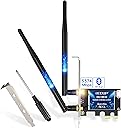
🚀 Upgrade your desktop to WiFi 6E & Bluetooth 5.2 — Stay ahead, stay connected!
The EDUP PCIe WiFi 6E Card with Intel AX210 chipset delivers tri-band wireless speeds up to 5400 Mbps across 6GHz, 5.8GHz, and 2.4GHz bands. Featuring Bluetooth 5.2 for enhanced range and speed, plus OFDMA and MU-MIMO for superior multi-user performance, it’s designed for Windows 10/11 64-bit desktops. Easy to install with included brackets and magnetic screwdriver, this adapter future-proofs your PC with cutting-edge wireless tech and seamless connectivity.


| ASIN | B0832MR4WB |
| Best Sellers Rank | #126 in Internal Computer Networking Cards |
| Brand | EDUP |
| Built-In Media | 1* PCIE Network Card |
| Color | Black |
| Compatible Devices | Desktop |
| Customer Reviews | 4.4 out of 5 stars 3,353 Reviews |
| Data Link Protocol | Bluetooth |
| Data Transfer Rate | 5400 Megabits Per Second |
| Global Trade Identification Number | 00723172896812 |
| Hardware Interface | 802.11 ac/b/g/n |
| Item Dimensions L x W x H | 0.01"L |
| Item Type Name | COMPUTER NETWORKING CARD |
| Manufacturer | EDUP |
| Product Dimensions | 0.01"L |
| UPC | 723172896812 |
| Warranty Description | 2 year manufacturer |
V**A
Excellent product-way better than USB dongles,not taken advantage of WiFi6 yet,Bluetooth is a bonus
Tired of trying various wi-fi USB dongles that has dependency on USB 3.0 for better throughput, I first started looking for the possibility of adding a USB 3.0 hub in my old refurbished desktop. I ran into this product in Amazon, and although Bluetooth was not my main purpose, I wanted to take a stab at this. First of all, product arrived way much quicker than they originally said, and secondly, it was the easiest thing to install. I was concerned about the fact the product description did not show a smaller mounting bracket, yet I wanted to try thinking that I will run to a local store if it is not there. It was there, and they also added a magnetic screw driver as that additional little bonus. After installation of the product as well as the driver, it all worked like a charm. I wish the UI of the Wi-Fi driver installation was a little more intuitive with a message that installation successful or completed etc. I had to refer to the manual to realize just a spinning icon is all what it takes for the Wi-Fi driver to complete installation. Considering the value I have finally, that little shortcoming can certainly be excused. As far as the final output, refer to the image with results from May 9th onwards. I wanted to purposefully try multiple times over the course of last couple of days, since I used to have Wi-Fi disconnected with my old USB. I live in Dallas with a AT&T Fiber 1 GBPS connection. My modem is only 802.11 ac, and not AX. Obviously I didn't expect any better than 1 gbps; 200 or 300 mbps download / upload may appear to be disappointing, but not at all, considering that I am getting the highest throughput (on a wireless device) now only on my oldest device. Also, it makes me look forward to the point when I will upgrade my router also to Wi-Fi 6. I don't have HUGE expectations, but even if exceeds 1 GBPS at that point, this is all worth it. Bluetooth came in as a bonus, and when I connected one of my old bluetooth headsets, it worked totally fine, but when I walked 5-6 meters away from desktop, I could hear some disturbance. Most likely because the headset doesn't support Bluetooth 5.0, and at this time I am least worried about this. The experience of researching (2-3 hours) and doing something (flat 15 minutes) on my own for the first time with regard to hardware assembly is priceless too!!
M**A
Just use intel drivers
Worked great and easy to install, I dual boot catchyos and windows. It was plug and play for linux, but for the windows I had to find the drivers dont use the ones from the paper the website is hard to use and unreliable the wifi card uses intel so you can just use intel wifi and Bluetooth drivers. The wifi is pretty good I use if for games and it workes good, I download things noticeably faster now.
T**U
It works!
This review is for the EDUP PCIe WiFi 6 Card Bluetooth 5.0 AX 3000 Mbps AX200 Dual Band 5.GHz/2.4GHz PCI-E Wireless WiFi Network Adapter Card for Desktop Windows 10 64-bit. I was very skeptical at first. The package came with a nice brown box with a small driver CD, a tiny screw driver, 2 screws, and a low profile bracket. My old Dell PC had a 300 Mbps Wireless N with only 2.4Ghz band. My router is a TM-AC1900 with dual band 2.4Ghz and 5Ghz, and my Internet is 240Mbps down and 10Mbps up. My PCI wireless N max download speed was 50-60Mbps. I wanted a faster AX wifi adapter card to max out my Internet speed at 240Mbps. So I searched on Amazon, and this one is lowest price with a 4.4/5 stars and more than 1,000 reviews. I want to try it knowing Amazon would let me return it if things don't work. The AX3000 speed is so tempting. The small CD driver did not work on my PC's optical drive, luckily, they also provided a small manual that tells you to go to their website to download the drivers. My Windows 10 pro PC picked up the wireless AX card without any driver but the Bluetooth did not work. I went to their website and downloaded the driver for the Bluetooth and it works instantly. My Internet speed went from 60Mbps to max out my Internet speed at 240Mbps. The Bluetooth connects easily to my Bluetooth headsets and my Bluetooth speakers without any issues. It's nice to max out my Internet speed, what I pay for.
R**T
Worth the money!
I built a PC for my stepdad and though in past builds I’ve used more expensive (Fenvi) WiFi/Bluetooth cards, I decided to roll the dice with this one. Install is easy, plug it into the PCI-e slot, add the antennas and that’s basically it. My stepdad was unable to connect to the internet, until (using my own laptop) I went on the website and put the drivers onto a USB stick and installed them to his PC. After that, everything worked flawlessly. WiFi connected first try, and is fast as expected. Bluetooth speaker also connected almost instantly and had no lag (I didn’t do a distance test because that won’t be a concern). The only reason I’m giving 4 stars and not 5 is because it came with a mini CD for drivers, which my build does not include a disc drive (as almost all computers no longer do). Though, others have said they connected to WiFi without drivers so maybe it was user error on my stepdads part? Good card, totally worth it. I may dare to say best WIFI/BT card under $45.
N**R
Works as described, easy to install
I bought this for my sons desktop computer which was using an external wireless bridge which wasn't giving great performance. The AP he is connecting to is an Ubiquiti AP a couple of rooms over on the same floor. Installing the card only took a few minutes Helpful hint: Go to Intel's website and download the drivers for the AX200 wireless chipset BEFORE installing, especially if installing this required disconnecting your current network. DON'T go to the venders site for drivers or use the Windows default drivers. It took about 30 seconds to install in his PC's PCIE 1x slot and connect the jumper from the card to a USB header on the motherboard (only required for bluetooth). After installation connected the provided antennas to the card. Once the computer was booted I installed the latest drivers from Intels site for both wireless and bluetooth and it started working. Once I had connected to my home network I checked the wireless connection speed by running "netsh wlan show interfaces" and it showed 866Mbs which is the max for a 2x2 wireless card connecting to a 2x2 802.11ac AP . A quick speed test using the xfinity speedtest site (my Internet provider) showed something like 125Mbs which considering this was wireless is very very respectable. Overall this is a great product, performs as expected and requires the bare minimum level of computer knowledge to install.
E**J
Simple, Quick, and Easy Setup
Whenever adding a peripheral to a computer, there's always the challenge of wonder: I wonder if it's compatible? I wonder if it will work? I wonder if it's easy to set up? With the WiFi6 Adapter, the answers are Yes, Yes, Yes!! The unit installed easily with the provided bolts. I did wish I had connected the lead to my motherboard first and then to the card. I ended up disconnecting from the card and doing just that. The included software was out-of-date by two versions, so I went to the Intel support site and downloaded the updated software. No big deal. Easy-to-find, easy-to-install. One installed, the WiFi connected with my router-modem on the first try. The bluetooth was instantly recognized upon software installation by Windows 10 on my MSI GTX-470 board. It found avaialbe devices quickly. Before jumping in, there is one caution. Ensure that your motherboard has extra USB plugs. My board has two, and both were in use. One from the case's front USB ports and the other from the card reader I installed. Luckily, I had two USB 3 plugs that were unused. I did have to purchase a USB2 to USB 3 converter, about $8 on Amazon. All-in-all, I'd buy it again should the need arise on another computer.
G**M
Getting 80% packet loss with terrible bandwidth and latency
I ordered this to replace a 450Mb/s USB AC adapter and though it'll get me the maximum download from my ISP. Doing some testing and I'm getting about 80% packet loss and 200ms jitter when pinging my router. I can't run a speedtest because connectivity is so bad. I had to plug in the USB Adapter I had to even write this review. Like an idiot, I waited more than a month to install it. It LOOKS legit and installed and detected, but I knew something was up when it took 3 minutes to connect to my wifi. I am a technician by trade and have done everything I can to troubleshoot this adapter. I've updated drivers, played with the antennas, rebooted numerous times and pulled the card and put it into another machine with the same results. I can't find a way to contact the seller from the EDUP site, so I guess I have to write a bad review. It's a standard Intel AX210 chipset and SHOULD work, but the bluetooth portion doesn't even work, giving me a USB Device Not Recognized when the USB header is plugged in. 30 bucks seemed like a deal, but my 3 year old USB adapter runs circles around this one. If someone from EDUP wants to contact me for support, I'd be willing to change my review if we can get this working as advertised.
A**S
Black extenders broke
It works, and I’ve used for years but the 2 wifi extenders that screw onto the outside broke. I wasn’t especially harsh with them but the hinges wore out and the tips broke so I no longer use them. I am wondering if I can replace them but there’s no way to get product support. I would prefer to not have to buy a whole new card to fix this issue. If I do it won’t be from this brand.
Trustpilot
4 days ago
2 months ago