Buy anything from 5,000+ international stores. One checkout price. No surprise fees. Join 2M+ shoppers on Desertcart.
Desertcart purchases this item on your behalf and handles shipping, customs, and support to USA.
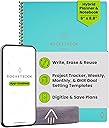
♻️ Plan smarter, erase faster, and never miss a beat with Rocketbook Fusion!
The Rocketbook Fusion is an executive-sized (6x8.8") hybrid planner and notebook featuring 7 reusable page templates including calendars, goal trackers, and dotted/lined pages. Using Pilot Frixion pens, users write, digitize via the Rocketbook app with cloud syncing, then erase pages with a damp cloth for endless reuse. Its durable polyurethane cover and spiral binding ensure professional style and longevity, making it ideal for busy professionals seeking eco-friendly, organized productivity.


| ASIN | B07ZHZ6B75 |
| Best Sellers Rank | #196 in Planners (Office Products) |
| Binding | Home |
| Brand | Rocketbook |
| Brand Name | Rocketbook |
| Calendar Type | Weekly |
| Color | Teal |
| Cover Material | Polyurethane |
| Customer Reviews | 4.4 out of 5 stars 23,742 Reviews |
| Format | Day to Day Calendar, Notebook, Organizer |
| Global Trade Identification Number | 00850007403638 |
| Item Dimensions L x W | 8.8"L x 6"W |
| Item Dimensions L x W x Thickness | 8.9"L x 6"W x 0.6"Th |
| Manufacturer | Rocketbook Innovations, Inc |
| Material | Paper |
| Model Number | EVRF-E-K-CCE |
| Pages | 42 |
| Paper Size | 6 x 8.9 inches |
| Part Number | EVRF-E-K-CCE |
| Ruling Type | Ruled |
| Special Features | Soft Cover |
| Target Audience | Adult |
| UPC | 850015045127 850007403638 |
| Unit Count | 1.0 Count |
H**Y
MUST BUY 5 STAR BUSINESS EXECUTIVE NOTEBOOK
I never write reviews but I love this product SO much I had to share my experience. I got the executive size Fusion. For a few dollars more it’s WELL worth it compared to the regular Everlast because you get the extra planning templates plus a mix of dot and line paper. I read that the paper is like writing on a post card. I can appreciate that comparison because the Rocketbook is glossy; however my pen would always stop working on a glossy post card...NOT the rocketbook. The Fusion pens are smooth like butter and truly does feel like writing on paper. The app is as straightforward as it gets and is freaking awesome; it can even drill down into sub folders within programs like One Note. This will be my everyday planner and would HIGHLy recommend for anyone - especially in a corporate environment. Take note of the size - this is perfect for me but they also have a full size option as well. Okay so that said I have two strong recommendations. First, I have always preferred 0.5 extra fine tip pens; the rocket book defaults to 0.7. This pen is fine and a common width in the U.S. but the 0.7 makes my handwriting look better and DRIES faster (5 seconds versus 10-15). Amazon carries them in a multiple packs; I ordered the 3 pack of red black and blue with 9 refills. Big bargain. These pens originate from japan and are the real deal. Word of caution as with all frixon pens - don’t expose to temps 140degree or the ink will fade. It says if this happens to put in the freezer for 20 minutes to restore. Not a big deal unless you forget it in your car on a hot day - just don’t do that and this is moot. :). Pilot FriXion Ball Knock Retractable Erasable Gel Ink Pens, Extra Fine Point 0.5mm, Black/Blue/Red Ink, 3 Pens & 9 Refills Value Set https://www.amazon.com/dp/B071KSF1S8/ref=cm_sw_r_cp_api_i_ioAGDbM7JBSZR Second, and I cannot stress this enough....the notebook cover!! I searched everywhere for a (real) leather hardback cover. It’s pretty hard because this notebook is slightly bigger than the standard A5. LOOK NO FURTHER....Genuine Leather Rocketbook Cover... https://www.amazon.com/dp/B07SN6CMHJ?ref=ppx_pop_mob_ap_share. it’s freaking awesome! Talk about a WOW FACTOR and ready for a board room meeting. Inexpensive and REAL leather. I can’t say enough good things about this as you can tell from my review. :) do yourself a favor - buy this!
T**T
Surprisingly Satisfied!
I am a chronic journaler. I will keep a journal and then after I complete a journal, I will usually put it on my bookshelf never to ever open it again. Just for reference, I love using molskine notebooks. But this notebook has revolutionized my journaling. I love the pens and the paper of the rocketbook fusion. I decided to try it on a whim on Prime Day. I've used it for four weeks now. But I love it. I like the feel of the gel pens. They're very similar to the pilot gel pens if you know those. I love the erasability of the pens and that I can use them on normal paper. I switch media often so it's helpful in this regard. I recommend you go 'big' and buy the 0.5mm friction pen. The rocketbook comes with 0.7mm pen but I like the 0.2 difference. I like to write on the small side. And I think it makes a difference. I love storing my handwritten journal in my chosen cloud space (Google Drive) because it feels safe and I have hope that one day rocketbook's software turning handwriting to text will work better than it does now. Right now it's a bit rough but for me it's not about the transcription from my writing to text. It's about storing my journal in the cloud. I do think the pages are lacking in thickness and durability. So you've got to be a little careful with the pages as you're wiping it clean with the microfiber cloth. But it's as I expected, so I think it's ok. The notebook itself is travel safe and I felt comfortable carrying it in my carry-on luggage. So I believe it's fairly sturdy. None of the pages bent during all the woes of airline travel! I'm overall very impressed with the notebook. The dots are fun and I think I like those pages are my favorite. I'm looking forward to getting the letter sized, dot grid, flip notebook next! I do wish the lines were closer together, more of a college rule. But I write two lines to a single line and it works out well enough. I haven't tried anything but the friction gel pens, so I am not sure how the markers do, but all the reviews sound great. If I knew someone who is as big of a journaler as I am. I'd totally gift them this!
A**Y
BEST NOTEBOOK EVER!!! But…
I don’t always take the time to write reviews like I probably should but I felt it was necessary on this product for a couple reasons which I will explain below. 1. The whole concept of a eco/environment friendly, RE-USEABLE notebook is just plain awesome! I have tried to switch to my iPad and Apple Pencil for note taking when it first came out, even tried fancy screen protectors with texture to feel more like paper but nothing will ever come close to the “pen to paper” feel to which I love when it comes to taking notes. Not to mention if you need to quickly jot something down, grabbing a pen and paper is much faster then your iPad - unlocking it and opening an app, a new note or notebook/page, etc… 2. This notebook by far meets my needs when it comes to a “pen to paper” feel especially considering it is re-usable and scannable to so many platforms. Speaking of platforms, there are so many to choose from. I love that this company didn’t limit you to using and having to subscribe to their own service because that would have been less appealing and probably a no go for me. The app also can transcribe your notes if you choose making it easy for you to search for things. Oh how I spent hours looking through pages for a note I wrote down, “I know it’s here somewhere…” only to never have found it… Bonus points @Rocketbook! 3. Microfiber Cloth: I am impressed at the quality of the microfiber cloth that was included. They could have easily given some thin crappy material that would have quickly deteriorated but nope, they spent the big bucks and included an extra thick and plushy cloth that makes me wish I had a bath robe or blanket made out of it! More bonus points @Rocketbook! 4. Packaging: Cute packaging however, given the nature of having an environment friendly, re-usable notebook I would think the company would at least have recyclable packaging, this should be an easy change. @Rocketbook. Lots of pro’s and bonus points being thrown around I suppose it’s time to get to the nitty gritty, the “but…” Specifically pertaining to quality control, or is that even a thing @Rocketbook? 1. Page cut quality… If you have ANY amount of OCD, this might be a problem. I am particular about what things I have OCD about, lol. Might sound silly but this bothers me a little for a couple reasons, mainly cause the company got everything else on point and let me down at something so simple to fix for an item they want to charge an amount that seems high to most, but I am willing to pay for so is it wrong that demand perfection? I made two separate purchases of Rocketbooks (one with 2-letters sizes and one with 1-executive), two different sizes, different colors, and one being the NEW “Fusion” which contains a few different page styles and all 3 books have flaws in the cuts of pages and some in the book covers (corners). Now, hear me out… a $2 notebook from where ever can give you straight pages, please tell me why when I am spending $34 (1 executive) or $68 (2 letters) I can’t get a notebook with straight pages??!?!?!?! I am supposedly going to have this thing for forever right? This is ANNOYING and a total let down. @Rocketbook - You need to redeem yourselves! *Photos provided. Tips: Clean up old paper notes by laying them on a Rocketbook page, add a title to the top in between double hashtags (## TITLE ##) so that it is searchable later (OCR must be enabled in settings), cross off your designated location at the bottom of the page, scan using the Rockbook app, and throw out your paper notes!!!
A**R
Versatile & Easy to use
I've been using my Rocketbook since 1/1/2021 and I'm loving it. I was burdened by all the filled notebooks that I had and needed to keep, just in case I needed to refer back to my work notes. It's hard to find something you know might be in there without knowing when it might be. Enter Rocketbook. I can OCR my notes (with some corrections) and if I need something Windows can find it. I tested this feature out after accumulating a couple of weeks notes (saving each day as a separate file) and then asked Windows to find a particular phrase. It worked beautifully and finding multiple instances of that phrase--one I didn't even remember writing down. Ideally I would scan and OCR my notes daily, but in reality I do it about once a week. This means I have to set aside a little more time to correct the OCR translation of my not so great handwriting, but well worth it in the end. Though I bought a variety of Frixion pens, the ones I use every day are the ball clickers (.7mm). They write fairly well and scan easily--even the pink pen comes up well in the scans. I haven't used the markers as much for everyday notes--too thick. It's recommended that you use a spray bottle & a micro cloth for cleaning. I do that, but for everyday mistakes that's a little hard. It is NOT recommended to use the erasers that come on the pens--they not only smear, but the can remove the coating from your Rocketbook pages. I've found that using a water pen & a Q-tip works great for correction in little areas. The pen I use is: Pentel Japan Aquash Waterbrush Water Brush Pen, Fine. It gets into small areas with precision; I then use both sides of a Q-tip--one for absorption of the water & ink, and the other to dry. This allows me to make quick corrections and continue on without "waiting for the page to dry." When I do my mass cleanings (about every 2 weeks), I use a soft wet rag and a dry micro cloth. I wholesale wash down the pages and dry them. This process is a little slow as the drying does take time. I've tried it with the pages bound and unbound and have only seen a little improvement on the drying time of the unbound pages. One note I have is that right after I've cleaned the pages and they are dry there appears to be light impressions from the pen that are still there after cleaning, but after a couple of days those impressions disappear. My first (two) Rocketbooks were of the Fusion variety, as I didn't really know what I wanted. I like some of the planner pages and the lined pages, but only used the dotted pages when I ran out of lined pages. I have created some two page calendar pages using the dotted pages, but for me they weren't as useful. When I originally got the Fusion book it was the only one with lined pages; at that time the Core only came with dotted pages, but now they have a version that is all lines. I've added one of those to my inventory. If I had to go back and could do the purchases again, I'd probably still get the Fusion for the versatility, but my other book would be a Core lined. At the bottom of every page are 7 icons. You can program them to be locations to where you want your scanned pages to go and what actions you want taken. For instance, I have two set up for personal notes/scans--one for email & one to go to my G-drive--both with OCR. I also have two set up for work notes/scans, but in this case they are going to my work email and my work based OneDrive--again both with OCR. If you were in school and part of a study group, you could make one of the icons go to a group email or to a group accessible cloud storage. The versatility here is endless. All in all I'd recommend the Rocketbook. At $35 for 42 pages it might seem high, but think about some of the other alternatives and their expense. I tried several more expensive options, and none of the others worked like I do or made it as easy to see and retrieve my notes.
B**Y
The BEST way to take notes
I am a teacher and I am constantly looking for a way to plan lessons, take meeting notes, write down notes on students, and keep a planner going. I'm also a Master's student so I need a place to take class notes and keep track of assignments. I am really bad at keeping notebooks organized and tend to write down my notes on scraps of paper, random notebooks, and legal pads. I even bought an iPad Pro and tried using various apps to keep myself up to date. The only thing that has kept me on track and up to date on all my assignments has been this book. Its reusable, easy to erase, easy to use, and easy to keep yourself on track. The pens work well and its mind blowing how the erasing work. One of my favorite things to do is show people how I scan, save, then erase my notes. I've recommended this book to about 20 people and counting. The app is easy to use and navigate. I was able to get it setup and ready to use in about a minute. It keeps all my notes organized with the easy tagging system. I like handwriting my assignments so I frequently use OCR to transcribe my notes and get the notes typed for me. I send it to my email then copy and paste it to Canvas or Blackboard to submit it. I chose the Fusion because of all of the pages that are available. The first page is a project/task manager that I use to keep track of all of my assignments and their due dates. The next two pages are weekly calendars where I keep my planner. The next page is a monthly calendar. The page after that is a planner of some sort. It has 4 boxes, 1 for objectives, 1 for key results, 1 for action plan, and 1 for reflections. I find this to be really helpful for lesson planning for the day. The next page is another planner with space for an idea, rating, next step, and inspiration. I use this page when planning for projects and assignments for my students. After that there are 18 pages front and back for grid dots and lined pages. 9 for dots and 9 lined which come out to 36 pages total. It is a handy little book and I highly recommend it.
C**A
I don't know
11/2/23: I had been wanting one of these notebooks for a while and finally caved in. I bought assorted colored pens and hilighters months prior to purchasing the notebook as I used them on normal paper and they worked fine (bonus: they still erase on normal paper!) Since I already had pen a few colors in the size .7 pens, I decided to order Gel Pens too because why not?! As soon as my order was delivered, I ripped it open, and began using my notebook. I was disappointed at how awful the pen that comes with the notebook writes. It picked up well in some areas and others not so much. I had to erase to try to rewrite the same number on the calendar several times. It was still extremely faint in color and I couldn't get the number to fully appear when writing. The hilighters worked well as I assumed they would. I tried the other colored pens I had already previously purchased. They sucked. I haven't tried to gel pens yet as they haven't arrived but I will update IF they work well. If there isn't an update - they also suck. The ease of erasing the entire page with the cloth was like magic. That part was constructed well. I was also disappointed by the fact that once you erase, you can see your pen marks on the page where you previously wrote something. It drives me NUTS. I wish I would have just went with a good old fashioned planner and my favorite pens at this point. The one and only page for the calendar on the Executive size is on the left hand side - so if you're right handed, be prepared for the page coil to be in your way as you try to write :( As far as functionality, I'd rate it 3/5. It does what it was designed to do but with several flaws. I guess it's worth it if you catch it on an extremely good discount. Meh.
C**S
GENIUS - I can't say enough great things about the RocketBook!
My only regret is that I didn't try RocketBook years ago! I waited to write a review to see if I would use this regularly. It's been nearly a year now and I still use it ALL the time and love it! I was tired of carrying around multiple notebooks to write down and track important information. I have several projects moving forward at a time and needed to have access to notes about phone conversations, decisions and such available any time and any where. This is the perfect solution. A couple of minutes when the notebook starts to fill and I'm organized into folders in my iCloud Drive that I can access any time from my iphone. I ordered the 6x8 size and it fits in most of my purses so I can grab it whenever I need it. The pages erase really well even after nearly a year. I've also created a couple of "forms" for myself with a Sharpie so I have a standardized format for items I track repeatedly. I love that RocketBook didn't patent its own pens to use too. I can order erasable pens that I like and even in multiple colors. I've also printed a "template" of just the QR code, black border, and file selector symbols on a transparency sheet (Staples does this) so I can easily scan in any piece of paper someone hands me and file it away in my iCloud Drive too.
S**H
Great reusable planner. A diary/journal for people who don't *do* diaries or journals.
I never got into the habit of keeping a journal or a diary. With the Fusion, I can plan my weeks and save them on my OneDrive for future reference. Who hasn't had the experience (except for those dedicated journal keepers) where you were wondering what you did on a certain day in the past. Memory isn't reliable enough in most cases unless it's there's something about the activity that's so unusual that you remember it. Most things you do on your weekly/monthly calendar are mundane and hence easily forgotten. Rocketbook Fusion is like a dayplanner that you can keep in the cloud for reference. If you're the rare person who keeps a physical diary, then what do you do with all your diaries over the years. I suspect they occupy a large section of a bookshelf, ordered neatly by year. But for the rest of us who don't have that dedication we are missing sections of our life experiences that only photos or a fleeting memory might help us to remember. I know I find myself wondering what I did even a few days ago because short-term memory is where most of those thins are stored. When did I meet my friend for lunch? Where did I find that interesting new shop? Or what day did I visit that new restaurant? For some things, I could search around for receipts, but having a Fusion helps to keep that stuff around in digital form for later reference. Of course, it still takes some dedication to record your week, but there's something unique about being able to not have a huge diary with a page for every day of the year -- or a many-paged day-planner. A lot of this could be done on a computer or a phone, but writing it out gives a tactile experience that is somehow more satisfying. The other reviews about the technical issues with the ink and paper are accurate. It's not perfect just yet. But the concept is where I find the value. Plus when a company cares, it will improve its products based on the comments and suggestions it receives -- hopefully making a better product as it learns by experience. I'm hopeful for the future of Rocketbook. I like the packaging, the variety of sizes and especially the ability to save daily activities, monthly calendars, and personal notes in the cloud or email or however you want to move to digital and then start with a clean slate for the next week/month. I've already bought 4 Rocketbooks. I got the Fusion to replace a bulky day-planer (still use Google Calendar with some overlap). I got an Everlast Executive size to take notes for any purpose like to-do lists, ideas, project planning. I got an Everlast Mini for short little notes in a small size that I can carry in a pocket or next to my phone to jot down little ideas or quick to-do lists for the day. I bought an Everlast Letter size which I will probably be giving away as a gift. I'd rather have lined in the letter size for writing. I just can't seem to keep a straight sentence with the dot-grid. The pen holders work great as well. They come in a two pack, maybe more. It keeps the pen with the book without being intrusive and snug, unlike sticking a pen into the spiral which falls out more often than not Easy to clean. Easy to erase little mistakes. Highly recommended.
R**A
Great tool for students!
Bought it as a gift for my boyfriend and he loves it! Great tool for notetaking and very environmentally friendly. Would highly recommend for anyone uses lots of paper ;) Also great for studying anywhere as long as you have your notes uploaded on cloud!
K**C
A little bit of fun.
I use this for tracking things like items I'd like to buy, chores that need to be done and notes to family that don't need to be kept so they can be erased and the paper re-used. It's pretty cool and a bit of fun. I don't really use the sections in it as they don't fit me but the others didn't either so I created my own formats on the extra pages.
T**D
Ecológico
Es el cuaderno perfecto. Puedes llevar un diario secreto, escribes una página, la escaneas a un archivo tuyo, Y LA BORRAS. Nadie podrá leerlo. Puedes también dibujar, hacer contabilidades… ¡Me encanta!
L**T
So good, we’ve ordered more!
I bought this for my husband as he goes through regular notebooks like crazy. He’s obsessed. He’s ordered 30, YES 30, for his office. It’s so easy to use, sends perfectly transcribed emails. Definitely 10/10, you should get one.
P**Z
Excelente herramienta de trabajo.
10/10👌
Trustpilot
3 weeks ago
1 month ago