Buy anything from 5,000+ international stores. One checkout price. No surprise fees. Join 2M+ shoppers on Desertcart.
Desertcart purchases this item on your behalf and handles shipping, customs, and support to USA.
🎬 Elevate your home cinema game with LG CineBeam UHD – where epic visuals meet smart living!
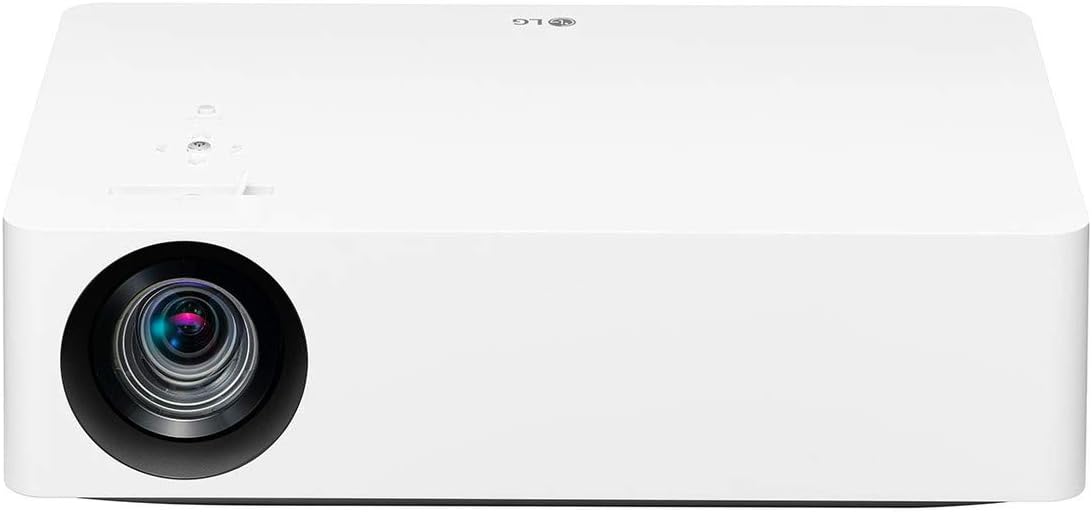
The LG CineBeam HU70LA is a sleek, ceiling-mountable 4K UHD DLP projector delivering up to 140-inch vivid displays with 1500 lumens brightness. Featuring advanced wheel-less LED technology for superior color accuracy and HDR10 with Dynamic Tone Mapping, it ensures stunning picture quality. Remote Focus and 1.25x zoom enable easy image adjustments, while built-in Alexa and Google Assistant offer intuitive voice control. With versatile connectivity options including Bluetooth, HDMI, USB, and Miracast, it’s designed for seamless smart home integration and immersive entertainment.


| ASIN | B07VJKZZTZ |
| Additional Features | Internet Ready |
| Antenna Location | Home Cinema |
| Best Sellers Rank | #1,150 in Video Projectors |
| Brand | LG |
| Brightness | 1500 Lumen |
| Built-In Media | Power Cord, Projector, Remote, Remote Control Battery (AAA), User Manual, Warranty Card |
| Color | White |
| Compatible Devices | Android, iPhone |
| Connectivity Technology | Bluetooth, HDMI , USB |
| Contrast Ratio | 16:9 |
| Control Method | Voice |
| Controller Type | amazon_alexa, vera |
| Customer Reviews | 4.2 out of 5 stars 396 Reviews |
| Display Resolution Maximum | 3840 x 2160 Pixels |
| Display Type | DLP |
| Display resolution | 3840 x 2160 |
| Form Factor | Portable |
| Global Trade Identification Number | 00719192633339 |
| Hardware Connectivity | HDMI, USB |
| Item Dimensions L x W x H | 12.4"L x 8.3"W x 3.7"H |
| Item Type Name | LG HU70LA 4K UHD Smart Home Theater CineBeam Projector with Alexa Built-In, LG ThinQ AI, and LG webOS Lite Smart TV (Netflix, Amazon Prime and VUDU) |
| Item Weight | 7.1 Pounds |
| Lamp Wattage | 3 Watts |
| Light Source Operating Life | 30000 Hours |
| Manufacturer | LG |
| Maximum Image Size | 140 Inches |
| Maximum Throw Distance | 11.2 Feet |
| Mfr Part Number | HU70LA |
| Minimum Image Size | 60 Inches |
| Minimum Throw Distance | 8.9 Feet |
| Model Name | HU70LA |
| Model Number | HU70LA |
| Mounting Type | Ceiling Mount, Tabletop Mount |
| Native Resolution | 3840 x 2160 |
| Picture Quality Enhancement Technology | Wheel-less LED and XPR technologies |
| Projector Maximum White Brightness | 1500 ANSI Lumens |
| Recommended Uses For Product | Home Cinema |
| Smart Home Compatibility | Smart Home Compatible |
| Special Feature | Internet Ready |
| UPC | 719192633339 |
| Unit Count | 1.0 Count |
| Video Encoding | H.264 or H.265 |
| Voltage | 100240 |
| Warranty Description | Limited: 1 Year Parts & Labor |
| Wattage | 310 watts |
A**M
Pretty good for the price
It is quiet enough the fan noise is not noticeable even within few feet of my head. The picture quality is good, but it is not a true 4K. Read the PDF manual which is linked from the web page. I purchased this to use as a PC monitor and needed full resolution, but it turns out the resolution has to be reduced for the best quality. The user interface is easy to use. It has a built-in TV turner which I don't see much use as most people probably use a separate streaming or cable box. The picture is not that bright and cannot be used in daylight. The room does not have to be dark, but it needs a dim room. It can be placed on a table, but ceiling mounting is the best to keep it out of the way. It needs to be horizontally centered at the lens (not the body) for the best focus because it only has vertical adjustment. This was a good starting projector at a reasonable price. I would go for the laser one the next time if I can afford it so that it can be used in daylight.
S**.
Great 4k projector with minor set backs
Great product! Coming from using cheaper Chinese brand projectors to using this is night and day. The good part: Low fan noise, sharp 4k HDR picture, bright image, image remains clear with low to moderate lighting, and all the smart functions of an LG smart TV. The negative: Zoom function is very minimal and you would need to physically move your projector forward or back to find the optimal distance to fit you screen. While you can adjust the image itself to view whatever media you're going to be watching the LG home screen remains at a certain resolution that is unadjustable. For me I already had an existing ceiling mount and found it difficult while initially setting up the projector as I need to move it forward to fit my existing screen. Once everything was adjusted setting up the rest was easy. I would highly recommend anyone who's looking to upgrade their 1080p projector to take a hard look at this product. Very happy with it especially for the price.
D**3
Perfect for my use. Smart app support is lacking compared to 4k sticks
Brighter and sharper than the previous 4k dlp lamp projector i had that was rated 3000 lumens. I have the mounted 15 ft from wall. Image looks awesome Why not 5 stars: Settings are funny to make it comparable to a pannel tv. Like others stated contrast needs to be set to 100%. Then fine tune from there. Apps are pointless, just get a 4k stick from your prefered platform. Honestly why do device makers even add these smart app stuff. Mounting holes are super close due to small size of unit. I eas able to use my previous bracket but had to add washers so the mount plate could clear the rubber foot bar that is at back of unit
S**C
LG CineBeam HU70LA DLP LED Projector is Like having A 150 Inch Big Screen Smart TV
After seven years of excellent use of my Epson 2150 Home Cinema, I decided to upgrade to a 4K projector. I use my projector to watch TV, movies, sports, etc. daily. This decision meant that I had also to upgrade my home theatre receiver. Both the previous projector and my home theatre receiver were 1080. For this upgrade, I invested in a Sony Surround Sound Home Theater 8K A/V Receiver to accompany my LG CineBeam UHD 4K projector. Immediately, I experienced difficulties. My picture was jumpy and intermittent. I could no longer seamlessly switch from one input on my home theater to another. Before the upgrade, I would regularly switch between my Xfinity cable box, an Amazon Fire Stick, and a Fire TV Cube. I started panicking thinking I would have to return all of my new equipment, reconnect my old home theater receiver, and put my old projector back into the ceiling. So, I got on the phone with tech support. First, I called LG. The only negative experience I had with LG is that their customer support appears to be set up for every class of appliance except a projector. The first guy said he was TV support and was not helpful. I knew he was TV support because I chose television on the automated prompt. After all, there was no option for a projector. I went online and initiated a chat. The chat agent called me and I proceeded to explain my issue. At that point, I was having difficulty figuring out how to resize the projector image to fit my 130-inch tab-tensioned screen while focusing it. I could get it focused, but the image was too big for the screen. When I reduced the image to fit the screen, I couldn't get it focused. After quite a while on the phone, the tech support said he would research the issue and call me back the next morning. He even gave me a case number, but he never called back. Fortunately, I solved that problem on my own. I had to first focus the oversized image, then reduce it. I had done it the other way, and I couldn't get the correctly sized image to focus. Once that problem was solved, I couldn't get a consistent signal or switch from one input to another. The SONY tech figured out that the SONY equipment was working properly, but that the LG projector was not receiving the signals from my various devices. He told me the problem was that I needed also to upgrade my HDMI cable to a high-speed 4k cable. That immediately concerned me because I have a 100 ft cable embedded in a ceiling that had been finished over the cable. No way I was going to rip apart the ceiling (thousands of dollars) to replace the HDMI cable. I did some online research and came across a solution that worked perfectly. I made every small investment in an HDMI 2.0 Repeater. This super mini HDMI repeater works by decoding and then re-encoding the HDMI signal to a new standard HDMI signal. It also extends the range of the signal. I was now getting perfect pictures from my Firestick and Fire TV Cube and was able to switch freely between them. I changed some of the display settings in the Fire Stick and Amazon Cube. However, I could not pick up the cable TV signal on my LG 4K receiver. Picking up that signal required one last piece of equipment upgrade. I swapped out my 1080 cable TV boxes for 4K boxes. Problem solved. Now, I am receiving a perfect 4K image on the LG from all devices, and I can easily switch from one to the other. Now, let's talk about the LG 4K projector features. First, this projector is solid white and has a low profile, relatively flat design. If you mount your projector to the ceiling as I do, these are nice features. The white color blends in with the ceiling and the flat design means that you don't have a large, bulky object hanging from your ceiling. The projector displays a very sharp 4K image. I project onto a 130-inch diagonal screen with absolute clarity and crisp pictures. Even though this projector has been out for a few years now, I still chose it over some competing models. The bundled features are a good value for the price. You're getting a solid native 4K projector with a life expectancy of 10 or more years. I say this because the LG CineBeam UHD 4K projector utilizes an LED light source, as contrasted with the lamp used by many projectors. Hence, there is no lamp to replace, and the LED light source is projected to last 30,000 hours. If you use this projector for 8 hours per day, that's approximately 10 years. However, most people don't sit at home and watch TV or home theater for 8 hours a day. Consequently, you're likely to get more than 10 years out of this projector. Speaking of TVs, this projector is a lot like a big-screen smart TV. That's one of the features that attracted me to it. I use my projector as a big-screen TV. And this one even has a Tuner input like a TV. I haven't used the tuner because I connect my cable box via an HDMI cable, but if you're like I am and are looking for a projector that you intend to use like a big-screen TV, I strongly recommend that you give this one close attention. The on-screen features are a lot like LG's big-screen, smart TVs. This one supports HDR (High Dynamic Range). The colors are crisp and sharp. And for a projector that is equivalent to 1500 lumens, this one is quite bright. Like an LG smart TV, this projector has a smart TV platform that includes both a web browser and the ability to load streaming apps. That means that you don't even need an external streaming device like a Fire TV stick or Cube because you can load services like Netflix and Amazon Prime directly onto the projector by downloading these apps. The LG Magic Remote is unlike any other remote I have seen. When you point it at the screen, it has a pointer, like a laser pointer; however, this one allows you to click directly on the feature you're pointing at and choose those various settings with the pointer as you're changing them. Very cool. There's a lot of versatility here. You can change the color modes to ones like cinema, Vivid, Standard, Sports, etc., and you can edit the settings in each mode if you so desire to make it brighter, have more contrast, color, or tint, etc. This LG HU70LA projector has two HDMI inputs for connecting external devices, two regular USB 2.0 inputs, and one USB C input. It also has an optical output for high-definition audio as well as an audio-out mini-jack and a LAN/ethernet input. Some people complain that it has poor-quality speakers; however, this wasn't an issue for me because I connected my projector to a home theater system. The projector also has built-in wifi and Bluetooth. In summary, I highly recommend this LG HU70LA projector. I was looking for a projector that I could use as a big-screen TV for movies, binge series watching, sports, and the news. This one had everything I was looking for. And, as you can see from the attached screenshots, the picture is stunning with extremely vibrant colors, even when you have a light on in the same room or in an adjacent room. This LG projector is reasonably priced, delivers stunning 4K images and video, and has a ton of features - more than I can discuss in this review. Get one.
G**A
Great Projector, but don't rely on the Amazon Alexa support (very misleading)
At this point, I have owned this projector for a few months and can say that it is honestly great! The picture quality is amazing and the screen size is awesome (I have it set up on a 120" widescreen projector screen). I specifically chose to purchase this projector because of 3 major features: 1) Built in 4k Chromecast 2) 4k quality 3) Smart features with smart home hub support Now here is the thing, the built in chromecast and the 4k quality are great, but I mainly wanted to be able to control the projector the same way I control my smart TVs around the home, where I can tell Alexa to turn them on/off. The projector features all mention Alexa support, as well as other smart home hub support. To my surprise, once I received the unit, it turns out that not only is the Alexa smart home features not available, but neither are any other smart home devices. I tried updating the firmware manually, to no avail. I won't lie, the remote control with the pointer features is quite neat, but I was hoping to be able to just control the projector without having to try and find the remote. In any case, if you are looking for an awesome budget projector, this one definitely will fit the bill. Just know that smart home hub services will not work. Built in smart features do work though, like a sort of app store and such.
T**Y
Amazing 4k projector for under $1400
Well, I'm not a tech guy, just a guy that loves a product with eye pleasing performance. Bought two projectors this week, 1st one ( different brand ) went back and the 2nd, this lg hu70lab I'll be keeping. Photos attached via steaming from Netflix, vudu were right out of the box using firetv 4k and roku ultra. Read a professional review on this lg but it was somewhat negative, surprisingly. I decided to try it anyways because of the sale price and for all that was offered. Setup was easy and seamless with my 2 streaming sticks ( switched to hdr mode flawlessly) , back-lit remote nice, small, lightweight ,easy navigation through lg OS, extremely quiet ( fan noise non issue ), fired up in 6 seconds, shutdown in 2 seconds, auto focus from remote. To my eye what I had seen out of the box on my 120" screen was amazing, beautiful and i was sold. This format for viewing movies, sports, tv shows will replace any furture purchases of 4k televisions. Again, jmho, looking forward to fine tuning this projector even more once I know what I'm doing 😉
P**R
Warning - OCD
Guys I have bought 2 projectors prior to this one both were under $300 and some random amazon brands. I honestly enjoyed those they were plug and play grab a level and make sure your mount is zeroed and your ready to go. Yeah they were 1080p but this projector was just a bit over $1K and I love the image quality I can give it that. BUT THE STRUGGLE TO GET THIS TO PROJECT EVENLY AND NOT DISTORTED IS REAL! I have tried everything I flipped it upside down, I adjusted the keystone per the instructions and for whatever reason it has the absolute weirdest angle of projection AND the weirdest most uneven noticeable black background border. I clicked just about every single setting possible to see if it was adjusting issues and nothing solved it. I never knew I suffered from OCD until I bought this projector. My surface was steady and leveled and it just wouldn’t work I’m convinced the product was maybe defective, I’m willing to give this another shot after I return the one I received because there’s just no way this LG projector could actually work this way. The remote didn’t light up as I read in some reviews and some of the buttons didn’t work either such as the button to turn the button lights on, the Amazon assistant or ai assistant , I also I have some serious concerns that the projector I received may have been used and returned already before as it had someone else’s name on the box with another address and the control itself had some signs of use… idk I’m a simple customer. Take my money and give me a product that matches the price I paid. If LG cares to work something out with me I’d be happy to update my review and give this product another shot but I need some assurance here guys!!! Seriously not happy with this product as I have experienced it :/
P**L
Worth the price of entry
I've had this projector for a couple days now and it has blown me away. I upgraded from an old optima hd20 because I wanted 4k hdr and this LG projector delivers both. As long as this projector gets the rated 30k hours usage, i'll be completely satisfied. Setup was quick enough, I used an existing ceiling mount from my old projector. When I first turned HU70LA on, it recognized it was upside down and flipped the image automatically, that was a nice touch. I'm projecting from about 15ft away onto a 133in screen and the image is plenty bright, even with some ambient light in the room things are still watchable. Something really noticeable, especially in HDR content is how vivid everything looks. The colors are really vibrant. The throw distance i'm using is about as far away from my screen as i can while not making the image too large for my screen. If you have a longer throw distance you are going to need a bigger screen. I did have to use the keystone alignment, it only adjusts vertically and not horizontally (but i only needed vertical keystone). LG's webOS is integrated just like their TV's. The magic remote is just that. Magic. I really like the motion control cursor and the smart features of the projector. I didn't think i would use them a lot, but it is just really convenient rather than turning on my xbox or apple tv. It is also really easy to have different image presets and swap between them (for example a gaming preset and then a movie preset) CEC works to turn on my receiver so with the one remote it is all I need if i'm streaming things from webOS. If you have used webOS on any of their recent tvs, no surprises here. its the same great experience. Normally i don't like the smooth motion image interpolation when watching tv or movies, but on a projector and screen this large i've become a quick fan. Everything about it just feels better. (Not for gaming though, only for video content consumption) Being able to play pc games at 1080p and 120hz is pretty amazing. One of the reason i selected this model was for pc gaming on a big screen and not having to sacrifice high refresh rate is absolutely awesome. The input lag on game mode (while i'm not sure what it is) was not noticeable to me. My only image complaint is the black levels aren't super great. They are decent, but when you go watch something darker like Batman the dark knight or Mr Robot, i found I had to turn up the brightness setting on the projector to actually see details in the dark. Doing this washes out the image a little bit, but it still is a great improvement over my old projector. I just made a preset for darker things and switch to it when needed. It would also be nice if the power supply was internal so it used a normal plug to the projector from the wall rather than using a power brick, but i feel like that is really nitpicky. In my situation i just zip tied it to my ceiling projector mount arm and called it good. It isn't as clean as an install though as just plugging a cable directly from the outlet into the projector. Also wanted to make a quick note, make sure that you get cables rated for 4k@60hz (18Gbps). I first tried with an old high speed cable that was only rated for 4k@24hz (10.2Gbps) and I couldn't push 4k content to the projector. Just keep cabling in mind when getting a projector like this. EDIT: After using this projector for a little over a month I tried to get the Disney+ app on it but it is not supported. This projector is running webos 3 instead of 4 (you need 4 for the more recent channels like disney+). My LG TV bought in 2017 has been updated with webos 4 and can get Disney+ so i'm hoping that LG updates the projector as well at some point.
M**O
Excellent but no Netflix
Excelente image and easy to connect to my jbl sound system by Bluetooth. Despite has Netflix button on the remote control i couldn’t find on the apps to install. Weird because i have a LG TV and have more app options.
Trustpilot
1 month ago
1 month ago