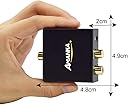
🎶 Elevate your sound game—convert digital to analog like a pro!
The AMANKA DAC Audio Converter transforms digital optical and coaxial audio signals into high-fidelity analog output via RCA and 3.5mm ports. Supporting multiple sampling rates up to 96KHz and powered conveniently by USB, it delivers noise-free, uncompressed 2-channel LPCM/PCM audio. Ideal for gaming consoles, Blu-ray players, and home cinema systems, this compact converter combines professional-grade shielding and gold-plated connectors with easy plug-and-play setup and dedicated technical support.


| ASIN | B01MTPG6WX |
| Best Sellers Rank | #168,222 in Electronics ( See Top 100 in Electronics ) #271 in Digital-Analog Converters #331 in Signal Converters |
| Brand | AMANKA |
| Customer Reviews | 4.2 4.2 out of 5 stars (1,756) |
| Date First Available | December 30, 2016 |
| Interface Type | Coaxial, USB |
| Is Discontinued By Manufacturer | No |
| Item Weight | 3.52 ounces |
| Item model number | Amanka DAC05 |
| Manufacturer | AMANKA |
| Material | Copper |
| Maximum Supply Voltage | 5 Volts |
| Minimum Supply Voltage | 5 Volts |
| Mounting Type | Cable Mount |
| Number of Channels | 2 |
| Number of Pins | 20 |
| Product Dimensions | 2.95"L x 2.17"W |
| UPC | 707427526488 614134536801 |
| Upper Temperature Rating | 60 Degrees Celsius |
K**.
Great converter, audio conversion has no problems
This converter actually works incredibly well, it does exactly as it's meant to do, convert a digital signal to an analog signal without any background noise or anything else otherwise detectable. It certainly wins bonus points for being one of the only converters with a micro usb port for power (I've used a small, blackberry charger with an output of 5V and 750mA and it works fine), and also having a built in 3.5mm port rather than just the left and right RCA audio channels. However, just two things I'd like to point out so anyone with specific needs may know. First of all, when i tried plugging in my 3.5mm aux cable, I heard a loud droning noise with partial audio coming through my connected speakers, which meant it had an improper plug in. I had to push it in with quite a bit of force that when i heard a loud click, I thought it broke, but then the audio came through perfectly with no background noise. It may have just been an overly tight holder, the piece that keeps the cable in place. But it's certainly concerning if you plan to constantly unplug and replug an aux cable. I'd suggest possibly having a dedicated cable for the converter. Secondly, the power on light, is actually rather bright, and can been seen through the RCA ports, and is noticeable at night. These are minor quirks, and certainly do not detract from the functionality of the converter. If you do not care for the aesthetics and the (presumably) strong 3.5mm outlet, then this is a great converter. Especially as I mentioned before, the micro usb outlet for power and the 3.5mm outlet.
H**K
Optical continues to work flawlessly
Desperate for a way to connect my audio headphones to my Samsung TV, I took a chance on this small, lowly converter and it worked - It worked beautifully, and continues to work flawlessly for the months It's been installed. I have two wireless headphones (RCA 900mhz) with a base unit that connects to a sound source via a 3.5mm connector. I connected the converter to the TV's optical audio-out (and to ac power), plugged the 3.5mm connector from the headphone base to the converter-out, turned on the TV, set it's sound to "optical", turned on the headphones ( both of them), and viola, I had sound, beautiful sound. This converter is a gem of a discovery. (I also discovered something about my smart UHD Samsung TV. I had thought that it could produce sound through only one output at a time, That is, it would produce sound to TV speakers, or the receiver, or optical, but never to more than one at a time. Playing with the TV's settings with the converter working, I discovered that it can and does deliver sound to both the receiver and optical-out at the same time. [so now people can listen to the TV with headphones AND with 5.1 receiver sound.])
H**W
Works perfectly but with delay
Works perfectly. Does exactly what I want. I have it connected to my TV and speakers. Only thing is if I have sound on both devices there is a tiny bit of delay, so it sounds like an echo. So I either have to use TV sound or speaker sound but not both
M**Y
This Thing Works
Bought a small Behringer PA to hook up to a big, flat screen television at church and discovered that the TV doesn’t have RCA audio outputs on it. The TV does have a digital optical audio port on it, this little device makes the connection super easy. Be forewarned though, you get a digital optical cable to connect the TV, or whatever you’re using, to the converter. You also get a USB to micro USB cable to power the converter. What you don’t get is a power supply. Luckily I had a Samsung cell phone charger handy that puts out the required 5 volts. Add an RCA style cable to connect to your analog sound device and you’re set.
A**.
DAC better than headphones output.
This is what I needed to connect my smart TV audio to my old school Amplifier. Way better than using the headphone output, mostly because when using the headphone output, it mutes the TV. This way I can easily use either. However, using both at the same time I experience an obvious delay between the TV audio and my Stereo Amplifier.
R**.
Worked great
I bought this because I recently replaced my Blu-ray player with a newer model. The newer model did not have the red/white, left/right RCA audio jacks that would normally plug into my (older) wireless headphones. So I bought this converter to do the job. Well it ended up working just fine. I plugged the power cord into one of the USB ports on the TV, so the unit powers up whenever I turn on the TV. Just make sure the audio output of your device is set to PCM audio (as outlined in the instructions). Otherwise, you will just hear static on your headphones (with Dolby output). As it happened, the default audio output setting of my Blu-ray player was "auto". As such, I could hear the bonus features on the disk but the main feature was static. I went to the settings on the Blu-ray player and set the output audio to be PCM (not Dolby). Everything worked fine after that.
A**R
Didn't work for what I needed if for.
I bought this to connect a Bose Soundlink Mini bluetooth speaker to my, bottom of the line, Samsung smart TV, This is a function beyond it's 14.99 capability. When I plugged everything in, the only sound I got was that of Ashton Kutcher having a seizure. Per other reviews, it seems like this works great for other things, but not for what I needed it for. So I ended up buying the Gefen Digital Audio To Analog Audio Adapter/Converter (GTV-DIGAUD-2-AAUD). Which, granted, is much less economic, but works. PS. Also I had to set my TV's Audio Format PCM.
N**Y
Quite simply, it does NOT work!! Followed all the trouble shooting directions. Changed TV to PCM — nothing!! I am returning this and will try a HDM (ARC) to analog converter. Hopefully, this will work.
F**E
Produto ótimo. Funciona muito bem.
T**R
I plugged this into the back of my Samsung tv with the output going to an old Yamaha surround amp. Every input going into the tv via HDMI and scart lead works brilliantly and I'm only using one input on my amp. A great well made product. I chose this model which came without the mains adaptor due to the power being supplied via my tv. I didn't want a cheap adaptor and if required I can purchase a decent one I know would be safe to use. Overall I cannot fault this product. Came with optical lead and usb lead. Very pleased
K**T
Great little device. I had a problem with my first unit ordered and I was immediately emailed and sent out another. Pleased to say works great. Very good customer service. Recommend worth the money. Just put the power cable in the unit very very gently and don’t force it in.
K**S
take the plastic nodules off first before inserting into TV or other device - works well - volume not outstanding but OK
Trustpilot
3 weeks ago
1 week ago